Nativebase: tab style not working
I have gone through these following points
- [done] Check latest documentation: https://docs.nativebase.io/
- [done] Check for existing open/closed issues for a possible duplicate before creating a new issue: https://github.com/GeekyAnts/NativeBase/issues
- [done] Use the latest NativeBase release: https://github.com/GeekyAnts/NativeBase/releases
- [not related] Check examples from NativeBase KitchenSink https://github.com/GeekyAnts/NativeBase-KitchenSink
- [no] For discussion purpose make use of NativeBase Slack: http://slack.nativebase.io/
- [no] For queries related to theme, check [Theme Variables]
version
node: 10.9.0
npm: 6.2.0
"react": "16.4.1",
"react-native": "0.56.0",
"native-base": "^2.8.0"
Expected behaviour:
style should be apply to TabHeading
Actual behaviour
style not working for TabHeading
Steps to reproduce
i am applying background color but its not working

you can see in image there is not red or green color as i expect.
<Tabs>
     <Tab
          heading={
               <TabHeading
                        activeTabStyle={{ backgroundColor: 'green' }}
                        tabStyle={{ backgroundColor: "red" }}
               >
                     <Text>Comment</Text>
               </TabHeading>}>
           <Comment comment={comments}/>
     </Tab>
      <Tab
             heading={
                     <TabHeading
                            activeTabStyle={{ backgroundColor: 'green' }}
                            tabStyle={{ backgroundColor: "red" }}
                     >
                          <Text>History</Text>
                      </TabHeading>}>
                 <History comment={comments} stackUsers={this.props.stackUsers} />
       </Tab>
</Tabs>
Is the bug present in both iOS and Android or in any one of them?
this issue is in IOS, not sure about android
 ZeroCool00
All 26 comments
 SupriyaKalghatgi
on 19 Sep 2018
SupriyaKalghatgi
on 19 Sep 2018
@SupriyaKalghatgi plz reopen, i follow issue_template as you mention
ZeroCool00
on 20 Sep 2018
SupriyaKalghatgi
on 20 Sep 2018
How do i know how it use on coding side if i apply background color from sidebar.
code not change in code editor. this link is useless without we know what is actually happening,
and also i m not able to write anything in code editor
ZeroCool00
on 20 Sep 2018
Have you tried downloading theme files from http://nativebase.io/customizer/? before making decision that its useless?
SupriyaKalghatgi
on 20 Sep 2018
@SupriyaKalghatgi i dont understand what is the actual use of customizer. i meant its say download variable.js file and follow customizer docs, and use ejected theme, i meant how it relate to my issue.. i simply use tab component and tab has some styling props issue.. sorry to say but its like you are leading me in the wrong direction. i dont understand why i need to follow this customizer step..
ZeroCool00
on 20 Sep 2018
I hope now you will be clear with NativeBase Customizer

SupriyaKalghatgi
on 20 Sep 2018
Download variable file will give you the updated theme file as per changes made by you
You can then use this downloaded theme file in your app, by following https://docs.nativebase.io/Customize.html#Customize
SupriyaKalghatgi
on 20 Sep 2018
Also why haven't you checked https://docs.nativebase.io/docs/ThemeVariables.html?
This was mentioned in issue template
SupriyaKalghatgi
on 20 Sep 2018
woooh.. it become too messy to understand native-base now.. guess i need to limit my use of native-base for icon, input, button and checkbox component.
Thank you for your support.
ZeroCool00
on 20 Sep 2018
why messy?
Its more easy due to NativeBase Customizer which acts as live editor, which tells you if and how to customize components
SupriyaKalghatgi
on 20 Sep 2018
Its not mandatory to use NativeBase Customizer before you customize NativeBase components
It will help you know if its possible or not, also gives you preview of how our customization would look into your app
SupriyaKalghatgi
on 20 Sep 2018
does that mean if i use tab component i need to use nativebase customizer ? if no than how to solve this issue..
ZeroCool00
on 20 Sep 2018
My last comment has already answered this before you ask
SupriyaKalghatgi
on 20 Sep 2018
now your comment looks messy too.. well thank you for your time.
ZeroCool00
on 20 Sep 2018
I have done my best to explain you. Well you can wait over this week, we are coming up with some tutorials about theme. To help solve issue like yours
SupriyaKalghatgi
on 20 Sep 2018
Hello @SupriyaKalghatgi,
I think I found what @ZeroCool00 was talking about, just faced the same issue here, I know about the themes, but I would like to change the background color of the tabs based on the screen I am in.
These are the props from tabs
interface Tabs {
renderTabBar?: Function;
tabBarPosition?: "top" | "bottom";
edgeHitWidth?: number;
springTension?: number;
springFriction?: number;
onChangeTab?: Function;
locked?: boolean;
initialPage?: number;
tabBarUnderlineStyle?:ReactNative.ViewStyle | Array<ReactNative.ViewStyle>;
tabBarBackgroundColor?:string;
tabBarActiveTextColor?:string;
tabBarInactiveTextColor?:string;
tabBarTextStyle?:ReactNative.TextStyle;
tabContainerStyle?:ReactNative.ViewStyle | Array<ReactNative.ViewStyle>;
style?: ReactNative.ViewStyle | Array<ReactNative.ViewStyle>;
contentProps?: ReactNative.ScrollViewProper
}
so there is a option there tabBarBackgroundColor but it does't work, the only property I could managed to get working from this props is the tabBarPosition and tabBarUnderlineStyle
so nothing of this work:
tabBarBackgroundColor="red"
tabBarActiveTextColor="red"
tabBarInactiveTextColor="red"
tabBarTextStyle={{ color: "red" }}
tabContainerStyle={{ backgroundColor: "red" }}
style={{ backgroundColor: "red" }}
and looking at the code here: https://github.com/GeekyAnts/NativeBase/blob/master/src/basic/Tabs/index.js
if (this.props.tabBarBackgroundColor) {
tabBarProps.backgroundColor = this.props.tabBarBackgroundColor;
}
I am going to figure this out when I got some time, do you think this is a issue? Should I open one?
 adrianolsk
on 2 Oct 2018
adrianolsk
on 2 Oct 2018
@ZeroCool00 I found a solution to my problem, gonna post here case anyone else needs, check if it solves yours.
     <Tabs tabBarUnderlineStyle={{ backgroundColor: "yellow" }}>
          <Tab
            heading={
              <TabHeading style={{ backgroundColor: "green" }}>
                <Text>Camera</Text>
              </TabHeading>
            }
          >
            <Tab1 />
          </Tab>
          <Tab heading="Tab2">
            <Tab2 />
          </Tab>
          <Tab heading="Tab3">
            <Tab3 />
          </Tab>
        </Tabs>
This worked for me
<Tabs>
<Tab
heading="Your Projects"
activeTabStyle={{ backgroundColor: '#201D41' }}
tabStyle={{ backgroundColor: '#FFFFFF' }}
>
<Tab1 />
</Tab>
<Tab
heading="Your Proposals"
activeTabStyle={{ backgroundColor: '#201D41' }}
tabStyle={{ backgroundColor: '#FFFFFF' }}
>
<Tab2 />
</Tab>
</Tabs>
 linux08
on 5 Mar 2019
linux08
on 5 Mar 2019
@linux08's solution worked for me
 andrewheekin
on 4 Apr 2019
andrewheekin
on 4 Apr 2019
@linux08 yep, that solution works, but then another problem appears, when it's impossible to disable font scaling. More details are available here https://github.com/GeekyAnts/NativeBase/issues/2179
 dmitryt
on 19 Jun 2019
dmitryt
on 19 Jun 2019
@ZeroCool00 I found a solution to my problem, gonna post here case anyone else needs, check if it solves yours.
     <Tabs tabBarUnderlineStyle={{ backgroundColor: "yellow" }}>
          <Tab
            heading={
              <TabHeading style={{ backgroundColor: "green" }}>
                <Text>Camera</Text>
              </TabHeading>
            }
          >
            <Tab1 />
          </Tab>
          <Tab heading="Tab2">
            <Tab2 />
          </Tab>
          <Tab heading="Tab3">
            <Tab3 />
          </Tab>
        </Tabs>
This seriously worked for me...........
Thanks, bro :)
 chirag-chopra
on 27 Jun 2019
chirag-chopra
on 27 Jun 2019
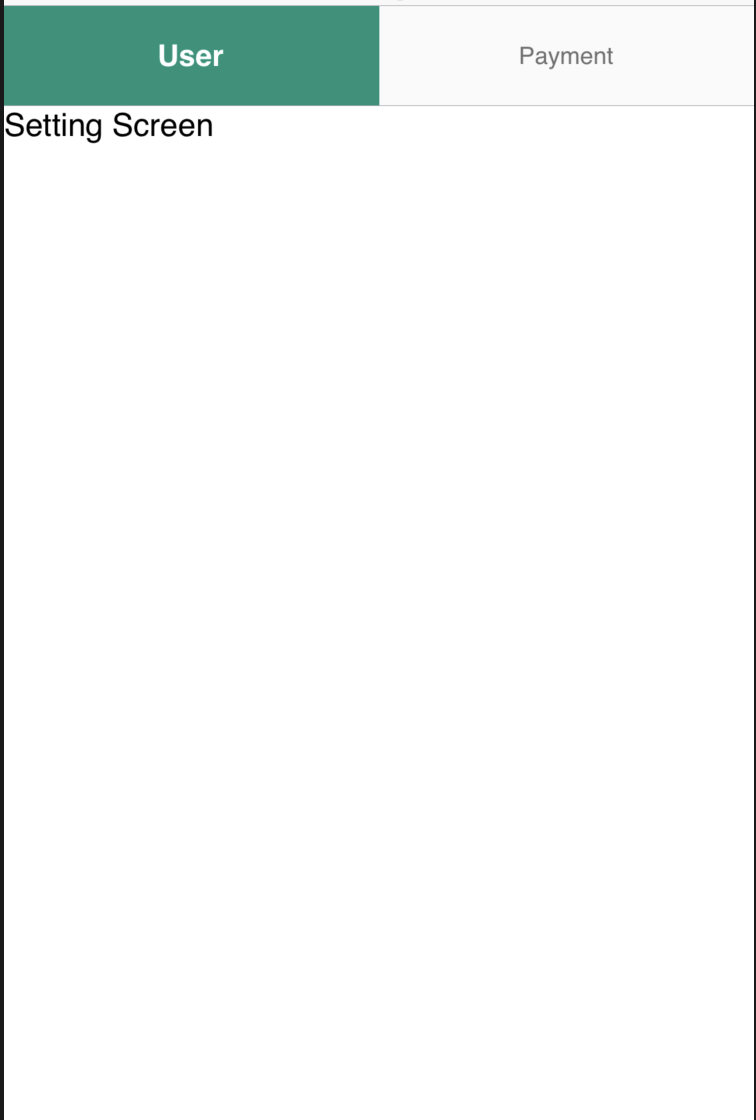
My solution
      <Tabs tabBarUnderlineStyle={{ backgroundColor: 'transparent' }}>
        <Tab
          heading="User"
          activeTextStyle={{ color: '#FFF', fontWeight: 'bold' }}
          textStyle={{ color: '#707070', fontSize: 12 }}
          tabStyle={{ backgroundColor: '#FAFAFA' }}
          activeTabStyle={{ backgroundColor: '#129378' }}
        >
          <ProfileTab />
        </Tab>
        <Tab
          heading="Payment"
          activeTextStyle={{ color: '#FFF', fontWeight: 'bold' }}
          textStyle={{ color: '#707070', fontSize: 12 }}
          tabStyle={{ backgroundColor: '#FAFAFA' }}
          activeTabStyle={{ backgroundColor: '#129378' }}
        >
          <PaymentTab />
        </Tab>
      </Tabs>
 siliconavengers
on 10 Sep 2019
siliconavengers
on 10 Sep 2019
I understand I can use the customiser to set the default active tab heading background. But there is no property to set the background of the active heading tab per screen / component, without using a custom component for the heading entirely.
Tabs contain props for almost everything style wise - except the active heading background..
It would be great to be flexible on this
 Cookizza
on 11 Sep 2019
Cookizza
on 11 Sep 2019
i still cannot add styling to the activeTab most of the props listed in the documentation does not work at all.
 habeebtheprogrammer
on 26 Jan 2020
habeebtheprogrammer
on 26 Jan 2020
i still cannot add styling to the activeTab most of the props listed in the documentation does not work at all.
same issue here,
 nickwang0808
on 1 Dec 2020
nickwang0808
on 1 Dec 2020
Related issues
 inv2004
·
3Comments
inv2004
·
3Comments
 natashache
·
3Comments
natashache
·
3Comments
 Landerson352
·
3Comments
Landerson352
·
3Comments
 mcpracht
·
3Comments
mcpracht
·
3Comments
 sihemhssine
·
3Comments
sihemhssine
·
3Comments
Most helpful comment
@ZeroCool00 I found a solution to my problem, gonna post here case anyone else needs, check if it solves yours.