Nativebase: There is not plenty of space to use in Header - title
Hey guys, I have reviewed some issues related with this problem, but in all cases people are using a short text.
I'm no able to change the width of the Title within the Body component. There is plenty of space to use, but the Body component is using a very small portion of the available width.

Also in IOS: if I dont use a right button, the text gets lost:

react-native, react and native-base version
"react-native": "0.55.1",
"native-base": "^2.4.5",
Expected behaviour
To be able to use more width within the Body component, and align the text when there is not right button in IOS
Actual behaviour
Not using plenty of space available for the title and the alignment when there is not right button gets lost
Steps to reproduce (code snippet or screenshot)
const buildHomeBtn = navigation => {
  return (
    <Left>
      <Button transparent onPress={() => navigation.navigate('PatientHome')}>
        <Icon name='ios-home-outline' style={{ color: PRIMARY_DARK }} />
      </Button>
    </Left>

  )
}

const buildLeftArrowIcon = leftIconHandler => {
  console.log('leftIconHandler', leftIconHandler)
  return (
    <Left>
      <Button transparent onPress={leftIconHandler}>
        <Icon name='ios-arrow-back' style={{ color: PRIMARY_DARK }} />
      </Button>
    </Left>
  )
}

const buildRightSideIcon = navigation => {
  return (
    <Right>
      <Button transparent onPress={() => navigation.navigate('DrawerOpen')}>
        <Icon name='menu' style={{ color: PRIMARY_DARK }} />
      </Button>
    </Right>

  )
}

 <Header style={typo.bgWhite}
   androidStatusBarColor={getStatusBarColor(statusBarColor)}
   iosBarStyle='light-content'>
   {leftIconType === 'home' ? buildHomeBtn(navigation) : buildLeftArrowIcon(leftIconClickHandler)}
   <Body>
    <Title style={{ color:'blue', fontSize: 16 }}> RESUMEN DEL SERVICIO </Title>
   </Body>
    {showRightIcon ? buildRightSideIcon(navigation) : null}
</Header>
Is the bug present in both ios and android or in any one of them?
both
 erick2014
All 10 comments
@erick2014
Also in IOS: if I dont use a right button, the text gets lost:
If you include Left / Body / Right, to align your elements, then you have to wrap the rest of the elements similarly for alignment
 SupriyaKalghatgi
on 25 May 2018
SupriyaKalghatgi
on 25 May 2018
@SupriyaKalghatgi do you mean use Left or Right within the Body?
erick2014
on 25 May 2018
I believe she means that if you are using the Left and Body component, you also have to use the Right component but you don't have to include anything inside it. Something like this should work for you.
{showRightIcon ? buildRightSideIcon(navigation) : <Right />}
 joshuahenson
on 26 May 2018
joshuahenson
on 26 May 2018
Alright I'm going to try, thx for the explanation @joshuahenson
erick2014
on 26 May 2018
@erick2014 Did you try?
SupriyaKalghatgi
on 29 May 2018
This issue will be closed tomorrow, in case of no response
SupriyaKalghatgi
on 4 Jun 2018
Did anyone find a solution for this? I'm having the same issue. I'm using all three components Left / Body / Right and all of them seem to be cutting off like there's not enough room when really there is plenty of space.
       <Header>
          <Left>
            <Button transparent onPress={() => this.props.navigation.navigate('Accounts')}>
              <Icon active name='ios-arrow-back' type='Ionicons' />
              <Text>Back</Text>
            </Button>
          </Left>

          <Body>
            <Title>EDIT ACCOUNTS</Title>
          </Body>

          <Right>
            <Button transparent onPress={() => this.setState({ reorder: !this.state.reorder })}>
              {(this.state.reorder ? <Icon active name='close' type='AntDesign' /> : <Icon name='ios-menu' type='Ionicons' />)}
            </Button>
          </Right>
        </Header>

 rosemarystanley
on 8 Apr 2019
rosemarystanley
on 8 Apr 2019
I have the same problem
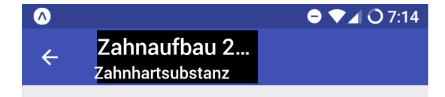
<Header >
  <Left>
      <Button transparent onPress={() => navigation.goBack()}>
          <Icon name='arrow-back' />
      </Button>
   </Left>
   <Body style={{ backgroundColor: "black" }}>
       <Title>{item.level3}</Title>
       <Subtitle>{item.level4}</Subtitle>
   </Body>
   <Right />
</Header>
I tried-and-error setting some styles on the Body and Right component , and also removed the Right component without any good results.
// @akhil-geekyants can you reopen this issue pls?
 jannikbuschke
on 15 May 2019
jannikbuschke
on 15 May 2019
I solved the truncated titles by putting style={{ flex: 2 }} on the <Body> tag
 kentrh
on 11 Aug 2019
kentrh
on 11 Aug 2019
@SupriyaKalghatgi style={{ flex: 2 }} on the <Body> tag seems to workaround the problem. Can GeekyAnts get a more permanent fix?
 Enalmada
on 25 Oct 2019
Enalmada
on 25 Oct 2019
Related issues
 eggybot
·
3Comments
eggybot
·
3Comments
 bsiddiqui
·
3Comments
bsiddiqui
·
3Comments
 omerdn1
·
3Comments
omerdn1
·
3Comments
 Cotel
·
3Comments
Cotel
·
3Comments
 maphongba008
·
3Comments
maphongba008
·
3Comments
Most helpful comment
I solved the truncated titles by putting
style={{ flex: 2 }}on the<Body>tag