Nativebase: Unable to change borderBottomColor at activeTabStyle
Hi! Thanks for trying out NativeBase!
Due to the overwhelming requests and issues/questions we ask you to add the following details with your issue.
Please check the existing open/closed issues for a possible duplicate before creating a new issue :)
react-native, react and native-base version
"native-base": "^2.3.10",
"react": "16.2.0",
"react-native": "https://github.com/expo/react-native/archive/sdk-25.0.0.tar.gz",
Expected behaviour
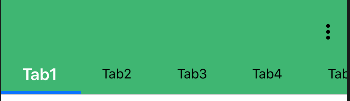
borderBottomColor can be changed
Actual behaviour
borderBottomColor remained unchanged as default color
Steps to reproduce (code snippet or screenshot)
<Tab heading="Tab1"
tabStyle={styles.tabStyling}
activeTabStyle={styles.activeTabStyle}
textStyle={styles.tabTextStyle}
activeTextStyle={styles.activeTabTextStyle} />

const styles = StyleSheet.create({
  tabStyling: {
    backgroundColor: '#37b372'
  },
  activeTabStyle: {
    backgroundColor: '#37b372',
    borderColor: 'white',
    opacity: 1000
  },
  tabTextStyle: {
    color: 'black'
  },
  activeTabTextStyle: {
    fontWeight: 'bold',
    color: 'white',
    fontSize: 20
  }
});
Screenshot of emulator/device
 isaaclem
All 3 comments
@isaaclem Did you refer NativeBase Docs?
 SupriyaKalghatgi
on 12 Apr 2018
SupriyaKalghatgi
on 12 Apr 2018
@isaaclem I find there is wrong usage of components
Please refer docs
SupriyaKalghatgi
on 12 Apr 2018
To be honest @SupriyaKalghatgi it wasn't that easy to figure out. Had to do a bit of trial and error to figure out that it expects the 'backgroundColor' to change it and also on the Tabs instead of activeTabStyle
The solution for anyone hitting this page is:
You set the background color on Tabs with tabBarUnderlineStyle
<Tabs tabBarUnderlineStyle={{backgroundColor: "red"}}>
 venix
on 15 Jun 2019
venix
on 15 Jun 2019
Related issues
 mcpracht
·
3Comments
mcpracht
·
3Comments
 aloifolia
·
3Comments
aloifolia
·
3Comments
 chetnadaffodil
·
3Comments
chetnadaffodil
·
3Comments
 natashache
·
3Comments
natashache
·
3Comments
 muthuraman007
·
3Comments
muthuraman007
·
3Comments