Nativebase: Icon type isn't working properly or the Icons are very out-to-date.
RN 0.51
NB 2.3.9
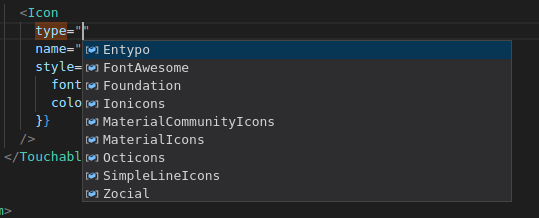
I'm just trying to add a "remove" Icon from FontAwesome and I'm getting this:

<Icon
    type="FontAwesome"
    name="remove"
/>

 rafaelgrilli92
All 8 comments
I doublt there is a "type" prop for Icon, as in the docs, this
 jarvisluong
on 1 Mar 2018
jarvisluong
on 1 Mar 2018
@jarvisluong And why does it come up with that?
rafaelgrilli92
on 1 Mar 2018
Oops I was checking the source code again and there is indeed a type prop, but as I saw in the source code, no matter what type of icon we are using, native-base will auto-prepend the icon name with md- if we are in android, and ios- on ios. That's why FontAwesome can't find md-remove
Source code of Icon.js:
https://github.com/GeekyAnts/NativeBase/blob/master/src/basic/Icon/index.js
I will try to add a PR for this!
jarvisluong
on 1 Mar 2018
Yeah, I kinda noticed that on the Icon.js file, but it's weird because it was working like 2 days ago hahaha
Or maybe I was always getting the Ionicons icons and didn't notice it lol
rafaelgrilli92
on 1 Mar 2018
@rafaelgrilli92 now you can have a workaround of specifying icon name for both ios and android like this:
<Icon type="FontAwesome" android="remove" ios="remove" />
Thank you mate! Appreciated :smiley:
rafaelgrilli92
on 1 Mar 2018
1596
 SupriyaKalghatgi
on 7 Mar 2018
SupriyaKalghatgi
on 7 Mar 2018
Fixed with NB 2.3.10
SupriyaKalghatgi
on 9 Mar 2018
Related issues
 agersoncgps
·
3Comments
agersoncgps
·
3Comments
 Bundas
·
3Comments
Bundas
·
3Comments
 kitsune7
·
3Comments
kitsune7
·
3Comments
 chetnadaffodil
·
3Comments
chetnadaffodil
·
3Comments
 aloifolia
·
3Comments
aloifolia
·
3Comments