Nativebase: TabHeading with Image and text both not changing the style in Tab
Hi!
I m using Tabs in my app from Native base but its not working if i use TabHeading instead of String only.
Tab style not changed.
If I use only string instead of adding
below is the working code with string
`
<Tab tabStyle= { { backgroundColor: ColorConstant.BRANDDARK}}  textStyle={{color: ColorConstant.BRANDPRIMARY}} activeTabStyle={{backgroundColor: ColorConstant.BRANDPRIMARY }} activeTextStyle={{color: ColorConstant.BRANDWHITE , fontWeight: 'bold'}} heading="List">
          <Tab1 />
        </Tab>
<Tab tabStyle= { { backgroundColor: ColorConstant.BRANDDARK  }}  textStyle={{color: ColorConstant.BRANDPRIMARY}} activeTabStyle={{backgroundColor: ColorConstant.BRANDPRIMARY }} activeTextStyle={{color: ColorConstant.BRANDWHITE, fontWeight: 'bold'}} heading="Grid">
          <Tab2 />
        </Tab>
      </Tabs>`
react-native, react and native-base version
"native-base": "^2.3.8",
"react": "16.0.0",
"react-native": "0.51.0",
Expected behaviour
Tabs color should be changed
Actual behaviour
Tabs color not changed
Steps to reproduce (code snippet or screenshot)
`
<Tab tabStyle= { { backgroundColor: ColorConstant.BRANDDARK}}  textStyle={{color: ColorConstant.BRANDPRIMARY}} activeTabStyle={{backgroundColor: ColorConstant.BRANDPRIMARY }} activeTextStyle={{color: ColorConstant.BRANDWHITE , fontWeight: 'bold'}} heading={ <TabHeading ><Icon name="list" /><Text>List</Text></TabHeading>}>
          <Tab1 />
        </Tab>
<Tab tabStyle= { { backgroundColor: ColorConstant.BRANDDARK  }}  textStyle={{color: ColorConstant.BRANDPRIMARY}} activeTabStyle={{backgroundColor: ColorConstant.BRANDPRIMARY }} activeTextStyle={{color: ColorConstant.BRANDWHITE, fontWeight: 'bold'}} heading={ <TabHeading ><Icon name="grid" /><Text>Grid</Text></TabHeading>}>
          <Tab2 />
        </Tab>
      </Tabs>
`
Screenshot of emulator/device


 nitin0331
All 3 comments
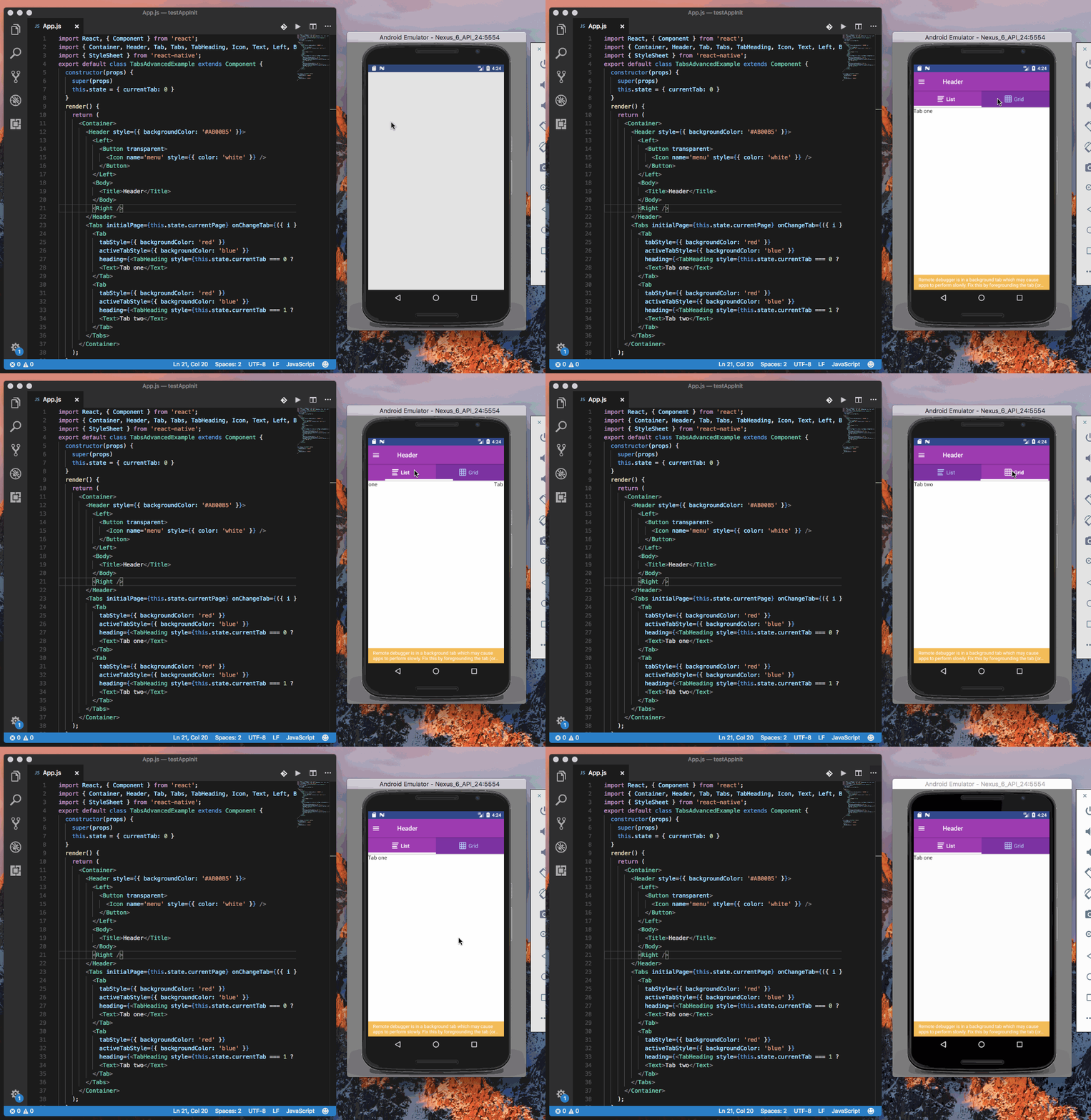
@nitin0331 As <TabHeading/> is another component, active/normal tabStyles are not useful. You can handle the styles in the code by getting the current tab index. An example is given below
Code
import React, { Component } from 'react';
import { Container, Header, Tab, Tabs, TabHeading, Icon, Text, Left, Body, Right, Button, Title } from 'native-base';
import { StyleSheet } from 'react-native';
export default class TabsAdvancedExample extends Component {
  constructor(props) {
    super(props)
    this.state = { currentTab: 0 }
  }
  render() {
    return (
      <Container>
        <Header style={{ backgroundColor: '#AB00B5' }}>
          <Left>
            <Button transparent>
              <Icon name='menu' style={{ color: 'white' }} />
            </Button>
          </Left>
          <Body>
            <Title>Header</Title>
          </Body>
          <Right />
        </Header>
        <Tabs initialPage={this.state.currentPage} onChangeTab={({ i }) => this.setState({ currentTab: i })}>
          <Tab
            tabStyle={{ backgroundColor: 'red' }}
            activeTabStyle={{ backgroundColor: 'blue' }}
            heading={<TabHeading style={this.state.currentTab === 0 ? styles.activeTabStyle : styles.tabStyle}><Icon name="list" /><Text>List</Text></TabHeading>}>
            <Text>Tab one</Text>
          </Tab>
          <Tab
            tabStyle={{ backgroundColor: 'red' }}
            activeTabStyle={{ backgroundColor: 'blue' }}
            heading={<TabHeading style={this.state.currentTab === 1 ? styles.activeTabStyle : styles.tabStyle}><Icon name="grid" /><Text>Grid</Text></TabHeading>}>
            <Text>Tab two</Text>
          </Tab>
        </Tabs>
      </Container>
    );
  }
}

const styles = StyleSheet.create({
  activeTabStyle: {
    backgroundColor: '#AB00B5'
  },
  tabStyle: {
    backgroundColor: '#8800A7'
  }
})
Gif
 akhil-geekyants
on 12 Feb 2018
akhil-geekyants
on 12 Feb 2018
Closing this issue due to no response
akhil-geekyants
on 22 Feb 2018
I think this issue has to be reopened. The solution above applies styles but it causes a glitch when changing between tabs (as it updates the component state)
Update: this happens only when using scrollable tabs
 kujma10
on 27 Apr 2020
kujma10
on 27 Apr 2020
Related issues
 muthuraman007
·
3Comments
muthuraman007
·
3Comments
 Bundas
·
3Comments
Bundas
·
3Comments
 bsiddiqui
·
3Comments
bsiddiqui
·
3Comments
 Landerson352
·
3Comments
Landerson352
·
3Comments
 georgemickael-b
·
3Comments
georgemickael-b
·
3Comments
Most helpful comment
@nitin0331 As
<TabHeading/>is another component, active/normal tabStyles are not useful. You can handle the styles in the code by getting the current tab index. An example is given belowCode
Gif