Nativebase: Incorrect position of Icon with Floating label
react-native, react and native-base version
"native-base": "^2.3.7",
"react": "16.2.0",
"react-native": "0.52.0",
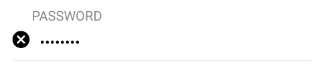
Expected behavior
Icon should be on right side
Actual behavior
Position of Icon always is on left side
Steps to reproduce (code snippet or screenshot)
<Item floatingLabel error={error && touched}>
  <Label style={{top}}>{labelText}</Label>
  <Input
          ref={c => (this.textInput = c)}
          secureTextEntry={input.name === "password" ? true : false}
          {...input}
  />
  <Icon name='close-circle' />
</Item>
Screenshot of emulator/device
Is the bug present in both ios and android or in any one of them?
checked only Android
Any other additional info which would help us debug the issue quicker.
duplicate
 ViktorAksionov
All 2 comments
1102
 SupriyaKalghatgi
on 23 Jan 2018
SupriyaKalghatgi
on 23 Jan 2018
                    <Item floatingLabel style={{ flexDirection: 'row-reverse' }}>
                        <Label>Password</Label>
                        <Input/>
                        <Icon name="close-circle" />
                    </Item>
 navibrar
on 23 Feb 2018
navibrar
on 23 Feb 2018
👎4
Was this page helpful?
0 / 5 - 0 ratings
Related issues
 Landerson352
·
3Comments
Landerson352
·
3Comments
 omerdn1
·
3Comments
omerdn1
·
3Comments
 Cotel
·
3Comments
Cotel
·
3Comments
 bsiddiqui
·
3Comments
bsiddiqui
·
3Comments
 Bundas
·
3Comments
Bundas
·
3Comments