Nativebase: Fab child buttons are "shown" initially/sometimes when active=false
react-native, react and native-base version
Other than my project, this also happens with current KitchenSink in Expo.
{
  "main": "node_modules/expo/AppEntry.js",
  "private": true,
  "scripts": {
    "test": "node ./node_modules/jest/bin/jest.js --watch"
  },
  "jest": {
    "preset": "jest-expo"
  },
  "dependencies": {
    "@expo/samples": "2.1.1",
    "@expo/vector-icons": "^6.2.1",
    "expo": "^23.0.0",
    "firebase": "^4.6.2",
    "moment": "^2.19.3",
    "native-base": "^2.3.3",
    "react": "16.0.0",
    "react-native": "https://github.com/expo/react-native/archive/sdk-23.0.0.tar.gz",
    "react-native-datepicker": "^1.6.0",
    "react-native-keyboard-spacer": "^0.4.1",
    "react-navigation": "^1.0.0-beta.19",
    "react-redux": "^5.0.6",
    "redux": "^3.7.2",
    "redux-logger": "^3.0.6",
    "redux-thunk": "^2.2.0",
    "validate.js": "^0.12.0"
  },
  "devDependencies": {
    "jest-expo": "^23.0.0"
  }
}
Expected behaviour
Fab child buttons are hidden when active=false.
Actual behaviour
Fab child buttons are "shown" initially, although partially covered or in different position. Let me show you what I mean.
KitchenSink, during first open: see that red button...?

My own app, during first open and "sometimes after toggling a few times": see that very slight pink, that is a child button.

Note that there is no problem when active=true. The problem is only when active=false.
Is the bug present in both ios and android or in any one of them?
Only tested with Android 7.0 and Expo 23.
 ceefour
All 11 comments
@ceefour Hi, I had the same problem. In my case they were like pulled to the side like this when the page was navigated to:
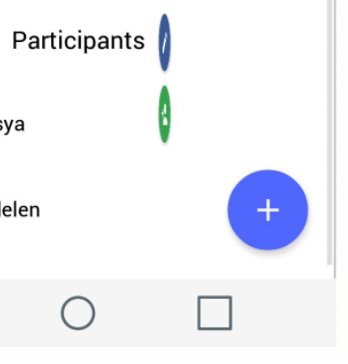
I overpassed that by checking for active in the child components:
<Fab
    active={this.state.active}
    direction="up"
    containerStyle={{}}
    style={{ backgroundColor: '#5067FF' }}
    position="bottomRight"
    onPress={() => this.setState({ active: !this.state.active})}
>
      <Icon ios="ios-add" android="md-add" />
            {
               this.state.active && [
                <Button style={{ backgroundColor: '#34A34F' }} >
                    <Icon ios="ios-person-add" android="md-person-add" />
                 </Button>,
                 <Button style={{ backgroundColor: '#3B5998' }}>
                    <Icon ios="ios-create-outline" android="md-create" />
                 </Button>
               ]
            }
</Fab>
The only downside I noticed with this is that you dont get closing Animations.
Hope I could help, till it gets fixed^^
 phantom1299
on 11 Dec 2017
phantom1299
on 11 Dec 2017
Fixed with 2.3.6
 SupriyaKalghatgi
on 5 Jan 2018
SupriyaKalghatgi
on 5 Jan 2018
I still see this issue in Native Base 2.10.0 when FAB on position "bottomRight". Should be reopened.
 pnoyens
on 28 Jan 2019
pnoyens
on 28 Jan 2019
Same here, seeing this happening Native Base 2.12.1
<Fab
  active={this.state.fabActive}
  direction='up'
  style={styles.fab}
  position='bottomRight'
  onPress={() => this.setState({ fabActive: !this.state.fabActive })}>
  <Icon name='angle-up' type='FontAwesome5' />
  <Button style={styles.share}>
    <Icon name='share' type='FontAwesome5' onPress={shareAction} />
  </Button>
  <Button style={styles.delete} onPress={deleteAction}>
    <Icon name='trash' type='FontAwesome5' />
  </Button>
</Fab>
 AnonymousSB
on 21 Apr 2019
AnonymousSB
on 21 Apr 2019
@AnonymousSB I have the exact same markup for my Fab but and also have the issue. I think it depends on how we render our navigators. For example when I only use a stack navigator the Fab won't bug out and doesn't show the child buttons.
 Choem
on 7 May 2019
Choem
on 7 May 2019
@Choem I also started getting this issue when I combined a drawer navigator with a stack navigator.
 devt3000
on 21 May 2019
devt3000
on 21 May 2019
Problem still persists when bottomRight is used!
 sjonchhe
on 16 Jul 2019
sjonchhe
on 16 Jul 2019
Same problem here.
 maitrungduc1410
on 22 Sep 2019
maitrungduc1410
on 22 Sep 2019
problem is still here as well
any workaround ?
 FadiAboMsalam
on 5 Oct 2019
FadiAboMsalam
on 5 Oct 2019
Hi all, still haven't fixed the issue. I don't have a workaround for the native base package. I used another FAB which was less cumbersome to work with together with the navigators I used for my project.
Choem
on 7 Oct 2019
Same issue. I don't get why this issue is marked close. Running 2.13.8 on Expo.
 Infinitism
on 30 Apr 2020
Infinitism
on 30 Apr 2020
Related issues
 eggybot
·
3Comments
eggybot
·
3Comments
 bsiddiqui
·
3Comments
bsiddiqui
·
3Comments
 maphongba008
·
3Comments
maphongba008
·
3Comments
 elnygren
·
3Comments
elnygren
·
3Comments
 Landerson352
·
3Comments
Landerson352
·
3Comments
Most helpful comment
I still see this issue in Native Base 2.10.0 when FAB on position "bottomRight". Should be reopened.