Nativebase: <Right> not working on some component configuration, requires justifyContent=space-between
react-native, react and native-base version
Expo SDK 23
{
  "main": "node_modules/expo/AppEntry.js",
  "private": true,
  "scripts": {
    "test": "node ./node_modules/jest/bin/jest.js --watch"
  },
  "jest": {
    "preset": "jest-expo"
  },
  "dependencies": {
    "@expo/samples": "2.1.1",
    "@expo/vector-icons": "^6.2.1",
    "expo": "^23.0.0",
    "firebase": "^4.6.2",
    "native-base": "^2.3.3",
    "react": "16.0.0",
    "react-native": "https://github.com/expo/react-native/archive/sdk-23.0.0.tar.gz",
    "react-navigation": "^1.0.0-beta.19",
    "react-redux": "^5.0.6",
    "redux": "^3.7.2",
    "redux-logger": "^3.0.6",
    "redux-thunk": "^2.2.0"
  },
  "devDependencies": {
    "jest-expo": "^23.0.0"
  }
}
Expected behaviour
<Right> always aligns right
arrow icon:

"Pria" below

Actual behaviour
<Right> aligns somewhat left

"Wanita" below:
Steps to reproduce (code snippet or screenshot)
For the Card:
  render() {
    return (
      <Container style={styles.container}>
        <Content padder>

          <Card>
            <CardItem header bordered>
              <Text>{this.props.currentUserProfile.name}, selamat datang di KeluargaSamara</Text>
            </CardItem>
            <CardItem>
              <Body>
                <Text>Agar kami dapat memberikan layanan dan fitur yang sesuai dengan
                  kebutuhan Anda, silakan isi biodata Anda terlebih dahulu.</Text>
              </Body>
            </CardItem>
            <CardItem button={true} onPress={() => this.personalInfoWizard()} style={{}}>
              <Icon active name="contact"/>
              <Text>Isi Biodata Anda</Text>
              <Right>
                <Icon name="arrow-forward"/>
              </Right>
            </CardItem>
          </Card>

          <Button title="Logout" onPress={this.doLogout}/>

        </Content>
      </Container>
    );
  }
For the Form:
  render() {
    return (
      <Container style={styles.container}>
        <Content padder>
          <Form>
            <Item stackedLabel>
              <Label>Name</Label>
              <Input />
            </Item>
            <ListItem style={{justifyContent: 'space-between'}}>
              <Text>Pria</Text>
              <Right>
                <Radio selected={true}/>
              </Right>
            </ListItem>
            <ListItem>
              <Text>Wanita</Text>
              <Right>
                <Radio selected={false}/>
              </Right>
            </ListItem>
          </Form>
        </Content>
      </Container>
    );
  }
Is the bug present in both ios and android or in any one of them?
Only tested in Android 7.0.
Any other additional info which would help us debug the issue quicker.
Workaround is possible using justifyContent=space-between, but... why is this required?
The sample codes don't use this workaround, so I'm curious why is this happening to me.
 ceefour
All 8 comments
However the CardItem justifyContent=space-between workaround results in inconsistent padding/margin around the text.
Instead of this: (item 1 and item 2 will not be aligned)
            <CardItem style={{justifyContent: 'space-between'}}>
              <Icon active name="contact"/>
              <Text>Isi Biodata Anda</Text>
              <Right>
                <Icon name="arrow-forward"/>
              </Right>
            </CardItem>
            <CardItem style={{justifyContent: 'space-between'}}>
              <Icon active name="contact"/>
              <Text>Isi Biodata Anda Bla bla bla</Text>
              <Right>
                <Icon name="arrow-forward"/>
              </Right>
            </CardItem>
Now I'm using this (flex stuff, without justifyContent) which will align perfectly:
            <CardItem>
              <Icon active name="contact"/>
              <Text style={{flex: 1}}>Isi Biodata Anda</Text>
              <Right style={{flex: 0}}>
                <Icon name="arrow-forward"/>
              </Right>
            </CardItem>
            <CardItem>
              <Icon active name="contact"/>
              <Text style={{flex: 1}}>Isi Biodata Anda Bla bla bla</Text>
              <Right style={{flex: 0}}>
                <Icon name="arrow-forward"/>
              </Right>
            </CardItem>
Experiencing the same issue on ios too. Need to set 'space-between' manually.
 carsonwah
on 30 Dec 2017
carsonwah
on 30 Dec 2017
@ceefour For card
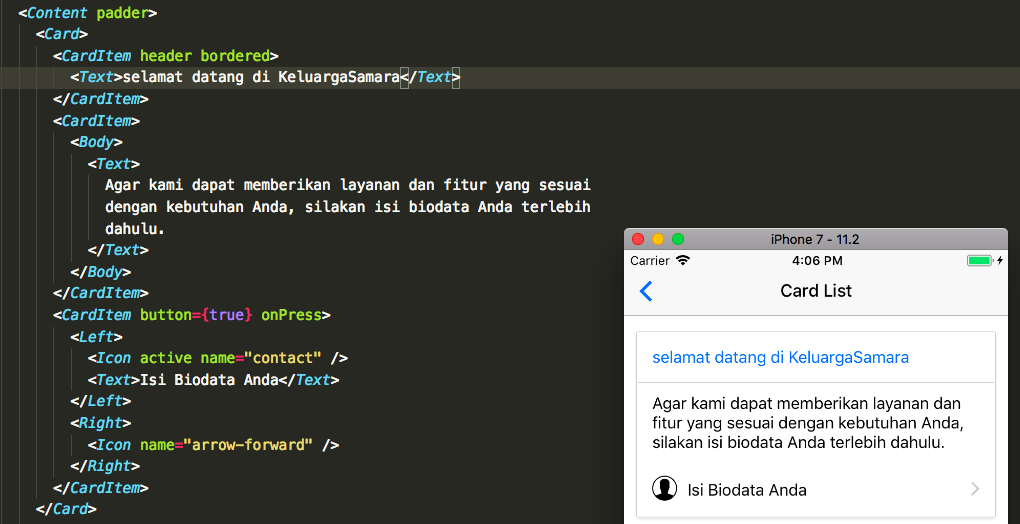
 SupriyaKalghatgi
on 5 Jan 2018
SupriyaKalghatgi
on 5 Jan 2018
@ceefour For Form

SupriyaKalghatgi
on 5 Jan 2018
@ceefour @carsonwah If you include component to be aligned towards Right then you should align other elements to either Left or Body as per your requirement
SupriyaKalghatgi
on 5 Jan 2018
Docs will be updated on this
SupriyaKalghatgi
on 5 Jan 2018
Thanks @SupriyaKalghatgi
ceefour
on 5 Jan 2018
I have opened this issue on the docs repo here: #71
Since we split the docs and the source into separate repos.
SupriyaKalghatgi
on 31 Jan 2018
Related issues
 muthuraman007
·
3Comments
muthuraman007
·
3Comments
 kitsune7
·
3Comments
kitsune7
·
3Comments
 omerdn1
·
3Comments
omerdn1
·
3Comments
 natashache
·
3Comments
natashache
·
3Comments
 elnygren
·
3Comments
elnygren
·
3Comments
Most helpful comment
@ceefour For Form
