Nativebase: Scrollable Tabs showing weird borders at some tabs
Hi there,
Unfortunately could not find a solution within your current issue tracker, so opened the one following next.
react-native, react and native-base version
"native-base": "^2.3.3",
"react": "16.0.0",
"react-native": "0.50.4"
Expected behaviour
No borders
Actual behaviour
Borders when clicking/swiping to some tabs:
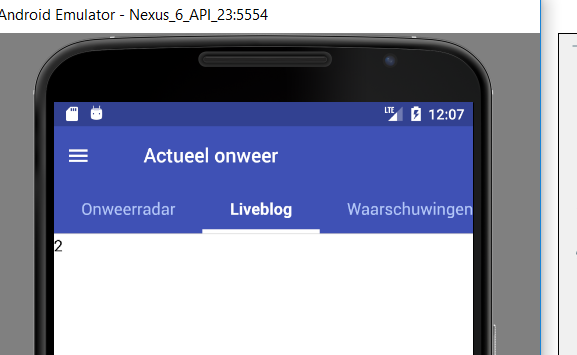

Steps to reproduce (code snippet or screenshot)
Code pretty much equal to demo code, the behaviour also occurs when running the demo code:
import React, { Component } from 'react';
import { ScrollableTab, Container, Content, Footer, Header, Title, Button, Left, Right, Body, Icon, Text, Tabs, Tab } from 'native-base';

export default class HeaderExample extends Component<{}> {
  render() {
    return (
      <Container>
        <Header hasTabs>
          <Left>
            <Button transparent>
              <Icon name='menu' />
            </Button>
          </Left>
          <Body>
            <Title>Actueel onweer</Title>
          </Body>
          <Right />
        </Header>
        <Tabs renderTabBar={()=> <ScrollableTab />}>
          <Tab heading="Onweerradar">
            <Text>1</Text>
          </Tab>
          <Tab heading="Liveblog">
            <Text>2</Text>
          </Tab>
          <Tab heading="Waarschuwingen">
            <Text>3</Text>
          </Tab>
          <Tab heading="Informatie">
            <Text>4</Text>
          </Tab>
        </Tabs>
      </Container>
    );
  }
}
Screenshot of emulator/device
Screenshot attached above.
Is the bug present in both ios and android or in any one of them?
Android tested, iOS not tested.
Any other additional info which would help us debug the issue quicker.
Negative.
 christianversloot
All 3 comments
Any clues? @akhil-geekyants
christianversloot
on 13 Dec 2017
@christianversloot try setting backgroundColor in tabsContainerStyle of <ScrollableTab/> to the required color for each platform.
Like
<ScrollableTab tabsContainerStyle={{ backgroundColor: platform == 'ios' ? '#F8F8F8' : '#3F51B5' }}
 akhil-geekyants
on 14 Dec 2017
akhil-geekyants
on 14 Dec 2017
👍9
This fixes the problem, thanks 👍 😄
christianversloot
on 14 Dec 2017
Was this page helpful?
0 / 5 - 0 ratings
Related issues
 chetnadaffodil
·
3Comments
chetnadaffodil
·
3Comments
 georgemickael-b
·
3Comments
georgemickael-b
·
3Comments
 maphongba008
·
3Comments
maphongba008
·
3Comments
 bsiddiqui
·
3Comments
bsiddiqui
·
3Comments
 elnygren
·
3Comments
elnygren
·
3Comments
Most helpful comment
@christianversloot try setting
backgroundColorin tabsContainerStyle of<ScrollableTab/>to the required color for each platform.Like