Nativebase: Deckswiper not re rendering straight away when datasource changes
react-native, react and native-base version
0.50.3, 16.0.0, 2.3.3
Expected behaviour
When the dataSource passed to the DeckSwiper changes the DeckSwiper should re render straight away.
Actual behaviour
When the dataSource changes the cards don't re-render straight away, it only re renders once a card has been swiped from the deck.
Steps to reproduce (code snippet or screenshot)
import React from "react";
import { Platform, Image } from "react-native";
import {
  Container,
  Header,
  Title,
  Content,
  Button,
  Icon,
  Text,
  Right,
  Body,
  Left,
  Picker,
  Form,
  View,
  DeckSwiper,
  Card,
  CardItem,
  Item as FormItem
} from "native-base";

const Item = Picker.Item;

const topics = [
  { label: "topic 1", value: "1" },
  { label: "topic 2", value: "2" },
  { label: "topic 3", value: "3" }
];

const cards = [
  { text: "Card A", topicId: "1", name: "One" },
  { text: "Card B", topicId: "2", name: "Two" },
  { text: "Card C", topicId: "3", name: "Three" },
  { text: "Card D", topicId: "1", name: "Four" },
  { text: "Card E", topicId: "2", name: "Five" },
  { text: "Card F", topicId: "3", name: "Six" }
];

export default class App extends React.Component {
  constructor(props) {
    super(props);
    this.state = {
      selected: "1",
      topics: topics,
      cards: cards
    };
  }
  onValueChange(value: string) {
    this.setState({
      selected: value,
      cards: cards.filter(item => item.topicId === value)
    });
  }
  render() {
    console.log(this.state.cards)
    return (
      <Container>
        <Header />
        <Content>
          <Form>
            <Picker
              iosHeader="Select one"
              mode="dropdown"
              selectedValue={this.state.selected}
              onValueChange={this.onValueChange.bind(this)}
            >
              {this.state.topics.map((topic, i) => {
                return <Item label={topic.label} value={topic.value} key={i} />;
              })}
            </Picker>
          </Form>
          <View>
            <DeckSwiper
              ref={c => (this._deckSwiper = c)}
              dataSource={this.state.cards}
              renderItem={item => (
                <Card style={{ elevation: 3 }}>
                  <CardItem>
                    <Left>
                      <Body>
                        <Text>{item.text}</Text>
                        <Text>Topic{item.topicId}</Text>
                      </Body>
                    </Left>
                  </CardItem>
                  <CardItem cardBody>
                    <Image
                      style={{ height: 300, flex: 1 }}
                      source={{
                        uri:
                          "http://www.pixedelic.com/themes/geode/demo/wp-content/uploads/sites/4/2014/04/placeholder4.png"
                      }}
                    />
                  </CardItem>
                </Card>
              )}
            />
          </View>
        </Content>
        <View style={{ flexDirection: "row", flex: 1, position: "absolute", bottom: 50, left: 0, right: 0, justifyContent: 'space-between', padding: 15 }}>
        <Button iconLeft onPress={() => this._deckSwiper._root.swipeLeft()}>
          <Text>Swipe Left</Text>
        </Button>
        <Button iconRight onPress={() => this._deckSwiper._root.swipeRight()}>
          <Text>Swipe Right</Text>
        </Button>
      </View>
      </Container>
    );
  }
}
Screenshot of emulator/device
Link to GIF demonstrating issue http://gph.is/2iqA9o4
Is the bug present in both ios and android or in any one of them?
Only checking on ios so don't know if it's also happening in android.
Any other additional info which would help us debug the issue quicker.
I have looked at other issues on here that discuss a similar problem but have not found any solutions in any of the comments.
 123lk
123lk
All 17 comments
Hi @akhil-geekyants, any update on when this will be fixed? or a suggestion on how I can work around it? Thanks!
123lk
on 5 Dec 2017
Stack Overflow question (same question) https://stackoverflow.com/questions/47575342/react-native-app-nativebase-deckswiper-not-re-rendering-immediately-when-datas
 akhil-geekyants
on 10 Jan 2018
akhil-geekyants
on 10 Jan 2018
I'm also having a basic issue using this component. Before the data is fetched, the component is initialized with an empty array and therefore renders the empty template. When the populated array is passed to props for re-render, the deck continues to display the empty state... so I cannot even swipe a card to re-render. Any suggestion on how we should explicitly update the datasource?
import React, { Component } from 'react';
import { DeckSwiper, Card, CardItem, Thumbnail, Text, Left, Body, Image, View } from 'native-base';

function DeckCard(props) {
    const { task } = props;
    return (
        <Card style={{ elevation: 3 }}>
            <CardItem>
                <Left>
                    <Body>
                        <Text>{task.taskName}</Text>
                        <Text note>{task.description}</Text>
                    </Body>
                </Left>
            </CardItem>
            <CardItem cardBody />
        </Card>
    );
}

function EmptyDeck() {
    return (
        <View style={{ alignSelf: 'center' }}>
            <Text>Done!</Text>
        </View>
    );
}

function Deck(props) {
    console.log('TaskDeck props', props);
    // props are called with data array but deck remains empty
    return (
        <DeckSwiper
            dataSource={props.cards}
            renderEmpty={() => <EmptyDeck />}
            renderItem={(item) => <DeckCard task={item} />}
        />
    );
}

export default Deck;
 vanb
on 14 Jun 2018
vanb
on 14 Jun 2018
We also have the same issue, when we fetch details from API its not loading the cards. But when we hardcode the values it works. I think when the state is changing the deck swiper is not getting the latest one. Any update will help us
 GokulDharumar
on 19 Jul 2018
GokulDharumar
on 19 Jul 2018
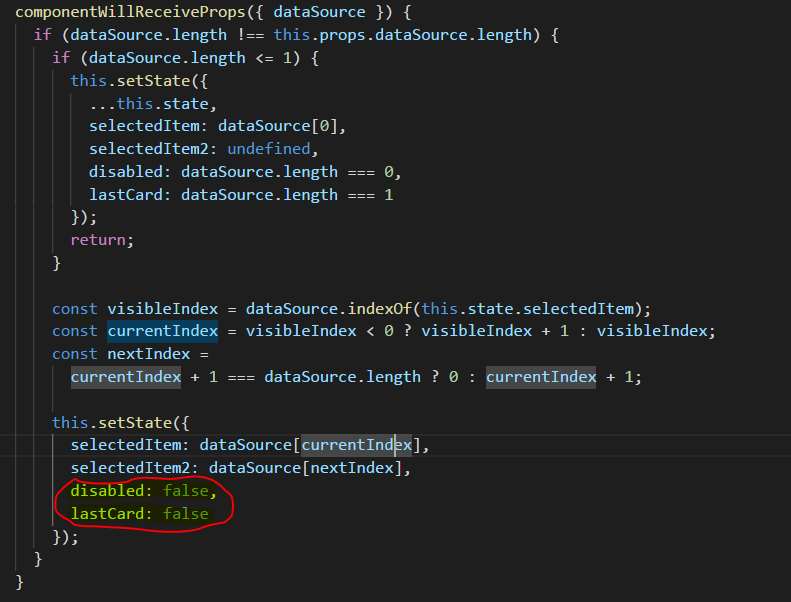
Add those two lines in the node_modules/native-base/src/DeckSwiper.js file and rebuild
 alexviar
on 26 Nov 2018
alexviar
on 26 Nov 2018
This is closed but it does not solve the problem and having to change your node modules is a really a bad idea for working on a team and just, in general, this is not an answer. Can we re-open this and actually solve the issue?
 isaiahols
on 9 Apr 2019
isaiahols
on 9 Apr 2019
Add a key to the DeckSwiper in your component tree and change it when the data source changes. https://reactjs.org/docs/reconciliation.html#keys
alexviar
on 9 Apr 2019
Adding a key does not seem to be the solution either... It appears that it is a Native base issue that is alleged to be addressed in an upcoming release. In the meantime, however, if anyone has a working solution I would be grateful for your help.
isaiahols
on 18 Apr 2019
I found that if you conditionally render the Deck swiper and toggle from visible to hidden to visible then it re-renders Deckswiper with the new data.
isaiahols
on 18 Apr 2019
This problem has two years and there is no solution yet?, great job.
 oscar-gallog
on 3 Jun 2019
oscar-gallog
on 3 Jun 2019
Did some one find the solution?
 TheChanDI
on 1 Jul 2019
TheChanDI
on 1 Jul 2019
I am having the same problem and currently working around this by adding a hook which will manually set the selectedItem in the DeckSwiper and therefor trigger the update. While this is working I am not entirely sure if this is a smart solution :-)
useEffect(() => {
    if (deckSwiper !== undefined) {
      deckSwiper._root.state.selectedItem = cards[index]
    }
  }, [cards])
 smigfu
on 12 Jul 2019
smigfu
on 12 Jul 2019
Following @isaiahols 's advice, here's the workaround that I used:
function MySwiper({data}) {
  return (
    {data ? (
      <DeckSwiper
        dataSource={data}
        renderItem={(item) => (...)}
      />
    ) : null}
  );
}
To be clear though, this is still a bug and the issue should be left open until it's resolved.
 ajenkins
on 3 Nov 2019
ajenkins
on 3 Nov 2019
Same for me. I can't use it.
 felix-lambert
on 12 Nov 2019
felix-lambert
on 12 Nov 2019
Still the same issue with "native-base": "2.13.8" and "react-native": "0.61.4". Just using a temporary hack for now. On top of @ajenkins code, I am resetting the datasource to null every time there is a change and then changing the datasource to the new data using a timeout function. I noticed that the components doesn't refresh without a small (2000ms in my case) timeout.
 kxt5258
on 4 Dec 2019
kxt5258
on 4 Dec 2019
This is torture TBH
Thanks to everyone who has suggested workarounds, I'm gonna try some of these
 Stephen2
on 5 Dec 2019
Stephen2
on 5 Dec 2019
HOw to stop SwipeLeft or SwipeRight having reach start or end of the array ? Looping=false is also not working... Any workarounds ?
 sumit1317
on 9 Apr 2020
sumit1317
on 9 Apr 2020
Related issues
 Landerson352
·
3Comments
Landerson352
·
3Comments
 eggybot
·
3Comments
eggybot
·
3Comments
 Bundas
·
3Comments
Bundas
·
3Comments
 georgemickael-b
·
3Comments
georgemickael-b
·
3Comments
 bsiddiqui
·
3Comments
bsiddiqui
·
3Comments
Most helpful comment
This problem has two years and there is no solution yet?, great job.