Nativebase: [Android] Under TabBar , horizontal List not working
this issue only for android it's working for iOS
<Container>
        <Header hasTabs/>
        <Tabs>
          <Tab heading={ <TabHeading><Icon name="camera" /><Text>Camera</Text></TabHeading>}>
                            <List dataArray={ItemList} horizontal={true}
                      renderRow={(item) =>
                          < HorizontalCell  data={item} >
                      }>
                </List>
          </Tab>
          <Tab heading={ <TabHeading><Text>No Icon</Text></TabHeading>}>
            <Tab2 />
          </Tab>
          <Tab heading={ <TabHeading><Icon name="apps" /></TabHeading>}>
            <Tab3 />
          </Tab>
        </Tabs>
      </Container>
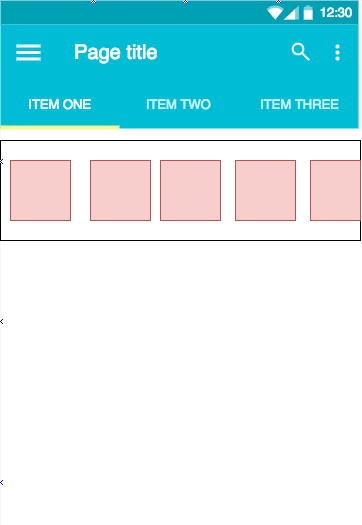
red boxes are horizontal cells when I try to move its goes to 2nd tab
for iOS it's worked
 sachithamh
All 4 comments
@sachithamadhupa You can either lock the Tabs swipe using locked prop in Tabs or check with pointer-events/touches for both the scrollable contents i.e, cells and Tabs
 shivrajkumar
on 12 Sep 2017
shivrajkumar
on 12 Sep 2017
👍1
yep it's working but, it's better to fix in a good way, @shivrajkumar k thanx for your answer
sachithamh
on 12 Sep 2017
@sachithamadhupa Better way/the correct way would be through pointer events.
shivrajkumar
on 28 Sep 2017
😄1
👍1
yep thanks @shivrajkumar :) 💯
sachithamh
on 6 Oct 2017
Was this page helpful?
0 / 5 - 0 ratings
Related issues
 agersoncgps
·
3Comments
agersoncgps
·
3Comments
 aloifolia
·
3Comments
aloifolia
·
3Comments
 omerdn1
·
3Comments
omerdn1
·
3Comments
 eggybot
·
3Comments
eggybot
·
3Comments
 elnygren
·
3Comments
elnygren
·
3Comments
Most helpful comment
@sachithamadhupa Better way/the correct way would be through pointer events.