Nativebase: Button Icon/Text left aligned?
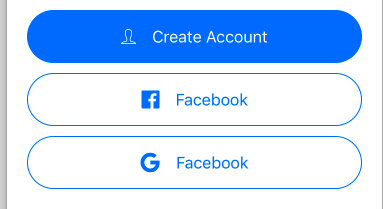
- How would I go about aligning the button text and icon to the left in each button?
- Is it possible to add colored images instead of the icon?
From Sketch:

My code:
<Button
  block
  rounded
  iconLeft
  style={{ height: 53, marginBottom: 10 }}
>
  <Icon name="logo-google" />
  <Text>Continue with Google</Text>
</Button>
 appjitsu
All 4 comments
@appjitsu Apply style rule justifyContent: "flex-start" to the Button.
 shivrajkumar
on 11 Sep 2017
shivrajkumar
on 11 Sep 2017
👍3
❤1
Ah ok. Thanks. What do you recommend for the full images next to the text instead of using icons?
~ Jason
On Sep 11, 2017, at 1:13 AM, Shivraj notifications@github.com wrote:
@appjitsu Apply style rule justifyContent: "flex-start" to the Button.
—
You are receiving this because you were mentioned.
Reply to this email directly, view it on GitHub, or mute the thread.
appjitsu
on 11 Sep 2017
@appjitsu You can use Image itself there
shivrajkumar
on 11 Sep 2017
@shivrajkumar Thanks!
appjitsu
on 12 Sep 2017
Was this page helpful?
0 / 5 - 0 ratings
Related issues
 maphongba008
·
3Comments
maphongba008
·
3Comments
 nschurmann
·
3Comments
nschurmann
·
3Comments
 Bundas
·
3Comments
Bundas
·
3Comments
 chetnadaffodil
·
3Comments
chetnadaffodil
·
3Comments
 muthuraman007
·
3Comments
muthuraman007
·
3Comments
Most helpful comment
@appjitsu Apply style rule
justifyContent: "flex-start"to the Button.