Nativebase: Native base Tabs is not working , it showing blank page, please help me
import AllPatient from "../components/allPatient.js"
import MainHeader from "../components/header.js"
import { Container, Header, Content, Tab, Tabs,Text } from 'native-base';
export default class AllTabs extends Component {
render() {
    return (
        <View>
            <Container>
                <Tabs initialPage={1}>
                    <Tab heading="Tab1">
                        <MainHeader />
                    </Tab>
                    <Tab heading="Tab2">
                        <AllPatient />
                    </Tab>
                </Tabs>

             </Container>
            <Text>
                this text is showing but tab not showing
            </Text>
        </View>
    )
}
}
 Mohammad-Khalid23
All 15 comments
I am having the same issue after upgrading my react native to 0.48..
package.json
"native-base": "^2.3.1",
 mgit7
on 7 Sep 2017
mgit7
on 7 Sep 2017
tabs are showing only in android.index.js but not showing in other components
Mohammad-Khalid23
on 11 Sep 2017
@Mohammad-Khalid23 Can you post your Tab content also. As this seems to be working for us just fine
 shivrajkumar
on 11 Sep 2017
shivrajkumar
on 11 Sep 2017
@shivrajkumar
I am having this same problem. I am just using .map to display a list of components under each of the Tabs but it is initially blank and it does not populate when I have set "initialpage={1}" only when I swipe to a different tab and back it will populate the items or if I click on the tab I'm currently on it then displays. But if I change the initialpage={0}, it will render correctly and show all the props under each tab.
WHEN
-Only started happening after updating react native.
<StyleProvider style={getTheme(platform)}>
<View style={{flex:1}}
<Tabs
style={{
width: Dimensions.get("window").width,
top: 15,
}}
tabBarUnderlineStyle={{
backgroundColor: "transparent",
}}
initialPage={1}
>
<Tab
tabStyle={{ backgroundColor: "transparent" }}
activeTabStyle={{ backgroundColor: "transparent" }}
activeTextStyle={{ color: "#CC00CC", fontSize: 22 }}
heading="Cones"
>
<Tab1 />
</Tab>
<Tab
tabStyle={{ backgroundColor: "transparent" }}
activeTabStyle={{ backgroundColor: "transparent" }}
activeTextStyle={{ color: "#CC00CC", fontSize: 22 }}
heading="Cones"
>
<Tab2/>
</Tab>
</Tabs>
</View>
</StyleProvider>
package.json
"reat-native":"^0.48.1"
"native-base": "^2.3.1",
mgit7
on 12 Sep 2017
Same here! Blank screen when setting initialPage to anything greater than 0..
"expo": "^21.0.0",
"native-base": "^2.3.1",
"react": "16.0.0-alpha.12",
"react-native": "https://github.com/expo/react-native/archive/sdk-21.0.2.tar.gz",
 ziudeso
on 21 Oct 2017
ziudeso
on 21 Oct 2017
Possibly same problem as https://github.com/GeekyAnts/NativeBase/issues/1318 ?
 dtuite
on 21 Oct 2017
dtuite
on 21 Oct 2017
Temporary workaround but it works (RN: 0.48):
"expo": "^21.0.0",
"moment": "^2.18.1",
"native-base": "^2.3.2",
"react-native": "https://github.com/expo/react-native/archive/sdk-21.0.2.tar.gz"
XXX = src/dist
in node_modules/native-base/XXX/basic/tabs/index.js
Replace:
if (this.scrollView && Platform.OS === "android") {
    const x = this.props.initialPage * this.state.containerWidth;
    this.scrollView.scrollTo({ x, animated: false });
}
with:
if (this.scrollView) {
    const x = this.props.initialPage * this.state.containerWidth;
    this.scrollView.scrollTo({ x, animated: false });
}
1010
 SupriyaKalghatgi
on 9 Nov 2017
SupriyaKalghatgi
on 9 Nov 2017
What was the fix here? This is an issue I'm having with the content component as well. Every post I see about this issue gets closed due to unable to reproduce or inactivity. Obviously, their is a problem. I'm 10 days delayed on releasing an app because of this issue and there appears to be no fix in sight.
 hindsricardo
on 8 Jan 2018
hindsricardo
on 8 Jan 2018
@hindsricardo did you check above comments about 1010?
SupriyaKalghatgi
on 9 Jan 2018
How to get selected tab heading value like if first tab is selected then i should get value of tab heading Tab1. Please help....
render() {
return (
         </Container>
        <Text>
            this text is showing but tab not showing
        </Text>
    </View>
)
}
 dwivediamit
on 24 Jan 2018
dwivediamit
on 24 Jan 2018
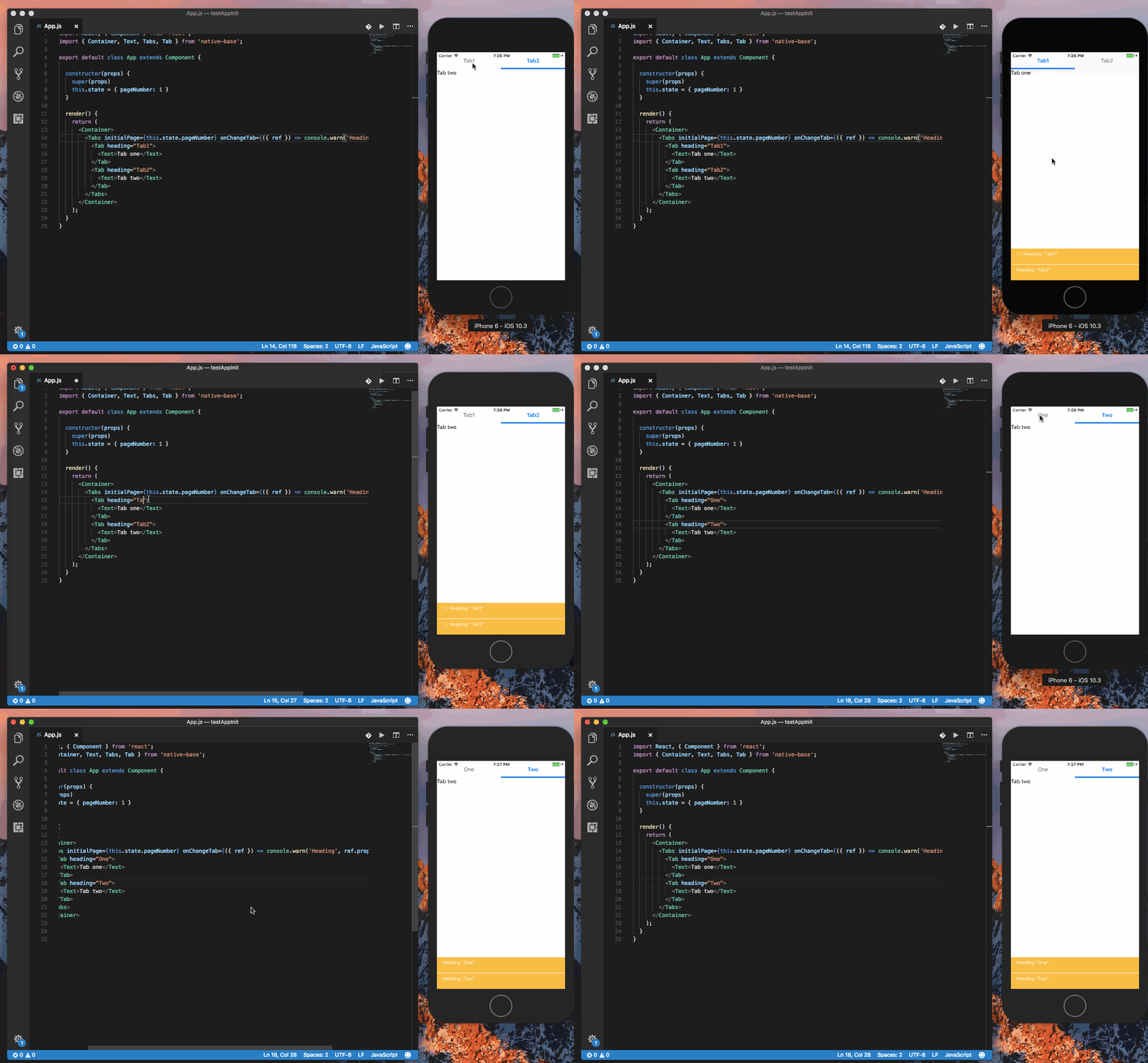
@dwivediamit you can get the value from onChangeTab function of <Tabs/>.
Code
import React, { Component } from 'react';
import { Container, Text, Tabs, Tab } from 'native-base';

export default class App extends Component {

  constructor(props) {
    super(props)
    this.state = { pageNumber: 1 }
  }

  render() {
    return (
      <Container>
        <Tabs initialPage={this.state.pageNumber} onChangeTab={({ ref }) => console.warn('Heading', ref.props.heading)}>
          <Tab heading="One">
            <Text>Tab one</Text>
          </Tab>
          <Tab heading="Two">
            <Text>Tab two</Text>
          </Tab>
        </Tabs>
      </Container>
    );
  }
}
Gif
 akhil-geekyants
on 24 Jan 2018
akhil-geekyants
on 24 Jan 2018
Thank you so much it's working fine for me......
dwivediamit
on 25 Jan 2018
Hi can you help me here...
/* @flow */
import React from "react";
import { Platform } from "react-native";
import { Root, StyleProvider } from "native-base";
import { StackNavigator } from "react-navigation";
import Artboard from "./src/artboard/Artboard";
import Login from "./src/artboard/Login";
import Signup from "./src/artboard/Signup";
import LocationMap from "./src/artboard/LocationMap";
import AvailablePlans from "./src/artboard/AvailablePlans";
import Checkout from "./src/artboard/Checkout";
import AddCard from "./src/artboard/AddCard";
import ActivityDetail from "./src/artboard/ActivityDetail";
import CalendarScreen from "./src/artboard/CalendarScreen";
import Confirmation from "./src/artboard/Confirmation";
import ForgotPassword from "./src/artboard/ForgotPassword";
import SuccessfullBooking from "./src/artboard/SuccessfullBooking";
import MainScreenNavigator from "./src/artboard/Index";
import getTheme from '../native-base-theme/components';
import material from "../native-base-theme/variables/material";
import platform from "../native-base-theme/variables/platform";
import Icon from 'react-native-fa-icons';
import commonColor from '../native-base-theme/variables/commonColor';
const AppNavigator = StackNavigator(
{
    Artboard: { screen: Artboard
     //    navigationOptions: {
     //      headerLeft: null
     // },
    },
    Login: { screen: Login },
    Signup: { screen: Signup },
    MainScreenNavigator: { screen: MainScreenNavigator },
    ForgotPassword: { screen: ForgotPassword },
    LocationMap: { screen: LocationMap },
    AvailablePlans: { screen: AvailablePlans },
    Checkout: { screen: Checkout },
    AddCard: { screen: AddCard },
    ActivityDetail: { screen: ActivityDetail },
    CalendarScreen: { screen: CalendarScreen },
    Confirmation: { screen: Confirmation },
    SuccessfullBooking: { screen: SuccessfullBooking },
},


{
    initialRouteName: "Artboard",
    headerMode: "none",
}
);
export default () =>
<Root>
    <StyleProvider style={getTheme(commonColor)}>
        <AppNavigator />
    </StyleProvider>
</Root>;
how to change initialRouteName if logged in right now my initialRouteName Artboard if logged in then i want in place of Artboard it will go to home screen... please help
dwivediamit
on 30 Jan 2018
@dwivediamit Your query is irrelevant to this library
SupriyaKalghatgi
on 30 Jan 2018
Related issues
 inv2004
·
3Comments
inv2004
·
3Comments
 natashache
·
3Comments
natashache
·
3Comments
 Landerson352
·
3Comments
Landerson352
·
3Comments
 elnygren
·
3Comments
natashache
·
3Comments
elnygren
·
3Comments
natashache
·
3Comments
Most helpful comment
Temporary workaround but it works (RN: 0.48):
"expo": "^21.0.0",
"moment": "^2.18.1",
"native-base": "^2.3.2",
"react-native": "https://github.com/expo/react-native/archive/sdk-21.0.2.tar.gz"
XXX = src/dist
in node_modules/native-base/XXX/basic/tabs/index.js
Replace:
with: