Nativebase: Floating Label does not reset position when input is cleared
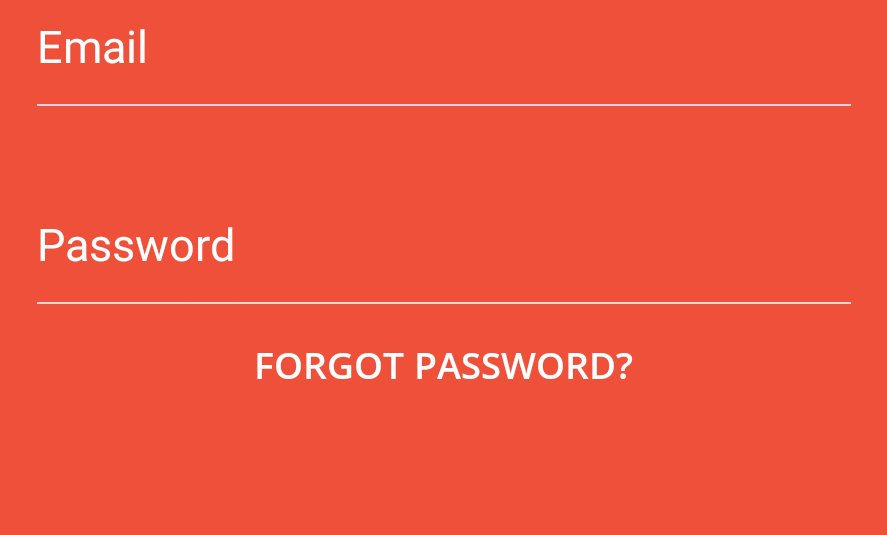
Floating label is not resetting to the blurred state when clearing input on both ios and android.
Versions
native-base: 2.1.5
react: 16.0.0-alpha.12
react-native: 0.45.0
Example
<Item floatingLabel light ref={item => { this.emailItem= item; }}>
  <Label>Email</Label>
  <Input
     getRef={input => { this.emailInput = input; }}
     returnKeyType='next'
     keyboardType='email-address'
     autoCapitalize='none'
     autoCorrect={false}
     onChangeText={email => this.setState({ email })}
     onSubmitEditing={() => this.submit()}
     value={this.state.email}
  />
</Item>
submit = () => {
  //these do not reset the floating label
  this.setState({email: ''});
  this.emailInput._root.clear();
  this.emailInput._root.blur();
  //this.emailItem._inputRef.clear();   //is undefined
  //this.emailItem._inputRef.blur();   //is undefined
}
Screenshots
Initial empty state:
Entering text:

After clear:
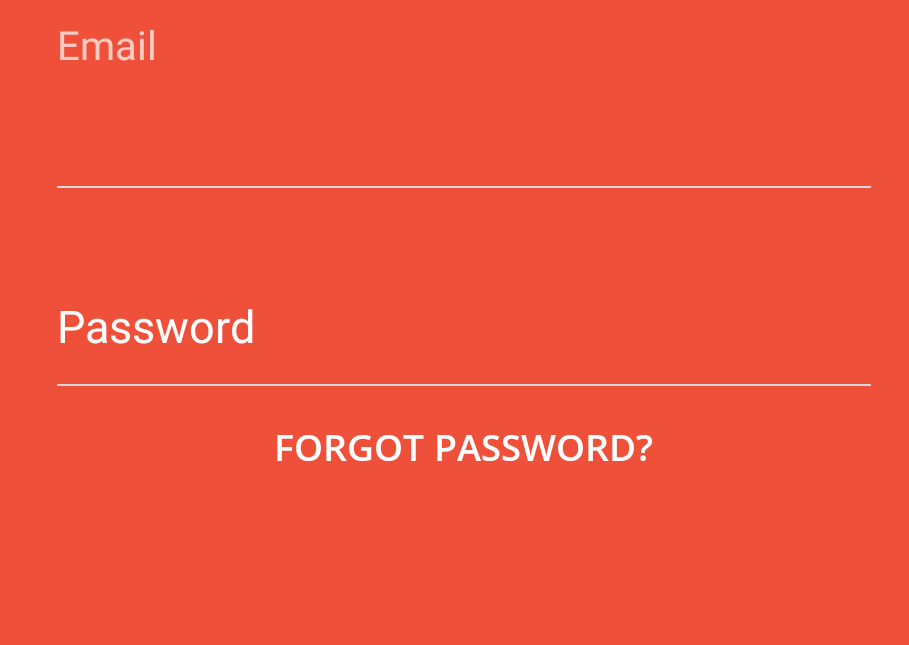
Expected clear() to reset floating label position (in the example, email label should look like password)
 brozef
All 11 comments
Also running into this issue. Have tried .clear() as above, as well as
this._TextInput._root.setNativeProps({text: ""});
 lukewlms
on 26 Jul 2017
lukewlms
on 26 Jul 2017
@JoeNimble @lukecwilliams Did you check this with NativeBase 2.3.3?
 SupriyaKalghatgi
on 8 Nov 2017
SupriyaKalghatgi
on 8 Nov 2017
@SupriyaKalghatgi still an issue for me using 2.3.3
brozef
on 14 Nov 2017
@SupriyaKalghatgi still facing this issue using 2.3.3
 harshada-bhanose
on 17 Dec 2017
harshada-bhanose
on 17 Dec 2017
@SupriyaKalghatgi still facing this issue using 2.3.3
 Nachox07
on 12 Jan 2018
Nachox07
on 12 Jan 2018
Hi guys, any update on this? Would you be happy to accept a PR to address it?
 jribeiro
on 29 Jan 2018
jribeiro
on 29 Jan 2018
@jribeiro Sure!
SupriyaKalghatgi
on 30 Jan 2018
PR #1606
Works for this.setState({email: ''}); but not for this.emailInput._root.clear(); because the clear function doesn't bubble up to the NB Input wrapper.
 rizzomichaelg
on 19 Feb 2018
rizzomichaelg
on 19 Feb 2018
Floating Label does not reset position when input is cleared, this is desired behavior
SupriyaKalghatgi
on 23 Mar 2018
Closing this issue
SupriyaKalghatgi
on 26 Mar 2018
Released with 2.5.0
SupriyaKalghatgi
on 8 Jun 2018
Related issues
 georgemickael-b
·
3Comments
georgemickael-b
·
3Comments
 Bundas
·
3Comments
Bundas
·
3Comments
 agersoncgps
·
3Comments
agersoncgps
·
3Comments
 mcpracht
·
3Comments
mcpracht
·
3Comments
 inv2004
·
3Comments
inv2004
·
3Comments
Most helpful comment
Released with 2.5.0