Nativebase: Header will be overried by Android notification bar ?
I use expo to create a project , here is my environment:
{
  "name": "test-nativebase-drawer",
  "version": "0.0.0",
  "description": "Hello Expo!",
  "author": null,
  "private": true,
  "main": "node_modules/expo/AppEntry.js",
  "dependencies": {
    "expo": "^18.0.4",
    "native-base": "^2.2.0",
    "react": "16.0.0-alpha.12",
    "react-native": "https://github.com/expo/react-native/archive/sdk-18.0.1.tar.gz",
    "react-native-drawer": "^2.3.0"
  }
}
I try to follow Anatomy of official tutorial , IOS is fine just like the official , but its not the same as my android emulator or device , it looks like the photo:

How to i fix it ? Any help would be appreciated.
Here is my App.js:
import React from 'react';
import Expo from 'expo';
import { StyleSheet, Text, View } from 'react-native';
import { Container, Drawer, Header, Body, Left, Right, Button, Icon, Title, Footer, FooterTab, Content } from 'native-base';

export default class App extends React.Component {
  constructor() {
    super();
    this.state = {
      isReady: false
    };
  }

  async componentWillMount() {
    await Expo.Font.loadAsync({
      Roboto: require("native-base/Fonts/Roboto.ttf"),
      Roboto_medium: require("native-base/Fonts/Roboto_medium.ttf"),
      Ionicons: require("@expo/vector-icons/fonts/Ionicons.ttf")
    });
    this.setState({ isReady: true });
  }

  render() {
    if (!this.state.isReady) {
      return <Expo.AppLoading />;
    }

    return (

        <Container>
          <Header>
            <Left>
              <Button transparent onPress={() => this.openDrawer()}>
                <Icon name='menu' />
              </Button>
            </Left>
            <Body>
              <Title>Header</Title>
            </Body>
            <Right />
          </Header>
          <Content>
            <Text>
              This is Content Section
          </Text>
          </Content>
          <Footer>
            <FooterTab>
              <Button full>
                <Text>Footer</Text>
              </Button>
            </FooterTab>
          </Footer>
        </Container>
      // </Drawer>

    );
  }
}
 motogod
All 8 comments
@motogod You will need to add androidStatusBar property in app.json
Something like this
 shivrajkumar
on 14 Jul 2017
shivrajkumar
on 14 Jul 2017
Thanks for your help , i add it and my app.json like this now:
{
  "expo": {
    "name": "test-nativebase-drawer",
    "description": "An empty new project",
    "slug": "test-nativebase-drawer",
    "privacy": "public",
    "sdkVersion": "18.0.0",
    "version": "1.0.0",
    "orientation": "portrait",
    "primaryColor": "#cccccc",
    "icon": "./assets/icons/app.png",
    "loading": {
      "icon": "./assets/icons/loading.png",
      "hideExponentText": false
    },
    "packagerOpts": {
      "assetExts": [
        "ttf",
        "mp4"
      ]
    },
    "ios": {
      "supportsTablet": true
    },
    "androidStatusBarColor": "#334393",
    "androidStatusBar": {
      "barStyle": "light-content",
      "backgroundColor": "#334393"
    }
  }
}
and compile it , my android screen still like this , any idea ? Thanks in advance.
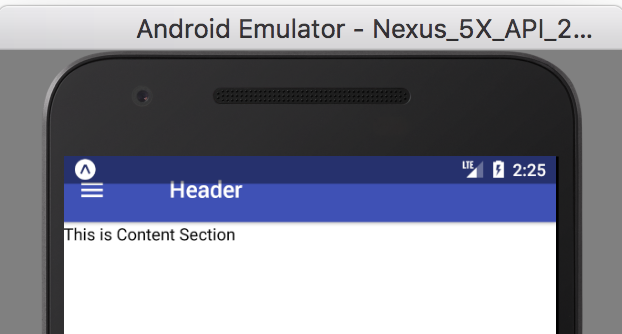
I try change my code like this , it still no working.
    "ios": {
      "supportsTablet": true
    },
    "android": {
      "androidStatusBarColor": "#334393",
      "androidStatusBar": {
        "barStyle": "light-content",
        "backgroundColor": "#334393"
      }
    }
@motogod Can you close and clear the code from expo app once and load again. As the above should work
shivrajkumar
on 14 Jul 2017
Oh my god , i close emulator and expo totally , compile it again , it's working now ! Thanks for your suggestion.
motogod
on 14 Jul 2017
on Second trial it worked because I forgot to clear in expo on android device. Thanks @shivrajkumar
 Vishal1419
on 6 Dec 2017
Vishal1419
on 6 Dec 2017
I did all steps and clear cache expo by "npm start -- --reset-cache" . It didn't work. Can anyone help me where I missed ?
 bhavyasruthi
on 7 Dec 2017
bhavyasruthi
on 7 Dec 2017
@bhavyasruthi Please share your app.json
 SupriyaKalghatgi
on 8 Dec 2017
SupriyaKalghatgi
on 8 Dec 2017
Try
marginTop: (Platform.OS === 'android') ? 15 : 0
in Header style.
For me androidStatusBarColor breaks Expo.LinearGradient component, it ceases to behave as KeyboardAvoidingView.
 ragozin-n
on 8 Dec 2017
ragozin-n
on 8 Dec 2017
Related issues
 natashache
·
3Comments
natashache
·
3Comments
 nschurmann
·
3Comments
nschurmann
·
3Comments
 muthuraman007
·
3Comments
muthuraman007
·
3Comments
 maphongba008
·
3Comments
maphongba008
·
3Comments
 elnygren
·
3Comments
elnygren
·
3Comments
Most helpful comment
@motogod You will need to add
androidStatusBarproperty in app.jsonSomething like this