Nativebase: Responsive fontSize for <Text /> ?
Hi,
I'm building an app with nativebase and it's pretty great!
However during UI/UX testing I experienced that my fontSize especially <Text> fontSize is ugly on some devices as it's not responsive.
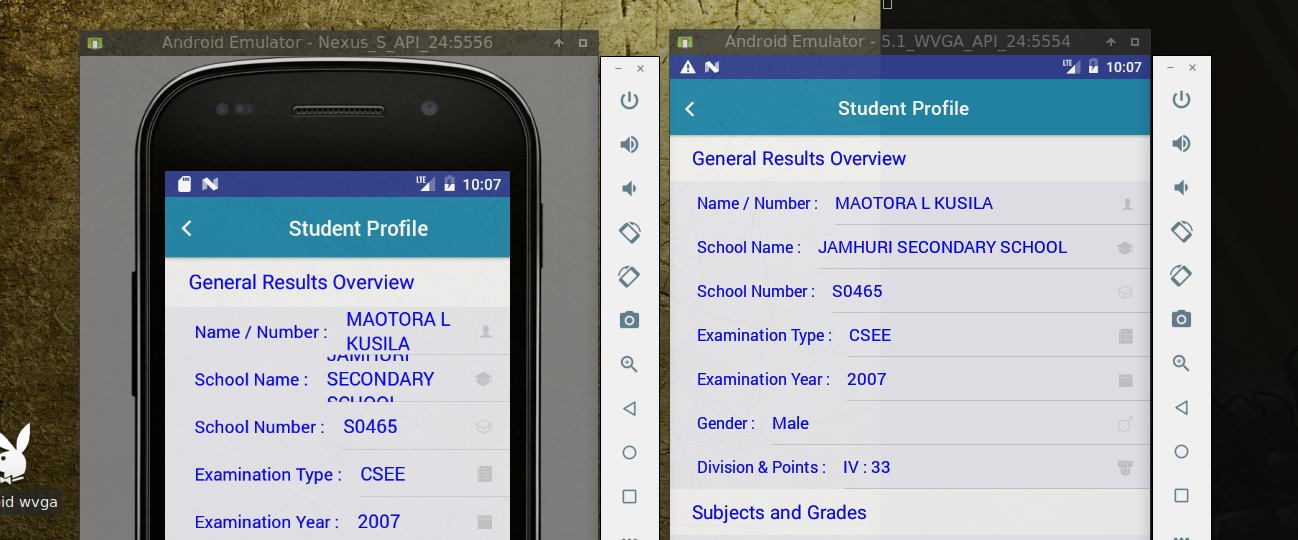
So I dug into nativebase theming picked the commonColor theme, applied it.
Now, I'm trying to make a responsive fontSize for all my <Text> elements so I won't have to worry about smaller screens devices in my commonColor/variables file.
I noticed this block
  // Text
  textColor: "blue", //- This is "#000" by default
  inverseTextColor: "#fff",
  noteFontSize: 14,
I'm not sure what noteFontSize is, but I tried to change it to ridiculus numbers and I didn't get anything suprising, but the color trick worked and the <Text> I'm referring to changed.
Question
How can I make my fontSize responsive from nativebase theme/variables?
I got this answer from here and I would like to have a recommended way on how to apply it in themes/variables.
I'm using
native-base: 2.2.0,
react: 16.0.0-alpha.12,
react-native: 0.45.1,
small-phone : Nexus S,
normal-phone: 5.1 WVGA
Thanks!
 maotora
>All comments
This code
import { Dimensions } from 'react-native';
const { width, height } = Dimensions.get('window');

//Guideline sizes are based on standard ~5" screen mobile device
const guidelineBaseWidth = 350;
const guidelineBaseHeight = 680;

const scale = size => width / guidelineBaseWidth * size;
const verticalScale = size => height / guidelineBaseHeight * size;
const moderateScale = (size, factor = 0.5) => size + ( scale(size) - size ) * factor;

export {scale, verticalScale, moderateScale};
From this post got me through the UI/UX scalling trauma.
I applied it in my theme as
  // Text
  textColor: "blue", //- This is "#000" by default
  inverseTextColor: "#fff",
  noteFontSize: moderateScale(14),
and on my fontSizeBase since moderateScale is used in "padding", "margin" & "image" scalling and most of those variables default theme values are a product of fontSizeBase.
Thanks all.
maotora
on 11 Jul 2017
Related issues
 georgemickael-b
·
3Comments
georgemickael-b
·
3Comments
 inv2004
·
3Comments
inv2004
·
3Comments
 natashache
·
3Comments
natashache
·
3Comments
 Cotel
·
3Comments
Cotel
·
3Comments
 aloifolia
·
3Comments
aloifolia
·
3Comments
Most helpful comment
This code
From this post got me through the UI/UX scalling trauma.
I applied it in my theme as
and on my
fontSizeBasesincemoderateScaleis used in "padding", "margin" & "image" scalling and most of those variables default theme values are a product offontSizeBase.Thanks all.