Nativebase: Picker not display in Item component
I cant display Picker component in Item.
<Container>
            <Content>
                <Item stackedLabel >
                    <Label>Picker</Label>
                    <Picker
                        supportedOrientations={['portrait']}
                        mode="dialog"
                        selectedValue="choose"
                        onValueChange={(item) => {
                        }}
                    >
                        <Item label="Choose" value="choose" />
                    </Picker>
                </Item>
            </Content>
        </Container>
native-base : 2.1.5
 bahadircivelek
All 11 comments
@bahadircivelek Item for Picker and Input are both different.
For this to work, use Picker.Item for Item inside Picker.
<Container>
<Content>
<Item stackedLabel >
<Label>Picker</Label>
<Picker
iosHeader="Select one"
mode="dropdown"
selectedValue={this.state.selected1}
onValueChange={this.onValueChange.bind(this)}>
<Picker.Item label="Wallet" value="key0" />
<Picker.Item label="ATM Card" value="key1" />
<Picker.Item label="Debit Card" value="key2" />
<Picker.Item label="Credit Card" value="key3" />
<Picker.Item label="Net Banking" value="key4" />
</Picker>
</Item>
</Content>
@</Container>
And remove this const Item = Picker.Item;. If you have added this.
 shivrajkumar
on 20 Jun 2017
shivrajkumar
on 20 Jun 2017
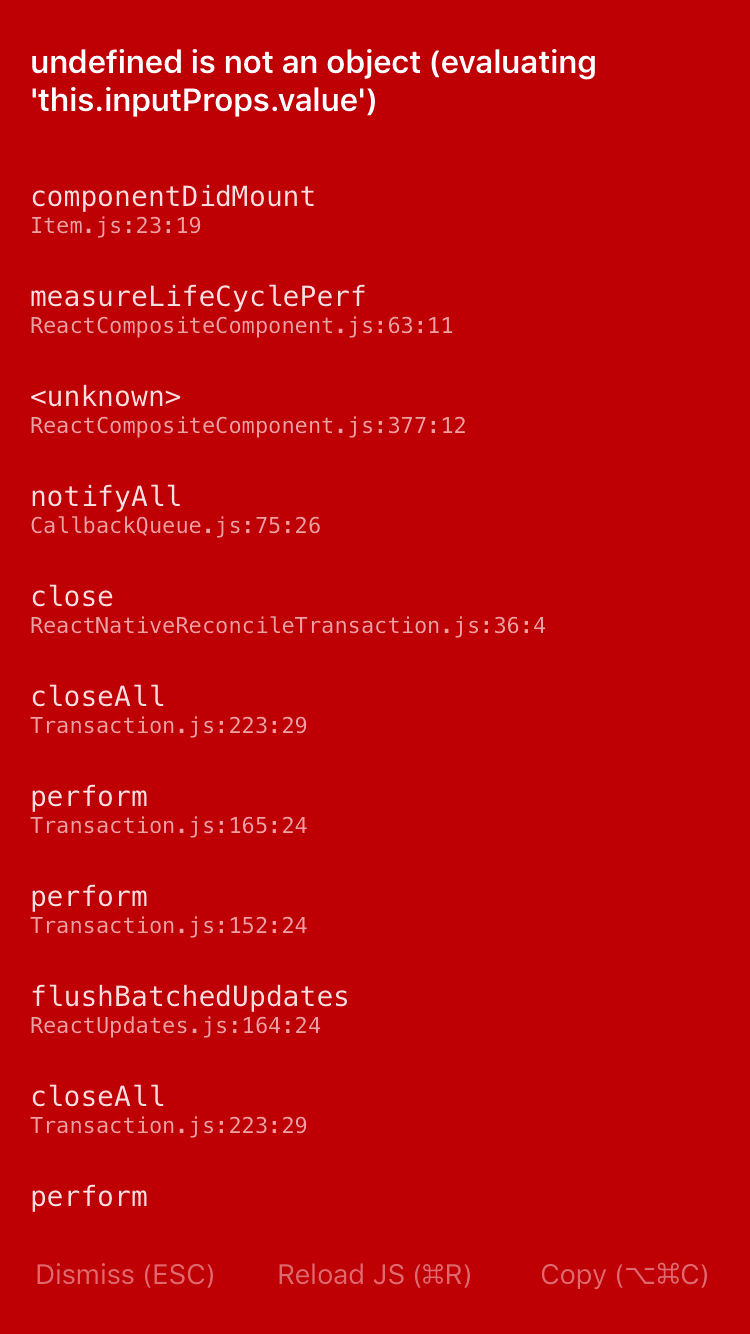
I tried your code but I'm getting the following error
 paologangemi
on 21 Jun 2017
paologangemi
on 21 Jun 2017
Try removing stackedLabel from Item.
There seems to be some issue with stackLabel. Will be fixed in the next release.
shivrajkumar
on 21 Jun 2017
I removed stackedLabel but I'm having the same issue.
paologangemi
on 21 Jun 2017
its a bug look here : https://github.com/GeekyAnts/NativeBase/pull/939
bahadircivelek
on 21 Jun 2017
Ah! Yes, the issue seems to be with Item itself. The issue has been resolved. Will be released in the next release.
For now you can remove Item wrapper around Picker and go ahead
shivrajkumar
on 21 Jun 2017
Item issue fixed with the latest version 2.2
shivrajkumar
on 3 Jul 2017
I use native-base 2.3.5, but Error seems to be still there... or is it my fault?
Tried it with Picker.Item and only with Item.
If I put the Picker into
<Content>
                                <Form>
                                    <Item>
                                        <Label>Api</Label>
                                        <Picker
                                            placeholder="API choose"
                                            mode="dropdown"
                                            selectedValue={this.state.selectedApi}
                                            onValueChange={this.onValueChange.bind(this)}
                                            style={{margin:5, color: colors.darkText}}
                                        >
                                            <Picker.Item label="API choose" enabled={false} value="choose" />
                                            <Picker.Item label="one" value="one" />
                                            <Picker.Item label="two" value="two" />
                                            <Picker.Item label="three" value="three" />
                                        </Picker >
                                    </Item>

                                <Item stackedLabel>
                                    <Label stackedLabel>E-Mail</Label>
                                    <Input />
                                </Item>
                                <Item stackedLabel last>
                                    <Label>API-Key</Label>
                                    <Input />
                                </Item>
                                </Form>
                            </Content>
  "dependencies": {
    "@expo/vector-icons": "^6.2.2",
    "flow-bin": "^0.62.0",
    "native-base": "^2.3.5",
    "react": "16.0.0",
    "react-native": "0.51.0"
  },
It even not work, If I copy your code from above...
 xstable
on 4 Jan 2018
xstable
on 4 Jan 2018
<Item stackedLabel>
<Label>Picker</Label>
<Picker
iosHeader="Select one"
placeholder="API choose"
mode="dropdown"
selectedValue={this.state.selected1}
onValueChange={this.onValueChange.bind(this)}
>
<Picker.Item label="Wallet" value="key0" />
<Picker.Item label="ATM Card" value="key1" />
<Picker.Item label="Debit Card" value="key2" />
<Picker.Item label="Credit Card" value="key3" />
<Picker.Item label="Net Banking" value="key4" />
</Picker>
</Item>
This worked fine
 SupriyaKalghatgi
on 29 Jan 2018
SupriyaKalghatgi
on 29 Jan 2018
@SupriyaKalghatgi Its not working
 anil1712
on 13 Feb 2018
anil1712
on 13 Feb 2018
@anil1712 Yes that works partially for iOS and not for Android
<Item/> with stackedlabel is designed to work mainly with Input components. So this may not work properly.
Having Picker with this, is not an intended use-case
1369
SupriyaKalghatgi
on 13 Feb 2018
Related issues
 georgemickael-b
·
3Comments
georgemickael-b
·
3Comments
 mcpracht
·
3Comments
mcpracht
·
3Comments
 Landerson352
·
3Comments
Landerson352
·
3Comments
 omerdn1
·
3Comments
omerdn1
·
3Comments
 bsiddiqui
·
3Comments
bsiddiqui
·
3Comments
Most helpful comment
I use native-base 2.3.5, but Error seems to be still there... or is it my fault?- , it won't be shown.
Tried it with Picker.Item and only with Item.
If I put the Picker into
  "dependencies": {
    "@expo/vector-icons": "^6.2.2",
    "flow-bin": "^0.62.0",
    "native-base": "^2.3.5",
    "react": "16.0.0",
    "react-native": "0.51.0"
  },
It even not work, If I copy your code from above...