Nativebase: Style Tabbar with Icons
Hi,
I have a Tabbar with icons and Text i am facing 2 problems:
1-Text doesn't go to the bottom of the icon
2-ActiveTabStyle doesn't apply on tabs so i can't style my tabs
her is my code
`
     <Tabs tabBarPosition = "bottom" {...tabProps}>

                    <Tab heading = {<TabHeading>
                            <Icon name="home"/>
                        <Text>Acheter</Text>
                    </TabHeading>}
                         tabStyle = {{backgroundColor: 'transparent'}}
                         activeTabStyle = {{backgroundColor: 'transparent'}}
                         activeTextStyle = {{fontWeight:'bold', color: '#651FFF', fontSize:17}}
                         textStyle = {{color: '#7C4DFF', fontWeight: 'bold', fontSize:16}}
                    >
                        <ProduitsScene style ={{ marginTop: -2}}/>
                    </Tab>

                    <Tab heading = {<TabHeading><Icon name="briefcase"/></TabHeading>}>
                    </Tab>

                    <Tab heading = {<TabHeading><Icon name="ios-menu-outline"/></TabHeading>}>
                    </Tab>

                    <Tab heading = {<TabHeading><Icon name="ios-compass-outline"/></TabHeading>}>
                    </Tab>

                    <Tab heading = {<TabHeading><Icon name="person"/></TabHeading>}>
                    </Tab>
                </Tabs>
`
her is a screen of my tabs

 googl3r
All 15 comments
try this one and add style to center it
<TabHeading><View><Icon name="briefcase"/></View><View><Text>Tab Text</Text></View></TabHeading>
 eggybot
on 13 Jun 2017
eggybot
on 13 Jun 2017
try <TabHeading style={{ flexDirection: 'column' }}><Icon name="briefcase"/><Text>Tab Text</Text></TabHeading>
 shivrajkumar
on 20 Jun 2017
shivrajkumar
on 20 Jun 2017
Active tab style does not apply probably since you are importing react native Text. Try to import Text from native base instead.
 andidev
on 21 Jun 2017
andidev
on 21 Jun 2017
Closing this due to inactivity. And also the above solutions should work
shivrajkumar
on 3 Jul 2017
sorry for the time, i was in holidays, but yes the above solutions works fine thanks a lot
googl3r
on 3 Jul 2017
Hi @googl3r, any feedback on this issue? I'm trying to customize the active state of my TabHeading with no success so far.
 wmendes
on 12 Jan 2018
wmendes
on 12 Jan 2018
@wmendes What is the issue you are facing?
Share your code snippet and output along with RN and NB version
 SupriyaKalghatgi
on 15 Jan 2018
SupriyaKalghatgi
on 15 Jan 2018
Sorry @SupriyaKalghatgi , my mistake. I was importing RN Text.
wmendes
on 15 Jan 2018
@SupriyaKalghatgi hi i have same issue as googl3r. Obviously the tabs cannot be styled when we use TabHeading. The code below is not executed :
tabStyle = {{backgroundColor: 'transparent'}}
                         activeTabStyle = {{backgroundColor: 'transparent'}}
                         activeTextStyle = {{fontWeight:'bold', color: '#651FFF', fontSize:17}}
                         textStyle = {{color: '#7C4DFF', fontWeight: 'bold', fontSize:16}}
>
 PdxMehmet
on 6 Feb 2018
PdxMehmet
on 6 Feb 2018
@PdxMehmet having the same problem, have you solved it?
 Elitebigboss90
on 4 Mar 2018
Elitebigboss90
on 4 Mar 2018
No didnt solve it yet :(
PdxMehmet
on 4 Mar 2018
@PdxMehmet @Elitebigboss90
posting code for the common case without <TabHeading/>
Code
import React, { Component } from 'react';
import { Container, Header, Content, Tab, Tabs, Text } from 'native-base';
export default class TabsExample extends Component {
  render() {
    return (
      <Container>
        <Header hasTabs />
        <Tabs initialPage={1} >
          <Tab heading="Tab1" tabStyle={{ backgroundColor: 'transparent' }}
            activeTabStyle={{ backgroundColor: 'transparent' }}
            activeTextStyle={{ fontWeight: 'bold', color: '#651FFF', fontSize: 17 }}
            textStyle={{ color: '#7C4DFF', fontWeight: 'bold', fontSize: 16 }}>
            <Text>Tab one</Text>
          </Tab>
          <Tab heading="Tab2"
            tabStyle={{ backgroundColor: 'transparent' }}
            activeTabStyle={{ backgroundColor: 'transparent' }}
            activeTextStyle={{ fontWeight: 'bold', color: '#651FFF', fontSize: 17 }}
            textStyle={{ color: '#7C4DFF', fontWeight: 'bold', fontSize: 16 }}>
            <Text>Tab two</Text>
          </Tab>
          <Tab heading="Tab3"
            tabStyle={{ backgroundColor: 'transparent' }}
            activeTabStyle={{ backgroundColor: 'transparent' }}
            activeTextStyle={{ fontWeight: 'bold', color: '#651FFF', fontSize: 17 }}
            textStyle={{ color: '#7C4DFF', fontWeight: 'bold', fontSize: 16 }}>
            <Text>Tab three</Text>
          </Tab>
        </Tabs>
      </Container>
    );
  }
}
Gif

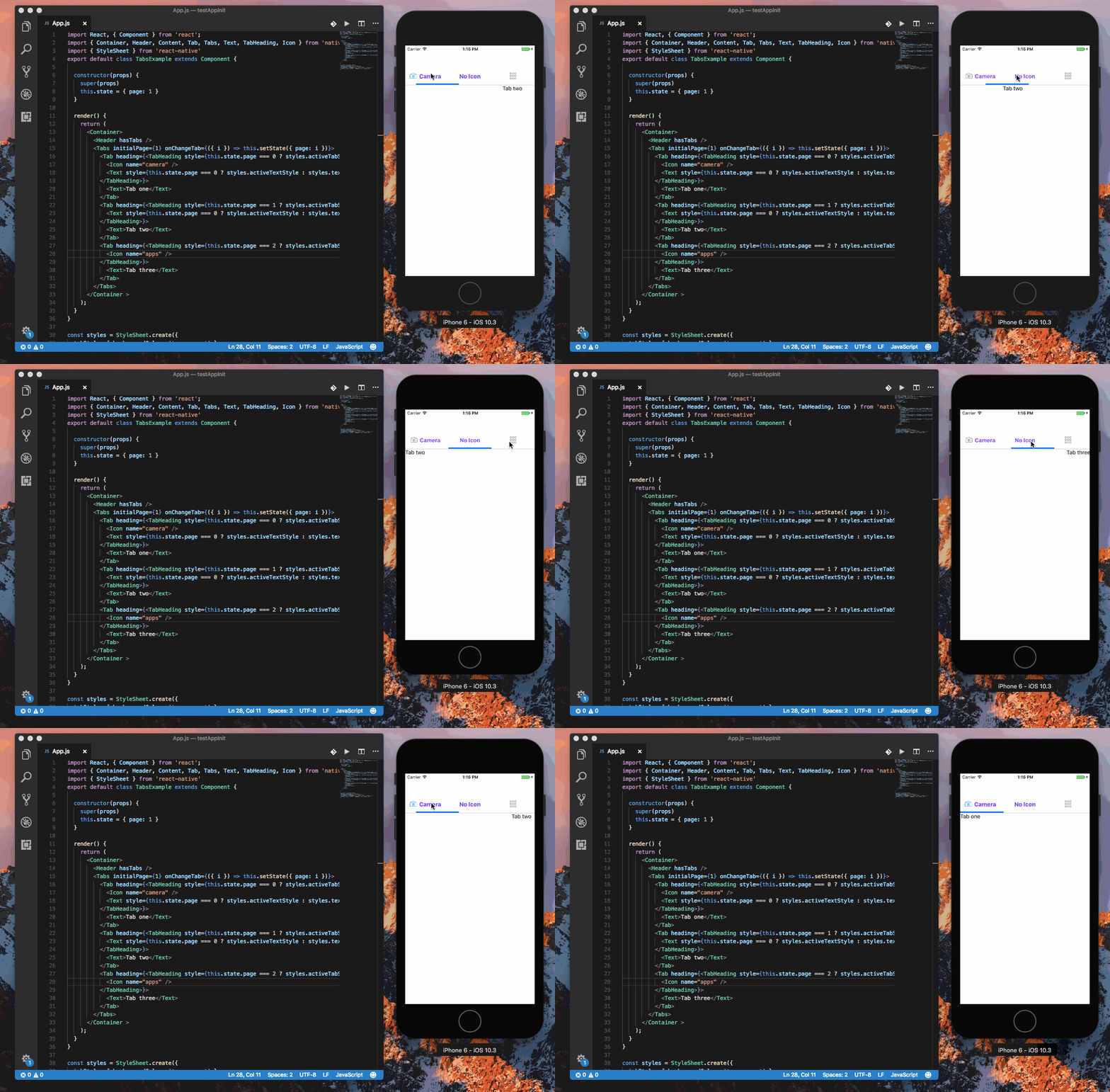
handling style programmatically while using <Tabheading/>
Code
import React, { Component } from 'react';
import { Container, Header, Content, Tab, Tabs, Text, TabHeading, Icon } from 'native-base';
import { StyleSheet } from 'react-native'
export default class TabsExample extends Component {

  constructor(props) {
    super(props)
    this.state = { page: 1 }
  }

  render() {
    return (
      <Container>
        <Header hasTabs />
        <Tabs initialPage={1} onChangeTab={({ i }) => this.setState({ page: i })}>
          <Tab heading={<TabHeading style={this.state.page === 0 ? styles.activeTabStyle : styles.tabStyle}>
            <Icon name="camera" />
            <Text style={this.state.page === 0 ? styles.activeTextStyle : styles.textStyle}>Camera</Text>
          </TabHeading>}>
            <Text>Tab one</Text>
          </Tab>
          <Tab heading={<TabHeading style={this.state.page === 1 ? styles.activeTabStyle : styles.tabStyle}>
            <Text style={this.state.page === 0 ? styles.activeTextStyle : styles.textStyle}>No Icon</Text>
          </TabHeading>}>
            <Text>Tab two</Text>
          </Tab>
          <Tab heading={<TabHeading style={this.state.page === 2 ? styles.activeTabStyle : styles.tabStyle}>
            <Icon name="apps" />
          </TabHeading>}>
            <Text>Tab three</Text>
          </Tab>
        </Tabs>
      </Container >
    );
  }
}

const styles = StyleSheet.create({
  tabStyle: { backgroundColor: 'transparent' },
  activeTabStyle: { backgroundColor: 'transparent' },
  activeTextStyle: { fontWeight: 'bold', color: '#651FFF', fontSize: 17 },
  textStyle: { color: '#7C4DFF', fontWeight: 'bold', fontSize: 16 }
})
Gif
 akhil-geekyants
on 6 Mar 2018
akhil-geekyants
on 6 Mar 2018
@akhil-geekyants
You are my hero! :D it works perfectly fine.
 msqar
on 19 Jan 2019
msqar
on 19 Jan 2019
@PdxMehmet @Elitebigboss90
posting code for the common case without<TabHeading/>Code
import React, { Component } from 'react';
import { Container, Header, Content, Tab, Tabs, Text } from 'native-base';
export default class TabsExample extends Component {
  render() {
    return (
      <Container>
        <Header hasTabs />
        <Tabs initialPage={1} >
          <Tab heading="Tab1" tabStyle={{ backgroundColor: 'transparent' }}
            activeTabStyle={{ backgroundColor: 'transparent' }}
            activeTextStyle={{ fontWeight: 'bold', color: '#651FFF', fontSize: 17 }}
            textStyle={{ color: '#7C4DFF', fontWeight: 'bold', fontSize: 16 }}>
            <Text>Tab one</Text>
          </Tab>
          <Tab heading="Tab2"
            tabStyle={{ backgroundColor: 'transparent' }}
            activeTabStyle={{ backgroundColor: 'transparent' }}
            activeTextStyle={{ fontWeight: 'bold', color: '#651FFF', fontSize: 17 }}
            textStyle={{ color: '#7C4DFF', fontWeight: 'bold', fontSize: 16 }}>
            <Text>Tab two</Text>
          </Tab>
          <Tab heading="Tab3"
            tabStyle={{ backgroundColor: 'transparent' }}
            activeTabStyle={{ backgroundColor: 'transparent' }}
            activeTextStyle={{ fontWeight: 'bold', color: '#651FFF', fontSize: 17 }}
            textStyle={{ color: '#7C4DFF', fontWeight: 'bold', fontSize: 16 }}>
            <Text>Tab three</Text>
          </Tab>
        </Tabs>
      </Container>
    );
  }
}
Gif
handling style programmatically while using
<Tabheading/>Code
import React, { Component } from 'react';
import { Container, Header, Content, Tab, Tabs, Text, TabHeading, Icon } from 'native-base';
import { StyleSheet } from 'react-native'
export default class TabsExample extends Component {

  constructor(props) {
    super(props)
    this.state = { page: 1 }
  }

  render() {
    return (
      <Container>
        <Header hasTabs />
        <Tabs initialPage={1} onChangeTab={({ i }) => this.setState({ page: i })}>
          <Tab heading={<TabHeading style={this.state.page === 0 ? styles.activeTabStyle : styles.tabStyle}>
            <Icon name="camera" />
            <Text style={this.state.page === 0 ? styles.activeTextStyle : styles.textStyle}>Camera</Text>
          </TabHeading>}>
            <Text>Tab one</Text>
          </Tab>
          <Tab heading={<TabHeading style={this.state.page === 1 ? styles.activeTabStyle : styles.tabStyle}>
            <Text style={this.state.page === 0 ? styles.activeTextStyle : styles.textStyle}>No Icon</Text>
          </TabHeading>}>
            <Text>Tab two</Text>
          </Tab>
          <Tab heading={<TabHeading style={this.state.page === 2 ? styles.activeTabStyle : styles.tabStyle}>
            <Icon name="apps" />
          </TabHeading>}>
            <Text>Tab three</Text>
          </Tab>
        </Tabs>
      </Container >
    );
  }
}

const styles = StyleSheet.create({
  tabStyle: { backgroundColor: 'transparent' },
  activeTabStyle: { backgroundColor: 'transparent' },
  activeTextStyle: { fontWeight: 'bold', color: '#651FFF', fontSize: 17 },
  textStyle: { color: '#7C4DFF', fontWeight: 'bold', fontSize: 16 }
})
Gif
Is there any faster solutions?
 mahdibarati
on 26 Mar 2019
mahdibarati
on 26 Mar 2019
@PdxMehmet @Elitebigboss90
posting code for the common case without<TabHeading/>Code
import React, { Component } from 'react';
import { Container, Header, Content, Tab, Tabs, Text } from 'native-base';
export default class TabsExample extends Component {
  render() {
    return (
      <Container>
        <Header hasTabs />
        <Tabs initialPage={1} >
          <Tab heading="Tab1" tabStyle={{ backgroundColor: 'transparent' }}
            activeTabStyle={{ backgroundColor: 'transparent' }}
            activeTextStyle={{ fontWeight: 'bold', color: '#651FFF', fontSize: 17 }}
            textStyle={{ color: '#7C4DFF', fontWeight: 'bold', fontSize: 16 }}>
            <Text>Tab one</Text>
          </Tab>
          <Tab heading="Tab2"
            tabStyle={{ backgroundColor: 'transparent' }}
            activeTabStyle={{ backgroundColor: 'transparent' }}
            activeTextStyle={{ fontWeight: 'bold', color: '#651FFF', fontSize: 17 }}
            textStyle={{ color: '#7C4DFF', fontWeight: 'bold', fontSize: 16 }}>
            <Text>Tab two</Text>
          </Tab>
          <Tab heading="Tab3"
            tabStyle={{ backgroundColor: 'transparent' }}
            activeTabStyle={{ backgroundColor: 'transparent' }}
            activeTextStyle={{ fontWeight: 'bold', color: '#651FFF', fontSize: 17 }}
            textStyle={{ color: '#7C4DFF', fontWeight: 'bold', fontSize: 16 }}>
            <Text>Tab three</Text>
          </Tab>
        </Tabs>
      </Container>
    );
  }
}
Gif
handling style programmatically while using
<Tabheading/>Code
import React, { Component } from 'react';
import { Container, Header, Content, Tab, Tabs, Text, TabHeading, Icon } from 'native-base';
import { StyleSheet } from 'react-native'
export default class TabsExample extends Component {

  constructor(props) {
    super(props)
    this.state = { page: 1 }
  }

  render() {
    return (
      <Container>
        <Header hasTabs />
        <Tabs initialPage={1} onChangeTab={({ i }) => this.setState({ page: i })}>
          <Tab heading={<TabHeading style={this.state.page === 0 ? styles.activeTabStyle : styles.tabStyle}>
            <Icon name="camera" />
            <Text style={this.state.page === 0 ? styles.activeTextStyle : styles.textStyle}>Camera</Text>
          </TabHeading>}>
            <Text>Tab one</Text>
          </Tab>
          <Tab heading={<TabHeading style={this.state.page === 1 ? styles.activeTabStyle : styles.tabStyle}>
            <Text style={this.state.page === 0 ? styles.activeTextStyle : styles.textStyle}>No Icon</Text>
          </TabHeading>}>
            <Text>Tab two</Text>
          </Tab>
          <Tab heading={<TabHeading style={this.state.page === 2 ? styles.activeTabStyle : styles.tabStyle}>
            <Icon name="apps" />
          </TabHeading>}>
            <Text>Tab three</Text>
          </Tab>
        </Tabs>
      </Container >
    );
  }
}

const styles = StyleSheet.create({
  tabStyle: { backgroundColor: 'transparent' },
  activeTabStyle: { backgroundColor: 'transparent' },
  activeTextStyle: { fontWeight: 'bold', color: '#651FFF', fontSize: 17 },
  textStyle: { color: '#7C4DFF', fontWeight: 'bold', fontSize: 16 }
})
Gif
it works for me but it "seems" that the itenary for my TabHeading components really slows down the render of my code. everytime I need to change the tabs it takes me around 1.5 to 2 seconds, even worse for certain tabs. i'm using icon from native base which requires me to do the itenary method. without it the styles of my activeTabsStyle and tabStyle will not be detected as @PdxMehmet mentions above.
any new solutions regarding of this problem @SupriyaKalghatgi ?
Thanks in advance.
 ghost
on 17 Apr 2019
ghost
on 17 Apr 2019
Related issues
 maphongba008
·
3Comments
maphongba008
·
3Comments
 elnygren
·
3Comments
elnygren
·
3Comments
 mcpracht
·
3Comments
mcpracht
·
3Comments
 natashache
·
3Comments
natashache
·
3Comments
 aloifolia
·
3Comments
aloifolia
·
3Comments
Most helpful comment
try
<TabHeading style={{ flexDirection: 'column' }}><Icon name="briefcase"/><Text>Tab Text</Text></TabHeading>