Nativebase: ActionSheet.show crash 2.1.5
Upgraded react-native and nativebase. No changes in my code. Running on iOS.
versions
react: 16.0.0-alpha.12
react-native: 0.45.1
native-base: 2.1.5
Expected behaviour
ActionSheet.show will show the ActionSheet
Actual behaviour
App crashes
Cannot read property 'showActionSheet' of null
Function.show
ActionSheet.js:128:85

 fbacker
All 23 comments
If I add this on a random view-container it works
<ActionSheet ref={(c) => { ActionSheet.actionsheetInstance = c; }} />

"dependencies": {
"native-base": "^2.1.5",
"react": "16.0.0-alpha.12",
"react-native": "0.45.1"
},
 SupriyaKalghatgi
on 15 Jun 2017
SupriyaKalghatgi
on 15 Jun 2017
My Application has a depth structure of subpages using react-native-router-flux. Maybe that can cause the issue?

fbacker
on 19 Jun 2017
@fbacker For ActionSheet to work, it has to be called inside Container component of NativeBase
 shivrajkumar
on 21 Jun 2017
shivrajkumar
on 21 Jun 2017
Sorry, I don't understand this.
I'm calling ActionSheet from a component. Now I've also tried to bubble up the event to a component that has Container -> Content in the render(). Still same issue.
fbacker
on 21 Jun 2017
@fbacker Not able reproduce the issue on our end.
Can post the code snippet of it. Or create a test repo with the issue for us to look into it.
shivrajkumar
on 21 Jun 2017
@shivrajkumar Will try to sit down in a couple of days and create an empty project and add router-flux-navigation and reproduce the issue. Thanks.
fbacker
on 21 Jun 2017
@fbacker If your App is ios-only, you might as well use the native actionsheet that comes bundled with react-native.
 sankhadeeproy007
on 21 Jun 2017
sankhadeeproy007
on 21 Jun 2017
Sorry no, both ios and android. It works for me to put the ActionSheet component in the render view. Maybe only me that has this issue :)
fbacker
on 21 Jun 2017
@fbacker This has been fixed in v2.2.0. But there is a slight change in the use case. Check the docs for the latest
shivrajkumar
on 25 Jul 2017
I encountered the same issue by the condition of remounting a component wrapped by Root, I'm using wix/react-native-navigation, after popping a screen which is wrapped by Root and pushing it again, the ActionSheet.actionsheetInstance._root becomes null.
react: 16.0.0-alpha.12
react-native: 0.46
native-base: 2.2.1
Currently I have no idea to deal with that.
 Blue-Lan
on 3 Aug 2017
Blue-Lan
on 3 Aug 2017
This was not fixed. I see this happen infrequently with the same stack trace as @fbacker on the latest native-base build.
 lone-cloud
on 20 Oct 2017
lone-cloud
on 20 Oct 2017
@hoboman313 Please share code snippet with screenshot and package.json
SupriyaKalghatgi
on 8 Nov 2017
I encountered the same issue by the condition of remounting a component wrapped by Root, I'm using wix/react-native-navigation, after popping a screen which is wrapped by Root and pushing it again, the ActionSheet.actionsheetInstance._root becomes null.
Did a fair bit of debugging. The culprit is the ref setter for ActionSheetContainer and ToasterContainer in the <Root /> element (Root.js).
After remounting, new Toast and ActionSheets instances are created but aren't set because it checks if it was already previously set:
<View ref={c => (this._root = c)} {...this.props} style={{ flex: 1 }}>
{this.props.children}
<Toast
ref={c => {
if (!Toast.toastInstance) Toast.toastInstance = c;
}}
/>
<ActionSheet
ref={c => {
if (!ActionSheet.actionsheetInstance) ActionSheet.actionsheetInstance = c;
}}
/>
</View>
You can get around it by simply removing the check if (!ActionSheet.actionsheetInstance) or adding an additional check to see if ActionSheet.actionsheetInstance._root is null:
<View ref={c => (this._root = c)} {...this.props} style={{ flex: 1 }}>
{this.props.children}
<Toast
ref={c => {
Toast.toastInstance = c;
}}
/>
<ActionSheet
ref={c => {
ActionSheet.actionsheetInstance = c;
}}
/>
</View>
 jxeeno
on 9 Nov 2017
jxeeno
on 9 Nov 2017
It will be very helpful if someone create a test repo to reproduce this issue.
 akhil-geekyants
on 14 Nov 2017
akhil-geekyants
on 14 Nov 2017
I solved this problem for myself by adding
    componentDidMount()
    {
        ActionSheet.actionsheetInstance = null;
    }
in caller component. After that ActionSheet reinit every time I enter my page.
 wish-master
on 24 Jan 2018
wish-master
on 24 Jan 2018
Same issue after changing tabs from tab navigator it does not work
 Rutulpatel7077
on 29 Mar 2018
Rutulpatel7077
on 29 Mar 2018
Same issue here, it was working initially and all of sudden this just started :(
 rungwe
on 30 May 2018
rungwe
on 30 May 2018
Fixed with 2.5.0
SupriyaKalghatgi
on 8 Jun 2018
Awesome Thanks!
Rutulpatel7077
on 8 Jun 2018
"native-base": "^2.8.1",
"react": "^16.4.1",
"react-native": "^0.55.4",
please help me, am getting error as cannot read property 'showActionSheet' of null
to reproduce this issue follow these steps:
- actionsheet available in page 1, for the first actionsheet is working
- navigate to page 2 from page1, and then page 3 from page2 (page1 -> page2 -> page3)
-then goback to page1 and click actionsheet, now getting error
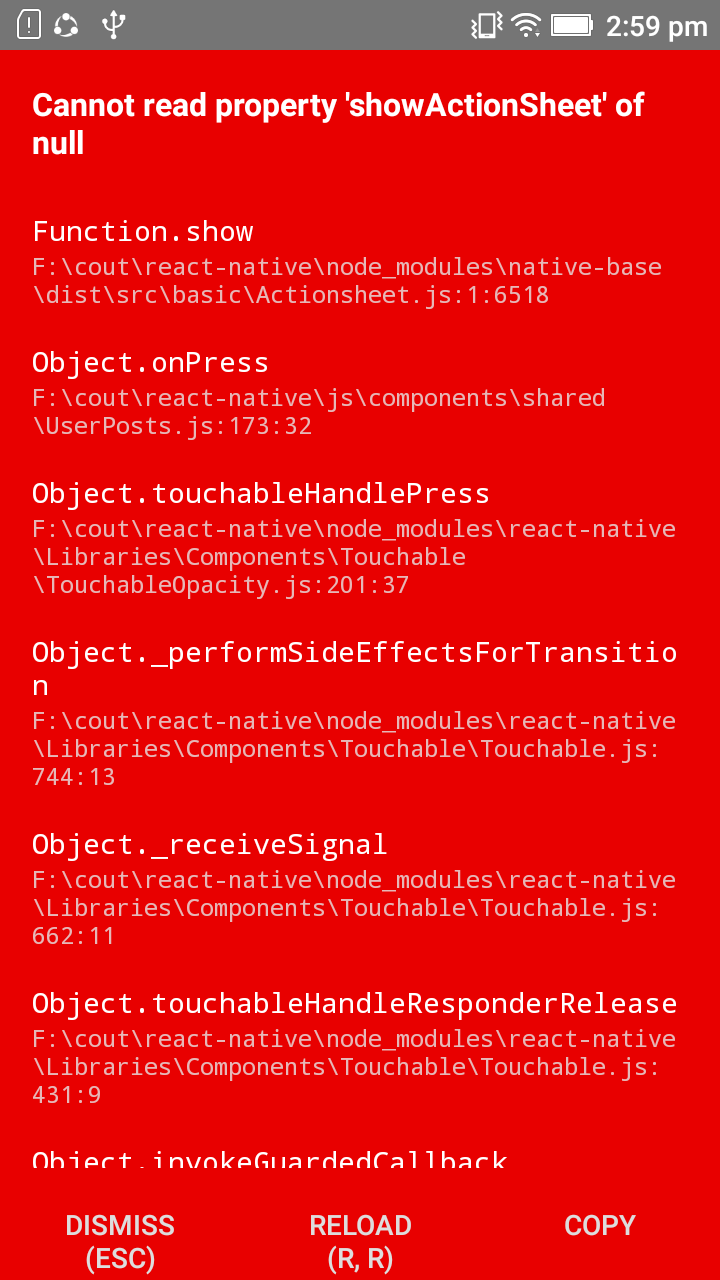
Thanks
 gogulanareshkw
on 25 Oct 2018
gogulanareshkw
on 25 Oct 2018
Hi @SupriyaKalghatgi , please check once above mentioned issue
gogulanareshkw
on 25 Oct 2018
Hi @gogulanareshkw I also had same error. But I have fixed it by following method. It's not a good practice, but it worked for me!
actionSheetPressed = () =>{
this.setState({ action_sheet_pressed: true });
ActionSheet.show(
{
options: ACTION_BUTTONS,
title: "Choose an option for action"
},
buttonIndex => this.setState({ clicked: ACTION_BUTTONS[buttonIndex] })
);
};
 jayan2019
on 21 Feb 2019
jayan2019
on 21 Feb 2019
Related issues
 agersoncgps
·
3Comments
agersoncgps
·
3Comments
 nschurmann
·
3Comments
nschurmann
·
3Comments
 inv2004
·
3Comments
inv2004
·
3Comments
 omerdn1
·
3Comments
omerdn1
·
3Comments
 elnygren
·
3Comments
elnygren
·
3Comments
Most helpful comment
I solved this problem for myself by adding
    componentDidMount()
    {
        ActionSheet.actionsheetInstance = null;
    }
in caller component. After that ActionSheet reinit every time I enter my page.