Nativebase: Undefined is not an object (evaluating '_reactNative.ViewPropTypes.style')
Hi, I have an issue with the latest version of nativeBase.
I'm trying just to add an example in my Application.
import { AppRegistry } from 'react-native'
import React, { Component } from 'react';
import { Container, Header, Title, Content, Footer, FooterTab, Button, Left, Right, Body, Icon } from 'native-base';
export default class AnatomyExample extends Component {
render() {
return (
<Container>
<Header>
<Left>
<Button transparent>
<Icon name='menu' />
</Button>
</Left>
<Body>
<Title>Header</Title>
</Body>
<Right />
</Header>
<Content>
// Your main content goes here
</Content>
<Footer>
<FooterTab>
<Button full>
<Text>Footer</Text>
</Button>
</FooterTab>
</Footer>
</Container>
);
}
}
AppRegistry.registerComponent('myApp', () => AnatomyExample)
My package.json:
{
  "name": "myApp",
  "version": "0.0.1",
  "private": true,
  "scripts": {
    "start": "node node_modules/react-native/local-cli/cli.js start",
    "test": "jest"
  },
  "dependencies": {
    "lodash": "^4.17.4",
    "native-base": "^2.1.4",
    "react": "16.0.0-alpha.6",
    "react-native": "0.43.4",
    "react-native-camera": "git+https://github.com/lwansbrough/react-native-camera.git",
    "react-native-vector-icons": "^4.1.1",
    "react-navigation": "^1.0.0-beta.9"
  },
  "devDependencies": {
    "babel-jest": "19.0.0",
    "babel-preset-react-native": "1.9.1",
    "jest": "19.0.2",
    "react-test-renderer": "16.0.0-alpha.6"
  },
  "jest": {
    "preset": "react-native"
  }
}

I'v tried to delete node_modules, cache clean, npm install, not working.
Thanks,
 Tsouef
All 40 comments
same
 dopey2
on 23 May 2017
dopey2
on 23 May 2017
@Tsouef @Dani93380 works perfect for me, try to update react-native package to 0.44.0
 RakhmatovR
on 23 May 2017
RakhmatovR
on 23 May 2017
@Tsouef @Dani93380 View.propTypes is deprecated and instead ViewPropTypes is used from RN44, which is introduced in the latest version of NativeBase as well. So For RN44 go for NativeBase v2.1.4 and anything below RN44, you can use NB v2.1.3
 shivrajkumar
on 23 May 2017
shivrajkumar
on 23 May 2017
Thanks, It's working !
Tsouef
on 23 May 2017
I'm using RN38 and NB 2.1.3 and still facing this issue, so frustrating... what should I do?
 brascene
on 29 May 2017
brascene
on 29 May 2017
"native-base": "2.1.4",
"react": "16.0.0-alpha.6",
"react-native": "0.44.0",
works for me
Also tried this with RNRF 3.39.2, got it running
 SupriyaKalghatgi
on 30 May 2017
SupriyaKalghatgi
on 30 May 2017
@shivrajkumar i can't upgrade to 0.44.0 because of other dependencies and I'm on
    "native-base": "2.1.0",
    "react": "15.4.1",
    "react-native": "0.42.3",
but nothing working so far even with older native-base versions
 matthiasprieth
on 30 May 2017
matthiasprieth
on 30 May 2017
I upgrade react-native-router-flux 3.39.0 and get this error, with a simple roll back to version 3.37.0 it works. Could be some related with -v3.39.0 .
 wellmonge
on 30 May 2017
wellmonge
on 30 May 2017
@wellmonge thank you! My problem was that in my package.json I was doing:
"react-native-router-flux": "^3.37.0"
But that actually fetches the most recent 3.x.x version. Setting the package version explicitly with:
"react-native-router-flux": "3.37.0"
Solved my problem.
 imcbv
on 30 May 2017
imcbv
on 30 May 2017
[email protected]
"react-native": "^0.42.3"
"react": "^15.4.1"
"react-native-router-flux": "3.37.0"
Solved It For ME
 lancebailey79
on 31 May 2017
lancebailey79
on 31 May 2017
@matthiasprieth In that case, try using older version of RNRF
May be you can check the compatibility versions pf React Native and RNRF
SupriyaKalghatgi
on 31 May 2017
@wellmonge I got my app running with the latest version of React Native, NativeBase and RNRF
Check my comment
SupriyaKalghatgi
on 31 May 2017
@matthiasprieth With the versions specified by you, try installing 3.37.0 of RNRF
SupriyaKalghatgi
on 31 May 2017
@SupriyaKalghatgi thx i got it working by switching to version
    "react": "~15.4.1",
    "react-native": "0.42.0",
and putting
    configurations.all {
        resolutionStrategy {
         eachDependency { DependencyResolveDetails details ->
           if (details.requested.group == 'com.facebook.react' && details.requested.name == 'react-native') {
             details.useVersion "0.42.0" // Your React Native version here
           }
         }
        }
    }
in build.gradle. So i think for me it had nothing to do with RNRF. And for the code in build.gradle there is also a dynamic approach on the web, where you don't have to put your react version in it, but i couldn't find it anymore.
matthiasprieth
on 31 May 2017
Good to know that you got it working.
SupriyaKalghatgi
on 31 May 2017
I'm using nativebase 2.1.4 and react-native 44.2.0 and still get this issue. any fix?
 Talor-A
on 3 Jun 2017
Talor-A
on 3 Jun 2017
For the life of me, I can't solve this issue. I've tried countless different variations of versions for React, RN, RNRF, as well as clearing caches.
Is there anything else that has been effective that I could be missing?
 scotthollandjr
on 6 Jun 2017
scotthollandjr
on 6 Jun 2017
@scotthollandjr Can you post your package.json here
shivrajkumar
on 6 Jun 2017
@shivrajkumar
"firebase": "3.6.8",
"lodash": "^4.17.4",
"react": "15.4.2",
"native-base": "2.1.0",
"react-native": "0.41.1",
"react-native-maps": "git+https://github.com/airbnb/react-native-maps.git",
"react-native-router-flux": "^3.37.0",
"react-native-vector-icons": "4.0.0",
"react-redux": "5.0.2",
"redux": "3.6.0",
"redux-thunk": "2.2.0"
This was the most recent setup before the error occurred
scotthollandjr
on 6 Jun 2017
@scotthollandjr And the version of native-base?
shivrajkumar
on 6 Jun 2017
@scotthollandjr native-base v2.1.0 should work fine with the above mention versions of react and react-native.
shivrajkumar
on 6 Jun 2017
And as for your issue, that is of react-native-router-flux, the latest of RNRF i.e, v3.39.1 is for RN44 and you are using RN41. Remove ^ from 3.37.0 of RNRF. That will resolve your issue.
shivrajkumar
on 6 Jun 2017
@shivrajkumar
These are my current versions and I'm still having the issue:
"react": "15.4.2",
"native-base": "2.1.0",
"react-native": "0.41.1",
"react-native-router-flux": "3.37.0",
I deleted node_modules and reinstalled, deleted the app from the simulator, cleared DerivedData from xcode, and npm start -- --reset-cache. I don't know what I'm missing
scotthollandjr
on 6 Jun 2017
@scotthollandjr Did you upgrade the app after changing RN version?
shivrajkumar
on 6 Jun 2017
react-native upgrade https://facebook.github.io/react-native/docs/upgrading.html
shivrajkumar
on 6 Jun 2017
@shivrajkumar Yes, same result
scotthollandjr
on 6 Jun 2017
@scotthollandjr This issue arises when you are using any package compatible for RN44 and you are using RN<44.
So do check other packages that you are using. May be react-native-maps.
shivrajkumar
on 6 Jun 2017
Package.json contains:
```
"prop-types": "^15.5.8",
"react": "16.0.0-alpha.6",
"native-base": "2.1.4",
"react-native": "^0.44.0",
"react-native-router-flux": "^3.37.0",
Did,
watchman watch-del-all
rm -rf node_modules && npm install
rm -fr $TMPDIR/react-*
npm start -- --reset-cache
```
But still getting error.
 jiteshwadia
on 7 Jun 2017
jiteshwadia
on 7 Jun 2017
@jiteshwadia Remove ^ from RNRF and upgrade to latest version, this in combination with the cache clearing you listed solved the problem for me
scotthollandjr
on 7 Jun 2017
@jiteshwadia make sure that you also have installed that react version globally:
npm install [email protected] -g
brascene
on 7 Jun 2017
It's react-native-router-flux issue. I did npm install, and I got the newer version for that.
And then I rolled it back to the version specified in package.json, that is v3.35.0, and it's working fine now.
 ArtixZ
on 29 Jun 2017
ArtixZ
on 29 Jun 2017
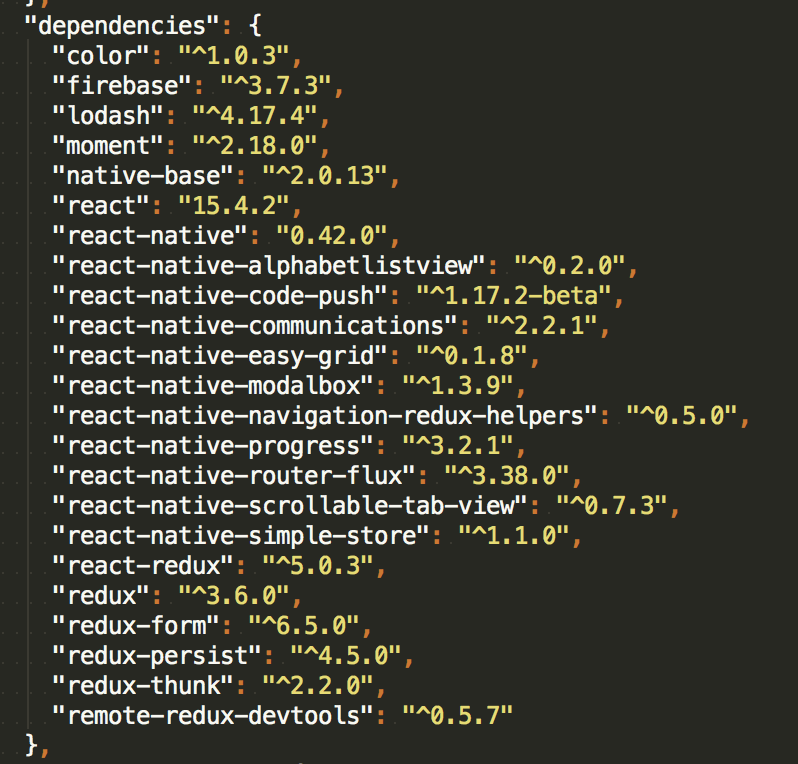
guys i'm having the same problem and i can't upgrade since i have other dependencies .. so what should i do ? thanks
 haifaGh
on 2 Jul 2017
haifaGh
on 2 Jul 2017
Hello! Guys I've been reading this thread because i also encountered the same issue. Here's what i did,
Current XCode Version = 8.3.3
i removed the /node_modules and ios/build folders and installed new with these versions
"react": "16.0.0-alpha.6"
"react-native": "0.44.0"
"babel-jest": "20.0.3"
"babel-preset-react-native": "2.0.0"
(Note: This step is very important)
and don't forget to restart the server like so
node node_modules/react-native/local-cli/cli.js start -- --reset-cache
then rebuild, for instance:
react-native run-<platform>
Hope this helps.
 rhomnickcoloma
on 3 Jul 2017
rhomnickcoloma
on 3 Jul 2017
For me the issue was a typo, I typed this
View.PropTypes.style
instead of (what is needs to be):
View.propTypes.style
It gives you the same error.
 adriaanvanrossum
on 13 Sep 2017
adriaanvanrossum
on 13 Sep 2017
ViewStylePropTypes must be used now. I changed them all manually and that worked but it gives me a lot of warnings.
 jeremyfrancis
on 22 Sep 2017
jeremyfrancis
on 22 Sep 2017
Install version: npm i --save [email protected] ,,, It's working !
 andcosta
on 23 Oct 2017
andcosta
on 23 Oct 2017
Just make a search for View.propTypes.style in your node_modules folder and you would come to know which module has the issue. You would then have to use the updated version of that module if they have fixed it or you would need to find an alternative. In my case , rn-viewpager was creating this issue. So, i used the workaround suggested here for solving the issue , as the fix for this issue hasn't been merged yet (as of this writing).
 parthgandhi7
on 31 Oct 2017
parthgandhi7
on 31 Oct 2017
I use nativebase on "react-native": "0.50.4" and have same issue, Somebody help me !
thanks
 ngoducduy
on 29 Nov 2017
ngoducduy
on 29 Nov 2017
How I solved this:
grep -R "View.propTypes" node_modules
above command fetches me list of all packages to update in my case ex. rn-viewpager,react-native-material-ui etc.Installed and cloned these scripts. https://github.com/reactjs/react-codemod#reactnative-view-proptypes
- ran command for each module found in step 1 https://github.com/reactjs/react-codemod#reactnative-view-proptypes
for ex. jscodeshift -t react-codemod/transforms/ReactNative-View-propTypes.js node_modules/rn-viewpager/
@ngoducduy
 shubhanshusingh
on 4 Dec 2017
shubhanshusingh
on 4 Dec 2017
App is Crashing on open checking updates then crash
{
"name": "poc1",
"version": "0.0.1",
"private": true,
"scripts": {
"start": "node node_modules/react-native/local-cli/cli.js start",
"test": "jest"
},
"dependencies": {
"react": "16.3.1",
"react-native": "0.55.4",
"react-native-auto-updater": "^0.2.5",
"react-native-exception-handler": "^2.7.5",
"react-navigation": "^2.0.1"
},
"devDependencies": {
"babel-jest": "22.4.3",
"babel-preset-react-native": "4.0.0",
"jest": "22.4.3",
"react-test-renderer": "16.3.1"
},
"jest": {
"preset": "react-native"
}
}
 sangdesigner
on 24 May 2018
sangdesigner
on 24 May 2018
Related issues
 muthuraman007
·
3Comments
muthuraman007
·
3Comments
 agersoncgps
·
3Comments
agersoncgps
·
3Comments
 Bundas
·
3Comments
Bundas
·
3Comments
 omerdn1
·
3Comments
omerdn1
·
3Comments
 natashache
·
3Comments
natashache
·
3Comments
Most helpful comment
@wellmonge thank you! My problem was that in my package.json I was doing:
"react-native-router-flux": "^3.37.0"But that actually fetches the most recent 3.x.x version. Setting the package version explicitly with:
"react-native-router-flux": "3.37.0"Solved my problem.