Nativebase: Nativebase Menu dropdown
Please help me to create react native menu with nativebase like Google Material Design https://material.io/guidelines/components/menus.html#
 nasirouwagana
All 13 comments
+1 .
 Symous
on 5 May 2017
Symous
on 5 May 2017
+1
 RyanLee1119
on 8 May 2017
RyanLee1119
on 8 May 2017
@wnasirou , @RyanLee1119
there is a popup dropdown menu which can work with native-base , I found it in react-native issuse https://github.com/facebook/react-native/issues/3004 .
there is the code :
import React from 'react';
import {View,TouchableOpacity,UIManager,findNodeHandle} from 'react-native';
import Icon from 'react-native-vector-icons/Ionicons';

const ICON_SIZE = 24;

class PopupMenu extends React.Component {
  handleShowPopupError = () => {
    // show error here
  };

  handleMenuPress = () => {
    const { actions, onPress } = this.props;

    UIManager.showPopupMenu(
      findNodeHandle(this.refs.menu),
      actions,
      this.handleShowPopupError,
      onPress,
    );
  };

  render() {
    return (
      <View>
        { this.props.children }
        <TouchableOpacity onPress={this.handleMenuPress} style={{alignSelf:'center',backgroundColor:'transparent',paddingLeft:15,paddingRight:15}}>
          <Icon
            name="md-more"
            size={ICON_SIZE}
            color='white'
            ref="menu"
          />
        </TouchableOpacity>
      </View>
    );
  }
}

PopupMenu.propTypes = {
  actions: React.PropTypes.array.isRequired,
  onPress: React.PropTypes.func.isRequired,
  children: React.PropTypes.object.isRequired,
};

export default PopupMenu;
how to use it:
<PopupMenu
                    actions={['item1','item2', 'item3']}
                    onPress={(e,i) => console.log(i)}
                  />
Great @Symous. It works properly. Thanks a lot!
nasirouwagana
on 8 May 2017
@wnasirou, one thing to note is the solution above will only work on Android.
 repetitions
on 12 May 2017
repetitions
on 12 May 2017
@Repetitions Ok
nasirouwagana
on 12 May 2017
889
 SupriyaKalghatgi
on 6 Jun 2017
SupriyaKalghatgi
on 6 Jun 2017
@Symous
Hi there, I have a question about the UIManager.
I cannot run the code exactly. It calls an error ( showPopupMenu is not a function).
And I cannot find the doc on the webpage about the UIManager.
 zjw199011
on 9 Feb 2018
zjw199011
on 9 Feb 2018
on another tricky way is to implement with absolute and zindex props
<Button transparent>
                                  <View style={{}}>
                                      <Icon name="more-vert" style={{
                                        zIndex:-999 ,
                                        position:'absolute',
                                        right:0,
                                        top:0,

                                      }}/>
                                      <Picker
                                        style={{
                                          zIndex:999,
                                          position:'absolute',
                                          //right:0,
                                          top:-35,
                                          backgroundColor:'transparent',
                                        }}
                                        onValueChange={()=>{}}
                                        mode="dropdown">

                                        <Item label="Wallet" value="key0" />
                                        <Item label="ATM Card" value="key1" />
                                      </Picker>
                                  </View>
                </Button>
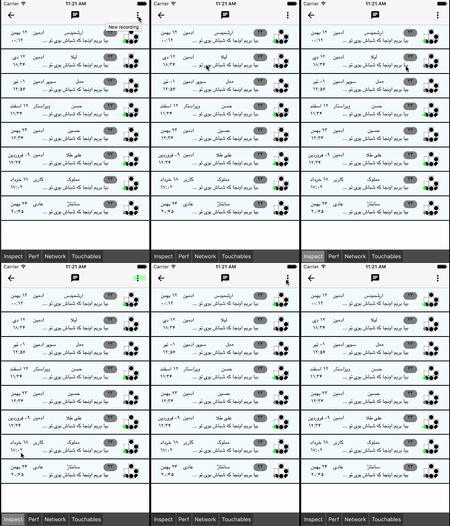
 Arshiamidos
on 7 Mar 2018
Arshiamidos
on 7 Mar 2018
Thanks @Symous :)
 stefmabo
on 20 Mar 2018
stefmabo
on 20 Mar 2018
@Symous
Thanks for the solution. Saved my day :)
 manisha2012
on 16 Sep 2018
manisha2012
on 16 Sep 2018
@Symous
Your sample is very useful, but it comes with a issue with android sdk19 android 4.4 that I have no success in solve it.
I have initialised a new project with react-native init proj, I made it even more simpler removing the react native-vector-icons. The component become it:
import React, { Component, PropTypes } from 'react';
import { View, UIManager, findNodeHandle, TouchableOpacity, Text } from 'react-native';

class PopupMenu extends Component {
    constructor(props) {
        super(props);
    }
    handleShowPopupError = () => {
        // show error here
    };
    handleMenuPress = () => {
        const { actions, onPress } = this.props;

        UIManager.showPopupMenu(findNodeHandle(this.refs.menu), actions, this.handleShowPopupError, onPress);
    };

    render() {
        return (
            <View>
                {this.props.children}
                <TouchableOpacity onPress={this.handleMenuPress}>
                    <Text ref="menu">test</Text>
                </TouchableOpacity>
            </View>
        );
    }
}
export default PopupMenu;
adb logcat *:E
E/unknown:ReactNative( 2213): Exception in native call
E/unknown:ReactNative( 2213): java.lang.ClassCastException: androidx.appcompat.widget.TintContextWrapper cannot be cast to com.facebook.react.uimanager.ThemedReactContext
E/unknown:ReactNative( 2213):   at com.facebook.react.uimanager.NativeViewHierarchyManager.getReactContextForView(NativeViewHierarchyManager.java:853)
E/unknown:ReactNative( 2213):   at com.facebook.react.uimanager.NativeViewHierarchyManager.showPopupMenu(NativeViewHierarchyManager.java:792)
E/unknown:ReactNative( 2213):   at com.facebook.react.uimanager.UIViewOperationQueue$ShowPopupMenuOperation.execute(UIViewOperationQueue.java:334)
E/unknown:ReactNative( 2213):   at com.facebook.react.uimanager.UIViewOperationQueue$1.run(UIViewOperationQueue.java:844)
E/unknown:ReactNative( 2213):   at com.facebook.react.uimanager.UIViewOperationQueue.flushPendingBatches(UIViewOperationQueue.java:952)
E/unknown:ReactNative( 2213):   at com.facebook.react.uimanager.UIViewOperationQueue.access$2200(UIViewOperationQueue.java:44)
E/unknown:ReactNative( 2213):   at com.facebook.react.uimanager.UIViewOperationQueue$DispatchUIFrameCallback.doFrameGuarded(UIViewOperationQueue.java:1012)
E/unknown:ReactNative( 2213):   at com.facebook.react.uimanager.GuardedFrameCallback.doFrame(GuardedFrameCallback.java:29)
E/unknown:ReactNative( 2213):   at com.facebook.react.modules.core.ReactChoreographer$ReactChoreographerDispatcher.doFrame(ReactChoreographer.java:172)
E/unknown:ReactNative( 2213):   at com.facebook.react.modules.core.ChoreographerCompat$FrameCallback$1.doFrame(ChoreographerCompat.java:84)
E/unknown:ReactNative( 2213):   at android.view.Choreographer$CallbackRecord.run(Choreographer.java:759)
E/unknown:ReactNative( 2213):   at android.view.Choreographer.doCallbacks(Choreographer.java:574)
E/unknown:ReactNative( 2213):   at android.view.Choreographer.doFrame(Choreographer.java:543)
E/unknown:ReactNative( 2213):   at android.view.Choreographer$FrameDisplayEventReceiver.run(Choreographer.java:747)
E/unknown:ReactNative( 2213):   at android.os.Handler.handleCallback(Handler.java:733)
E/unknown:ReactNative( 2213):   at android.os.Handler.dispatchMessage(Handler.java:95)
E/unknown:ReactNative( 2213):   at android.os.Looper.loop(Looper.java:136)
E/unknown:ReactNative( 2213):   at android.app.ActivityThread.main(ActivityThread.java:5017)
E/unknown:ReactNative( 2213):   at java.lang.reflect.Method.invokeNative(Native Method)
E/unknown:ReactNative( 2213):   at java.lang.reflect.Method.invoke(Method.java:515)
E/unknown:ReactNative( 2213):   at com.android.internal.os.ZygoteInit$MethodAndArgsCaller.run(ZygoteInit.java:779)
E/unknown:ReactNative( 2213):   at com.android.internal.os.ZygoteInit.main(ZygoteInit.java:595)
E/unknown:ReactNative( 2213):   at dalvik.system.NativeStart.main(Native Method)
E/EGL_emulation( 2213): tid 2213: eglSurfaceAttrib(1199): error 0x3009 (EGL_BAD_MATCH)
My Env
react-native info
info Fetching system and libraries information...

  Binaries:
    Node: 11.10.0 - /usr/local/bin/node
    Yarn: 1.13.0 - /usr/local/bin/yarn
    npm: 6.7.0 - /usr/local/bin/npm
    Watchman: 4.9.0 - /usr/local/bin/watchman
  SDKs:
    iOS SDK:
      Platforms: iOS 12.2, macOS 10.14, tvOS 12.2, watchOS 5.2
    Android SDK:
      API Levels: 23, 24, 25, 26, 27, 28, 29
      Build Tools: 27.0.3, 28.0.3
      System Images: android-19 | Google APIs Intel x86 Atom, android-23 | Google APIs Intel x86 Atom_64, android-24 | Google APIs Intel x86 Atom, android-24 | Google Play Intel x86 Atom, android-27 | Google Play Intel x86 Atom, android-29 | Google Play Intel x86 Atom
  IDEs:
    Android Studio: 3.4 AI-183.6156.11.34.5522156
    Xcode: 10.2.1/10E1001 - /usr/bin/xcodebuild
  npmPackages:
    react: 16.8.6 => 16.8.6
    react-native: 0.60.5 => 0.60.5
  npmGlobalPackages:
    react-native-alert-async: 1.0.3
    react-native-clean-project: 3.2.4
    react-native-cli: 2.0.1
    react-native-git-upgrade: 0.2.7
    react-native-html-to-pdf: 0.8.0
    react-native-navigation: 2.16.0
    react-native-rename: 2.4.1
    react-native-share: 1.1.3
Any help will be very appreciated.
 cassioseffrin
on 27 Aug 2019
cassioseffrin
on 27 Aug 2019
I have made another test.
The issue is in RN0.60 + in Class NativeViewHierachyManage.java line 853
/**
- @return Themed React context for view with a given {@param reactTag} - it gets the
- context directly from the view using {@link View#getContext}.
*/
private ThemedReactContext getReactContextForView(int reactTag) {
View view = mTagsToViews.get(reactTag);
if (view == null) {
throw new JSApplicationIllegalArgumentException("Could not find view with tag " + reactTag);
}
return (ThemedReactContext) view.getContext(); // here changed to view.getReactContext();
}
In RN < 0.60 This issue don't occours.
cassioseffrin
on 28 Aug 2019
Related issues
 nschurmann
·
3Comments
nschurmann
·
3Comments
 georgemickael-b
·
3Comments
georgemickael-b
·
3Comments
 muthuraman007
·
3Comments
muthuraman007
·
3Comments
 Bundas
·
3Comments
Bundas
·
3Comments
 agersoncgps
·
3Comments
agersoncgps
·
3Comments
Most helpful comment
@wnasirou , @RyanLee1119
there is a popup dropdown menu which can work with native-base , I found it in react-native issuse https://github.com/facebook/react-native/issues/3004 .
there is the code :
how to use it: