Nativebase: Header title never align to center
"native-base": "^2.1.3",
"react": "16.0.0-alpha.6",
"react-native": "0.44.0",
Here is my code
// Topbar.js
import React, { Component } from 'react';
import { StyleSheet, Text, View } from 'react-native';
import { DrawerNavigator } from 'react-navigation';
import {
    Container,
    Header,
    Left,
    Right,
    Button,
    Icon,
    Body,
    Title,
} from 'native-base';
import getTheme from '../../../native-base-theme/components';
import commonColor from '../../../native-base-theme/variables/commonColor';
import { StyleProvider } from 'native-base';

class TopBar extends Component {
    state = {};

    render() {
        return (
            <StyleProvider style={getTheme(commonColor)}>
                <Header>
                    <Left><Button transparent><Icon name="menu" /></Button></Left>
                    <Body><Title>Title</Title></Body>
                    <Right><Button transparent><Icon name="menu" /></Button></Right>
                </Header>
            </StyleProvider>
        );
    }
}

export default TopBar;

//App.js

import React, { Component } from 'react';
import { StyleSheet, Text, View } from 'react-native';
import SplashScreen from 'react-native-splash-screen';
import { DrawerNavigator } from 'react-navigation';
import { Container, Content, Footer, FooterTab } from 'native-base';
import { TopBar } from './components';
import getTheme from '../native-base-theme/components';
import platform from '../native-base-theme/variables/platform';
import { StyleProvider } from 'native-base';

class App extends Component {
    state = {};
    componentDidMount() {
        SplashScreen.hide();
    }

    render() {
        return (
            <StyleProvider style={getTheme(platform)}>
                <Container>
                    <TopBar title="Ziggy" />

                    <Content>
                        <Text>
                            Welcome to Ziggy Page!
                        </Text>
                    </Content>

                    <Footer>
                        <FooterTab>
                            <Text>Person</Text>
                        </FooterTab>
                    </Footer>
                </Container>
            </StyleProvider>
        );
    }
}

export default App;
Result

 stefensuhat
All 4 comments
@stefensuhat NativeBase follows Android and iOS guidelines. Thus the title is on the left of the header. If you want it to be in the center, apply flex: 1 to <Left>, <Body> and <Right>
 shivrajkumar
on 4 May 2017
shivrajkumar
on 4 May 2017
👍18
I try this ,it works for me
thanks
 adinaninacerdine
on 24 Nov 2017
adinaninacerdine
on 24 Nov 2017
@wikieswan : thanks bro, works like a charm
 tonilxm
on 13 Mar 2018
tonilxm
on 13 Mar 2018
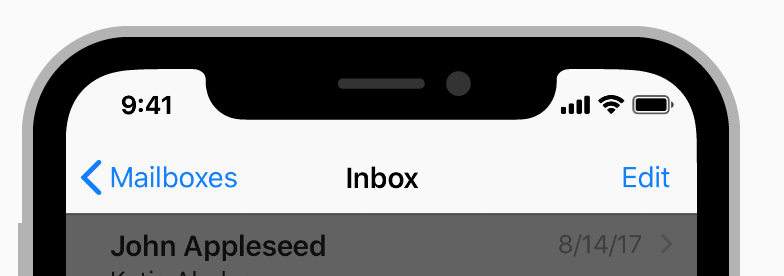
NativeBase follows Android and iOS guidelines. Thus the title is on the left of the header.
Apple HIG shows a centered title in the nav bar.
 trevor-coleman
on 28 Mar 2018
trevor-coleman
on 28 Mar 2018
Was this page helpful?
0 / 5 - 0 ratings
Related issues
 nschurmann
·
3Comments
nschurmann
·
3Comments
 aloifolia
·
3Comments
aloifolia
·
3Comments
 omerdn1
·
3Comments
omerdn1
·
3Comments
 agersoncgps
·
3Comments
agersoncgps
·
3Comments
 kitsune7
·
3Comments
kitsune7
·
3Comments
Most helpful comment
@stefensuhat NativeBase follows Android and iOS guidelines. Thus the title is on the left of the header. If you want it to be in the center, apply
flex: 1to<Left>,<Body>and<Right>