Nativebase: The issue with Input in Tabs
Hello,
I have created a test project on Windows 7 to show you the issues with the Input component in Tabs. I am using Exponent XDE v14.0.0 and running the project on Genymotion emulator for Google Nexus 5 4.4.4 API 19.
Versions used
- node.js 7.6.0
- exponent 14.0.0
- react 15.4.0
- react-native 0.41.0
- native-base 2.0.7
Expected behaviour
I am able to enter a long text in the input box.
Actual behaviour
After entering the text, which fills the visible area of the input box, I am able to enter few more letters and then after entering a letter the current tab moves to the left showing some part of the next tab on the right hand side of the current tab and the input box stops receiving any keyboard input. Then If I set the focus after the last letter, enter a letter, the current tab moves to the left again and the input box stops receiving any keyboard input again and so on.
The project code
import Exponent from 'exponent';
import React from 'react';
import {
  Platform,
  StyleSheet
} from 'react-native';
import {
  Container,
  Header,
  Title,
  Body,
  Icon,
  Tabs,
  Tab,
  TabHeading,
  Item,
  Input,
  Text,
  View
} from 'native-base';

class App extends React.Component {
  constructor (props) {
    super(props);

    this.state = {
      isReady: false
    };
  }

  async componentWillMount() {
    if (Platform.OS === 'android') {
      await Exponent.Font.loadAsync({
        'Roboto': require('native-base/Fonts/Roboto.ttf'),
        'Roboto_medium': require('native-base/Fonts/Roboto_medium.ttf')
      });

      this.setState({
        isReady: true
      });
    }
  }

  render() {
    if (!this.state.isReady) {
      return <Exponent.Components.AppLoading />;
    }

    return (
      <Container style={{ flex: 1 }}>
        <Header hasTabs>
          <Body>
            <Title style={{ alignSelf: 'stretch' }}>Test</Title>
          </Body>
        </Header>
        <Tabs tabBarPosition='bottom'>
          <Tab heading={ <TabHeading><Icon name="md-people" /></TabHeading> }>
            <View style={{ padding: 20 }}>
              <Text>Tab1 contents</Text>
              <Item regular>
                <Input placeholder='Enter text...' />
              </Item>
            </View>
          </Tab>
          <Tab heading={ <TabHeading><Icon name="md-chatboxes" /></TabHeading> }>
            <Text>Tab2 contents</Text>
          </Tab>
        </Tabs>
      </Container>
    );
  }
}

Exponent.registerRootComponent(App);
The screenshots


The device
I have tested the project only on Android.
 alexn777
All 18 comments
@alexn777 This seems to be fixed in the newer version
 shivrajkumar
on 15 Mar 2017
shivrajkumar
on 15 Mar 2017
I have just checked it with native-base 2.0.12. The issue still exists.
alexn777
on 15 Mar 2017

@alexn777 Works the same for android as well.
shivrajkumar
on 15 Mar 2017
If you had ejected the theme, you need to eject again and merge
shivrajkumar
on 15 Mar 2017
I did not eject the theme. You can check the code I initially posted. Here is how it works for me now:

alexn777
on 15 Mar 2017
Any updates on this? I'm having this problem and there is no work around
 jjsaguit
on 6 May 2017
jjsaguit
on 6 May 2017
Having this issue as well
 realfresh
on 26 Jul 2017
realfresh
on 26 Jul 2017
Is there any solution for this already? 🤔
 matejstrasek
on 23 Oct 2017
matejstrasek
on 23 Oct 2017
This seems to be getting worse. I have two Text Inputs side by side. when focus on the left input it causes the tab to scroll slightly but when you focus on the right input the whole tab scrolls 50% to the next screen and the keyboard will not pop up. Is there any fix for this on the horizon?
 jaded-Viper
on 5 May 2018
jaded-Viper
on 5 May 2018
A dirty fix, which I have used, is to wrap \ Has anyone found a proper fix?<Content contentContainerStyle={{ height: 200 }} >
<Tabs>
....
</Tabs>
</Content>
 Frans-L
on 14 Aug 2018
Frans-L
on 14 Aug 2018
Hi @Frans-L ,
The fix doesn't work for me, still waiting for a solution for this issue.
Thanks.
 XeCtvi
on 24 Aug 2018
XeCtvi
on 24 Aug 2018
Issue still exists for me in version 2.7.2. Any fix yet?
 sharanrprasad
on 30 Oct 2018
sharanrprasad
on 30 Oct 2018
@alexn777 @realfresh @matejstrasek @jaded-Viper @Frans-L @XeCtvi @sharanrprasad
Plz check. The issue seems to have been fixed in the latest native-base versions(2.9 released)...And also check your "react-native" version compatibility with "native-base"...Hopefully, the following code should show the expected behaviour...
import React, { Component } from "react";
import {
  View,
  Container,
  Header,
  Body,
  Title,
  Tabs,
  Tab,
  TabHeading,
  Icon,
  Item,
  Text,
  Input,
} from "native-base";

export default class BoldAndBeautiful extends Component {
  render() {
    return (
      <Container style={{ flex: 1 }}>
        <Header hasTabs>
          <Body>
            <Title style={{ alignSelf: "stretch" }}>Test</Title>
          </Body>
        </Header>
        <Tabs tabBasrPosition="bottom">
          <Tab
            heading={
              <TabHeading>
                <Icon name="ios-menu" />
              </TabHeading>
            }
          >
            <View style={{ padding: 20 }}>
              <Text>Tab1 Content</Text>
              <Item regular>
                <Input placeholder="Enter text..." />
              </Item>
            </View>
          </Tab>
          <Tab
            heading={
              <TabHeading>
                <Icon name="ios-home" />
              </TabHeading>
            }
          >
            <Text>Tab2 content</Text>
          </Tab>
        </Tabs>
      </Container>
    );
  }
}
 suvenduchhatoi
on 21 Dec 2018
suvenduchhatoi
on 21 Dec 2018
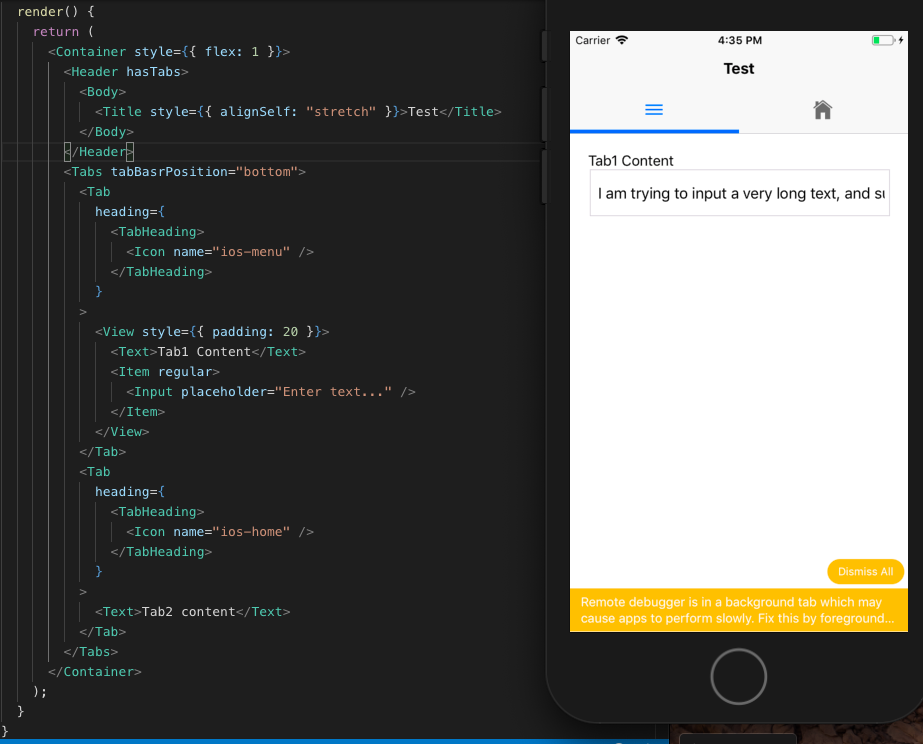
suvenduchhatoi
on 21 Dec 2018
Hi @suvenduchhatoi ,
Thanks for your suggestion, I will have a try on it.
XeCtvi
on 23 Dec 2018
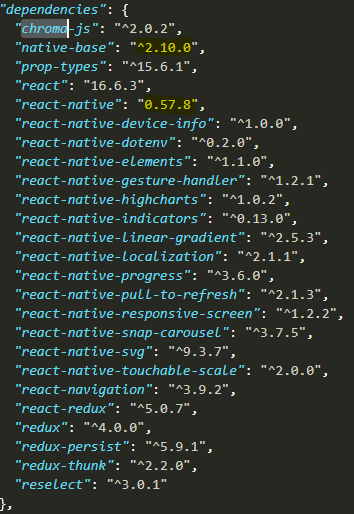
Hi @suvenduchhatoi ,I am also having the issue while typing in tabs..here is my package.json
 lalitkhedkar
on 29 May 2019
lalitkhedkar
on 29 May 2019
still i have this problem
 AlirezaAzizi145
on 2 Sep 2019
AlirezaAzizi145
on 2 Sep 2019
but on some android mobiles for example nexus 5 with android 6.0.0
AlirezaAzizi145
on 2 Sep 2019
Related issues
 agersoncgps
·
3Comments
agersoncgps
·
3Comments
 bsiddiqui
·
3Comments
bsiddiqui
·
3Comments
 georgemickael-b
·
3Comments
georgemickael-b
·
3Comments
 Landerson352
·
3Comments
Landerson352
·
3Comments
 elnygren
·
3Comments
elnygren
·
3Comments
Most helpful comment
Any updates on this? I'm having this problem and there is no work around