Nativebase: rows aren't rendered until scroll rendomly
some times it works well and renders all the rows and some times it doesnt - you have to scroll to render the screen.
Do you have any idea why?
                <List
                    dataArray={this.state.savedWords}
                      renderRow={(item) =>
                          <ListItem>
                              <Text>{item.word} - {item.exp}</Text>
                          </ListItem>
                      }>
                </List>
 azgron
All 7 comments
Hi, is there any example of this where we can test it out? Screenshot, code snippet?
 sankhadeeproy007
on 29 Dec 2016
sankhadeeproy007
on 29 Dec 2016
This seems to be a RN issue. I used to solve this by adding this prop to List components
renderScrollComponent={ (props) => <ScrollView style={{flex: 1}} /> }
 indesignlatam
on 3 Jan 2017
indesignlatam
on 3 Jan 2017
When you dynamically render a list like that, you should use a unique key property on the ListItem.
 kenleezle
on 5 Jan 2017
kenleezle
on 5 Jan 2017
I don't think this was ever solved. @sanketsahusoft, can you reopen this?
I'm having this same issue on iOS. The list is blank when I load the screen but when I "pull" down on the list the screen refreshes and I see the content as I should see it. Here are some screenshots:

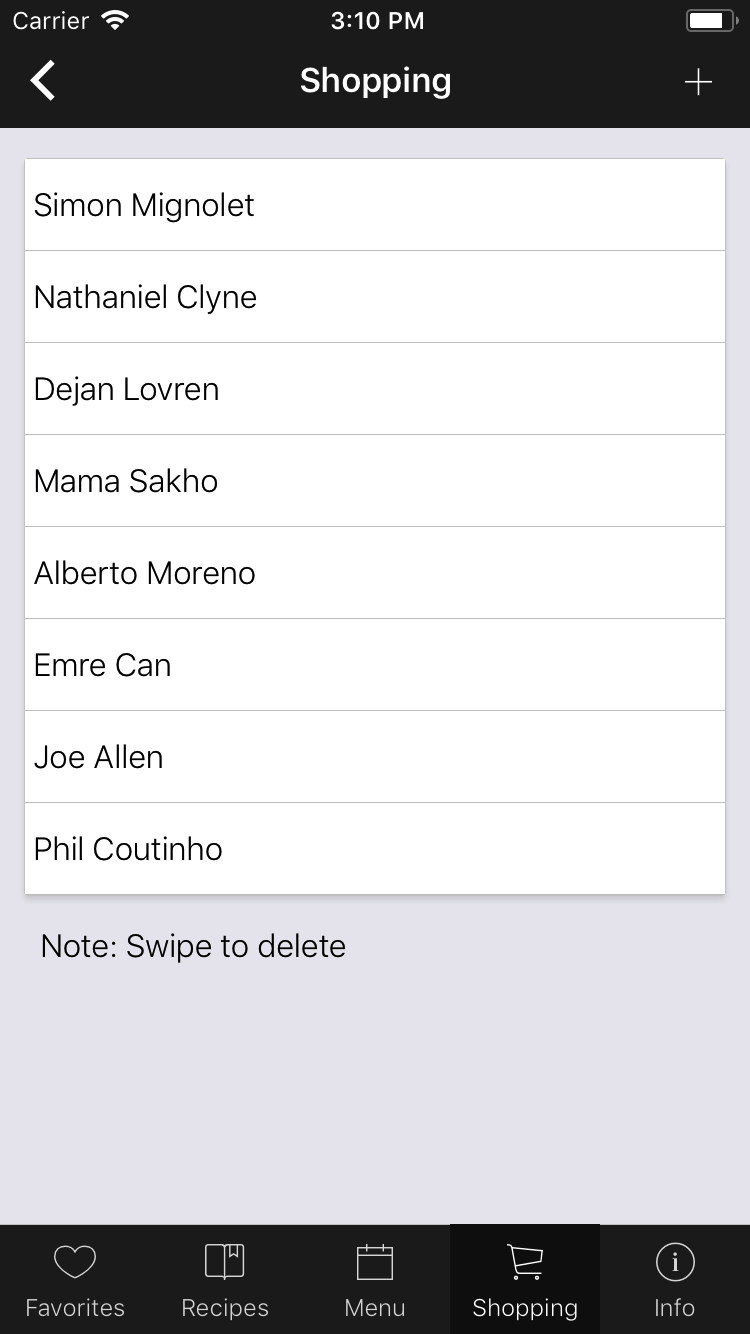
Here's my code:
import React, {Component} from "react";
import {ListView} from "react-native";
import {
    Container,
    Content,
    Button,
    Icon,
    List,
    ListItem,
    Text,
    Card,
    StyleProvider,
    Body,
    Header,
    Title,
    Left,
    Right
} from "native-base";
import getTheme from "../../native-base-theme/components";
import commonColor from "../../native-base-theme/variables/commonColor";
const datas = [
    "Simon Mignolet",
    "Nathaniel Clyne",
    "Dejan Lovren",
    "Mama Sakho",
    "Alberto Moreno",
    "Emre Can",
    "Joe Allen",
    "Phil Coutinho"
];
export default class Shopping extends Component {
    constructor(props) {
        super(props);
        this.ds = new ListView.DataSource({rowHasChanged: (r1, r2) => r1 !== r2});
        this.state = {
            basic: true,
            listViewData: datas
        };
    }
    deleteRow(secId, rowId, rowMap) {
        rowMap[`${secId}${rowId}`].props.closeRow();
        const newData = [...this.state.listViewData];
        newData.splice(rowId, 1);
        this.setState({listViewData: newData});
    }
    render() {
        return (
            <StyleProvider style={getTheme(commonColor)}>
                <Container>
                    <Header hasTabs>
                        <Left>
                            <Button transparent onPress={() => this.props.navigation.goBack()}>
                                <Icon name="arrow-back" />
                            </Button>
                        </Left>
                        <Body>
                            <Title>Shopping</Title>
                        </Body>
                        <Right>
                            <Button transparent onPress={() => this.props.navigation.goBack()}>
                                <Icon name="add" />
                            </Button>
                        </Right>
                    </Header>
                    <Content padder>
                        <Card>
                            <List
                                dataSource={this.ds.cloneWithRows(this.state.listViewData)}
                                onRowOpen={(secId, rowId, rowMap) => {
                                    rowMap[`${secId}${rowId}`].props.closeRow();
                                    console.log("asdfasdf");
                                }}
                                renderRow={data => (
                                    <ListItem>
                                        <Text> {data} </Text>
                                    </ListItem>
                                )}
                                renderLeftHiddenRow={data => (
                                    <Button full onPress={() => alert(data)}>
                                        <Icon active name="information-circle" />
                                    </Button>
                                )}
                                renderRightHiddenRow={(data, secId, rowId, rowMap) => (
                                    <Button full danger onPress={() => this.deleteRow(secId, rowId, rowMap)}>
                                        <Icon active name="trash" />
                                    </Button>
                                )}
                                leftOpenValue={75}
                                rightOpenValue={-75}
                            />
                        </Card>
                        <Text style={{padding: 10}}>Note: Swipe to delete</Text>
                    </Content>
                </Container>
            </StyleProvider>
        );
    }
}
and
import {StackNavigator} from "react-navigation";
import List from "./list.js";
import Shopping from "./shopping.js";
export default (MainScreenNavigator = StackNavigator(
    {
        List: {screen: List},
        Shopping: {screen: Shopping}
    },
    {
        initialRouteName: "List",
        headerMode: "none"
    }
));
and my package.json
"dependencies": {
    "native-base": "^2.3.1",
    "react": "[email protected]",
    "react-native": "^0.49.3",
    "react-native-linear-gradient": "^2.3.0",
    "react-native-modal": "^4.1.0",
    "react-native-simple-store": "^1.3.0",
    "react-navigation": "^1.0.0-beta.11"
},
 wootwoot1234
on 25 Oct 2017
wootwoot1234
on 25 Oct 2017
@sanketsahusoft yes we have the exactly same issue.
@indesignlatam it works for me! Thanks!
 luck2011
on 20 Jul 2018
luck2011
on 20 Jul 2018
@indesignlatam Thank you, you are a lifesaver!
 yingdongzhang
on 24 Mar 2019
yingdongzhang
on 24 Mar 2019
I also had this issue, which I resolved by migrating my instance of a NativeBase List to a React Native FlatList. According to the NativeBase docs:
NativeBase List will be deprecated in the near future. So please use React Native’s FlatList in place of it."
 maxharp3r
on 18 Apr 2019
maxharp3r
on 18 Apr 2019
Related issues
 aloifolia
·
3Comments
aloifolia
·
3Comments
 Bundas
·
3Comments
Bundas
·
3Comments
 georgemickael-b
·
3Comments
georgemickael-b
·
3Comments
 natashache
·
3Comments
natashache
·
3Comments
 elnygren
·
3Comments
elnygren
·
3Comments
Most helpful comment
This seems to be a RN issue. I used to solve this by adding this prop to List components
renderScrollComponent={ (props) => <ScrollView style={{flex: 1}} /> }