Nativebase: Refresh control not working with nativebase components


 sathish932
All 28 comments
Same problem. And adding refreshControl prop directly to <content> even causes maximum call stack size exceeded exception
 Chion82
on 8 Aug 2016
Chion82
on 8 Aug 2016
Fixed in 0.5.5
 sankhadeeproy007
on 20 Aug 2016
sankhadeeproy007
on 20 Aug 2016
Hey, unfortunately it's not fixed. Waiting for a "maximum call stack exceeded" error before using shallow merge is a very very slow solution. It can take seconds for the stack to fill itself and the exception is raised.
Is there any reason props can't be shallow merged by default? It seems like a normal and sensible approach to me, as you should never mutate the props anyway, so why clone that deep?
 mariusandra
on 30 Aug 2016
mariusandra
on 30 Aug 2016
Hi, @mariusandra could you send a PR with your proposed solution?
sankhadeeproy007
on 30 Aug 2016
@mariusandra Agree. Actually I'm also confused why use deep merge, and afraid of breaking anything, I just added that try-catch clause in #109 . Yeah, outgoing props shouldn't and cannot be mutated in principal, so using shallow merge by default should be just fine. Why not give it a try :)
Chion82
on 30 Aug 2016
The PR is here: https://github.com/GeekyAnts/NativeBase/pull/152 , thanks!
mariusandra
on 30 Aug 2016
By the way, it seems interesting why the deep merge hangs. Is there a reference loop in the generated React component (as a plain JavaScript object) that causes the infinite clone?
Chion82
on 30 Aug 2016
@mariusandra The reason for doing a deep merge was to preserve any other prop which the user might be sending. As we don't want to be losing out on any user sent prop. We can however put in a condition where we check the prop type, if the type is a function, we'll do the shallow merge otherwise we'll stick to merge.
sankhadeeproy007
on 30 Aug 2016
@sankhadeeproy007 Sorry, I'm not sure I follow. How will the props not be preserved with a shallow merge? The way I have understood is that it's always preferred to do a shallow merge, as the props will never be mutated downstream and this is way way faster.
All the code I find these days just uses Object.assign({}, oldState, newState) to shallowly clone and merge props.
mariusandra
on 30 Aug 2016
@mariusandra With shallow merge, when user sends props containing a top-level key that already exists in the default props, the value of that key will be lost. Say, user passes {myProp : { myKey : 1 }} and we have a {myProp : { defaultKey : 1 }} by default, we prefer {myProp : { myKey : 1 , defaultKey : 1}} as our result, instead of either one of them.
Chion82
on 30 Aug 2016
Ah, I get it now, thanks. What to do then?
mariusandra
on 30 Aug 2016
As @sankhadeeproy007 says, putting in a condition to check every prop type before merging should solve the problem. Maybe the checking logic should be deep too.
Chion82
on 30 Aug 2016
when I put it inside content, it fires and shows the spinner - however I get this error
Exception thrown while executing UI block: -[RCTView contentOffset]: unrecognized selector sent to instance 0x7ff19850cec0
 sgentile
on 16 Nov 2016
sgentile
on 16 Nov 2016
Hi, i found the same issue. How to fix it ?
 Thunderbird7
on 28 Nov 2016
Thunderbird7
on 28 Nov 2016
+1
 ghost
on 29 Nov 2016
ghost
on 29 Nov 2016
Same issue here. How to provide pull to refresh functionality inside Content?
 milkers
on 4 Jan 2017
milkers
on 4 Jan 2017
The same way you would add it inside ScrollView.
sankhadeeproy007
on 4 Jan 2017
I changed it to ScrollView but still get the same error. I know it is not directly related to NativeBase but it is still related somehow. Do you have any working example of RefreshControl inside Content? Or anyone knows why this exception fires?
milkers
on 4 Jan 2017
Well I arrive here with the same problem. Did Anybody solve it?
 Xosmond
on 20 Aug 2017
Xosmond
on 20 Aug 2017
Hi @Xosmond, check out #1192 for a related bug and see #269 (especially @axsann's) for possible alternatives for you, although none are satisfactory at the moment when TabNavigator is involved.
 ceefour
on 27 Aug 2017
ceefour
on 27 Aug 2017
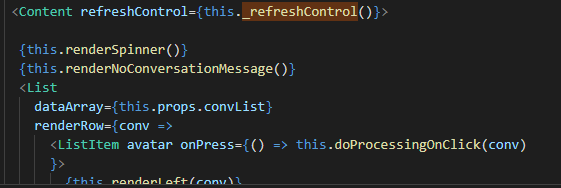
Hello is there any working example for the same ? where in we can apply the RefreshControl to the 'Content' or 'List' ? I am still facing issues with this. I am using native base '2.6.1' and react native 0.55.4
<Content refreshControl={this._refreshControl()}>
<List></List> ...
</Content>
below is attaching an image for the snippet code.
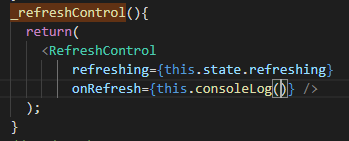
The Code for Refresh Control is
The consoleLog code is as follows
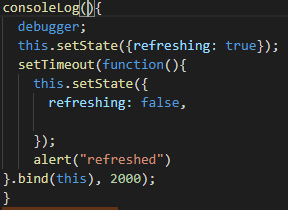
With this code in place I am getting the error -
Invariant Violation: Maximum update depth exceeded. This can happen when a component repeatedly calls setState inside componentWillUpdate or componentDidUpdate. React limits the number of nested updates to prevent infinite loops.
Can some one point out what is wrong with my code ? or what I need to do to fix it ?
 saurabhabh
on 31 Aug 2018
saurabhabh
on 31 Aug 2018
@saurabhabh There are many similar issues provided with solution, you can check them across NativeBase github
 SupriyaKalghatgi
on 31 Aug 2018
SupriyaKalghatgi
on 31 Aug 2018
@SupriyaKalghatgi Hi I did check them. But None of them seem to work. Hence I am asking if there is a working example with the refresh control added to the 'Content'. As few have suggested that it works in that scenario. Also I have checked it adding to the 'List' yet I am receiving the same error. looked into this as well
saurabhabh
on 31 Aug 2018
Tried this https://github.com/GeekyAnts/NativeBase/issues/348#issuecomment-266285965
SupriyaKalghatgi
on 31 Aug 2018
SupriyaKalghatgi
on 31 Aug 2018
How is the code in the 2 mentioned comments different from what I have written ? I have done the same thing and it doesnt work for me . Is it because I have a 'List' inside my 'Content' ?
saurabhabh
on 31 Aug 2018
I would suggest to try both these snippets
with List try this too https://github.com/GeekyAnts/NativeBase/issues/348#issuecomment-269958631
SupriyaKalghatgi
on 31 Aug 2018
I found the problem. It was a silly issue.

After changing this to the handle of the function it works.
Thanks for the support
saurabhabh
on 4 Sep 2018
Related issues
 natashache
·
3Comments
natashache
·
3Comments
 omerdn1
·
3Comments
omerdn1
·
3Comments
 elnygren
·
3Comments
elnygren
·
3Comments
 mcpracht
·
3Comments
mcpracht
·
3Comments
 maphongba008
·
3Comments
maphongba008
·
3Comments
Most helpful comment
when I put it inside content, it fires and shows the spinner - however I get this error