Napari: Antialiasing to reduce Moire effects
🚀 Feature
Antialiasing for 2D rendering
Motivation
Modern graphics card are very very powerfull, 2D rendering is peanuts for them.
OpenGL has lots of cool features such as MSAA that can be just turned on.
Vispy seems to support some antialiasing (not sure what kind).
Here is a discussion on this by the VISPY folks:
https://github.com/vispy/vispy/wiki/Tech.-Antialiasing
Some visuals in Vispy support it:
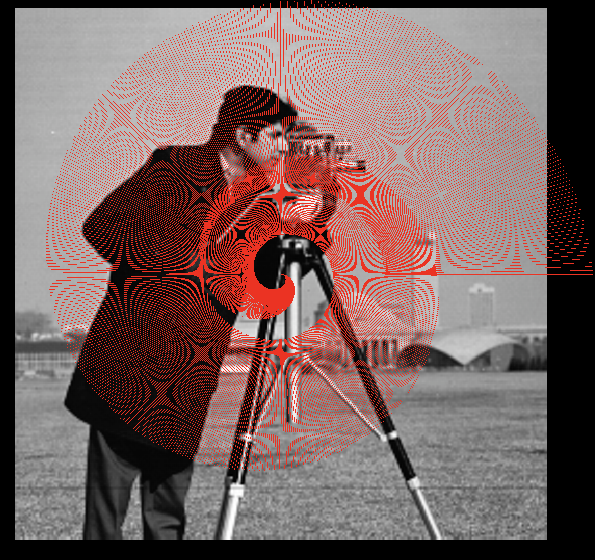
But in our case it seems that for example that the vectors layers for example is heavily aliased.
Proposal:
- make sure that all visuals have
antialias=True(particularly vectors layer) - Try to use MSAA by turning it on at the OpenGL level
 royerloic
All 4 comments
We are no longer using OpenGL lines in the vectors layer, but now using mesh visuals due to problems with arbitrary line widths. I am not sure if they support an antialias mode
 sofroniewn
on 20 Apr 2019
sofroniewn
on 20 Apr 2019
They should, antialias is not specific to old lines stuff...
royerloic
on 20 Apr 2019
That's great. I didn't see it exposed at a highlevel in vispy for meshes like it is for some line visuals, but we can dig in
sofroniewn
on 20 Apr 2019
This behaviour was fixed by using the mesh visual in #215 and i can no longer reproduce any moire effects. If anyone encounters additional aliasing problems they can either reopen this issue or create a new one with steps to reproduce
sofroniewn
on 7 Aug 2020
Related issues
sofroniewn
·
3Comments
 sebi06
·
3Comments
sofroniewn
·
3Comments
royerloic
·
3Comments
sebi06
·
3Comments
sofroniewn
·
3Comments
royerloic
·
3Comments
 JoOkuma
·
3Comments
JoOkuma
·
3Comments
Most helpful comment
They should, antialias is not specific to old lines stuff...