Nano-node: Setting up NANO test network?
Hello,
I'm new to NANO and am interested in setting up a "test" network with just a couple of docker nodes that I can use the CLI or web interface to connect to and explore to get a feel for how things work. I want to learn how to setup the TEST network, configure it, and then interact with it as some initial steps.
I am trying to determine how NANO compares to STEEM, BITSHARES, and EOS as far as transactions-per-second and scalability.
Is there any documentation on this?
Also, I am seeking a NANO forum or other place to discuss NANO core code development as well.
Any assistance or input would be greatly appreciated
Thanks and have a great day,
 Outstep
All 39 comments
Yes, I startup Testnet node already.
mkdir build
cd build/
wget -O boost_1_66_0.tar.gz https://netix.dl.sourceforge.net/project/boost/boost/1.66.0/boost_1_66_0.tar.gz
tar xzvf boost_1_66_0.tar.gz
cd boost_1_66_0
./bootstrap.sh --with-libraries=filesystem,iostreams,log,program_options,thread
./b2 --prefix=../boost link=static install
cd ..
git clone --recursive https://github.com/nanocurrency/raiblocks.git rai_build
cd rai_build
cmake -DBOOST_ROOT=../build/boost/ -DACTIVE_NETWORK=rai_test_network -G "Unix Makefiles"
make rai_node
started with ./rai_node --daemon --data_path ./data
Now everything is OK, but I can't sync block data from testnet chain, The error is as follows:
[2018-06-14 23:09:18.815598]: Node starting, version: 15.0
 penuel-leo
on 15 Jun 2018
penuel-leo
on 15 Jun 2018
@penuel-leo when creating a testnet, you make your own peers. This is your net. You own the genesis keys. There is no one to connect to.
If you wanted a network to peer to, the beta network would be sth for you, but I doubt it is operational at the moment.
 renesq
on 19 Jun 2018
renesq
on 19 Jun 2018
@renesq Thank you for your reply, and What's the difference between test and beta? I always think that test is the testnet network, used for development and test.
Now, I tried to recompile (cmake -DBOOST_ROOT=../../build/boost/ -DACTIVE_NETWORK=rai_beta_network -G "Unix Makefiles") with beta and run it, But the result is consistent
[2018-06-19 22:24:45.550430]: Node starting, version: 15.0
By the way, where can I get some NANO for test?
penuel-leo
on 20 Jun 2018
Test is for unit testing. Has a much lower pow and broadcast parameters. Beta is for testing features off live net. The beta network should be brought up and running soon. It had been down for quite a while
 argakiig
on 20 Jun 2018
argakiig
on 20 Jun 2018
I'll be bringing the Beta network online by 6/28
 icarusglider
on 21 Jun 2018
icarusglider
on 21 Jun 2018
@icarusglider Thank you very much, How is the Beta network now? What time do you plan to make beta network online?
penuel-leo
on 25 Jun 2018
Well it's online and working, here you find some info https://nanode21.cloud/testnet.php
@penuel-leo
 stefonarch
on 14 Jul 2018
stefonarch
on 14 Jul 2018
Hello! How do we get/create Nano currency for testing purposes?
 LotfiKobrosly
on 18 Jul 2018
LotfiKobrosly
on 18 Jul 2018
https://beta.nano.org/faucet/
but it seems broken atm
If you post an address I can send you some.
stefonarch
on 18 Jul 2018
Can I create Nano for the test network? (I need to use that on the test network and not on the beta network).
Thank's for the help! :)
LotfiKobrosly
on 26 Jul 2018
@penuel-leo when creating a testnet, you make your own peers. This is your net. You own the genesis keys. There is no one to connect to.
If you wanted a network to peer to, the beta network would be sth for you, but I doubt it is operational at the moment.
If I want to build a testnet with a few peers, how can i do?
I have already run two single nodes in docker, but they cannot connect to each other even I have called ''work_peer_add" RPC.
Many thanks in advance!
 nengliangZ
on 22 Oct 2018
nengliangZ
on 22 Oct 2018
@nengliangZ work peers have a different purpose.
when using multiple dockers on a single machine, be sure to map ports accordingly, without conflicts (in the docker run command and in the config.json file). and as a initial peer you need to set one of your nodes.
renesq
on 22 Oct 2018
Have you added their respective ip addresses to the key
"preconfigured_peers" in the configuration file? You can choose static ip
addresses in your docker-compose.yml file so that when you add the addresse
to the config.json, the nodes can connect to each other
Le lun. 22 oct. 2018 06:31, Lu notifications@github.com a écrit :
@penuel-leo https://github.com/penuel-leo when creating a testnet, you
make your own peers. This is your net. You own the genesis keys. There is
no one to connect to.If you wanted a network to peer to, the beta network would be sth for you,
but I doubt it is operational at the moment.If I want to build a testnet with a few peers, how can i do?
I have already run two single nodes in docker, but they cannot connect to
each other even I have called ''work_peer_add" RPC.
Many thanks in advance!—
You are receiving this because you commented.
Reply to this email directly, view it on GitHub
https://github.com/nanocurrency/raiblocks/issues/918#issuecomment-431736771,
or mute the thread
https://github.com/notifications/unsubscribe-auth/AfAjebXv0SLEQtpfxTkWWoGBWtqWGbmCks5unUozgaJpZM4Um_XY
.
LotfiKobrosly
on 22 Oct 2018
@nengliangZ work peers have a different purpose.
when using multiple dockers on a single machine, be sure to map ports accordingly, without conflicts (in thedocker runcommand and in theconfig.jsonfile). and as a initial peer you need to set one of your nodes.
Thank you for the reply. I still have a few doubts:
- I built the docker image myself with 'test' option:
./docker/node/build.sh -n test
source from https://github.com/nanocurrency/raiblocks/issues/443
in this way, the 'config.json' file is defined when I create the docker image, and I cannot pass the config.json as a configuration parameter to the docker image, which means if I want to config differently for different nodes, I need to build one image for each node, is this the way nano works?
- sorry for my bad understanding, I didn't catch the meaning of 'as a initial peer you need to set one of your nodes'. Could you please explain it more?
I open an issue in https://github.com/nanocurrency/raiblocks/issues/1324, and offer the detailed description and logs I got, hope you can have a look! Thanks a lot!!
nengliangZ
on 23 Oct 2018
Have you added their respective ip addresses to the key "preconfigured_peers" in the configuration file? You can choose static ip addresses in your docker-compose.yml file so that when you add the addresse to the config.json, the nodes can connect to each other.
Thank you for the reply.
- I didn't add 'preconfigured_peers'.
as I described in the reply above:
I built the docker image myself with 'test' option:
./docker/node/build.sh -n test
source from https://github.com/nanocurrency/raiblocks/issues/443
in this way, the 'config.json' file is defined when I create the docker image, and I cannot pass the config.json as a configuration parameter to the docker image, which means if I want to config differently for different nodes, I need to build one image for each node. And what if I want to add more peers after the docker has run? Do I need to rebuild a new docker image with the changed 'preconfigured_peers'?
- The second issue is when configuring 'preconfigured_peers', what is the peer connection protocol? For example, if there are three nodes, how to config for each of them?
- mutual config: node A adds node B's ip, at the same time B must add A's ip?
- Or no need to double config, just node A adds B's ip, node B adds C's ip, so they can connect?
I open an issue in https://github.com/nanocurrency/raiblocks/issues/1324, and offer the detailed description and logs I got, hope you can have a look! Thanks a lot!!
nengliangZ
on 23 Oct 2018
Thank you @renesq and @LotfiKobrosly,
Now I have found out the way to add 'config.json' when I run the docker image in here: https://developers.nano.org/guides/docker-management/#updating-node-configuration
And thanks for the instruction by @LotfiKobrosly, I fill out the 'preconfigured_peers' and bootstrap the nodes to sync from an initial node, now all nodes seem to work fine and sync successfully.
Here comes a new issue:
I noticed that after I create a bootstrap call, all nodes sync successfully. If I send some coins from one account to another, the send block will be broadcast to every node where this log shows and I can search out this block's hash which means the broadcasting success:
Block EB0... was republished to peers
Broadcasting confirm req for block EB0... to 1 representatives
Block EB0... was republished to peers
but weirdly, after a few minutes (not exactly measure the duration), if I send some coins again, all other nodes cannot successfully receive this newly created block's hash and the logs periodically show:
Bootstrap stopped because there are no peers
Any ideas? Thanks in advance!!
nengliangZ
on 23 Oct 2018
You're welcome!
I encountered the same issue: it seems that sometimes some nodes stop
seeing each other (I ran a test network on some VMs, and running iftop from
each VM's shell shows to which nodes it is connected) and thus can't
communicate, and unfortunately I haven't figured that out.
Le 23 oct. 2018 09:44, "Lu" notifications@github.com a écrit :
Thank you @renesq https://github.com/renesq and @LotfiKobrosly
https://github.com/LotfiKobrosly,
Now I have found out the way to add 'config.json' when I run the docker
image in here:
https://developers.nano.org/guides/docker-management/#updating-node-configuration
And thanks for the instruction by @LotfiKobrosly
https://github.com/LotfiKobrosly, I fill out the 'preconfigured_peers'
and bootstrap the nodes to sync from an initial node, now all nodes seem to
work fine and sync successfully.
Here comes a new issue:
I noticed that after I create a bootstrap call, all nodes sync
successfully. If I send some coins from one account to another, the send
block will be broadcast to every node where this log shows and I can search
out this block's hash which means the broadcasting success:
Block EB0... was republished to peers
Broadcasting confirm req for block EB0... to 1 representatives
Block EB0... was republished to peers
but weirdly, after a few minutes (not exactly measure the duration), if I
send some coins again, all other nodes cannot successfully receive this
newly created block's hash and the logs periodically show:
Bootstrap stopped because there are no peers
Any ideas? Thanks in advance!!
—
You are receiving this because you were mentioned.
Reply to this email directly, view it on GitHub
https://github.com/nanocurrency/raiblocks/issues/918#issuecomment-432132859,
or mute the thread
https://github.com/notifications/unsubscribe-auth/AfAjed-1lPX4rHP_anpXk_WhEx5mqjFRks5unsjMgaJpZM4Um_XY
.
LotfiKobrosly
on 23 Oct 2018
I want some testnet NANO tthanks address: xrb_3t1989g8o35boj9wy9x1ap9a57f6y7ohs1yns9r7t51p17b46hh4am6apfrx
 Sayplaydiv
on 13 Nov 2018
Sayplaydiv
on 13 Nov 2018
There is the faucet for that:
https://beta.nano.org/faucet/
stefonarch
on 13 Nov 2018
Hi Guys, I have created two nodes in my own network, but I don't know how to setup one as the initial node. In one node I have created the genesis account but the second one is not syncing. If I execute RPC bootstrap command they start to communicate but I have 3 blocks in the first node and the second node only has 1.
Thanks
 giovangonzalez
on 15 Nov 2018
giovangonzalez
on 15 Nov 2018
Hi Guys, I have created two nodes in my own network, but I don't know how to setup one as the initial node. In one node I have created the genesis account but the second one is not syncing. If I execute RPC bootstrap command they start to communicate but I have 3 blocks in the first node and the second node only has 1.
Thanks
Have you tried to send the bootstrap command again after you issued the blocks to both two nodes so they can mutual bootstraped?
nengliangZ
on 15 Nov 2018
Yes, I did it and logs in both nodes displays the following:

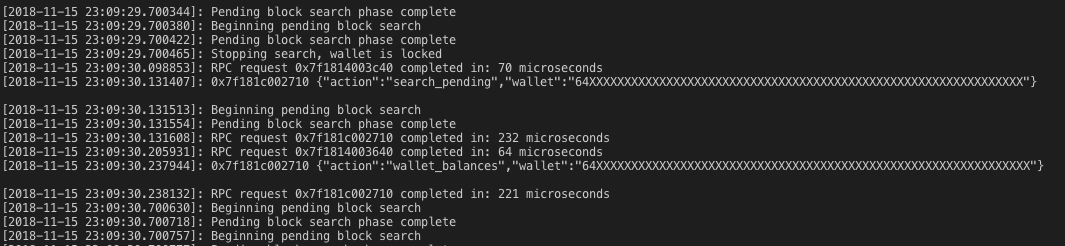
And when I count blocks, the initial node displays 3 and the other node only 1.
If I see the balance total it shows:
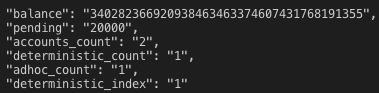
Another weird thing is that when I call confirmation_quorum it shows

Do you figure what should I do? I'm not sure if the initial node must have something different in the configuration.
giovangonzalez
on 16 Nov 2018
https://beta.nano.org/faucet/
but it seems broken atm
If you post an address I can send you some.
can you give me some? xrb_1rq9ustc1zqn3539p3qr6ui3smagh8dx5qzd3y6cww8sqw1e83sh3gpswxdw
thanks~
 Nataila
on 8 Mar 2019
Nataila
on 8 Mar 2019
I have the same issue
[2019-03-20 10:20:05.293167]: Starting bootstrap attempt
[2019-03-20 10:20:05.293281]: Bootstrap stopped because there are no peers
[2019-03-20 10:20:05.294124]: Exiting bootstrap attempt
[2019-03-20 10:20:10.293345]: Starting bootstrap attempt
[2019-03-20 10:20:10.293425]: Bootstrap stopped because there are no peers
[2019-03-20 10:20:10.294275]: Exiting bootstrap attempt
[2019-03-20 10:20:15.293498]: Starting bootstrap attempt
[2019-03-20 10:20:15.293812]: Bootstrap stopped because there are no peers
[2019-03-20 10:20:15.293846]: Exiting bootstrap attempt
this was built with build script nano-node/docer/node/build.sh with -n test parameter.
This created docker image
nano-node-test latest 1da5a920e400 45 minutes ago 126MB
and run docker run -d -p 7076:7076 -p 7075:7075 nano-node-test:latest
where is the problem?
Thanks for help.
 nicram-cf
on 20 Mar 2019
nicram-cf
on 20 Mar 2019
You just created a new private block lattice, so there of course are neither peers nor blocks. Maybe you unintentially chose the wrong network (test vs. beta)? What's your goal?
renesq
on 20 Mar 2019
I created a private block lattice. I believe that is what @Outstep and several others finding this are trying to do. Here are the steps I figured out:
First you need to build the executable, you can not use the Docker image for this. The reason is that the Genesis block is hard coded into the nano_node executable. So here is how you setup a new genesis block (one that you have the private key to) and configure the build:
Build instructions: https://github.com/nanocurrency/nano-node/wiki/Build-Instructions
Build Examples: https://github.com/nanocurrency/nano-node/wiki/Build-nano_node-samples
I am on a Mac so I did:
- install boost:
brew install boost - update install submodules:
git submodule update --init --recursive - build:
cmake -DBOOST_ROOT=/usr/local/Cellar/boost -DACTIVE_NETWORK=nano_test_network -G "Unix Makefiles" - make:
make
Now you should have an executable that you can use to create your genesis block:
- Generate a seed for your genesis account. This will be the originating account that has all of the allocated Nano at the beginning.
./nano_node --key_create - With that seed, generate an Open block using any method you choose...I used the debug_bootstrap_generate command of the nano_node executable which takes a key and generates a series of blocks (you really only need the Genesis block that it creates, if you are creating an empty testnet).
./nano_node --debug_bootstrap_generate --key={private key} - In nano/secure/common.cpp replace the live_genesis_data variable (or test, or beta) with your new Genesis block
- In nano/node/nodeconfig.cpp alter the nano_live_network (or test, or beta) case to use your own preconfigured representatives and your own preconfigured peers.
- Run make again:
make - run:
./nano_node --daemon --data_path ./data - in
/data/config.jsonsetrpc_enableandenable_controltotrue - re-run
./nano_node --daemon --data_path ./data - Create a wallet on that node (at this point I switched over to using Postman to execute these RPC requests)
{ "action": "wallet_create" } - Wallet add key (using the Genesis private key):
{ "action": "wallet_add", "wallet": "WALLET_ID_FROM_STEP_9", "key": "YOUR_GENESIS_PRIVATE_KEY" } - Confirm the balance of your wallet now has the full Genesis amount:
{ "action": "wallet_balance_total", "wallet": "WALLET_ID_FROM_STEP_9" } - Create another account
{ "action": "account_create", "wallet": "WALLET_ID_FROM_STEP_9"} - Send funds from your wallet to your new account:
{
"action": "send",
"wallet": "9C884A427C058B7873DC153D46082DF26534A97C42C1FCFB68C682EF57926BFF",
"source": "xrb_1progxxzsrx1g91fh8kc8q7ux3g58dnop3i1jenbnom78gzhsk5uwih9gnsh",
"destination": "xrb_3q56eog9bhmbbuckwbcz8f47ezadu4i3yogowsamfg14f1xzdkidq75h97sn",
"amount": "1000000"
}
- You should be able to take it from here. Create a receive block ect...
I copied the executable to another Mac, ran it, and set the preconfigured_peers in the config.json to be the IP for the original node. I was absolutely delighted to find that they synchronized my little block lattice.
ref: https://np.reddit.com/r/RaiBlocks/comments/7m47nh/how_to_run_a_private_raiblocks_testnet/
 jfbloom22
on 20 Apr 2019
jfbloom22
on 20 Apr 2019
@jfbloom22 thanks for above steps. i just testing with nano test_genesis_data, this return
{
"error": "Bad wallet number"
}
for request :
{ "action": "wallet_balance_total", "wallet": "xrb_3e3j5tkog48pnny9dmfzj1r16pg8t1e76dz5tmac6iq689wyjfpiij4txtdo" }
what wrong i am doing here ? in postman url is http://localhost:55000 and one more query: what you mean by YOUR_GENESIS_KEY is this the private key ?
 tundak
on 24 Apr 2019
tundak
on 24 Apr 2019
this is working, i was doing wrong.
YOUR_GENESIS_KEY = Genesis Private
WALLET_ID = response of step 9
@jfbloom22 I've tried following your guide several times but get Balance 0, I also see Bootstrap stopped because there are no peers in the log but I guess that shouldn't be the problem?
 wrtp2p
on 6 May 2019
wrtp2p
on 6 May 2019
@wrtp2p did you get balance 0 on the genesis account or on the second account? Yes you are correct, the node is functioning for me without any peers.
jfbloom22
on 13 May 2019
@jfbloom22
If I look at the ledger I can see the only block in it, the Open Block from the genesis that I generated with ./nano_node --debug_bootstrap_generate --key={private key} and which I then replaced in nano/secure/common.cpp. That Open Block has the balance, but I can't see it when I add the Genesis Key to the newly generated account in the node as per step 10 in your instructions.
wrtp2p
on 13 May 2019
@wrtp2p I would double check that the block on the ledger is the block you created in step 2. You might also double check that you are using the private key in step 10. I messed that up at one point. and that tripped up tundak. I updated my example to make that more clear.
jfbloom22
on 14 May 2019
@wrtp2p
1. I do
./nano_node --key_create results in
It results in
Private: 2FD01B091D4FBD001BBA14579DFF5CF8306C9DB28798D90DA58B8771F6F7ADE3
Public: 0DF4723DA6F2BD9996908861BD315A88A17058115D3E19AF1C6C3468C6E712D7
Account: nano_15hngaytfwoxm8db3453qnroo473g3e34qby58qjru3nf55gg6pqseo389ik
2. I do
./nano_node --debug_bootstrap_generate --key=2FD01B091D4FBD001BBA14579DFF5CF8306C9DB28798D90DA58B8771F6F7ADE3
It results in
{
"type": "open",
"source": "0DF4723DA6F2BD9996908861BD315A88A17058115D3E19AF1C6C3468C6E712D7",
"representative": "nano_15hngaytfwoxm8db3453qnroo473g3e34qby58qjru3nf55gg6pqseo389ik",
"account": "nano_15hngaytfwoxm8db3453qnroo473g3e34qby58qjru3nf55gg6pqseo389ik",
"work": "a632ec0a7391e310",
"signature": "278EB3071A0D7CC2E1424413C1D3352D8DFDC8B5F8249C8889D1773B5D310292C727E55E16ADB292643D95D3E34D9E4D0885E0A410855F4F6F89D57B2F78AA05"
}
3. In nano/secure/common.cpp I replace test_genesis_data with the above genesis block.
4. In nano/node/nodeconfig.cpp I change nothing as for test_network there are no parameters that can be replaced, unlike live_network or beta_network.
5. I setup the RPC as described and it works.
6. I create a wallet in the node with
curl -d '{ "action": "wallet_create" }' 127.0.0.1:7076
and it returns
{"wallet": "D0113E1C6C070ED32A2099D04FE82CBC60BC9A3F7001848FBE449198EFE12D15"}
7. I add the private key from the Genesis to the newly created wallet as per your step #9.
curl -d '{ "action": "wallet_add", "wallet": "D0113E1C6C070ED32A2099D04FE82CBC60BC9A3F7001848FBE449198EFE12D15", "key": "2FD01B091D4FBD001BBA14579DFF5CF8306C9DB28798D90DA58B8771F6F7ADE3" }' 127.0.0.1:7076
and that returns
{"account": "nano_15hngaytfwoxm8db3453qnroo473g3e34qby58qjru3nf55gg6pqseo389ik"}
8. I try to confirm the balance with the Account ID that I just created as per your step 11 but I get the following result.
curl -d '{ "action": "wallet_balance_total", "wallet": "D0113E1C6C070ED32A2099D04FE82CBC60BC9A3F7001848FBE449198EFE12D15" }' 127.0.0.1:7076
{
"balance": "0",
"pending": "0",
"accounts_count": "1",
"deterministic_count": "0",
"adhoc_count": "1",
"deterministic_index": "0"
}
If I check for the block instead the ledger for account nano_15hngaytfwoxm8db3453qnroo473g3e34qby58qjru3nf55gg6pqseo389ik (which is the one from the genesis, and the one that results from adding the genesis private key to the Wallet ID) I get the full balance in the block.
curl -d '{ "action": "ledger", "account": "nano_15hngaytfwoxm8db3453qnroo473g3e34qby58qjru3nf55gg6pqseo389ik", "count": "1" }' 127.0.0.1:7076
{
"accounts": {
"nano_3e3j5tkog48pnny9dmfzj1r16pg8t1e76dz5tmac6iq689wyjfpiij4txtdo": {
"frontier": "058F5FBFAF745997B9D89A6E033ED34DCC46275461F08F648D1E3E5AB54B2EAB",
"open_block": "058F5FBFAF745997B9D89A6E033ED34DCC46275461F08F648D1E3E5AB54B2EAB",
"representative_block": "058F5FBFAF745997B9D89A6E033ED34DCC46275461F08F648D1E3E5AB54B2EAB",
"balance": "340282366920938463463374607431768211455",
"modified_timestamp": "1557945506",
"block_count": "1"
}
}
}
At this point I'm not sure if it's a miscommunication between the node and the ledger that's causing the Wallet no not have the full balance, but as you can see the block is there and I follow all the steps.
wrtp2p
on 15 May 2019
@wrtp2p It looks like the public key for your genesis block is: nano_3e3j5tkog48pnny9dmfzj1r16pg8t1e76dz5tmac6iq689wyjfpiij4txtdo
You are expecting it to be nano_15hngaytfwoxm8db3453qnroo473g3e34qby58qjru3nf55gg6pqseo389ik. Which supports my suspicion that the genesis block was not created properly.
when I run "action": "ledger" and { "action": "wallet_add"} I get back the public key I hard coded for the genesis block in step my step 3. So the steps you shared are correct. The issue is likely with how you are building or configuring the build.
jfbloom22
on 21 May 2019
@jfbloom22 once setup private betanet, and run multiple nodes. it display unconfirmed blocks in x announcements.
- block sync properly within the
preconfigured_peers - block sync not working out of
preconfigured_peers
Is there any specific configurations ? how to allow it work normally ?
tundak
on 4 Jul 2019
Setting up a private network isn't a use-case we're going to support.
 clemahieu
on 6 Jul 2019
clemahieu
on 6 Jul 2019
@tundak I only used preconfigured_peers so far, so I am not sure.
jfbloom22
on 11 Jul 2019
I created a private block lattice. I believe that is what @Outstep and several others finding this are trying to do. Here are the steps I figured out:
First you need to build the executable, you can not use the Docker image for this. The reason is that the Genesis block is hard coded into the nano_node executable. So here is how you setup a new genesis block (one that you have the private key to) and configure the build:
Build instructions: https://github.com/nanocurrency/nano-node/wiki/Build-Instructions
Build Examples: https://github.com/nanocurrency/nano-node/wiki/Build-nano_node-samplesI am on a Mac so I did:
- install boost:
brew install boost- update install submodules:
git submodule update --init --recursive- build:
cmake -DBOOST_ROOT=/usr/local/Cellar/boost -DACTIVE_NETWORK=nano_test_network -G "Unix Makefiles"- make:
makeNow you should have an executable that you can use to create your genesis block:
- Generate a seed for your genesis account. This will be the originating account that has all of the allocated Nano at the beginning.
./nano_node --key_create- With that seed, generate an Open block using any method you choose...I used the debug_bootstrap_generate command of the nano_node executable which takes a key and generates a series of blocks (you really only need the Genesis block that it creates, if you are creating an empty testnet).
./nano_node --debug_bootstrap_generate --key={private key}- In nano/secure/common.cpp replace the live_genesis_data variable (or test, or beta) with your new Genesis block
- In nano/node/nodeconfig.cpp alter the nano_live_network (or test, or beta) case to use your own preconfigured representatives and your own preconfigured peers.
- Run make again:
make- run:
./nano_node --daemon --data_path ./data- in
/data/config.jsonsetrpc_enableandenable_controltotrue- re-run
./nano_node --daemon --data_path ./data- Create a wallet on that node (at this point I switched over to using Postman to execute these RPC requests)
{ "action": "wallet_create" }- Wallet add key (using the Genesis private key):
{ "action": "wallet_add", "wallet": "WALLET_ID_FROM_STEP_9", "key": "YOUR_GENESIS_PRIVATE_KEY" }- Confirm the balance of your wallet now has the full Genesis amount:
{ "action": "wallet_balance_total", "wallet": "WALLET_ID_FROM_STEP_9" }- Create another account
{ "action": "account_create", "wallet": "WALLET_ID_FROM_STEP_9"}- Send funds from your wallet to your new account:
{
"action": "send",
"wallet": "9C884A427C058B7873DC153D46082DF26534A97C42C1FCFB68C682EF57926BFF",
"source": "xrb_1progxxzsrx1g91fh8kc8q7ux3g58dnop3i1jenbnom78gzhsk5uwih9gnsh",
"destination": "xrb_3q56eog9bhmbbuckwbcz8f47ezadu4i3yogowsamfg14f1xzdkidq75h97sn",
"amount": "1000000"
}
- You should be able to take it from here. Create a receive block ect...
I copied the executable to another Mac, ran it, and set the
preconfigured_peersin theconfig.jsonto be the IP for the original node. I was absolutely delighted to find that they synchronized my little block lattice.ref: https://np.reddit.com/r/RaiBlocks/comments/7m47nh/how_to_run_a_private_raiblocks_testnet/
Hello,
how to get the "GENESIS_PRIVATE_KEY", for someone who is using the preconfigured_representatives account as genesys.
I am not seeing RPC command that provides the private key, from account number or from public key.
I am on testnet
thank you
 ElBigo
on 3 Nov 2020
ElBigo
on 3 Nov 2020
@wrtp2p
1. I do
./nano_node --key_createresults inIt results in
Private: 2FD01B091D4FBD001BBA14579DFF5CF8306C9DB28798D90DA58B8771F6F7ADE3
Public: 0DF4723DA6F2BD9996908861BD315A88A17058115D3E19AF1C6C3468C6E712D7
Account: nano_15hngaytfwoxm8db3453qnroo473g3e34qby58qjru3nf55gg6pqseo389ik2. I do
./nano_node --debug_bootstrap_generate --key=2FD01B091D4FBD001BBA14579DFF5CF8306C9DB28798D90DA58B8771F6F7ADE3It results in
{
    "type": "open",
    "source": "0DF4723DA6F2BD9996908861BD315A88A17058115D3E19AF1C6C3468C6E712D7",
    "representative": "nano_15hngaytfwoxm8db3453qnroo473g3e34qby58qjru3nf55gg6pqseo389ik",
    "account": "nano_15hngaytfwoxm8db3453qnroo473g3e34qby58qjru3nf55gg6pqseo389ik",
    "work": "a632ec0a7391e310",
    "signature": "278EB3071A0D7CC2E1424413C1D3352D8DFDC8B5F8249C8889D1773B5D310292C727E55E16ADB292643D95D3E34D9E4D0885E0A410855F4F6F89D57B2F78AA05"
}
3. In nano/secure/common.cpp I replace test_genesis_data with the above genesis block.
4. In nano/node/nodeconfig.cpp I change nothing as for test_network there are no parameters that can be replaced, unlike live_network or beta_network.
5. I setup the RPC as described and it works.
6. I create a wallet in the node with
curl -d '{ "action": "wallet_create" }' 127.0.0.1:7076and it returns
{"wallet": "D0113E1C6C070ED32A2099D04FE82CBC60BC9A3F7001848FBE449198EFE12D15"}7. I add the private key from the Genesis to the newly created wallet as per your step #9.
curl -d '{ "action": "wallet_add", "wallet": "D0113E1C6C070ED32A2099D04FE82CBC60BC9A3F7001848FBE449198EFE12D15", "key": "2FD01B091D4FBD001BBA14579DFF5CF8306C9DB28798D90DA58B8771F6F7ADE3" }' 127.0.0.1:7076and that returns
{"account": "nano_15hngaytfwoxm8db3453qnroo473g3e34qby58qjru3nf55gg6pqseo389ik"}
8. I try to confirm the balance with the Account ID that I just created as per your step 11 but I get the following result.curl -d '{ "action": "wallet_balance_total", "wallet": "D0113E1C6C070ED32A2099D04FE82CBC60BC9A3F7001848FBE449198EFE12D15" }' 127.0.0.1:7076 { "balance": "0", "pending": "0", "accounts_count": "1", "deterministic_count": "0", "adhoc_count": "1", "deterministic_index": "0" }If I check for the block instead the ledger for account nano_15hngaytfwoxm8db3453qnroo473g3e34qby58qjru3nf55gg6pqseo389ik (which is the one from the genesis, and the one that results from adding the genesis private key to the Wallet ID) I get the full balance in the block.
curl -d '{ "action": "ledger", "account": "nano_15hngaytfwoxm8db3453qnroo473g3e34qby58qjru3nf55gg6pqseo389ik", "count": "1" }' 127.0.0.1:7076
{
    "accounts": {
        "nano_3e3j5tkog48pnny9dmfzj1r16pg8t1e76dz5tmac6iq689wyjfpiij4txtdo": {
            "frontier": "058F5FBFAF745997B9D89A6E033ED34DCC46275461F08F648D1E3E5AB54B2EAB",
            "open_block": "058F5FBFAF745997B9D89A6E033ED34DCC46275461F08F648D1E3E5AB54B2EAB",
            "representative_block": "058F5FBFAF745997B9D89A6E033ED34DCC46275461F08F648D1E3E5AB54B2EAB",
            "balance": "340282366920938463463374607431768211455",
            "modified_timestamp": "1557945506",
            "block_count": "1"
        }
    }
}
At this point I'm not sure if it's a miscommunication between the node and the ledger that's causing the Wallet no not have the full balance, but as you can see the block is there and I follow all the steps.
in common.cpp update
live_public_key_data
 rathodudayy
on 10 Dec 2020
rathodudayy
on 10 Dec 2020
Related issues
 i3bitcoin
·
4Comments
i3bitcoin
·
4Comments
 frankh
·
3Comments
frankh
·
3Comments
 zhyatt
·
4Comments
zhyatt
·
4Comments
 bartclaeys
·
3Comments
bartclaeys
·
3Comments
 BitDesert
·
6Comments
BitDesert
·
6Comments
Most helpful comment
I created a private block lattice. I believe that is what @Outstep and several others finding this are trying to do. Here are the steps I figured out:
First you need to build the executable, you can not use the Docker image for this. The reason is that the Genesis block is hard coded into the nano_node executable. So here is how you setup a new genesis block (one that you have the private key to) and configure the build:
Build instructions: https://github.com/nanocurrency/nano-node/wiki/Build-Instructions
Build Examples: https://github.com/nanocurrency/nano-node/wiki/Build-nano_node-samples
I am on a Mac so I did:
brew install boostgit submodule update --init --recursivecmake -DBOOST_ROOT=/usr/local/Cellar/boost -DACTIVE_NETWORK=nano_test_network -G "Unix Makefiles"makeNow you should have an executable that you can use to create your genesis block:
./nano_node --key_create./nano_node --debug_bootstrap_generate --key={private key}make./nano_node --daemon --data_path ./data/data/config.jsonsetrpc_enableandenable_controltotrue./nano_node --daemon --data_path ./data{ "action": "wallet_create" }{ "action": "wallet_add", "wallet": "WALLET_ID_FROM_STEP_9", "key": "YOUR_GENESIS_PRIVATE_KEY" }{ "action": "wallet_balance_total", "wallet": "WALLET_ID_FROM_STEP_9" }{ "action": "account_create", "wallet": "WALLET_ID_FROM_STEP_9"}I copied the executable to another Mac, ran it, and set the
preconfigured_peersin theconfig.jsonto be the IP for the original node. I was absolutely delighted to find that they synchronized my little block lattice.ref: https://np.reddit.com/r/RaiBlocks/comments/7m47nh/how_to_run_a_private_raiblocks_testnet/