Mysql: Why does this query return no results?
Code:
const conn = mysql.createConnection({
    host: 'localhost',
    port: 3306,
    username: 'root',
    password: '',
    multipleStatements: true,
    timeout: 5000
});

conn.connect((err) => {
    if (err) {
        // console.log(err.code);
        // console.log(err.fatal);
        // console.log(err.sql);
        // console.log(err.sqlState);
        // console.log(err.sqlMessage);

        dialog.showErrorBox('Uh-Oh!', err.code);

        return;
    }

    const SQL = 'SELECT TABLE_NAME FROM information_schema.TABLES WHERE TABLE_SCHEMA = "' + db + '"';

    conn.query(SQL, function (err, rows, fields) {
        if (err) {
            dialog.showErrorBox('Uh-Oh!', err.code);

            return;
        }

        console.log(SQL);
        console.log(rows); // []
        console.log(fields);
    });
});
When SQL is dumped it returns:
SELECT * FROM information_schema.TABLES WHERE TABLE_SCHEMA = "survive"
However rows is always an empty array. When I run the exact query in PMA then:

I am not getting errors and I have tried connecting with debug: true too.
 Script47
All 17 comments
Are you sure you're connected to the same database instance? For example, can you run the following query from this module and see if your schema name is even in the database?
SELECT DISTINCT TABLE_SCHEMA FROM information_schema.TABLES
 dougwilson
on 19 Feb 2019
dougwilson
on 19 Feb 2019
@dougwilson Odd, it only returns:
[
  {
    "TABLE_SCHEMA": "information_schema"
  }
]
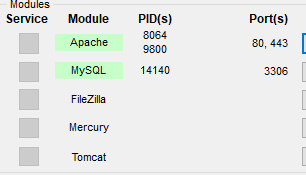
I am running MySQL through XAMPP port 3306.
Script47
on 19 Feb 2019
So it sounds like this module is working just fine... your queries are being sent to your MySQL server and it is providing the results as returned by your MySQL server. I'm not sure there is anything we can change in this module to make it return something different? If so, can you clarify what we would need to change?
dougwilson
on 19 Feb 2019
@dougwilson but running that exact query through PMA (phpmyadmin) returns rows related to that specific database fine, any ideas why the results are skewed when running through this module?
Script47
on 19 Feb 2019
I have no idea except that it's just not the same database you're connected to. If there is a way you can provide steps for me to replicate the issue, I can try to investigate on my end.
dougwilson
on 19 Feb 2019
@dougwilson I'm running this through Electron but other than that, what you see above is the code I'm using. If you cannot replicate the issue with the above then I'll have to keep trying on my end.
Thanks for your prompt assistance so far in the matter, you've narrowed it down for me at the very least.
Script47
on 19 Feb 2019
It's no problem. I ran the code you provided on one of my MySQL servers and it provided an empty result set, as I don't have a schema named "survive".
I then created one and added a couple tables to it and then the same script returned the names of those tables.
dougwilson
on 19 Feb 2019
That's just frustrating.
I'm thinking it might be XAMPP, I'll try run MySQL without XAMPP and report back tomorrow.
Script47
on 19 Feb 2019
No problem. I can't say for sure there is still no issue here without knowing more, so I won't close the issue until I hear back :+1:
dougwilson
on 19 Feb 2019
This is (likely) a permissions issue. When a user doesn't have permission to access a schema, that schema's tables are invisible in information_schema.tables. You appear to be using the root user with an empty password (!?) but that doesn't mean you necessarily are the root user -- if the installation wasn't properly finished, you may have the unprivileged user accounts with empty usernames still on the server. The query SHOW GRANTS, run from this script, will show what user you are and what permissions that user has.
 sqlbot
on 19 Feb 2019
sqlbot
on 19 Feb 2019
@dougwilson and @sqlbot, this is most odd, when connecting via the connection string:
this.conn = mysql.createConnection('mysql://' + this.get_username() + ':' + this.get_password() + '@' + this.get_host() + '/');
Everything seems to work and I get the results from information_schema successfully.
Any ideas why it would work with the string and not the object? It seems like the same parameters are being passed.
Script47
on 20 Feb 2019
It doesn't look like the object you're using has the values from this.get_username() etc like your string does. If you provide those values to the object, does it work?
dougwilson
on 20 Feb 2019
@dougwilson yep, I've used the following snippet:
this.conn = mysql.createConnection({
    host: this.get_host(),
    username: this.get_username(),
    password: this.get_password()
});
Exact same values being passed to the connection yet still not the same values from the query.
Script47
on 20 Feb 2019
Probably because there is no such option as username; it's called user: https://github.com/mysqljs/mysql#connection-options
this.conn = mysql.createConnection({
    host: this.get_host(),
    user: this.get_username(),
    password: this.get_password()
});
@dougwilson Dammit, one of those moments. It is working now - wasted a lot of time on this.
Thanks for all your help.
Script47
on 20 Feb 2019
@Script47 FWIW you may want to SELECT * FROM mysql.user WHERE user = ''. Your server is allowing anonymous logins, and you probably want to delete those empty-username entries. Had they not been there, you would have failed to connect and the error message would likely have identified you as ''@'localhost', which might have been a tipoff.
sqlbot
on 20 Feb 2019
@sqlbot understood.
I'm working on localhost so I'm not worried about unauthorised access but definitely for the error reporting, I'll look into it.
Script47
on 20 Feb 2019
Related issues
 macias
·
3Comments
macias
·
3Comments
 whatthehell232
·
3Comments
whatthehell232
·
3Comments
 JCQuintas
·
3Comments
JCQuintas
·
3Comments
 Rhapsody-Sky
·
3Comments
Rhapsody-Sky
·
3Comments
 acefxlabs
·
4Comments
acefxlabs
·
4Comments