Mysql: Unable to connect to MySQL 8
Issue description
MySQL 8 has now gone into general availability and I am seemingly unable to connect to a MySQL 8 instance as I have previously done with 5.x.
Lets say for example I have a MySQL instance running locally via Docker like so:
docker run --name some-mysql -p 3306:3306 -e MYSQL_ROOT_PASSWORD=my-secret-pw -e MYSQL_DATABASE=dbname -d mysql:8
Then I can try to connect to this instance:
Example code
package main

import (
  "fmt"
  "database/sql"
  "os"
  _ "github.com/go-sql-driver/mysql"
)

func main() {
  db, err := sql.Open("mysql", "root:my-secret-pw@tcp(localhost:3306)/dbname")
  if err != nil {
    fmt.Printf("conn fail: %s\n", err)
    os.Exit(1)
  }

  if err = db.Ping(); err != nil {
    fmt.Printf("ping fail: %s\n", err)
    os.Exit(1)
  }

  fmt.Println("all good")
}
Of course I would expect this to work and I'd see the all good message (which is the case with a 5.7 instance for example). However I see the following:
Error log
ping fail: this authentication plugin is not supported
exit status 1
Configuration
Driver version (or git SHA):
3287d94d4c6a48a63e16fffaabf27ab20203af2a
Go version: run go version in your console
go version go1.10 darwin/amd64
Server version: E.g. MySQL 5.6, MariaDB 10.0.20
8.0.11
Server OS: E.g. Debian 8.1 (Jessie), Windows 10
Mac OS 10.12.6
 danmrichards
All 11 comments
I've been looking into it. It looks like to make it work you need to set legacy Authentication in MySQL 8 (which is less secure of course).
Installation scripts for Ubuntu 16.04 ship this file (if you select Legacy MySQL 8 authentication)
[mysqld]
default-authentication-plugin = mysql_native_password
Note: It looks like currently it is NOT enough to simply create user using native_password authentication - it will still fail with different error message
Cannot connect to MySQL: this user requires mysql native password authentication.
It has been suggested in other issue https://github.com/go-sql-driver/mysql/issues/625
to do this to make native password accounts to work:
Note that you will need to explicitly set "allowNativePasswords=True" in the DSN.
 PeterZaitsev
on 22 Apr 2018
PeterZaitsev
on 22 Apr 2018
Hi
I'm the manager of connectors here at MySQL and we want to help you guys fix this. Not a great deal of Go experience here on the team. We can try to work on a pull request but we may need some help
 rykr
on 22 Apr 2018
rykr
on 22 Apr 2018
@rykr @PeterZaitsev I am at PerconaLive conf this week, if you down here, we could work on this together. Lemme know
 arthurnn
on 22 Apr 2018
arthurnn
on 22 Apr 2018
I was bitten by a similar issue while working on dbdeployer.
The workaround is to change authentication plugin for the user. However, the root user is created during a previous run of the server, where the default plugin was caching_sha2_password.
After changing the authentication plugin in the user, you need to set the password again. With ALTER USER you can do both things at once.
alter user root@'localhost' identified with mysql_native_password by 'my-secret-pw';
Your sample program will run successfully after the change.
The suggestion from @PeterZaitsev works for all users created after restarting the server with the new directive.
 datacharmer
on 22 Apr 2018
datacharmer
on 22 Apr 2018
@arthurnn I wish I was there. I'm back at the office but would love to compare notes with you on this as I try to get up a pull request to fix this.
rykr
on 24 Apr 2018
Here is a link to an article that may help for anyone trying to implement a real fix for this issue:
https://insidemysql.com/preparing-your-community-connector-for-mysql-8-part-2-sha256/
 johnemb
on 25 Apr 2018
johnemb
on 25 Apr 2018
I have verified @datacharmer's suggested workaround - the change is on a per-user basis. So if you want to maintain the overall config, disabling for one user appears to be an acceptable condition.
Thanks!
 cajund
on 3 May 2018
cajund
on 3 May 2018
794, adding support for MySQL 8.0's default auth plugin was merged. Some feedback whether further problems occur would be great!
 julienschmidt
on 19 May 2018
julienschmidt
on 19 May 2018
I had to do add the following to my stack.yml when using a mysql docker container then it worked. Posting here in hopes that it helps someone else: command: --default-authentication-plugin=mysql_native_password
 DerfOh
on 21 Jul 2018
DerfOh
on 21 Jul 2018
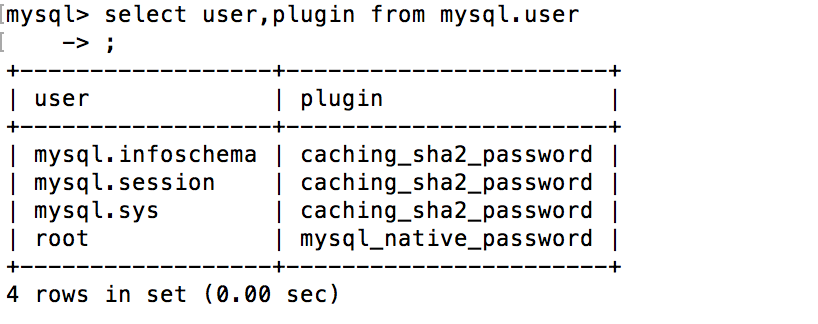
I changed the authentication plugin and set the DSN, but it is still not work, anyone can suggest more?

 JasonZhang1021
on 10 Sep 2018
JasonZhang1021
on 10 Sep 2018
import mysql.connector
def connect():
conn = mysql.connector.connect(host='localhost',
database='mydb',
user='root_new',
password='root_new')
if conn.is_connected():
print('Connected to MySQL database')
if __name__ == '__main__':
connect()
Output : Connected to MySQL database
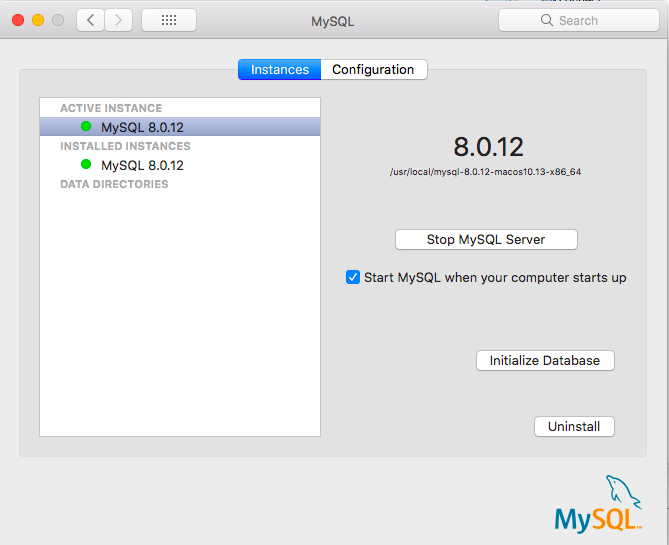
Follow the Screenshot 👍
- Stop database server in preferences.
- initialise DB with legacy authentication.
- Open mysqlWorkBench and Create a new user with standard authentication.
- Create a new schema(DB) in sqlWorkbench.
- Execute python Code in Eclipse.


 djanshuman
on 20 Oct 2018
djanshuman
on 20 Oct 2018
Related issues
 albrow
·
7Comments
albrow
·
7Comments
 tbdingqi
·
7Comments
tbdingqi
·
7Comments
 tanepiper
·
8Comments
tanepiper
·
8Comments
 zhaohui-kevin
·
5Comments
zhaohui-kevin
·
5Comments
 AlekSi
·
4Comments
AlekSi
·
4Comments
Most helpful comment
I was bitten by a similar issue while working on dbdeployer.
The workaround is to change authentication plugin for the user. However, the root user is created during a previous run of the server, where the default plugin was
caching_sha2_password.After changing the authentication plugin in the user, you need to set the password again. With
ALTER USERyou can do both things at once.Your sample program will run successfully after the change.
The suggestion from @PeterZaitsev works for all users created after restarting the server with the new directive.