Mysql: Error about Can't set headers after they are sent.
it happen rarely
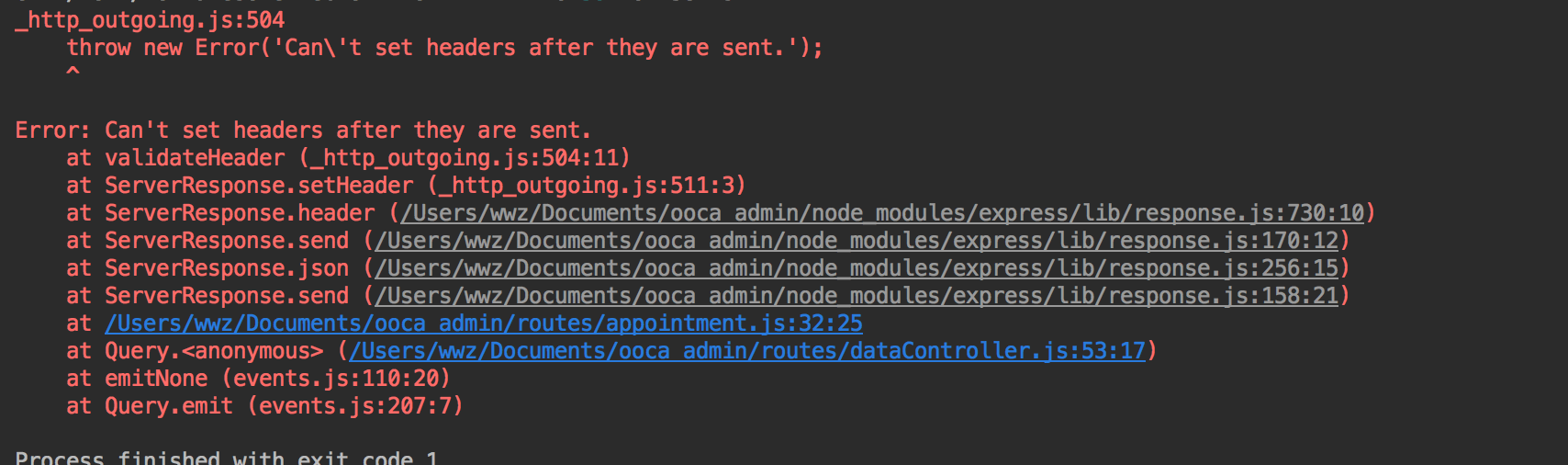
this is my dataController
const   mysql = require('mysql');

const dbInfo = {
    host: 'localhost',
    user: 'root',
    password: '',
    database: 'test',
    charset: 'utf8_unicode_ci',
    typeCast: function (field, next) {
        if (field.type == 'JSON') {
            return (JSON.parse(field.string()));
        }
        return next();
    }
}

var connection = mysql.createConnection(dbInfo);


function createRequest(command, callback,opt) {
    var query = connection.query(command,opt),
        contentStream=[];

    query
        .on('error', function(err) {
            // Handle error, an 'end' event will be emitted after this as well
            callback(err,{});
        })
        .on('fields', function(fields) {
            // the field packets for the rows to follow
        })
       .on('result', function(row) {
            // Pausing the connnection is useful if your processing involves I/O
            connection.pause();
            processRow(row, function(data) {
                var dataObj=JSON.parse(data);
                contentStream.push(dataObj);
                connection.resume();
            });
        })
        .on('end', function() {
            // all rows have been received
            if(typeof callback == "function") {
                callback(null,contentStream);
            } else
                return contentStream;
        });

    function processRow(row,callback) {
        var dataString=JSON.stringify(row);
        contentStream.push(dataString);
        callback();
    }

}


module.exports = {
    createRequest : createRequest
};
this is my route
router.route('/')
    .post(function (req, res) {
        var startDay = moment().startOf('day').utc().format();
        if(req.body.cmd == 'getAppointment') {
            var sql = "my command sql ";
            dataController.createRequest(sql, function (error, results) {
                if(!error) {
                    res.send(results);
                } else {
                    res.send({error:error});
                }
            });
        }
    });
i don't know how's it happen and how to fix it
thank you
 zeing
zeing
All 20 comments
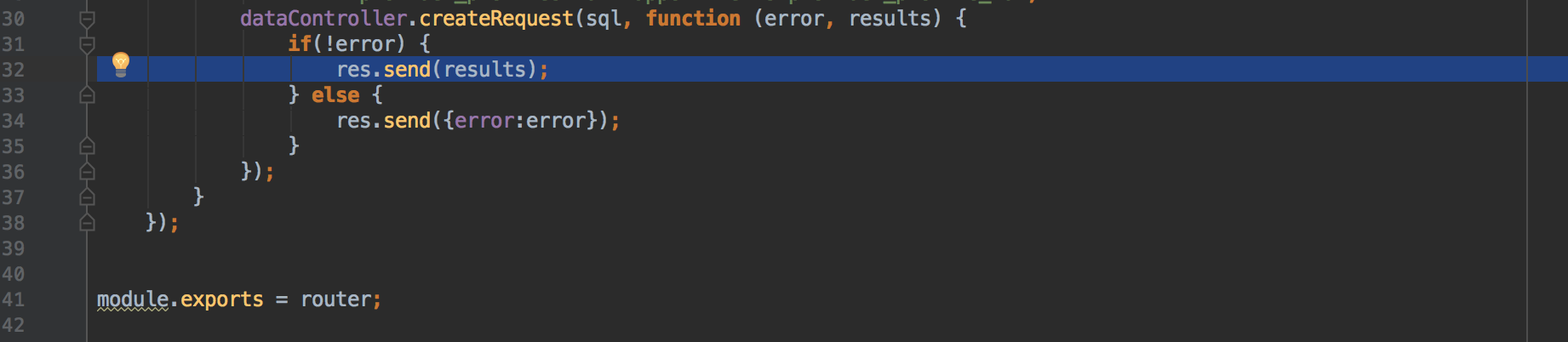
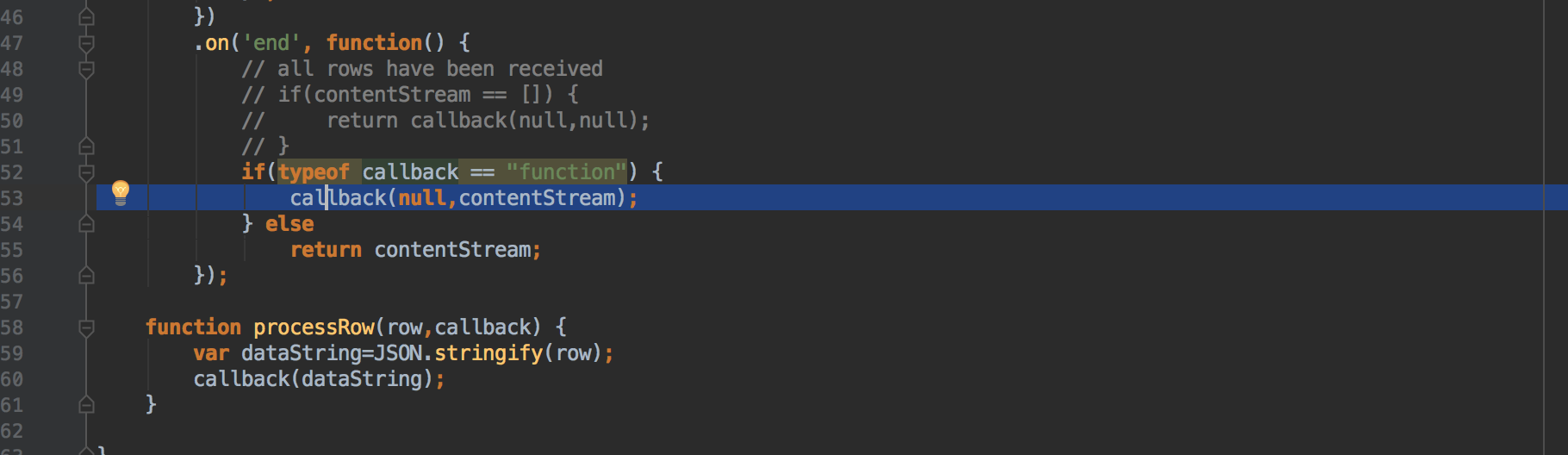
Hi @zeing I'm trying to follow the stack trace, can you add marks on those pastes where lint 53 in dataController.js is and where line 32 in appointment.js is?
 dougwilson
on 3 Aug 2017
dougwilson
on 3 Aug 2017
okay wait a min.
zeing
on 3 Aug 2017
line 32 in appointment.js
line 53 in dataController.js
zeing
on 3 Aug 2017
Ah, that's what I thought. So it looks like the second call was the end. But I wonder what was the first call. Perhaps can you add console.trace(error); to appointment.js between lines 30 and 31 and then run your code again? You should end up with multiple stacks printed, and just paste them here.
dougwilson
on 3 Aug 2017
wait a min and follow this comment update
UPDATE
log is
Trace: null
at /Users/wwz/Documents/ooca admin/routes/appointment.js:31:25
at Query.(/Users/wwz/Documents/ooca admin/routes/dataController.js:53:17)
at emitNone (events.js:110:20)
at Query.emit (events.js:207:7)
at Query.Sequence.end (/Users/wwz/Documents/ooca admin/node_modules/mysql/lib/protocol/sequences/Sequence.js:91:12)
at Query._handleFinalResultPacket (/Users/wwz/Documents/ooca admin/node_modules/mysql/lib/protocol/sequences/Query.js:139:8)
at Query.EofPacket (/Users/wwz/Documents/ooca admin/node_modules/mysql/lib/protocol/sequences/Query.js:123:8)
at Protocol._parsePacket (/Users/wwz/Documents/ooca admin/node_modules/mysql/lib/protocol/Protocol.js:279:23)
at Parser.write (/Users/wwz/Documents/ooca admin/node_modules/mysql/lib/protocol/Parser.js:76:12)
at Protocol.write (/Users/wwz/Documents/ooca admin/node_modules/mysql/lib/protocol/Protocol.js:39:16)
or see simply

zeing
on 3 Aug 2017
previous comment don't have error like this
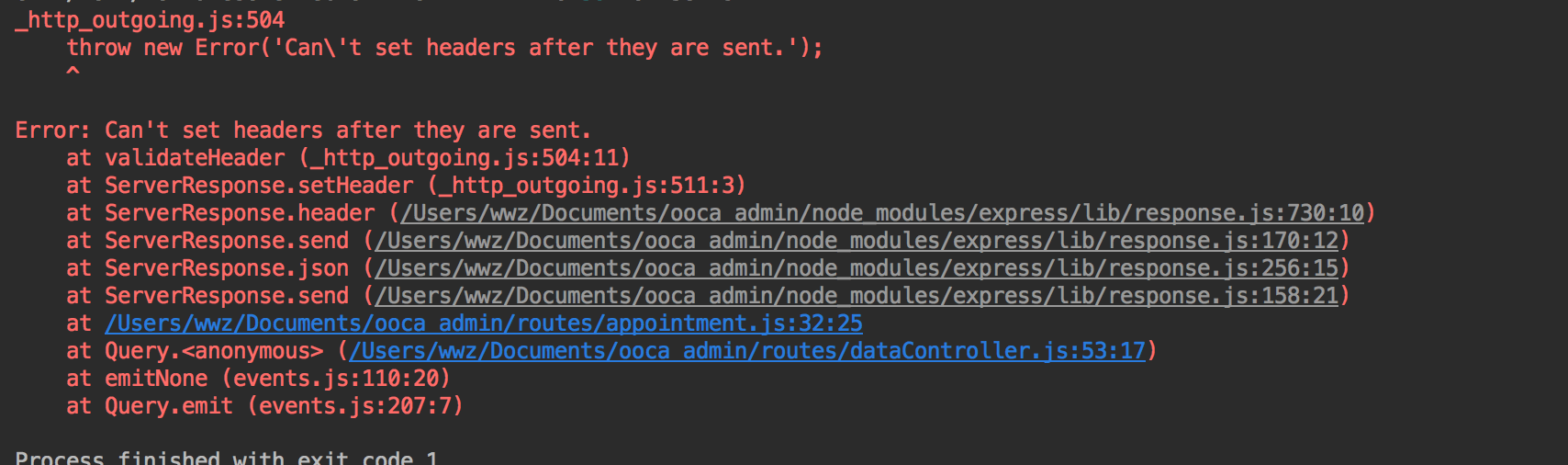
because it happen rarely
zeing
on 3 Aug 2017
Gotcha. In order to figure it out, just need the trace output for a request that also has the error, otherwise it doesn't help understand why the error happens.
dougwilson
on 3 Aug 2017
okay i will console.trace(error); everywhere like this position . So, when it happen i will paste error for you , okay ?
zeing
on 3 Aug 2017
here you are and make my server stop service when this error happen Error('Can\'t set headers after they are sent.');
Trace : { Error: read ECONNRESET
at exports._errnoException (util.js:1022:11)
at TCP.onread (net.js:610:25)
--------------------
at Protocol._enqueue (/Users/wwz/Documents/ooca admin/node_modules/mysql/lib/protocol/Protocol.js:145:48)
at Connection.query (/Users/wwz/Documents/ooca admin/node_modules/mysql/lib/Connection.js:208:25)
at Object.createRequest (/Users/wwz/Documents/ooca admin/routes/dataController.js:27:28)
at /Users/wwz/Documents/ooca admin/routes/appointment.js:30:28
at Layer.handle [as handle_request] (/Users/wwz/Documents/ooca admin/node_modules/express/lib/router/layer.js:95:5)
at next (/Users/wwz/Documents/ooca admin/node_modules/express/lib/router/route.js:137:13)
at next (/Users/wwz/Documents/ooca admin/node_modules/express/lib/router/route.js:131:14)
at Route.dispatch (/Users/wwz/Documents/ooca admin/node_modules/express/lib/router/route.js:112:3)
at Layer.handle [as handle_request] (/Users/wwz/Documents/ooca admin/node_modules/express/lib/router/layer.js:95:5)
at /Users/wwz/Documents/ooca admin/node_modules/express/lib/router/index.js:281:22
code: 'ECONNRESET',
errno: 'ECONNRESET',
syscall: 'read',
fatal: true }
at /Users/wwz/Documents/ooca admin/routes/appointment.js:31:25
at Query.(/Users/wwz/Documents/ooca admin/routes/dataController.js:33:13)
at emitOne (events.js:120:20)
at Query.emit (events.js:210:7)
at Query.Sequence.end (/Users/wwz/Documents/ooca admin/node_modules/mysql/lib/protocol/sequences/Sequence.js:83:12)
at Protocol.handleNetworkError (/Users/wwz/Documents/ooca admin/node_modules/mysql/lib/protocol/Protocol.js:363:14)
at Connection._handleNetworkError (/Users/wwz/Documents/ooca admin/node_modules/mysql/lib/Connection.js:428:18)
at emitOne (events.js:115:13)
at Socket.emit (events.js:210:7)
at emitErrorNT (internal/streams/destroy.js:62:8)
Trace: for dougwilson : null
at /Users/wwz/Documents/ooca admin/routes/appointment.js:31:25
at Query.(/Users/wwz/Documents/ooca admin/routes/dataController.js:53:17)
at emitNone (events.js:110:20)
at Query.emit (events.js:207:7)
at Query.Sequence.end (/Users/wwz/Documents/ooca admin/node_modules/mysql/lib/protocol/sequences/Sequence.js:91:12)
at Protocol.handleNetworkError (/Users/wwz/Documents/ooca admin/node_modules/mysql/lib/protocol/Protocol.js:363:14)
at Connection._handleNetworkError (/Users/wwz/Documents/ooca admin/node_modules/mysql/lib/Connection.js:428:18)
at emitOne (events.js:115:13)
at Socket.emit (events.js:210:7)
at emitErrorNT (internal/streams/destroy.js:62:8)
_http_outgoing.js:504
throw new Error('Can\'t set headers after they are sent.');
^
zeing
on 4 Aug 2017
Oh, haha, I see the issue now. You're getting an error, but don't have any guard to prevent the query ending (because of error) from then also calling your callback.
The docs at https://github.com/mysqljs/mysql#streaming-query-rows note that an 'end' will be emitted after the 'error' (which I also see you have copied in your source code). Sorry I didn't notice that before. Here would be the guard added to your implementation:
function createRequest(command, callback,opt) {
    var query = connection.query(command,opt),
        contentStream=[];

    query
        .on('error', function(err) {
            // Handle error, an 'end' event will be emitted after this as well
            query.removeListener('end', onEnd)
            callback(err,{});
        })
        .on('fields', function(fields) {
            // the field packets for the rows to follow
        })
       .on('result', function(row) {
            // Pausing the connnection is useful if your processing involves I/O
            connection.pause();
            processRow(row, function(data) {
                var dataObj=JSON.parse(data);
                contentStream.push(dataObj);
                connection.resume();
            });
        })
        .on('end', onEnd);
       function onEnd() {
            // all rows have been received
            if(typeof callback == "function") {
                callback(null,contentStream);
            } else
                return contentStream;
        }
    function processRow(row,callback) {
        var dataString=JSON.stringify(row);
        contentStream.push(dataString);
        callback();
    }

}
yes i don't know how to end connection , i try to use connection.end(); but it have error
zeing
on 4 Aug 2017
Hi @zeing I'm not sure what you mean. Did the solution I posted above not work for you?
dougwilson
on 4 Aug 2017
haha sorry for my english , i have been used connection.end(); for stop connect from database but it take my server stop service
this the solution which you post i put it in my code and it wait several time for happen this case adaub , if several day don't happen this case again i will tell you
zeing
on 4 Aug 2017
it work and service don't stop but i refresh my website it don't get data until i restart my service
this is error from console.trace(error)
Trace: { Error: Cannot enqueue Query after fatal error.
at Protocol._validateEnqueue (/Users/wwz/Documents/ooca admin/node_modules/mysql/lib/protocol/Protocol.js:201:16)
at Protocol._enqueue (/Users/wwz/Documents/ooca admin/node_modules/mysql/lib/protocol/Protocol.js:139:13)
at Connection.query (/Users/wwz/Documents/ooca admin/node_modules/mysql/lib/Connection.js:208:25)
at Object.createRequest (/Users/wwz/Documents/ooca admin/routes/dataController.js:27:28)
at /Users/wwz/Documents/ooca admin/routes/appointment.js:30:28
at Layer.handle [as handle_request] (/Users/wwz/Documents/ooca admin/node_modules/express/lib/router/layer.js:95:5)
at next (/Users/wwz/Documents/ooca admin/node_modules/express/lib/router/route.js:137:13)
at next (/Users/wwz/Documents/ooca admin/node_modules/express/lib/router/route.js:131:14)
at Route.dispatch (/Users/wwz/Documents/ooca admin/node_modules/express/lib/router/route.js:112:3)
at Layer.handle [as handle_request] (/Users/wwz/Documents/ooca admin/node_modules/express/lib/router/layer.js:95:5) code: 'PROTOCOL_ENQUEUE_AFTER_FATAL_ERROR', fatal: false }
at /Users/wwz/Documents/ooca admin/routes/appointment.js:31:25
at Query.(/Users/wwz/Documents/ooca admin/routes/dataController.js:34:13)
at emitOne (events.js:120:20)
at Query.emit (events.js:210:7)
at Query.Sequence.end (/Users/wwz/Documents/ooca admin/node_modules/mysql/lib/protocol/sequences/Sequence.js:83:12)
at /Users/wwz/Documents/ooca admin/node_modules/mysql/lib/protocol/Protocol.js:225:14
at _combinedTickCallback (internal/process/next_tick.js:95:7)
at process._tickCallback (internal/process/next_tick.js:161:9)
error from ajax

zeing
on 4 Aug 2017
i fix it from your git mysql's old issue
it's right ?
var connection;

function startConnection() {
    console.error('CONNECTING');
    connection = mysql.createConnection(dbInfo);
    connection.connect(function(err) {
        if (err) {
            console.error('CONNECT FAILED', err.code);
            setTimeout(startConnection, 2000);
        }
        else
            console.error('CONNECTED');
    });
    connection.on('error', function(err) {
        if (err.fatal)
            setTimeout(startConnection, 2000);
    });
}

startConnection();


function createRequest(command, callback,opt) {
    var query = connection.query(command,opt),
        contentStream=[];

    query
        .on('error', function(err) {
            // Handle error, an 'end' event will be emitted after this as well
            query.removeListener('end', onEnd);
            //-
            //- The server close the connection.
            //-
            if(err.code === "PROTOCOL_CONNECTION_LOST"){
                console.log("/!\\ Cannot establish a connection with the database. /!\\ ("+err.code+")");
                return startConnection();
            }

            else if(err.code === "PROTOCOL_ENQUEUE_AFTER_QUIT"){
                console.log("/!\\ Cannot establish a connection with the database. /!\\ ("+err.code+")");
                return startConnection();
            }

            else if(err.code === "PROTOCOL_ENQUEUE_AFTER_FATAL_ERROR"){
                console.log("/!\\ Cannot establish a connection with the database. /!\\ ("+err.code+")");
                return startConnection();
            }

            else if(err.code === "PROTOCOL_ENQUEUE_HANDSHAKE_TWICE"){
                console.log("/!\\ Cannot establish a connection with the database. /!\\ ("+err.code+")");
            }

            else{
                console.log("/!\\ Cannot establish a connection with the database. /!\\ ("+err.code+")");
                return startConnection();
            }
            callback(err,{});
        })
        .on('fields', function(fields) {
            // the field packets for the rows to follow
        })
        .on('result', function(row) {
            // Pausing the connnection is useful if your processing involves I/O
            connection.pause();
            processRow(row, function(data) {
                var dataObj=JSON.parse(data);
                contentStream.push(dataObj);
                connection.resume();
            });
        })
        .on('end', onEnd);
    function onEnd() {
        // all rows have been received
        if(typeof callback == "function") {
            callback(null,contentStream);
        } else
            return contentStream;
    }
    function processRow(row,callback) {
        var dataString=JSON.stringify(row);
        callback(dataString);
    }
}
Hi @zeing I would suggest you use the Pool feature instead of trying to reconnect yourself. You can even set connectionLimit: 1 if you only want to use one connection but still get the reconnecting behavior.
dougwilson
on 5 Aug 2017
okay i will try
zeing
on 5 Aug 2017
May you check my code is correct ?
dataController.js
const   mysql = require('mysql');

const   fs = require('fs'),
        config  = JSON.parse(fs.readFileSync("routes/config.json"));

const  hash = config.hash;

const   prefix = "local", // test | local
        dbInfo = {
            host: config.database[prefix].host,
            user: config.database[prefix].user,
            password: config.database[prefix].password,
            database: config.database[prefix].database,
            charset: config.database[prefix].charset,
            typeCast: function (field, next) {
                if (field.type == 'JSON') {
                    return (JSON.parse(field.string()));
                }
                return next();
            },
            waitForConnections: true,
            connectTimeout: 10000,
            connectionLimit: 10


        };


//-
//- Create the connection variable
//-
var connection = mysql.createPool(dbInfo);

//-
//- Reconnect
//-
function reconnect(connection){
    console.log("\n New connection tentative...");

    //- Create a new one
    connection = mysql.createPool(dbInfo);

    //- Try to reconnect
    connection.getConnection(function(err){
        if(err) {
            //- Try to connect every 2 seconds.
            setTimeout(reconnect(connection), 2000);
        }else {
            console.log("\n\t *** New connection established with the database. ***")
            return connection;
        }
    });
}


function createRequest(command, callback,opt) {
    var query,
        contentStream=[];

    connection.getConnection(function(err){
        //-can't connect to database
        if(err) {
            console.error("\n\t *** ERROR  CONNECTION  ***");
            callback(err);
            return reconnect(connection);

        } else {
            //-can connect to database
            query = connection.query(command,opt);
            query
                .on('error', function(err) {
                    // Handle error, an 'end' event will be emitted after this as well
                    query.removeListener('end', onEnd);
                    console.log("/!\\ Cannot establish a connection with the database. /!\\ ("+err.code+")");
                    callback(err,{});
                    return reconnect(connection);


                })
                .on('fields', function(fields) {
                    // the field packets for the rows to follow
                })
                .on('result', function(row) {
                    // Pausing the connnection is useful if your processing involves I/O
                    processRow(row, function(data) {
                        var dataObj=JSON.parse(data);
                        contentStream.push(dataObj);
                    });
                })
                .on('end', onEnd);
        }
    });

    function onEnd() {
        // all rows have been received
        if(typeof callback == "function") {
            callback(null,contentStream);
        } else
            return contentStream;
    }

    function processRow(row,callback) {
        var dataString=JSON.stringify(row);
        callback(dataString);
    }
}

module.exports = {
    createRequest : createRequest,
    config : config,
    hash  : hash,
    connection : connection
};
sometimes i can't query but my mysql service is started and my nodejs don't stop service already
i check log in ajax happen in part
   error: function (xhr, status, err) { // server doesn't respond
                console.error('Contact backend error');
                console.log(xhr, status, err);
                alertmesseage('Please try again!');

            },
it show error

i think it happen from
query.removeListener('end', onEnd);callback in onEnd function to my route
callback(null,contentStream);
on dataController.js
this is my route
.post(function(req, res) {
        var sql;
                sql = "SELECT bra bra bra ";
                dataController.createRequest(sql,function (error, results) {
                    if(!error) {
                        res.send(results);
                    } else {
                        res.send({error:error});
                    }
                });
zeing
on 7 Aug 2017
when i refresh webpage about 8 times it make query don't work
zeing
on 7 Aug 2017
Hi @zeing I don't see anything in the above that would cause your description (or see where the error you screenshotted above would come from). I'm not sure if I can really help much without getting some full system to run, see the issue, and attach a debugger to to poke at.
dougwilson
on 8 Aug 2017
Related issues
 acefxlabs
·
4Comments
acefxlabs
·
4Comments
 EdoardoPedrotti
·
3Comments
EdoardoPedrotti
·
3Comments
 JCQuintas
·
3Comments
JCQuintas
·
3Comments
 nanom1t
·
3Comments
nanom1t
·
3Comments
 PeppeL-G
·
3Comments
PeppeL-G
·
3Comments