Mysql: Cannot read property 'release' or Cannot read property 'query' of undefined
Hello, it's the first time I'm using NodeJs with mysql and I chose this module. I'm also getting the same error described in this issue:
https://github.com/mysqljs/mysql/issues/1183
TypeError: Cannot read property 'release' of undefined
I deleted the connection.release in the error part as suggested by @dougwilson. When I do that, I get other errors which are:
Error: ER_CON_COUNT_ERROR: Too many connections
and
TypeError: Cannot read property 'query' of undefined at pool.getConnection
I'm not sure which one is the cause and which one is the consequence. I tried to increase the connection limit but I still have this bug sometimes.
Am I doing something wrong? Should I verify that connection exists? But if it doesn't exist the code should only return my cb(err) and not even execute the query, no?
Here's my code:
class Database {

    static getPool() {
        let pool = mysql.createPool({
            connectionLimit :   100,
            host:               DATABASE_HOST,
            user:               DATABASE_USER,
            password:           DATABASE_PASSWORD,
            database:           DATABASE_NAME,
            port:               DATABASE_PORT
        });

        return pool;
    }

    static createQuery(query, params, cb) {

        let pool = this.getPool();

        pool.getConnection((err, connection) => {

            if (err) {
                cb(err);
            }

            connection.query(query, params, (err, result) => {

                connection.release();

                if (err) {
                    cb(err);
                } else {
                    cb(null, result);
                }
            });
        });
    }
}
 anacicconi
All 12 comments
Hi @anacicconi in your code above, you have the three lines:
            if (err) {
                cb(err);
            }
Because the code after that is not wrapped in an else, of course the execution continues to execute code in an error condition. The above code should be the following:
class Database {

    static getPool() {
        let pool = mysql.createPool({
            connectionLimit :   100,
            host:               DATABASE_HOST,
            user:               DATABASE_USER,
            password:           DATABASE_PASSWORD,
            database:           DATABASE_NAME,
            port:               DATABASE_PORT
        });

        return pool;
    }

    static createQuery(query, params, cb) {

        let pool = this.getPool();

        pool.getConnection((err, connection) => {

            if (err) {
                cb(err);
            } else {
                connection.query(query, params, (err, result) => {

                    connection.release();

                    if (err) {
                        cb(err);
                    } else {
                        cb(null, result);
                    }
                });
            }
        });
    }
}
 dougwilson
on 16 Feb 2017
dougwilson
on 16 Feb 2017
Oh shame on me @dougwilson ! I'm starting with node and I thought cb(err) stopped the script and returned the error to the other function. Nothing to do with the module. Sorry.
However, I'm still getting:
Error: ER_CON_COUNT_ERROR: Too many connections
Isn't it because when I have an error I don't release the connection and it keeps stocking the connections? Is it a good idea to do something like this or the connection is automatically released when errors are found?
if (err) {
   if(typeof connection !== 'undefined' && connection) {
       connection.release();
   }

   cb(err);
   return;
}
Hi @anacicconi there is no case when pool.getConnection will provide an err and a connection you need to release. You can certainly add that condition, but I suspect it will not change anything you're seeing. In order to diagnose your issue, we'd need to understand a lot more about how you're using the above code in your program. I see you changed the connectionLimit to 100. I assume you're server it set to allow that many connections, correct?
dougwilson
on 16 Feb 2017
Hi @dougwilson, yes, the server accepts 100 connections. However, this doesn't seem to change anything so I replaced by the default connectionLimit (10). I made some changes to my code in order to have a unique pool and close it after query. However, my connections keep increasing as you can see in my screenshot. Do you have an entire example of how I should use the pool? I mean with the release, the end if necessary and so on?
class Database {

    static createQuery(query, params, cb) {

        var pool              = mysql.createPool({
            host:               DATABASE_HOST,
            user:               DATABASE_USER,
            password:           DATABASE_PASSWORD,
            database:           DATABASE_NAME,
            port:               DATABASE_PORT,
            debug:              true
        });

        pool.getConnection((err, connection) => {

            Logger.info('connected as id ' + connection.threadId);

            if (err) {

                Logger.error('Database - Not able to get connection from pool.');

                if(typeof connection !== 'undefined' && connection) {
                    connection.release();
                }

                cb(err);
                return;
            }

            connection.query(query, params, (err, result) => {

                connection.release();

                if (err) {
                    Logger.error('Database - Error on query.');
                    cb(err);
                } else {
                    cb(null, result);
                }

                pool.end(function onEnd(err) {
                    if (err) {
                        Logger.error('Database - Not able to end pool.');
                    }
                });
            });
        });
    }
}

I'm also in mode debug true now so I can follow all queries and log the connection id just before if. It looks like the pool is creating a new connection to each new query instead of using the ones available as I expected a pool to do. Is it the regular behaviour?
4:36:06 PM - info: connected as id 120
--> ComQueryPacket
ComQueryPacket {
  command: 3,
  sql: 'SELECT * FROM user WHERE fb_uid = \'***\' LIMIT 1' }

4:36:06 PM - info: connected as id 121
--> ComQueryPacket
ComQueryPacket {
  command: 3,
  sql: 'SELECT * FROM user WHERE fb_uid = \'***\' LIMIT 1' }

4:36:06 PM - info: connected as id 122
--> ComQueryPacket
ComQueryPacket {
  command: 3,
  sql: 'SELECT * FROM dialog WHERE user_id = *** ORDER BY created_at DESC LIMIT 1' }
If you keep creating a new pool, then yes, you'll end up with a new connection for each query since it's a new, empty pool each time. Your code above would cause that to happen.
dougwilson
on 17 Feb 2017
If this can be useful for someone, I ended up creating my pool object with a singleton. I thought it was already a singleton in the module but my mistake. Thanks @dougwilson for helping me through the problem.
var Pool = (function () {
    var instance;

    function createInstance() {
        var object = mysql.createPool({
            connectionLimit :   10,
            host:                    DATABASE_HOST,
            user:                    DATABASE_USER,
            password:           DATABASE_PASSWORD,
            database:           DATABASE_NAME,
            port:                   DATABASE_PORT,
            //debug:             true
        });
        return object;
    }

    return {
        getInstance: function () {
            if (!instance) {
                instance = createInstance();
            }
            return instance;
        }
    };
})();

function createQuery(query, params, cb) {

    var pool = Pool.getInstance();

    pool.getConnection((err, connection) => {

        logger.debug('Database - Connection id ' + connection.threadId);

        if (err) {

            logger.error('Database - Not able to get connection from pool');

            if (typeof connection !== 'undefined' && connection) {
                connection.release();
            }

            cb(err);
            return;
        }

        connection.query(query, params, (err, result) => {

            connection.release();

            if (err) {
                logger.error('Database - Error on query');
                cb(err);
            } else {
                cb(null, result);
            }
        });
    });
}


module.exports = {
    createQuery: createQuery
};
i am getting a frequent error shown below and it is leading to crash of application.... can anyone help on this.
D:\Users\vurumadl\Desktop\bg_latest_5pm\node_modules\mysql\lib\protocol\Parser.js:79
throw err; // Rethrow non-MySQL errors
^
TypeError: Cannot read property 'query' of undefined
at D:\Users\vurumadl\Desktop\bg_latest_5pm\appOriginal.js:671:13
at Handshake.onConnect [as _callback] (D:\Users\vurumadl\Desktop\bg_latest_5pm\node_modules\mysql\lib\Pool.js:58:9)
at Handshake.Sequence.end (D:\Users\vurumadl\Desktop\bg_latest_5pm\node_modules\mysql\lib\protocol\sequences\Sequence.js:86:24)
at Handshake.ErrorPacket (D:\Users\vurumadl\Desktop\bg_latest_5pm\node_modules\mysql\lib\protocol\sequences\Handshake.js:105:8)
at Protocol._parsePacket (D:\Users\vurumadl\Desktop\bg_latest_5pm\node_modules\mysql\lib\protocol\Protocol.js:280:23)
at Parser.write (D:\Users\vurumadl\Desktop\bg_latest_5pm\node_modules\mysql\lib\protocol\Parser.js:75:12)
at Protocol.write (D:\Users\vurumadl\Desktop\bg_latest_5pm\node_modules\mysql\lib\protocol\Protocol.js:39:16)
at Socket. (D:\Users\vurumadl\Desktop\bg_latest_5pm\node_modules\mysql\lib\Connection.js:104:28)
at emitOne (events.js:96:13)
at Socket.emit (events.js:191:7)
 vurumadla
on 27 Jul 2017
vurumadla
on 27 Jul 2017
this is the code i used...
var applicantbank = mysql.createPool({
connectionLimit: 150000,
host: 'localhost',
user: 'root',
password: 'root',
database: 'applicantbank'
});
alfabank.get('/bgamendreq',function (req, res) {
var queryString = "SELECT * FROM bankguaranteeamend where status='AMEND REQUESTED'";
applicantbank.getConnection(function(err, connection) {
    /*if (err) {
        //connection.release();
        res.json({ "code": 100, "status": "Error in connection database" });
        return;
    }*/
    connection.query(queryString, function(err, rows, fields) {
        if (err){
            res.send("FAILURE");
        }
        if(rows.length <=0){
            res.send(" [ { Result: 'Failure' } ]");
            return;
        }
        else{
            res.send(rows);
            return
            }
    connection.release();
    });
});
});
vurumadla
on 27 Jul 2017
@vurumadla what do you get in the err ?
note that you don't need to release connection if getConnection failed, your error handling code should look like this:
applicantbank.getConnection(function(err, connection) {
  if (err) {
     res.json({ "code": 100, "status": "Error in connection database" });
     return;
   }

   connection.query(queryString, function(err, rows, fields) {
     if (err) {
    res.send("FAILURE");
        return;
      }
    connection.release();
     // use data here
   });
});
 sidorares
on 27 Jul 2017
sidorares
on 27 Jul 2017
Thanks @sidorares :+1: for the response.
You saved the day @vurumadla. :+1:
 nsdeo12
on 28 Jul 2017
nsdeo12
on 28 Jul 2017
thank you @sidorares it worked for me. thanks for the response.
vurumadla
on 28 Jul 2017
hi all , i am having still same problem , I was not able to connect to MySQL for AWS Lambda with Node.js. When I used console.log it shows correct response from " the data base as the data from db : rk, " but when I tried to test it was not showing the correct response. , I also tried configuring the security groups for AWS MySQL and Lambda.
Below was the logs and the index.js files and logs. Can anybody please guide me i am strugling from 2 days ?
index.js :
var mysql = require('mysql');
var pool  = mysql.createPool({
    host     : 'mydbinstancelamda.connqa9taxeg.us-east-1.rds.amazonaws.com',
    user     : 'admin',
    password : 'password',
    database : 'dbname'
  });

exports.handler =  (event, context, req,res,callback)=> {
pool.getConnection(function(err, connection) {
    if (err) throw err;
var queryString = "SELECT emp_name from employee where emp_name='rk'";
    connection.query(queryString, function(err, rows, fields) {
        if (err) throw err;
        console.log(rows[0].emp_name);
        connection.release();
    });
});
};
error :
enter image description here
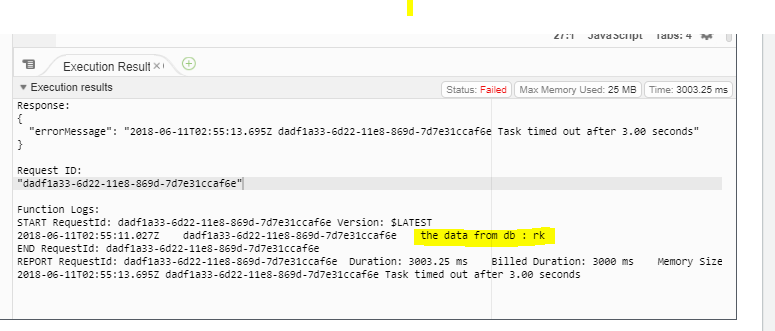
security groups in lamda:
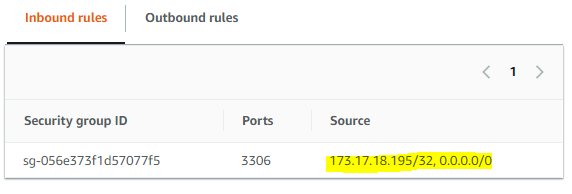
security groups in rds :


 ERama035
on 11 Jun 2018
ERama035
on 11 Jun 2018
Related issues
 wahengchang
·
3Comments
wahengchang
·
3Comments
 Axxxx0n
·
3Comments
Axxxx0n
·
3Comments
 abou7mied
·
4Comments
abou7mied
·
4Comments
 skilbjo
·
3Comments
skilbjo
·
3Comments
 acefxlabs
·
4Comments
acefxlabs
·
4Comments
Most helpful comment
Thanks @sidorares :+1: for the response.
You saved the day @vurumadla. :+1: