Mvvmcross: Closing new separate window with "X" button
Hello
I have command in MainViewModel attached to the button which opens a new separate window.
Here is the code which navigates to the new window:
await NavigationService.Navigate<UserViewModel, UserViewModelParameter>(parameter);
And here is the code of that window ViewModel: (The rest of code is not important)
In this VM I have a "Save button" which saves a data do the DB and close the window with the
await NavigationService.Close(this, user);
public class UserViewModel : MvxNavigationViewModel<UserViewModelParameter, UserWithGroups>
{
}

private async Task TryToSaveUserAsync()
{
    try
    {
        var user = await SaveUserAsync();
        await NavigationService.Close(this, user);
    }
    catch (Exception e)
    {
        await NavigationService.Close(this, Utilities.MapperHelper.Map<UserWithGroups>(cfg => cfg.CreateMap<UserViewModelParameter, UserWithGroups>(), _parameter));
                //dialog to do
    }
}
Here is the cs file of the View:
public partial class UserView : IMvxOverridePresentationAttribute
    {
        public UserView()
        {
            InitializeComponent();
        }

        public MvxBasePresentationAttribute PresentationAttribute(MvxViewModelRequest request)
        {
            var instanceRequest = request as MvxViewModelInstanceRequest;
            var viewModel = instanceRequest?.ViewModelInstance as UserViewModel;
            this.DataContext = viewModel;
            return new MvxWindowPresentationAttribute
            {
                Identifier = $"{nameof(UserView)}.{viewModel?.Count}"
            };
        }}
But my question is how to call await NavigationService.Close(this, user); when user hits "X" button in the top right corner?
Because when I close this new window with X button and close the MainWindow the app is still running in Visual Studio.
 GWawrzeniecki
All 3 comments
Stack OverflowHow can I catch the event of the window close button(red X button on window right top corner) in a WPF form? We have got the closing event, window unloaded event also, but we want to show a pop up ...

 Cheesebaron
on 25 Nov 2020
Cheesebaron
on 25 Nov 2020
Okay
So the UserView class looks like below:
`public partial class UserView : IMvxOverridePresentationAttribute
{
public UserView()
{
InitializeComponent();
}
    public MvxBasePresentationAttribute PresentationAttribute(MvxViewModelRequest request)
    {
        var instanceRequest = request as MvxViewModelInstanceRequest;
        var viewModel = instanceRequest?.ViewModelInstance as UserViewModel;
        this.DataContext = viewModel;
        return new MvxWindowPresentationAttribute
        {
            Identifier = $"{nameof(UserView)}.{viewModel?.Count}"
        };


    }

    private void MvxWindow_Closing(object sender, System.ComponentModel.CancelEventArgs e)
    {

    }

    protected override void OnClosing(CancelEventArgs e)
    {
        base.OnClosing(e);
        var vm = this.DataContext as UserViewModel;
        if (!vm.CloseWithNotXButton)
            (this.DataContext as UserViewModel).CloseWindow();
    }
}`
So when I close that new separate window - UserView with X button and the code from OnClosing method is being executed
I get following exception
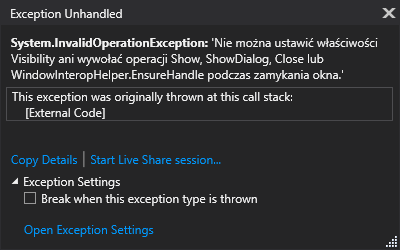
The transaltion:
System.InvalidOperationException: 'Cannot set the Visibility property or invoke Show, ShowDialog, Close, or WindowInteropHelper.EnsureHandle while closing the window.'
In addition when I only open MainWindow and close it with X button the process is still going on.
namespace OutlookSignatures.MvxCore.ViewModels
{
    public class SignatureViewModel : MvxNavigationViewModel
    {
 }
}
GWawrzeniecki
on 26 Nov 2020
@Cheesebaron Could you open this issue?
GWawrzeniecki
on 1 Dec 2020
Related issues
 RonakPatel21
·
4Comments
RonakPatel21
·
4Comments
 a7ex
·
3Comments
a7ex
·
3Comments
 ssepulveda
·
5Comments
ssepulveda
·
5Comments
 ehuna
·
3Comments
ehuna
·
3Comments
 biozal
·
3Comments
biozal
·
3Comments