Mvvmcross: Navigation from MvxTabbedPage does not work
The new MvxFormsPagePresenter does not support navigation inside a MvxTabbedPage.
Steps to reproduce :scroll:
Modify the three pages Tab1Page, Tab2Page and Tab3Page in Playground.Forms.UI sample so that WrapInNavigationPage is true for the MvxTabbedPagePresentation attribute.
Click the Show Child button
Expected behavior :thinking:
The child should appear inside the Tab1Page
Actual behavior :bug:
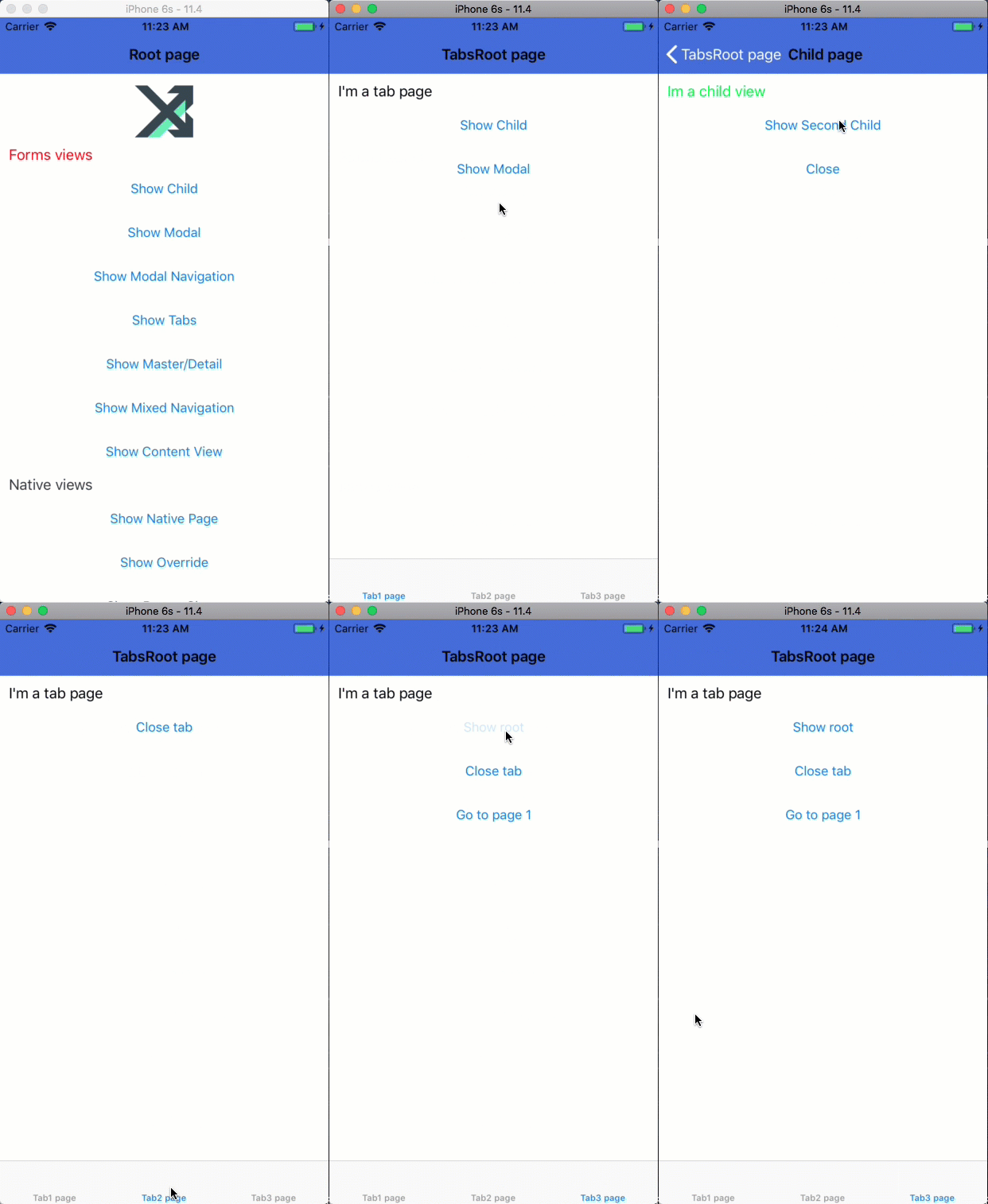
The child is displayed on top of the MvxTabbedPage page
Configuration :wrench:
Version: 5.x
Platform:
- [ ] :iphone: iOS
- [X ] :robot: Android
- [ ] :checkered_flag: WPF
- [ ] :earth_americas: UWP
- [ ] :apple: MacOS
- [ ] :tv: tvOS
- [ X] :monkey: Xamarin.Forms
 erviem99
All 16 comments
I think this issue could be resolved by utilizing the HostedViewModel attribute as a way to identify which Page the new page should be added to (the Navigation property).
Besides that there seems to be a problem in that MvxFormsPagePresenter does not create a new NavigationPage for pages inside a TabbedPage even though the WrapInNavigationPage attribute is true.
erviem99
on 5 Jan 2018
@erviem99 are you able to reproduce this issue on the 6.1 branch? and would you be able to submit a PR that demonstrates this issue (use the existing playground sample) so we can assist with fixing it?
 nickrandolph
on 6 Jun 2018
nickrandolph
on 6 Jun 2018
I'm sorry. I abandoned Xamarin.Forms shortly after this and haven't looked at it since.
erviem99
on 7 Jun 2018
Hi I believe it is still a problem. If I use the playground forms sample, using the show tabs menu option, clicking show child on the Tab1 page, the child is still pushed on top of the Tabbed page. I've tried adding HostViewModelType to the child page but this didn't have any impact. If I've missed something, a point in the right direction would be greatly appreciated.
 afk013
on 28 Jun 2018
afk013
on 28 Jun 2018
Is there any progress update on this?
@afk013 Have you managed to get any further on this?
 reense
on 30 Aug 2018
reense
on 30 Aug 2018
@afk013 Do you want to share your demo code?
 hoquem1
on 19 Sep 2018
hoquem1
on 19 Sep 2018
GitHub
The .NET MVVM framework for cross-platform solutions, including Xamarin.iOS, Xamarin.Android, Windows and Mac. - MvvmCross/MvvmCross

 Cheesebaron
on 11 Oct 2018
Cheesebaron
on 11 Oct 2018
Is there any hack work around for this?
I would love to use Mvx for my current forms app as I plan to transition to Xamarin.iOS and Xamarin.Android eventually - however, this bug is killing my ability to do so.
I tried adding the tabs as you would in a normal xamarin forms app but it seems to mess up the whole Mvx navigation stack.
 nxus-nick
on 15 Nov 2018
nxus-nick
on 15 Nov 2018
The hack is using another framework. I was halfway through creating my app, when I found out about this issue. I switched to FreshMVVM, it works perfectly.
reense
on 15 Nov 2018
@nickrandolph @martijn00
This is my first time poking around in the Mvx source code, and I only have been looking into the framework itself for a few days. It looks like this bug is related to: https://github.com/MvvmCross/MvvmCross/blob/develop/MvvmCross.Forms/Presenters/MvxFormsPagePresenter.cs#L590
The child page is added without checking its PresentationAttributes, specifically the WrapInNavigationPage attribute.
While it wouldn't be hard to add in a fix to wrap it in a navigation page if WrapInNavigationPage = true, I am not familiar enough with all the other navigation attribute properties to implement those.
Let me know how I can help.
In the mean time for anyone stuck I did find a work around by calling creating the children pages in the tabbedpage ctor and using MvxViewModelLoader to bootstrap the MvxFramework.
The .NET MVVM framework for cross-platform solutions, including Xamarin.iOS, Xamarin.Android, Windows and Mac. - MvvmCross/MvvmCross
nxus-nick
on 16 Nov 2018
Any progress on this or a workaround? We are currently having the same problem and can't seem to find a workaround.
 rurounidev
on 16 Nov 2018
rurounidev
on 16 Nov 2018
I am having the same issue. Hopefully I found a solution. @nxus-nick , you are correct. The issue is that the tab pages are not being wrapped in NavigationPage prior to being added to the tab host.
For anybody stuck with this issue try this: inherit from MvxFormsPagePresenter in your apps and override _ShowTabbedPage()_. Then wrap your page in a NavigationPage prior to pushing it to the tabhost children and the issue will be gone.
public override async Task<bool> ShowTabbedPage(Type view, MvxTabbedPagePresentationAttribute attribute, MvxViewModelRequest request)
{
    var page = await CloseAndCreatePage(view, request, attribute);

    if (attribute.Position == TabbedPosition.Root)
    {
        if (page is TabbedPage tabbedPageRoot)
        {
            await PushOrReplacePage(FormsApplication.MainPage, page, attribute);
        }
        else
            throw new MvxException($"A root page should be of type {nameof(TabbedPage)}");
    }
    else
    {
        var tabHost = GetPageOfType<TabbedPage>();
        if (tabHost == null)
        {
            tabHost = new TabbedPage();
            await PushOrReplacePage(FormsApplication.MainPage, tabHost, attribute);
        }

        // New code
        if (attribute.WrapInNavigationPage)
        {
            page = CreateNavigationPage(page).Build(tp =>
            {
                tp.Title = page.Title;
                tp.Icon = page.Icon;
            });
        }
        tabHost.Children.Add(page);
    }
    return true;
}
I have a CR here
 yavor87
on 27 Nov 2018
yavor87
on 27 Nov 2018
Any movement on this? Just ran in to this issue, and it's a show-stopper for me.
 bcornett
on 11 Feb 2019
bcornett
on 11 Feb 2019
Hello guys,
I have tried to implement the @yavor87 solution, it works fine. now i have a new navigationpage instance on top of each page of each tab option.
But the problem is that when i try to navigate in the page number 2(tab2) to another page, that new page is display in the navigation page of the first tab.
I'm using _navigationService.Navigate
Does anyone knows how to solve this issue? or any other way to have NavigationPage control for each tab item?
Thanks in advance
Victor.
 VicRamHdz
on 26 Apr 2019
VicRamHdz
on 26 Apr 2019
Hey Victor,
I had this same problem, I have 4 tabs, each is wrapped in a navigation page. If you look at the code in PushOrReplacePage it seems to assume there will only be a single navigation stack, i.e. it doesn't understand multiple tabs. So when you try and add a page to the 4th tab, it appears over the first.
The HostViewModelType presenter attribute isn't used here as a hint to which stack you might want to use. To fix I override the PushOrReplacePage function and added the following:
public override async Task PushOrReplacePage(Page rootPage, Page page, MvxPagePresentationAttribute attribute)
{
    // Make sure we always have a rootPage
    if (rootPage == null)
    {
        rootPage = FormsApplication.MainPage;
    }

    var navigationRootPage = GetPageOfType<NavigationPage>(rootPage);

    // if our root page is a tabbed page then we need to check the different tabs for the appropriate navigation stack
    if (attribute.WrapInNavigationPage && attribute.HostViewModelType != null && rootPage is TabbedPage tabbedPage)
    {
        // find the child that is a navigation stack with a view using the HostViewModelType as its view model
        foreach (var tab in tabbedPage.Children)
        {
            if (tab is NavigationPage navPage)
            {
                // does this stack have the view with the view model type we want
                var newPage = navPage?.Navigation?.NavigationStack?.OfType<IMvxPage>().FirstOrDefault(x => x.ViewModel.GetType() == attribute.HostViewModelType) as Page;
                if (newPage != null)
                {
                    navigationRootPage = navPage;
                }
            }
        }
    }
...
This requires you to set the HostViewModelType on the page you're trying to navigate to, this should be the view model associated with navigation page at the root of the tab you're wanting to add it to. I've not fully verified this code yet, however, it is working in my current test.
Note this is used in combination with the fix from @yavor87
 TonyPovey
on 5 Jun 2019
TonyPovey
on 5 Jun 2019
I've integrated the fixes suggested above into a setup that works in my scenario - YMMV. Taking a look at my PR may help make sense of the above if you need to get this working.
 rogersillito
on 27 Aug 2019
rogersillito
on 27 Aug 2019
Related issues
 StephenBeirlaen
·
4Comments
StephenBeirlaen
·
4Comments
 kenigj
·
5Comments
kenigj
·
5Comments
 HaraldMuehlhoffCC
·
4Comments
HaraldMuehlhoffCC
·
3Comments
HaraldMuehlhoffCC
·
4Comments
HaraldMuehlhoffCC
·
3Comments
 neminush
·
4Comments
neminush
·
4Comments
Most helpful comment
I am having the same issue. Hopefully I found a solution. @nxus-nick , you are correct. The issue is that the tab pages are not being wrapped in NavigationPage prior to being added to the tab host.
For anybody stuck with this issue try this: inherit from MvxFormsPagePresenter in your apps and override _ShowTabbedPage()_. Then wrap your page in a NavigationPage prior to pushing it to the tabhost children and the issue will be gone.
I have a CR here