Mvc: I met a mistake:Multipart body length limit 16384 exceeded
I use the middle to achieve large file upload, but encountered a mistake, I should be how to solve?
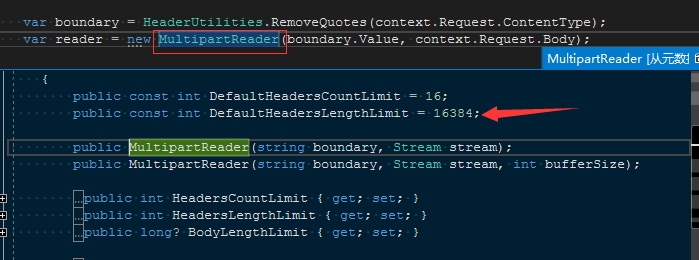
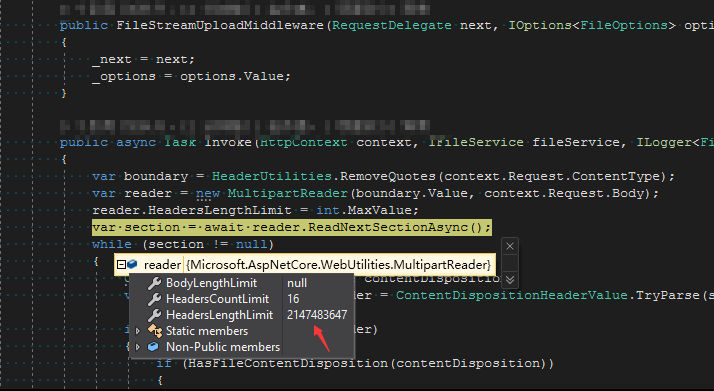
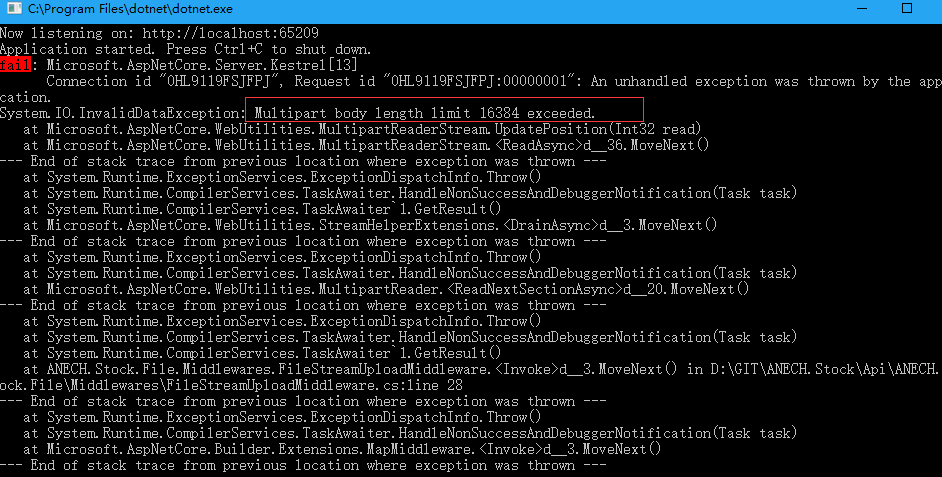
_All of the settings below are invalid_
```c#
public void ConfigureServices(IServiceCollection services)
{
services.Configure
{
x.ValueLengthLimit = int.MaxValue;
x.MultipartBodyLengthLimit = int.MaxValue;
x.MultipartHeadersLengthLimit = int.MaxValue;
});
    services.AddMvc();
}
```
 ynanech
All 12 comments
@Tratcher any idea on this limit?
 Eilon
on 2 Nov 2017
Eilon
on 2 Nov 2017
Some multipart bodies include preamble data before the first mutipart section. MultipartReader automatically drains that portion but limits it to 16k. There's not currently a way to configure this behavior.
See https://github.com/aspnet/HttpAbstractions/blob/c0f937239a0a099b73c67c96ab9e1c875952f67f/src/Microsoft.AspNetCore.WebUtilities/MultipartReader.cs#L48-L50
Do you know why your upload includes a large preamble section? This is likely unintentional.
 Tratcher
on 2 Nov 2017
Tratcher
on 2 Nov 2017
@Tratcher parking this on your plate until we can figure out what's wrong.
Eilon
on 2 Nov 2017
@Tratcher @Eilon
Thank you for your help.
I want to adjust the limit, but the setting is invalid, I want to achieve a separate file upload service through the middleware, I test only upload a 31.7KB file, it is temporarily unable to achieve this idea, I refer to this tutorial:
https://docs.microsoft.com/zh-cn/aspnet/core/mvc/models/file-uploads#uploading-large-files-with-streaming
ynanech
on 3 Nov 2017
What client are you using for the upload? An HTML form in a browser? Which browser?
Can you share a Fiddler trace of the upload? From your description it contains unexpected content.
Tratcher
on 3 Nov 2017
@Tratcher
I use Postman to upload, and this is the fiddler content
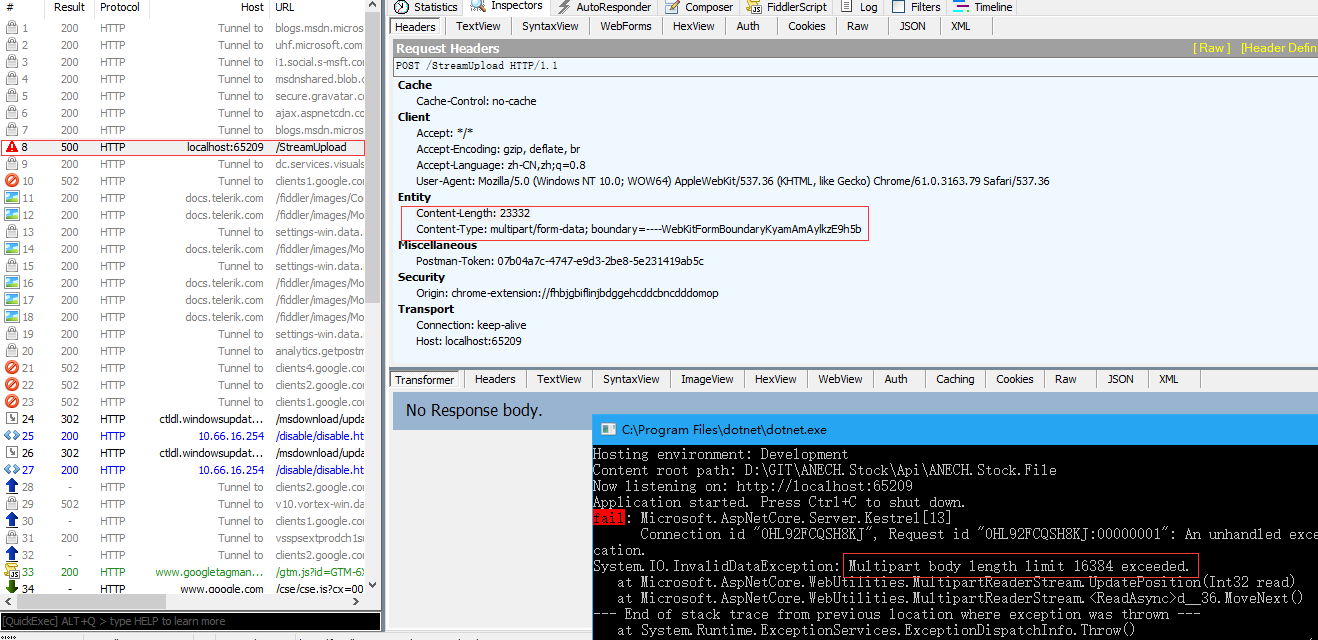
This is the test code:
`
public class FileStreamUploadMiddleware
{
private readonly RequestDelegate _next;
    public FileStreamUploadMiddleware(RequestDelegate next)
    {
        _next = next;
    }

    public async Task Invoke(HttpContext context)
    {
        var boundary = HeaderUtilities.RemoveQuotes(context.Request.ContentType);
        var reader = new MultipartReader(boundary.Value, context.Request.Body);
        reader.HeadersLengthLimit = int.MaxValue;
        var section = await reader.ReadNextSectionAsync();
        while (section != null)
        {
            ContentDispositionHeaderValue contentDisposition;
            var hasContentDispositionHeader = ContentDispositionHeaderValue.TryParse(section.ContentDisposition, out contentDisposition);

            if (hasContentDispositionHeader)
            {
                if (HasFileContentDisposition(contentDisposition))
                {
                    //保存文件
                }
            }
            section = await reader.ReadNextSectionAsync();
        }
    }

    #region Helper
    public static bool IsMultipartContentType(string contentType)
    {
        return !string.IsNullOrEmpty(contentType)
               && contentType.IndexOf("multipart/", StringComparison.OrdinalIgnoreCase) >= 0;
    }
    public static bool HasFileContentDisposition(ContentDispositionHeaderValue contentDisposition)
    {
        // Content-Disposition: form-data; name="myfile1"; filename="Misc 002.jpg"
        return contentDisposition != null
               && contentDisposition.DispositionType.Equals("form-data")
               && (!string.IsNullOrEmpty(contentDisposition.FileName.Value)
                   || !string.IsNullOrEmpty(contentDisposition.FileNameStar.Value));
    }
    #endregion
}
`
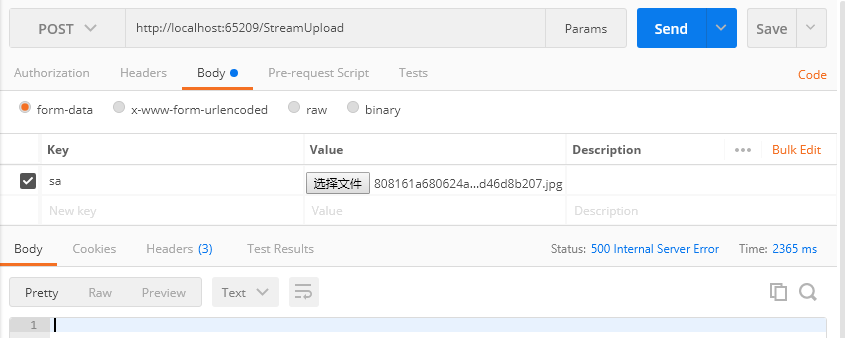
ynanech
on 3 Nov 2017
Can you save and upload that Fiddler trace? I need to see the request body.
Tratcher
on 3 Nov 2017
@Tratcher
Is this one?
4_Full.txt
ynanech
on 3 Nov 2017
The request looks normal, but I see you're retrieving the boundary incorrectly.
var boundary = HeaderUtilities.RemoveQuotes(context.Request.ContentType);
The linked sample code does this instead:
    var boundary = MultipartRequestHelper.GetBoundary(
        MediaTypeHeaderValue.Parse(Request.ContentType),
        _defaultFormOptions.MultipartBoundaryLengthLimit);
@Eilon @Tratcher
Feedback problem is too tired, I hope you can run the test code(FileStreamUploadMiddleware) I provided above, you will find the core issues. Can you take a look at it?
My code and the core of the official code is the same!
var boundary = HeaderUtilities.RemoveQuotes(context.Request.ContentType);
The following is an example of the official code:
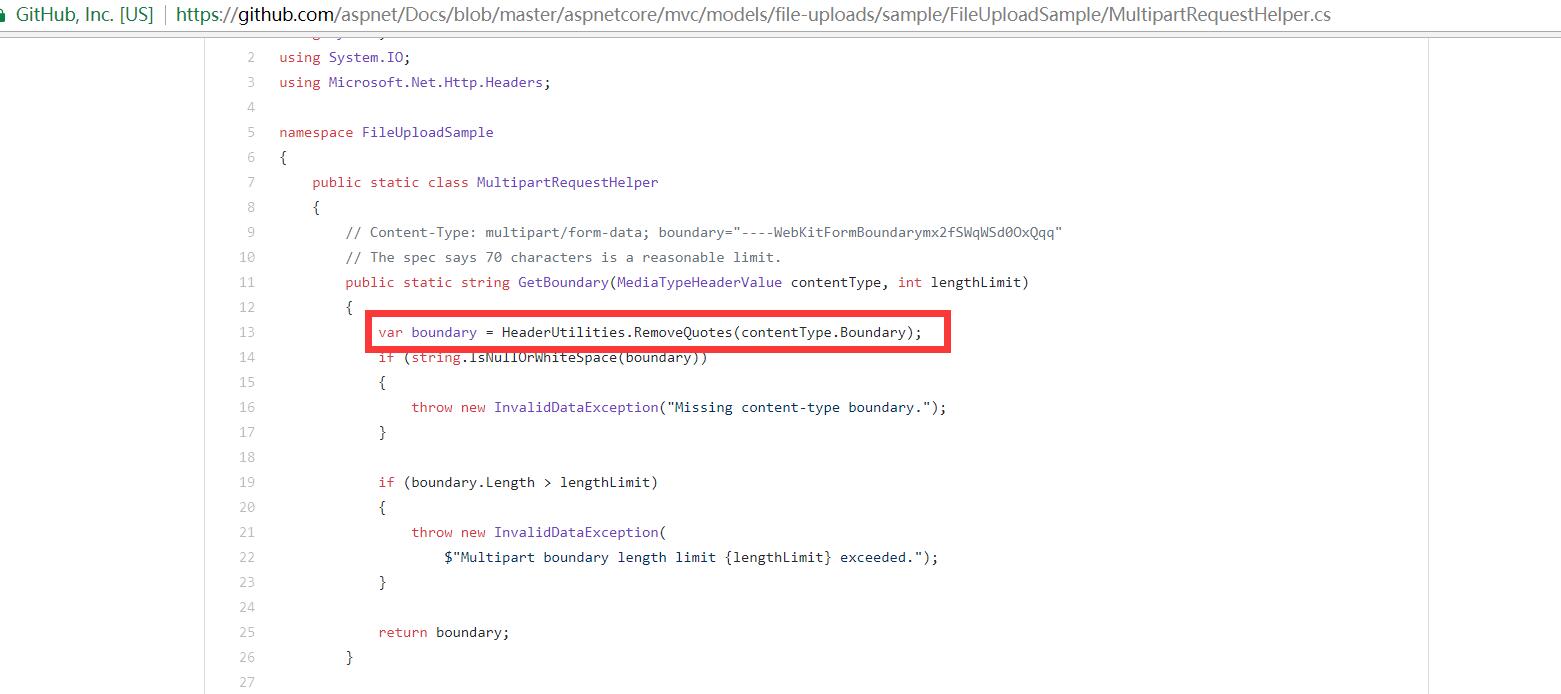
Please run the test code I provided, you will find the problem, I modified the size limit, but still use the default settings.
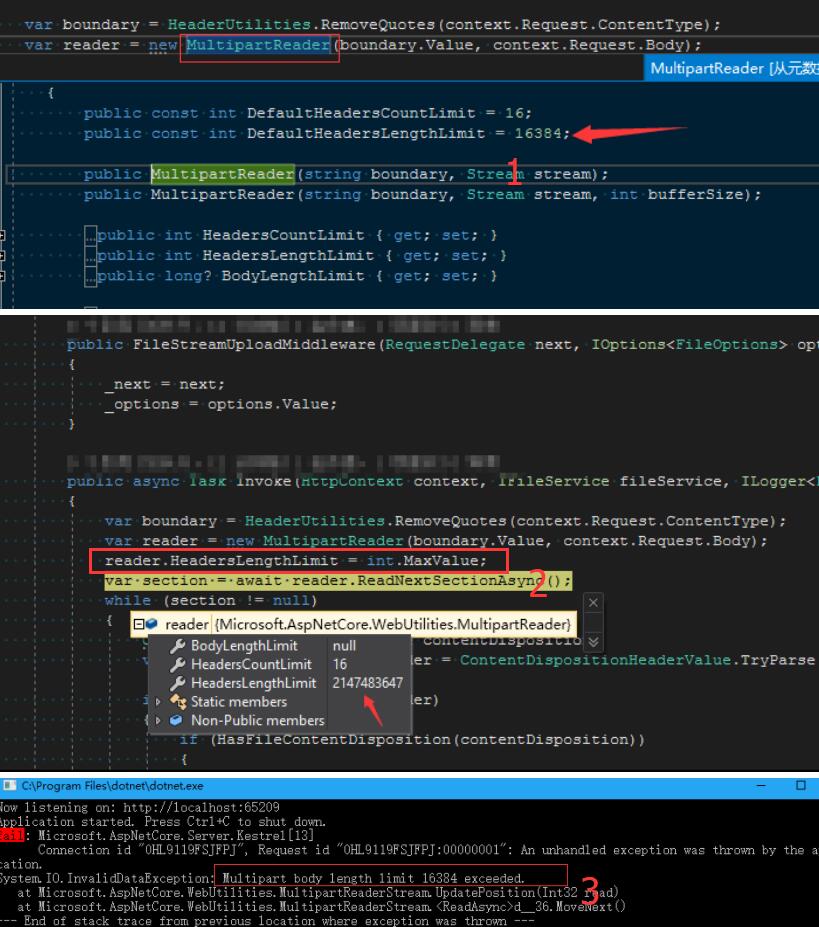
Test code(Please run it):
`public class FileStreamUploadMiddleware
{
private readonly RequestDelegate _next;
public FileStreamUploadMiddleware(RequestDelegate next)
{
    _next = next;
}

public async Task Invoke(HttpContext context)
{
    var boundary = HeaderUtilities.RemoveQuotes(context.Request.ContentType);
    var reader = new MultipartReader(boundary.Value, context.Request.Body);
    reader.HeadersLengthLimit = int.MaxValue;
    var section = await reader.ReadNextSectionAsync();
    while (section != null)
    {
        ContentDispositionHeaderValue contentDisposition;
        var hasContentDispositionHeader = ContentDispositionHeaderValue.TryParse(section.ContentDisposition, out contentDisposition);

        if (hasContentDispositionHeader)
        {
            if (HasFileContentDisposition(contentDisposition))
            {
                //保存文件
            }
        }
        section = await reader.ReadNextSectionAsync();
    }
}

#region Helper
public static bool IsMultipartContentType(string contentType)
{
    return !string.IsNullOrEmpty(contentType)
           && contentType.IndexOf("multipart/", StringComparison.OrdinalIgnoreCase) >= 0;
}
public static bool HasFileContentDisposition(ContentDispositionHeaderValue contentDisposition)
{
    // Content-Disposition: form-data; name="myfile1"; filename="Misc 002.jpg"
    return contentDisposition != null
           && contentDisposition.DispositionType.Equals("form-data")
           && (!string.IsNullOrEmpty(contentDisposition.FileName.Value)
               || !string.IsNullOrEmpty(contentDisposition.FileNameStar.Value));
}
#endregion
}`
ynanech
on 5 Nov 2017
What @Tratcher is referring to:
You use:
var boundary = HeaderUtilities.RemoveQuotes(context.Request.ContentType);
context.Request.ContentType is in your request multipart/form-data; boundary=----WebKitFormBoundary8Su1nBMUX1qEXx1z, you need to first parse it, because you're only interested in the boundary parameter
In the reference code you posted, contentType is already a parsed MediaTypeHeaderValue, take a close look at your screenshot it says contentType.Boundary, and take a look at the method signature it says MediaTypeHeaderValue, so yes you need to do exactly what @Tratcher said, parse the content-Type to MediaTypeHeaderValue then take the property Boundary and strip the (optional) quotes.
e.g.
var parsedContentType = MediaTypeHeaderValue.Parse(context.Request.ContentType);
var boundary = HeaderUtilities.RemoveQuotes(parsedContentType.Boundary);
You can also use the extension method GetMultipartBoundary from Microsoft.AspNetCore.Http.Extensions, see: https://github.com/aspnet/HttpAbstractions/blob/dev/src/Microsoft.AspNetCore.Http.Extensions/HttpRequestMultipartExtensions.cs
 Tornhoof
on 6 Nov 2017
Tornhoof
on 6 Nov 2017
I am sorry, I ignored this small detail, thank you very much for the patience solution. thank
ynanech
on 7 Nov 2017
Related issues
 bugproof
·
3Comments
bugproof
·
3Comments
 DamianEdwards
·
3Comments
DamianEdwards
·
3Comments
 saf-itpro
·
3Comments
saf-itpro
·
3Comments
 svallis
·
3Comments
svallis
·
3Comments
 rynowak
·
3Comments
rynowak
·
3Comments