My server is centos 7.2 64-bit system
Recently. Netcore1.1 procedures to upgrade to. Netcore2.0 View template changes do not timely update the problem
To restart the application to update
Because I was a multi-site application, the same procedures different domain name binding access, some sites after the update, some do not have to restart the application was updated, do not know if there is any internal MVC mechanism of special cache, because there is a run More than a hundred sites, and do not know if the system is not too many files in the folder reasons, do not have a server site will not have this problem
我服务器是centos 7.2 64位系统
最近把.netcore1.1程序升级成.netcore2.0后View模板修改后不及时更新问题
要重启应用程序才能更新
因为我的是多站点应用,相同的程序不同域名绑定访问,有些站点修改后就更新,有些不行一定要重启应用才更新,不知道是不是MVC的内部机制有什么特殊缓存,因为运行有一百多个站点了,不知道是不是系统文件夹里文件太多的原因,另一台服务器站点不多就不会有这问题
 qibucloud
All 26 comments
My server is centos 7.2 64-bit system
Recently. Netcore1.1 procedures to upgrade to. Netcore2.0 after checking the template is not updated after the update
To restart the application to update
Because my English multi-site applications, the same procedures for different domain name binding visit, some sites after the update, some not necessarily have to restart the application before updating, do not know if there is any internal mechanism MVC special cache, because the operation has More than one hundred sites, and do not know the system is not too many documents in the folder reasons, another server site will not have this problem
qibucloud
on 8 Sep 2017
<MvcRazorExcludeRefAssembliesFromPublish>false</MvcRazorExcludeRefAssembliesFromPublish>
    <MvcRazorCompileOnPublish>false</MvcRazorCompileOnPublish>
    <PreserveCompilationContext>true</PreserveCompilationContext>
    <LangVersion>latest</LangVersion>
I did these things , The problem is still 。
qibucloud
on 8 Sep 2017
Hi @qibucloud . I'm not sure I understand the problem. What caching are you using? What problem are you seeing?
 Eilon
on 8 Sep 2017
Eilon
on 8 Sep 2017
Hi @Eilon razor template modified to upload to the server can not be updated in real time
Be sure to use the supervisorctl restart restart the qibusite command before updatin
qibucloud
on 8 Sep 2017
@Eilon Be sure to use the command to restart before updating
qibucloud
on 8 Sep 2017
@Eilon supervisorctl restart restart
qibucloud
on 8 Sep 2017
No use of page caching @Eilon
qibucloud
on 8 Sep 2017
Are you saying that you've published the application to a server, with Razor compile-on-publish disabled, but if you upload a modified Razor file to the published site it is not updated in the application until it is restarted? Can you share your project file please?
 DamianEdwards
on 8 Sep 2017
DamianEdwards
on 8 Sep 2017
I tried to make it a better translation:
My server is running on centos 7.2 64 bit
Recently I upgrade my application from .NET CORE 1.1 To .NET Core 2.0, then modifications of view templates (.cshtml files) can't take effect unless I reboot the application.
I have many web sites, they have different domains but bind to the same web application code. The .cshtml changes can take effect immediately in a few of websites, but the others can't unless I reboot them. I don't know whether it's because of special caching mechanism inside the MVC. more than 100 websites have been deployed , I don't know whether it's because of there are too many files in the application folder, in another server, not such a lot of files so there's no problem.
Other information I got from @qibucloud ,
- each domain has its own application folder, so 10 domains point to 10 web app folders respectively.
- the .cshtml files seem to be modified on server directly by an online editor, which gathers .cshtml files from published Views folder, then shows them and can edit them directly.
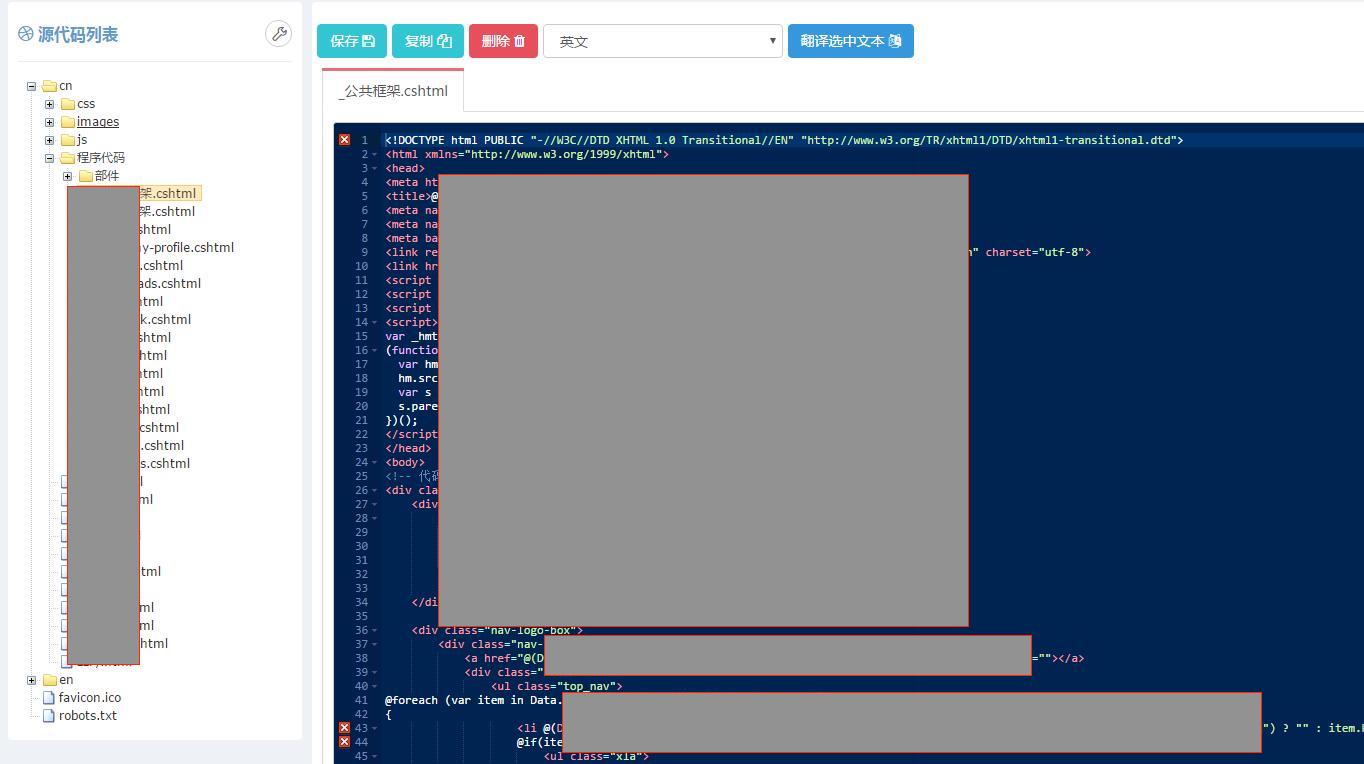
 RickyLin
on 8 Sep 2017
RickyLin
on 8 Sep 2017
@DamianEdwards @Eilon
My project file
<Project Sdk="Microsoft.NET.Sdk.Web">
  <PropertyGroup>
    <TargetFramework>netcoreapp2.0</TargetFramework>
    <MvcRazorExcludeRefAssembliesFromPublish>false</MvcRazorExcludeRefAssembliesFromPublish>
    <MvcRazorCompileOnPublish>false</MvcRazorCompileOnPublish>
    <PreserveCompilationContext>true</PreserveCompilationContext>
    <LangVersion>latest</LangVersion>
  </PropertyGroup>
  <PropertyGroup>
    <UserSecretsId>aspnet-Qibu-dbd76cae-d88a-44e7-b59b-ff431b0a8ccb</UserSecretsId>
    <ApplicationIcon />
    <OutputType>WinExe</OutputType>
    <StartupObject />
  </PropertyGroup>
  <PropertyGroup Condition="'$(Configuration)|$(Platform)'=='Debug|AnyCPU'">
    <PlatformTarget>AnyCPU</PlatformTarget>
    <Optimize>true</Optimize>
  </PropertyGroup>
  <ItemGroup>
    <PackageReference Include="Microsoft.ApplicationInsights.AspNetCore" Version="2.1.1" />
    <PackageReference Include="Microsoft.AspNetCore.All" Version="2.0.0" />
    <PackageReference Include="Microsoft.AspNetCore.NodeServices" Version="2.0.0" />
    <PackageReference Include="Microsoft.EntityFrameworkCore.Tools" Version="2.0.0" PrivateAssets="All" />
    <PackageReference Include="Microsoft.VisualStudio.Web.CodeGeneration.Design" Version="2.0.0" PrivateAssets="All" />
    <PackageReference Include="Microsoft.VisualStudio.Web.BrowserLink" Version="2.0.0" />
    <PackageReference Include="MimeKit" Version="1.18.1" />
    <PackageReference Include="MySql.Data.EntityFrameworkCore" Version="8.0.8-dmr" />
    <PackageReference Include="Pomelo.EntityFrameworkCore.MySql" Version="2.0.0-rtm-10059" />
    <PackageReference Include="Microsoft.Win32.Registry" Version="4.4.0" />
  </ItemGroup>
  <ItemGroup>
    <DotNetCliToolReference Include="Microsoft.EntityFrameworkCore.Tools.DotNet" Version="2.0.0" />
    <DotNetCliToolReference Include="Microsoft.Extensions.SecretManager.Tools" Version="2.0.0" />
    <DotNetCliToolReference Include="Microsoft.VisualStudio.Web.CodeGeneration.Tools" Version="2.0.0" />
  </ItemGroup>
  <ItemGroup>
    <ProjectReference Include="..\QibuCore\QibuCore.csproj" />
    <ProjectReference Include="..\QibuUEditor\QibuUEditor.csproj" />
  </ItemGroup>
</Project>
Do you redeploy publish your site as part of restarting it? If so it might be view precompilation resulting in over-caching, although your csproj does say it's turned off.
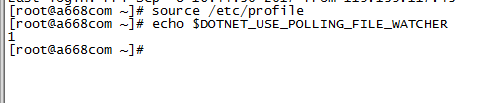
If that's not the case, could you try launching your app with the environment variable DOTNET_USE_POLLING_FILE_WATCHER=1 and see if that helps? I'm trying to eliminate the FileSystemWatcher as a possible source of the issue.
 pranavkm
on 8 Sep 2017
pranavkm
on 8 Sep 2017
@pranavkm

System environment variables plus go, but the problem is not resolved
qibucloud
on 8 Sep 2017
@Eilon @DamianEdwards @pranavkm @RickyLin
qibucloud
on 8 Sep 2017
@Eilon @DamianEdwards @pranavkm @RickyLin
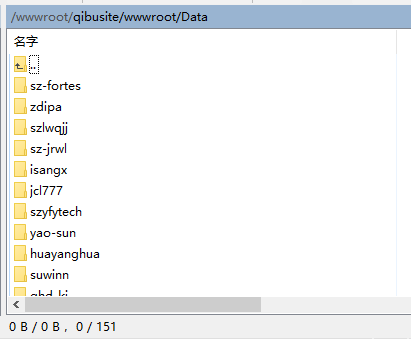
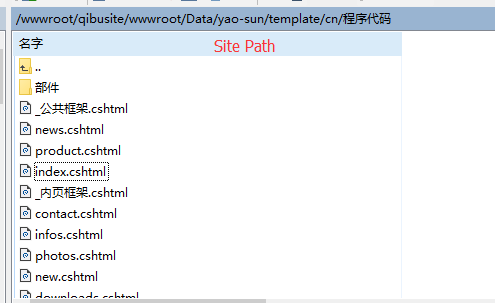
Through the exclusion test, now I am quite sure that the strange cache was caused by the excessive number of folders. After I reduced the amount of the folders and restarted the application, everything became normal. But when I put all the folders back and restarted the application, the problem came out again.
Could you please help me to analyze what is the reason of this problem? Could you please try to help me to solve this problem?
Thank you so much!
qibucloud
on 8 Sep 2017
qibucloud
on 8 Sep 2017
@ianhays adding you since it looks like you last touched FSW.Linux. Were there any changes between 1.1 and 2.0 that might cause the FSW to no longer report file changes if there are too many sub directories files under the directory being watched?
@qibucloud can you verify that your application picks up the DOTNET_USE_POLLING_FILE_WATCHER=1 env variable?
pranavkm
on 13 Sep 2017
@pranavkm Not from the 1.1 upgrade to 2.0 only the problem. 1.1 also have the same problem
How to use the environment variable to start my application
qibucloud
on 15 Sep 2017
View .cshtml in the wwwroot folder on the prime
Is it possible for this reason?
@pranavkm @ianhays
@DamianEdwards
@Eilon
qibucloud
on 15 Sep 2017
@qibucloud 如果不知道如何验证 DOTNET_USE_POLLING_FILE_WATCHER 是否开启,你可以在你的代码里输出一下那个环境变量。另外你还是说中文吧。中文说清楚一些,我帮你翻译。他们可能看不到你发的某些英文。
If you don't know whether DOTNET_USE_POLLING_FILE_WATCHER is picked up, you may print out that environment variable in your web application. By the way, you can speak Chinese, I can translate it. Probably they don't quite understand some of your English sentences.
RickyLin
on 15 Sep 2017
@RickyLin
我的视图模板与样式图片javascript一起放在wwwroot目录下,不知道跟这个有没有关系
qibucloud
on 15 Sep 2017
我的视图模板与样式图片javascript一起放在wwwroot目录下,不知道跟这个有没有关系
My view templates, css, images, javascripts are all in the wwwroot folder, I'm not sure whether there are something to do with it.
RickyLin
on 15 Sep 2017
FYI, here's some details about the system of @qibucloud.
There are many .cshtml files in wwwroot folder as templates, the code in Controller may be like this:
public IActionResult Abc()
{
    return View("wwwroot/MyTemplates/xyz.cshtml");
}
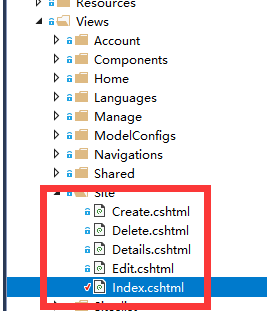
From @qibucloud
It doesn't work even if I put template files in Views folder.
 RickyLin
on 19 Sep 2017
RickyLin
on 19 Sep 2017
[program:qibusite]
command=dotnet /wwwroot/qibusite/Qibu.dll
directory=/wwwroot/qibusite/
autorestart=true
stderr_logfile=/var/log/Qibu.err.log
stdout_logfile=/var/log/Qibu.out.log
environment=DOTNET_USE_POLLING_FILE_WATCHER=true
user=root
stopsignal=INT
The problem is solved, thank you
qibucloud
on 19 Sep 2017
@pranavkm
As @qibucloud said, it works after adding DOTNET_USE_POLLING_FILE_WATCHER environment variable.
RickyLin
on 19 Sep 2017
@qibucloud if you'd like I'd recommend following up with a work item in https://github.com/dotnet/corefx. You're probably running in to some form of limit in the Linux implementation of the FileSystemWatcher and perhaps they might be able to add a switch or a workaround to address the issue in general. Polling files on disk does incur some I/O costs (we diff the timestamps to see files have changed), but clearly it's getting the job done, so that's great!
Thanks @RickyLin for helping us resolve this!
pranavkm
on 19 Sep 2017
Related issues
 bugproof
·
3Comments
bugproof
·
3Comments
 reekoheek
·
3Comments
reekoheek
·
3Comments
 CzechsMix
·
3Comments
CzechsMix
·
3Comments
 MariovanZeist
·
4Comments
MariovanZeist
·
4Comments
 workmonitored
·
3Comments
workmonitored
·
3Comments