Mvc: .net core received empty model when post data using application/json content type
Here is the request payload:
POST http://localhost:3000/api/news HTTP/1.1
Host: localhost:3000
Connection: keep-alive
Content-Length: 219
authorization: Bearer CfDJ8JLhoj58049Hsd7-z1uOcHoPfEBAhaOOeNZByLx8g4fvIxvRkV7TiaPGkEOzqoqQoh4JZRssHh8-EWXx5Yqc-yrlivjRv1DDylUW2ypOPjGwpAVZhUIk2VfRnwpoZpveLQamS2eDFg_zjPuGjvgjy3gbS5ZbSeluazMkfUZqPS5Hw8B6E-1nKGi3Nv8iq7b806EIuxpxV0PRDjMuvxg_eVQl1MxXNAV7br81lsLiIlUC8OQib3_nOui6aw3BaOUzpV5OkIgwCkoqYDNmkK5iY0JiETY-ljUgV-C_sjQc8dtvyeHs2OMiaO08FLNbFfCvJVNs5N6E-bW0adsJ9N62spfZHlbDowdVrvwKEvz9CZixBKMh-2GbKjkHljKnmAYi4TNeKkQ4YuHgoauwXIicd0UhfNvZFhFvLcC2rOerkUP63C2i-oRzF0G2_73I_zOOLSACYII2xXR4HBaEfxdx3rzTwwFapjzv33X7RbAVrUzOLwawQn9dh8sWOGEDVqRQVO_fG0fY_vCdpaZhZWJWOzVmqN2rIIdnOWfkCh9p40ikAZCqQgFFbDkXrIpIkzsJvslD1VYmJn7qipjdVtv5zyXYovjEuQSqTKQkHfmtq_pEfLZbjdQRvbsRCUz9M9hopOy-xNNPjaZF3VPIVFGT2uc40WtjhHttGnPtB7CTTtq6jXhgD5NMe8xF7G2zv2RsLw
Origin: http://localhost:3000
User-Agent: Mozilla/5.0 (Windows NT 10.0; Win64; x64) AppleWebKit/537.36 (KHTML, like Gecko) Chrome/58.0.3029.110 Safari/537.36
content-type: application/json;charset=UTF-8
accept: */*
Referer: http://localhost:3000/
Accept-Encoding: gzip, deflate, br
Accept-Language: en-US,en;q=0.8,vi;q=0.6,es;q=0.4

{"Title":"0983040785","PhotoIds":["71a58f15-bda8-431a-8eba-4cb0201abe23"],"PhoneNumber":["0983040785",""],"Body":"0983040785","Category":"vehicle","Money":"1000","AddressId":"3a7e3366-dcd4-4dd5-af03-48ae95624e86"}
Here is the client code using Fetch API:
  postJson(uri, data) {
    uri = uri.indexOf('/') === 0 ? uri : '/' + uri;
    return fetch(this.url + uri, {
      method: 'POST',
      headers: {
        ...this.defaultHeader,
        'Content-Type': 'application/json;charset=UTF-8'
      },
      body: JSON.stringify(data),
      compress: false
    }).then(this._processResponse.bind(this));
  }
Using 'postJson' function to post data to the API will get empty model. However, if I use fetch API to post formdata as below it will be fine:
postForm(uri, form) {
    uri = uri.indexOf('/') === 0 ? uri : '/' + uri;
    return fetch(this.url + uri, {
      method: 'POST',
      headers: {
        ...this.defaultHeader,
        'Content-Type': 'application/x-www-form-urlencoded'
      },
      body: qs.stringify(form, { allowDots: true }),
      compress: false
    }).then(this._processResponse.bind(this));
  }
Am I missing something here? Does default model binder not have Json type?
Edited: I also changed to jQuery ajax but samething happened (application/x-www-form-urlencoded with formdata works fine but not json)
 st2forget
All 9 comments
Use [FromBody] on the model parameter to bind JSON. By default model binding will not deserialize JSON or XML
 rynowak
on 22 Jun 2017
rynowak
on 22 Jun 2017
Here is what I'm doing on the api, but the req model is always null and that is the problem
    [HttpPost]
    public IActionResult Post([FromBody] NewsCreateRequest req)
    {
        if (!ModelState.IsValid)
        {
            ValidationFailed();
        }

        if (req.PhotoIds == null || req.PhotoIds.Count == 0)
        {
            return ValidationFailed();
        }
        var accessibility = req.Accessibility ?? (int)Accessibility.Public;
        var userId = User.GetUserId();
        var id = Guid.NewGuid();
        using (var transaction = _connectionFactory.OpenTransaction())
        {
            try
            {
                _newsCommand.Insert(
                    id,
                    userId,
                    req.Body,
                    req.Category.ToGuids(_connectionFactory),
                    req.PhoneNumber.Where(p => !string.IsNullOrWhiteSpace(p)).ToList(),
                    req.Money,
                    req.Title,
                    req.AddressId,
                    accessibility);
                transaction.Commit();

                Publisher.PublishAsync(new Message
                {
                    ActionType = (int)EntityActionType.Created,
                    EntityType = (int)EntityType.News,
                    EntityId = id,
                    Model = new NewsCreateMessage
                    {
                        PhotoIds = req.PhotoIds
                    }
                });

                return Success("Created News", id);
            }
            catch (Exception)
            {
                transaction.Rollback();
                throw;
            }
        }
    }
```
st2forget
on 23 Jun 2017
How are you determining that the model is null, are you using a debugger?
What does ModelState.IsValid return?
rynowak
on 23 Jun 2017
I don't see anything obviously wrong in your action definition or request.
rynowak
on 23 Jun 2017
I used Visual Studio 2017 Community to debug it. the "req" param always null even tested with jQuery, node-fetch and POSTMAN (chrome), here is the screenshot of POSTMAN
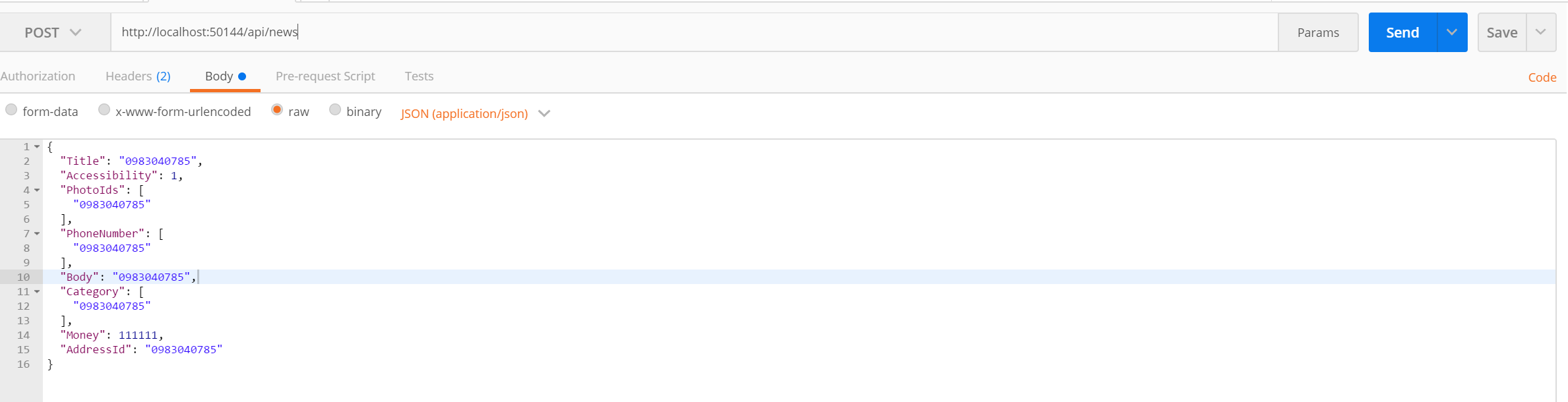
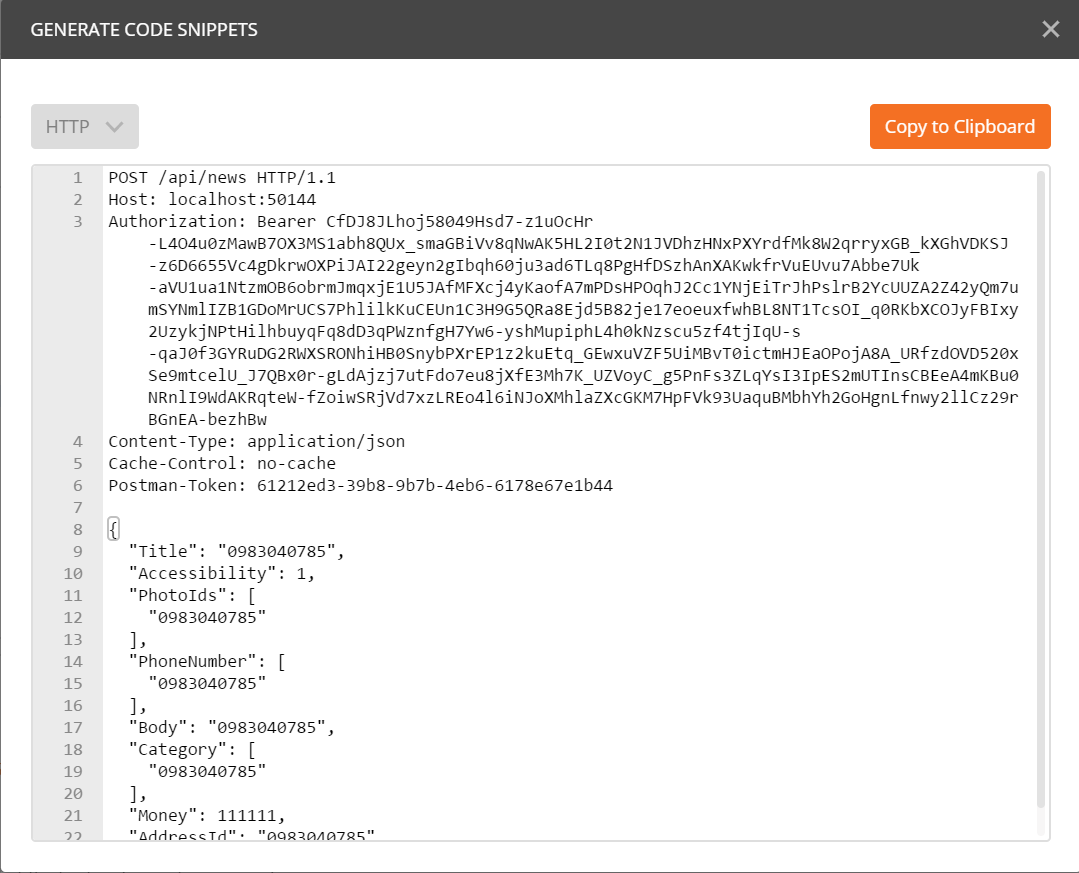
I am using .net core 1.1 for the project. As I mentioned, using "application/x-www-form-urlencoded" with formdata is completely fine but not "application/json" and json data.
As far as I know, the json formatter is added by default, should I need any other set up (Startup.cs) to troubleshoot the issue?
st2forget
on 23 Jun 2017
I could provide any information that you need to troubleshoot this issue, so please let me know what you need to know even the source code.
Here is the code from startup.cs:
/// <summary>
    ///
    /// </summary>
    public class Startup
    {
        /// <summary>
        /// Initializes a new instance of the <see cref="Startup"/> class.
        /// </summary>
        /// <param name="env">The env.</param>
        public Startup(IHostingEnvironment env)
        {
            var builder = new ConfigurationBuilder()
                .SetBasePath(env.ContentRootPath)
                .AddJsonFile("appsettings.json", true, true)
                .AddJsonFile($"appsettings.{env.EnvironmentName}.json", true)
                .AddEnvironmentVariables();
            Configuration = builder.Build();
        }

        /// <summary>
        /// Gets the configuration.
        /// </summary>
        /// <value>
        /// The configuration.
        /// </value>
        public IConfigurationRoot Configuration { get; }

        // This method gets called by the runtime. Use this method to add services to the container.
        /// <summary>
        /// Configures the services.
        /// </summary>
        /// <param name="services">The services.</param>
        public void ConfigureServices(IServiceCollection services)
        {
            // needed to load configuration from appsettings.json
            services.AddOptions();

            services.AddIpRateLimit(Configuration);

            services.AddAuthentication();

            // Add framework services.
            services
                .AddMvc()
                .AddJsonOptions(options =>
                {
                    options.SerializerSettings.ContractResolver = new DefaultContractResolver();
                    options.SerializerSettings.SerializationBinder = new DefaultSerializationBinder();
                    options.SerializerSettings.Formatting = Formatting.Indented;
                });

            // Open ID Connect
            services.AddScoped<SocosyOpenIdConnectProvider>();

            // Configurations {Settings, ConnectionStrings...}
            services.RegisterConfigurations(Configuration);

            services.AddSwaggerGen(c =>
            {
                c.SwaggerDoc("v1", new Info { Title = "Raodee API", Version = "v1" });
                c.OperationFilter<SwaggerHeaderParameter>();
            });
        }

        // This method gets called by the runtime. Use this method to configure the HTTP request pipeline.
        /// <summary>
        /// Configures the specified application.
        /// </summary>
        /// <param name="app">The application.</param>
        /// <param name="env">The env.</param>
        /// <param name="loggerFactory">The logger factory.</param>
        public void Configure(IApplicationBuilder app, IHostingEnvironment env, ILoggerFactory loggerFactory)
        {
            loggerFactory.AddConsole(Configuration.GetSection("Logging"));
            loggerFactory.AddDebug();

            // IPRateLimiting
            app.UseIpRateLimiting();

            app.UseOAuth2(Configuration);

            app.UsePropertiesFilter(Configuration);

            app.UseMvc();

            app.RegisterConfigurations(Configuration);

            app.UseSwagger();
            app.UseSwaggerUI(c =>
            {
                c.SwaggerEndpoint("/swagger/v1/swagger.json", "Raodee API V1");
                c.ShowRequestHeaders();
            });
        }
    }
I am using .net core 1.1 for the project. As I mentioned, using "application/x-www-form-urlencoded" with formdata is completely fine but not "application/json" and json data.
There is no way to write a single model parameter in an action method that will handle both form data and json.
    [HttpPost]
    public IActionResult Post([FromBody] NewsCreateRequest req)
This should handle JSON
    [HttpPost]
    public IActionResult Post(NewsCreateRequest req)
This should handle form data
Are there two action in your code? You're showing me an action with [FromBody] and telling me that form data works
rynowak
on 23 Jun 2017
I'm facing the same @rynowak. If you take off [FromBody] it will esforce parameters as query string.
 fals
on 16 Sep 2017
fals
on 16 Sep 2017
Hi, it looks like you are posting on a closed issue/PR/commit!
We're very likely to lose track of your bug/feedback/question unless you:
- Open a new issue
- Explain very clearly what you need help with
- If you think you have found a bug, include detailed repro steps so that we can investigate the problem
Thanks!
rynowak
on 18 Sep 2017
Related issues
 karthicksundararajan
·
4Comments
karthicksundararajan
·
4Comments
 michaelbowman1024
·
3Comments
michaelbowman1024
·
3Comments
 reekoheek
·
3Comments
rynowak
·
3Comments
reekoheek
·
3Comments
rynowak
·
3Comments
 kspearrin
·
4Comments
kspearrin
·
4Comments
Most helpful comment
Use
[FromBody]on the model parameter to bind JSON. By default model binding will not deserialize JSON or XML