Muuri: How to hide items until they are laid out?
Hey @niklasramo 👋 ,
Is it possible to hide Muuri items until they've been laid out? For example, I'd like to avoid showing items before they've been measured and positioned since it causes an undesirable animation, but I'm not sure how to implement this behavior. Here are two demos taken from the Muuri-React project which demonstrate some differences in behavior between versions 0.8.0 and 0.9.0 of Muuri.
Muuri-React with Muuri 0.8 (desired behavior)
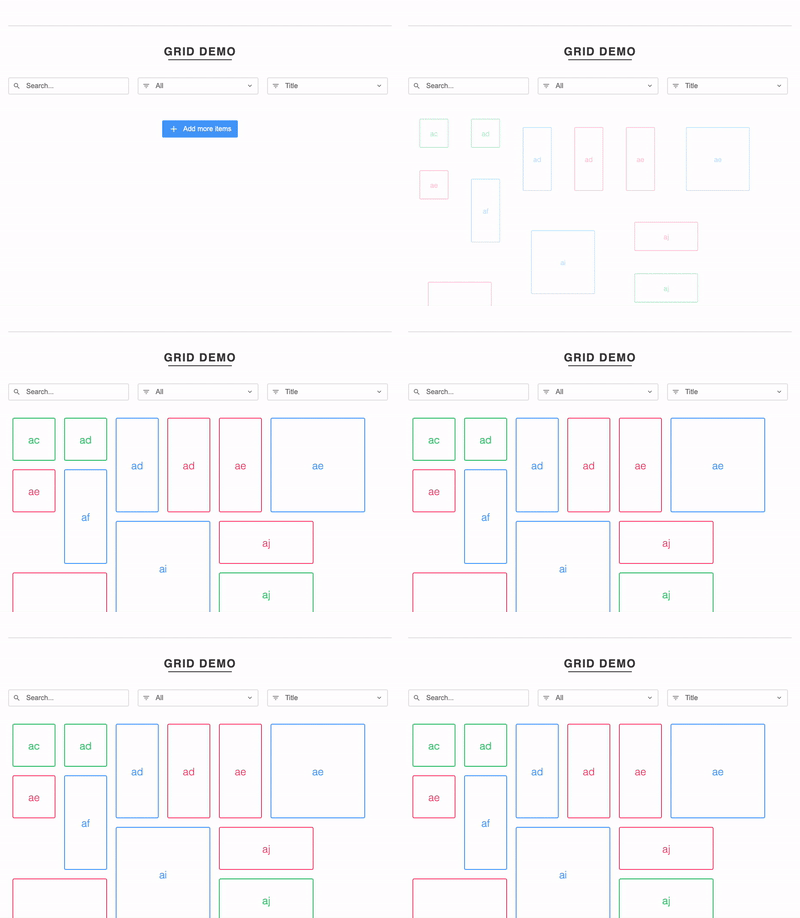
Demo
https://codesandbox.io/s/muuri-react-muuri-08-load-visibility-yl89g
Muuri-React with Muuri 0.9 (undesired behavior)
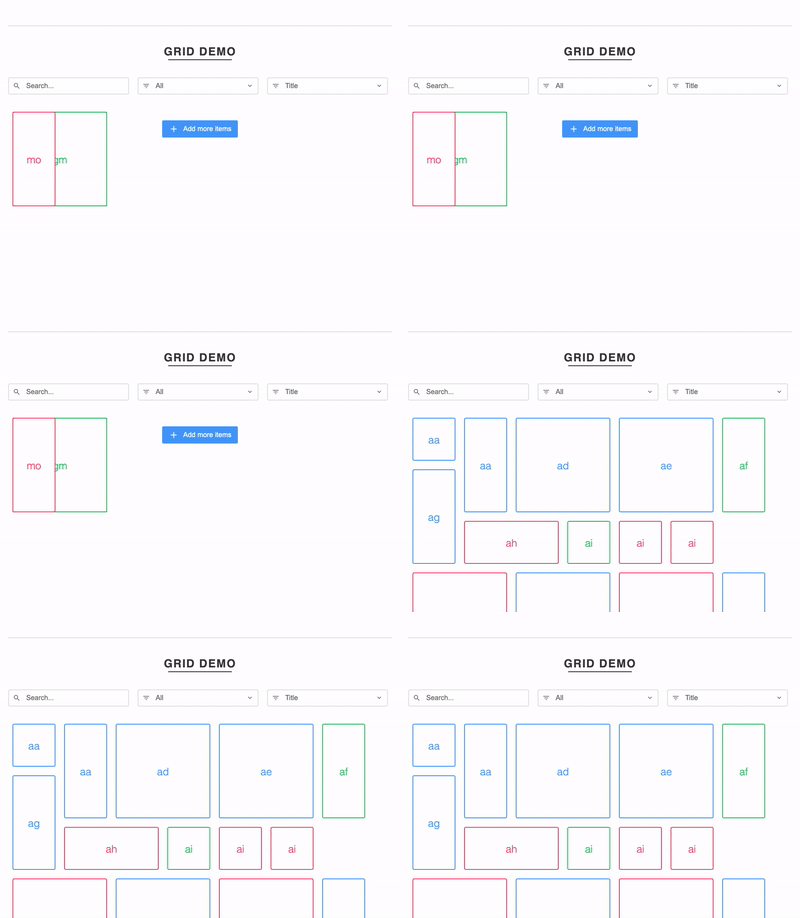
Demo
https://codesandbox.io/s/muuri-react-muuri-09-load-visibility-cxztb
Notes
- In the Muuri 0.9 demo, I tweaked one css rule to make the demo render, that change can be found here:
https://codesandbox.io/s/muuri-react-muuri-09-load-visibility-cxztb?file=/style.css:738-754 - I'm wondering if this commit may have any anything to do with the demos behavior. It seems like the 0.8 version may be relying on an items
displayvalue to be set toblock? https://github.com/haltu/muuri/commit/b37076112bc548d4e05f69a5a60a8f37a1ee96e3
 seanstrom
All 23 comments
Hi @seanstrom! I haven't used muuri-react, but yep, it's very much doable at least with vanilla Muuri. Just init your grid without items and then add the initial items in the grid like this.
const grid = new Muuri('.grid', { items: [] });
const initElements = document.querySelectorAll('.item');
const initItems = grid.add(initElements, { active: false, layout: false });
grid.show(initItems);
It might be wise to also hide the initial item elements (with inline styles) before all of that. Preferably you'd render the elements with style="display:none" so they have no chance of being shown before Muuri shows them with the .show() method. If you set display:none in the CSS stylesheets then the item will never be shown as Muuri does not enforce display:block anymore on visible elements as you pointed out.
I hope this helps a bit 🙂 let me know if you find issues the approach above, I'm eager to make Muuri as easy-to-use as possible.
P.S. Thanks a bunch for sponsoring my open source activities!
 niklasramo
on 4 Aug 2020
niklasramo
on 4 Aug 2020
This has been very helpful! I did run into some issues with setting items to display: none because I'm attempting to measure each item dynamically after the content has rendered. In some cases the content is also loaded asynchronously which means that each item could be re-measured. If I set the items to be display: none, and I don't set the height and width statically, then each item won't be measured with accurate dimensions. Do you have any suggestions?
I'm also working on producing a small example of what I'm tinkering on to make it easier to collaborate, but I do have a few notes:
- It would be nice to have a way to load, measure, and layout each item while keeping it hidden
- And then receive an event for the whole process being complete for a batch of items (i think
layoutEnd?) - And maybe have a way to display the recently completed items
P.S. Happy to sponsor your work! And thanks for working on Muuri it's great!
seanstrom
on 7 Aug 2020
Well you could always just set the item element's visibility: hidden and display: block (or whatever) and then measure, and after measuring set it display: none again. Of course this is bad for perf if you do it to many items without batching the operations as it causes a reflow, but then again this is exactly how Muuri also computes the item dimensions when a hidden item is shown. Muuri does batch the operations so that there is only one reflow no matter how many items you show at once.
niklasramo
on 11 Aug 2020
Sorry to hijack this issue, but my questions/issues may be related as I use the same technique for adding the items, but I'm having performance issues on a rather small grid (actually 6 grids with about 1-12 items each).
I'm loading/and hiding the items as suggested, but my rather small grids take about 0.5secs (9900K/2070 Super) to about 1 second on my office workstation (some old i5) to over 2 seconds on the terminals it's actually running in production. Compared to vue-grid-layout (which is almost instantaneous on all 3) this is a massive drawback.
1) Is there anything that I can do to speed up the process? I'm initializing the grid in the vue mounted() hook as I Muuri needs the DOM to be fully loaded/rendered for it's calculations (correct?) - compared to a fixed grid layout like mentioned above where it only needs to know how many X/Y blocks the element occupies to do it's preliminary calculations of just the spots (fixed row height, fixed number of columns). Would it help to pre-calculate the item sizes and set those in inline styles? (I do have a known col-height and total number of columns)
2) if it isn't possible to speed up the calculations - is there any event that gets fired (way) before the layout process is complete, but has finished the total/or at least updated height of the grid container so I can nicely grow the container instead of the whole layout jumping?
 bernhardberger
on 13 Aug 2020
bernhardberger
on 13 Aug 2020
@bernhardberger That sounds oddly slow indeed, could you provide a reduced test case (without Vue) to showcase this performance issue? Performance is one of the key design goals with Muuri so I'm more than happy to make Muuri run faster wherever possible.
niklasramo
on 13 Aug 2020
Here's a quick demo (with dev branch) where 10 grids are initiated after page load and 50 items dynamically added to each of them: https://bvtik.csb.app/. To my eyes that seems pretty snappy (on a very old Macbook pro), but what is the specific metric/phase I should be measuring here? What exactly was the slow part?
niklasramo
on 13 Aug 2020
@bernhardberger That sounds oddly slow indeed, could you provide a reduced test case (without Vue) to showcase this performance issue? Performance is one of the key design goals with Muuri so I'm more than happy to make Muuri run faster wherever possible.
I may have not been clear enough. I don't think Muuri has a performance issue. I am having a performance issue because I need to wait for the DOM to fully render.
TL;DR from the above: is there any way to start the layout process before the DOM rendering is done - if I know each of the items' sizes beforehand?
bernhardberger
on 13 Aug 2020
@bernhardberger Ah, gotcha! Well, the layout process (of Muuri) is be already pretty snappy so there should be no need to try to precompute the item sizes manually. Muuri does need the DOM elements to be _in the DOM_ when it computes the dimensions of items (just before the items are shown).
One thing that actually affects the layout calculation speed negatively is the default Muuri.Packer configuration. Since v0.9.0+ Muuri uses two web workers by default where it does all the layout calculations. This method has pros and cons. The main pro is that the layout calculations won't block the main thread (which is very visible with thousands of items). The main con is that the overall layout calculation time is slower since we have to pass the data to the worker and get the results back from there. As an example, in the demo above I tested with and without workers and the time to add 50 items in a grid, compute their dimensions and compute the grid layout took around 10ms without web workers (computing the layout synchronously in main thread), and around 100ms with web workers.
If you want to experiment with using the v0.9.0+ Muuri with the original synchronous layout behavior (without web workers) you can do so by changing the default packer. Do the following _once_ after Muuri has loaded and is accessible.
Muuri.defaultPacker.destroy();
Muuri.defaultPacker = new Muuri.Packer(0);
This should speed up layout calculations quite a lot and is probably a better option for smaller grids with less than 1000 items. It all depends on the use case.
niklasramo
on 13 Aug 2020
I'm now actually wondering if I should revert the default Packer behaviour to be synchronous 🤔 I think it might be better for the majority of Muuri users...
niklasramo
on 13 Aug 2020
Thank you for that valuable input once again! I'll try that asap and report back.
I wouldn't change default settings too often - but you could possibly add an configuration option to easily switch between the two methods.
bernhardberger
on 13 Aug 2020
Just a quick correction to the layout speed performance tests. I tested the web worker perf incorrectly previously, here are the correct times on my machine (MacBook Pro 2017 2,3GHz i5):
Item addition + dimension reading + layout with web workers (default)
- 50 items: ~50ms
- 500 items: ~120ms
- 1000 items: ~200ms
Item addition + dimension reading + layout synchronously in main thread
- 50 items: ~10ms
- 500 items: ~80ms
- 1000 items: ~150ms
niklasramo
on 13 Aug 2020
import Muuri from "muuri";
Muuri.defaultPacker.destroy();
Muuri.defaultPacker = new Muuri.Packer(0);

this.grid = new Muuri(this.$refs.grid, {
      items: [],
      ...options
    });

this.grid.on('layoutEnd', () => this.isLoaded = true) // <--- doesn't fire anymore

// collecting items from the dom, this.grid.add, this.grid.show(items) and so on..
Am I doing this right? As now the layoutEnd event isn't firing anymore..
However: I definitively is speedier now. I can't even see my loading placeholder anymore on my home machine (9900K/2700 Super). It's that quick.
Need to test it on my office "workstation" and the terminals tomorrow..
bernhardberger
on 13 Aug 2020
Yep, you are doing it right. As the layout happens synchronously now the very first layoutEnd event is emitted _before_ you bind the layoutEnd event listener as all the items are positioned without layout animation. You can just set this.isLoaded = true after instantiating the Muuri grid.
...oh wait, you weren't adding any items in the init so the layoutEnd should definitely be called when you add items _after_ you bind the listener. So there might be a bug! Need to check it out.
niklasramo
on 13 Aug 2020
For me it's a magnitude more time difference than for you. I did a quick and dirty measurement (really quick and really dirty):
Total of 6 Grids, about 50 items total across those 6 grids - 9900K/2700 Super, Win10 @ Chrome 84:
- Async: ~400ms from component
create()toon('layoutEnd') - Synchronous: ~15ms from component
create()tothis.grid.show(elements, {instant: true})
That's a magnitude of > 25 times faster and basically makes the difference from showing a loading component and scrapping it altogether because it's instant for the human eye Oo
bernhardberger
on 13 Aug 2020
There actually _is_ a bug with layoutEnd event in the v0.9.0+! It's happening also with the default packer config. But gladly should be an easy fix after quick glancing. Thanks for bringing it up 👍
niklasramo
on 13 Aug 2020
For me it's a magnitude more time difference than for you. I did a quick and dirty measurement (really quick and really dirty):
Total of 6 Grids, about 50 items total across those 6 grids - 9900K/2700 Super, Win10 @ Chrome 84:
- Async: ~400ms from component
create()toon('layoutEnd')- Synchronous: ~15ms from component
create()tothis.grid.show(elements, {instant: true})That's a magnitude of > 25 times faster and basically makes the difference from showing a loading component and scrapping it altogether because it's instant for the human eye Oo
I can now confirm that on my office workstation the discrepancy is even bigger. I went from ~1.5s for the layout down into the milliseconds range. It's now imperceptible for the human eye that there is some layouting happening.
bernhardberger
on 14 Aug 2020
@bernhardberger That's oddly large variation in performance indeed. Need to investigate a bit if there's something a bit off in the web worker implementation.
niklasramo
on 14 Aug 2020
I wouldn't rule out that it maybe has something to do with how Vue handles
things. As long as someone can turn the webworker feature off I think it
may be just fine. Just don't deprecate the possibility for now :-)
On Fri, 14 Aug 2020, 16:09 Niklas Rämö, notifications@github.com wrote:
@bernhardberger https://github.com/bernhardberger That's oddly large
variation in performance indeed. Need to investigate a bit if there's
something a bit off in the web worker implementation.—
You are receiving this because you were mentioned.
Reply to this email directly, view it on GitHub
https://github.com/haltu/muuri/issues/410#issuecomment-674093154, or
unsubscribe
https://github.com/notifications/unsubscribe-auth/AAQDFA7UVNNY7PBY7KJFNQ3SAVAQTANCNFSM4PT3TMKQ
.
bernhardberger
on 14 Aug 2020
@bernhardberger I fixed at least one bug that was causing layoutEnd event not being fired and released it just now: https://github.com/haltu/muuri/releases/tag/0.9.3. Let me know if you still have problems with it.
niklasramo
on 14 Aug 2020
Well you could always just set the item element's
visibility: hiddenanddisplay: block(or whatever) and then measure, and after measuring set itdisplay: noneagain.
Hey 👋 , just wanted to follow up with my current status. I still haven't created an example of my solution, but I have some more notes that I can share.
- Each item is initially rendered with styles
visibility: hiddenanddisplay: unset!important. - And each item is added to Muuri with these add options
{ layout: true, active: false }. - Then on each Muuri
addevent I manually callmuuri.showon each item with{ layout: false }as the show options. - Finally on the Muuri
layoutEndevent I change the visibility of each item tovisibility: unset.
This _seems_ to allow me to wait for each item to be laid out while not visible, and then layoutEnd signals which elements are ready to be revealed. Does this seem right, or are there any noticeable defects with this approach?
seanstrom
on 19 Aug 2020
And each item is added to Muuri with these add options { layout: true, active: false }.
Then on each Muuri add event I manually call muuri.show on each item with { layout: false } as the show options.
Generally speaking I'd encourage to add items in _batches_ whenever possible as it is _much_ more performant. So instead of adding each item one by one and showing them one by one _always_ add all the items simultaneously (the add method accepts an array of elements) and show the elements simultaneously (the show method accepts an array of items), if at all possible. Of course, sometimes this is not possible and you got to do what you got to do.
Here's how I would do what (I suspect) you are trying to do:
// Add items as "inactive" (display:none will be applied to them by muuri) and without layout.
var newItems = grid.add(elements, { active: false, layout: false });
// We can at this point remove the "hack" which kept the items hidden.
elements.forEach(el => { el.style.visibility = 'visible'; });
// Now just show the items (by default items are laid out after show method).
grid.show(newItems);
Generally speaking I'd encourage to add items in _batches_ whenever possible as it is _much_ more performant. So instead of adding each item one by one and showing them one by one _always_ add all the items simultaneously (the add method accepts an array of elements) and show the elements simultaneously (the show method accepts an array of items), if at all possible. Of course, sometimes this is not possible and you got to do what you got to do.
Yup I agree, unfortunately I'm not currently controlling the process for adding the items, it is currently being maintained by some functionality in Muuri-React. Maybe I can try to submit a patch to that project after I continue tinkering 👍 .
// Add items as "inactive" (display:none will be applied to them by muuri) and without layout.
var newItems = grid.add(elements, { active: false, layout: false });
// We can at this point remove the "hack" which kept the items hidden.
elements.forEach(el => { el.style.visibility = 'visible'; });
// Now just show the items (by default items are laid out after show method).
grid.show(newItems);
I'm about to try this solution but I was wondering, will calling show animate the items to their positions or will the items already be in the right place?
seanstrom
on 21 Aug 2020
will the items already be in the right place?
Nope, they were added in the grid as inactive so they do not have positions yet. Calling show will make the items temporarilly "renderable" (remove display:none and set visibility:hidden), compute the dimensions, make the items "unrenderable" (set display:none, remove visibility:hidden), wait for the next layout to be ready to be applied and finally animate the items in.
niklasramo
on 21 Aug 2020
Related issues
 Sashkan
·
3Comments
niklasramo
·
3Comments
Sashkan
·
3Comments
niklasramo
·
3Comments
 bsherwoodofdaptiv
·
4Comments
bsherwoodofdaptiv
·
4Comments
 osamamaruf
·
4Comments
niklasramo
·
7Comments
osamamaruf
·
4Comments
niklasramo
·
7Comments
Most helpful comment
Yep, you are doing it right. As the layout happens synchronously now the very first
layoutEndevent is emitted _before_ you bind thelayoutEndevent listener as all the items are positioned without layout animation. You can just setthis.isLoaded = trueafter instantiating the Muuri grid....oh wait, you weren't adding any items in the init so the
layoutEndshould definitely be called when you add items _after_ you bind the listener. So there might be a bug! Need to check it out.