Muuri: Drag and drop not working IOS 13 and 14
Drag and drop are not working on ios 13 and 14 but it is working on ios 12.
Tested on safari and chrome.
 anthony0030
All 14 comments
Thanks for the report @anthony0030 , could you give a bit more detailed info? E.g. what device was used and what were the exact OS versions? Steps to reproduce and a reduced test case would also be really helpful.
 niklasramo
on 22 Jul 2020
niklasramo
on 22 Jul 2020
Device one
iPhone SE
iOS 14 beta 2
Not working
Device two
iPhone 11
iOS 13 (latest updates)
Not working
Device three
iPhone 6
iOS 12 (latest update)
Working
Steps to reproduce
1) open muuri's site
2) try drag a block
anthony0030
on 22 Jul 2020
Yep, just got my ios 13 test iphone up and running and can confirm that dnd is indeed broken.
niklasramo
on 22 Jul 2020
Pinpointed the issue here: https://github.com/haltu/muuri/blob/master/src/Item/ItemDrag.js#L162
That piece of code is actually an optimization for non-iOS browsers (mainly for Android), which tries to prevent the start of drag when the page is currently scrolling. iOS is working nicely out of the box and does not allow starting a drag when you try to do this. However, Android let's you start a drag while scrolling, but then cancels the drag procedure after a second or so, which is not cool at all... So a simple fix would be either removing the optimization or doing some iOS sniffing (🤢) and applying it only for non-iOS devices.
niklasramo
on 22 Jul 2020
Fixed this in the dev branch already, here's a demo running it: https://17lib.csb.app/
Need to do a patch fix and release for the 0.9.x version.
niklasramo
on 22 Jul 2020
I can confirm that is working in the demo. Thankyou! :)
What ETA do you have for it to be published to NPM even as a beta release?
anthony0030
on 23 Jul 2020
No ETA yet, I'll update when I have some spare time :)
niklasramo
on 23 Jul 2020
Hi Niklas & Anthony,
I just tested the link at https://17lib.csb.app/ with Safari on my iPad (iPadOS 13.6; latest update as of today) to no avail. I can add some drag elements with the buttons and scroll within each box but I cannot drag any items. Instead of dragging an element, Safari highlights the text of the button after the element I tried to drag.
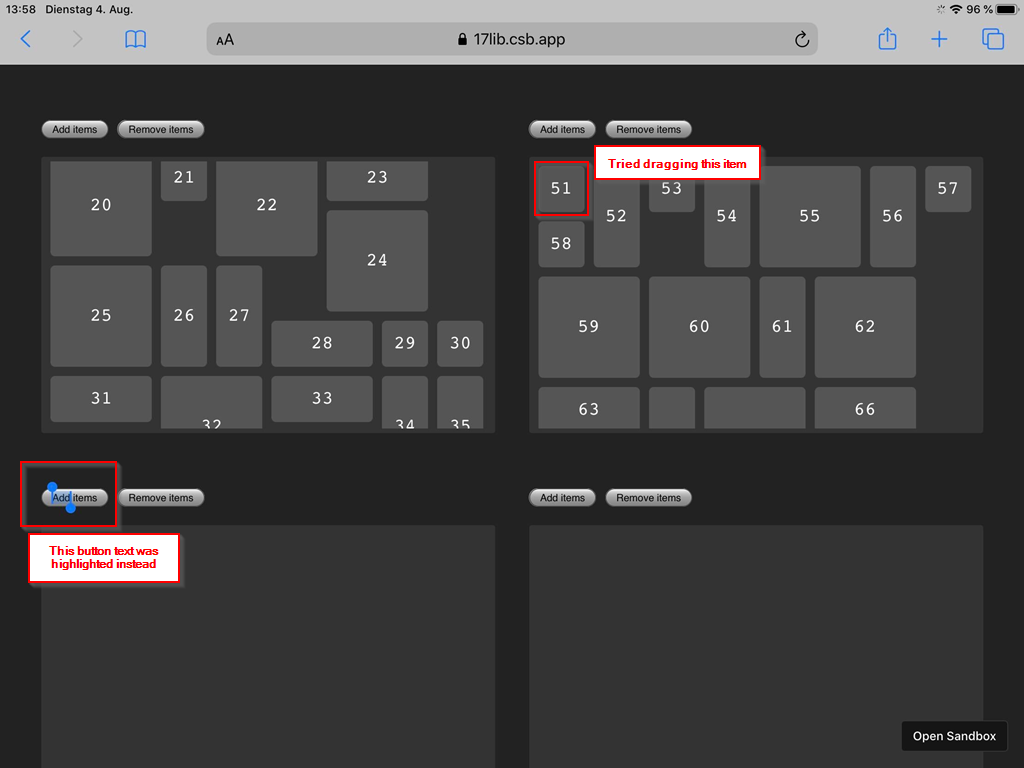
Drag & Drop works on my PC on Firefox 79.0 and Google Chrome 84.0.4147.105.
Any ideas why that happens?
 mark-langer
on 4 Aug 2020
mark-langer
on 4 Aug 2020
@mark-langer Thanks for reporting that! Unfortunately I don't have any clue what might be happening there and can't really debug it as I don't have an iPad at hand. Last time I checked that demo was working on my test iPhone 6 (iOS 13.6). If you can debug it and try to find the root cause that would be awesome 👍
niklasramo
on 4 Aug 2020
@mark-langer actually, after digging around a bit I found out that in iPadOS 13+ navigator.platform returns 'MacIntel' which means that this check fails: /iPad|iPhone|iPod/.test(window.navigator.platform);. This is most likely the cause. But how to fix it nicely 🤔
niklasramo
on 4 Aug 2020
@mark-langer I updated the dev branch with a fix that should take care of this issue, but can't confirm it. Can you recheck https://17lib.csb.app/ if it's working now?
niklasramo
on 4 Aug 2020
Sounds great, I'll have a look right away.
I was just going to suggest feature checking for a combination of MacIntel plus "does not support hover" = "is touch device" through a matchMedia call. That could look like window.matchMedia('(hover: hover)')
mark-langer
on 4 Aug 2020
Wow, @niklasramo , on the iPad this now works as beautiful as always with Muuri. Great fix! I'm excited to see the commit to see how you did it.
mark-langer
on 4 Aug 2020
This is now fixed in the latest release v0.9.2 👍 Thanks for everyone involved helping to get this one squashed!
niklasramo
on 12 Aug 2020
Related issues
 ppwfx
·
4Comments
ppwfx
·
4Comments
 stat92
·
6Comments
stat92
·
6Comments
 PrestaShark
·
7Comments
PrestaShark
·
7Comments
 dedurus
·
4Comments
dedurus
·
4Comments
 bsherwoodofdaptiv
·
4Comments
bsherwoodofdaptiv
·
4Comments
Most helpful comment
Yep, just got my ios 13 test iphone up and running and can confirm that dnd is indeed broken.