Muuri: Is it possible to drag a copy of item leaving original intact?
Fantastically beautiful piece of code!
I'd like to use Muuri to drag objects from one list to another while keeping the original list item intact. Is there any way to do this?
Thanks!
 JetsonDavis
All 28 comments
like this demo ?
 GianlucaFrongia
on 1 Jun 2019
GianlucaFrongia
on 1 Jun 2019
Pretty close - thanks Gianluca. Did that come from the Muuri website?
I'd like it more if it never removed the red box but instead lifted a clone. Anyone seen a demo that does that? I guess I could put an invisible clone under each tile and turn them on when drag is initiated!?
Thanks!
JetsonDavis
on 1 Jun 2019
That is incredible - thank you so much!!!!
JetsonDavis
on 4 Jun 2019
your welcome!
you need to implement a logic that prevents adding the item on the same grid.
GianlucaFrongia
on 4 Jun 2019
Oh, that's funny. If you click on the source (red) tile, it duplicates itself and stays on the left side! Is there some way to disappear the clone if it's not placed down somewhere in the green grid?
JetsonDavis
on 5 Jun 2019
ive changed it a bit: demo
GianlucaFrongia
on 14 Jun 2019
Cool - still a small bug. If you change the position of any of the tiles on the right, the tile you are moving regenerates on the left! Oh yeah, and you can only move a green item within its own row!
JetsonDavis
on 14 Jun 2019
Still does the same? Refresh the page and try to drag 7 to the left of 6!
On Jun 14, 2019, at 1:33 PM, Gianluca Frongia notifications@github.com wrote:
ok check it out again
—
You are receiving this because you authored the thread.
Reply to this email directly, view it on GitHub https://github.com/haltu/muuri/issues/287?email_source=notifications&email_token=AAGV3PSRI7GUVM632AUUDWDP2PI5RA5CNFSM4HR6DYJKYY3PNVWWK3TUL52HS4DFVREXG43VMVBW63LNMVXHJKTDN5WW2ZLOORPWSZGODXXPAAA#issuecomment-502198272, or mute the thread https://github.com/notifications/unsubscribe-auth/AAGV3PUKICNN77GBNEIGSELP2PI5RANCNFSM4HR6DYJA.
JetsonDavis
on 14 Jun 2019
there is an edge case to consider:
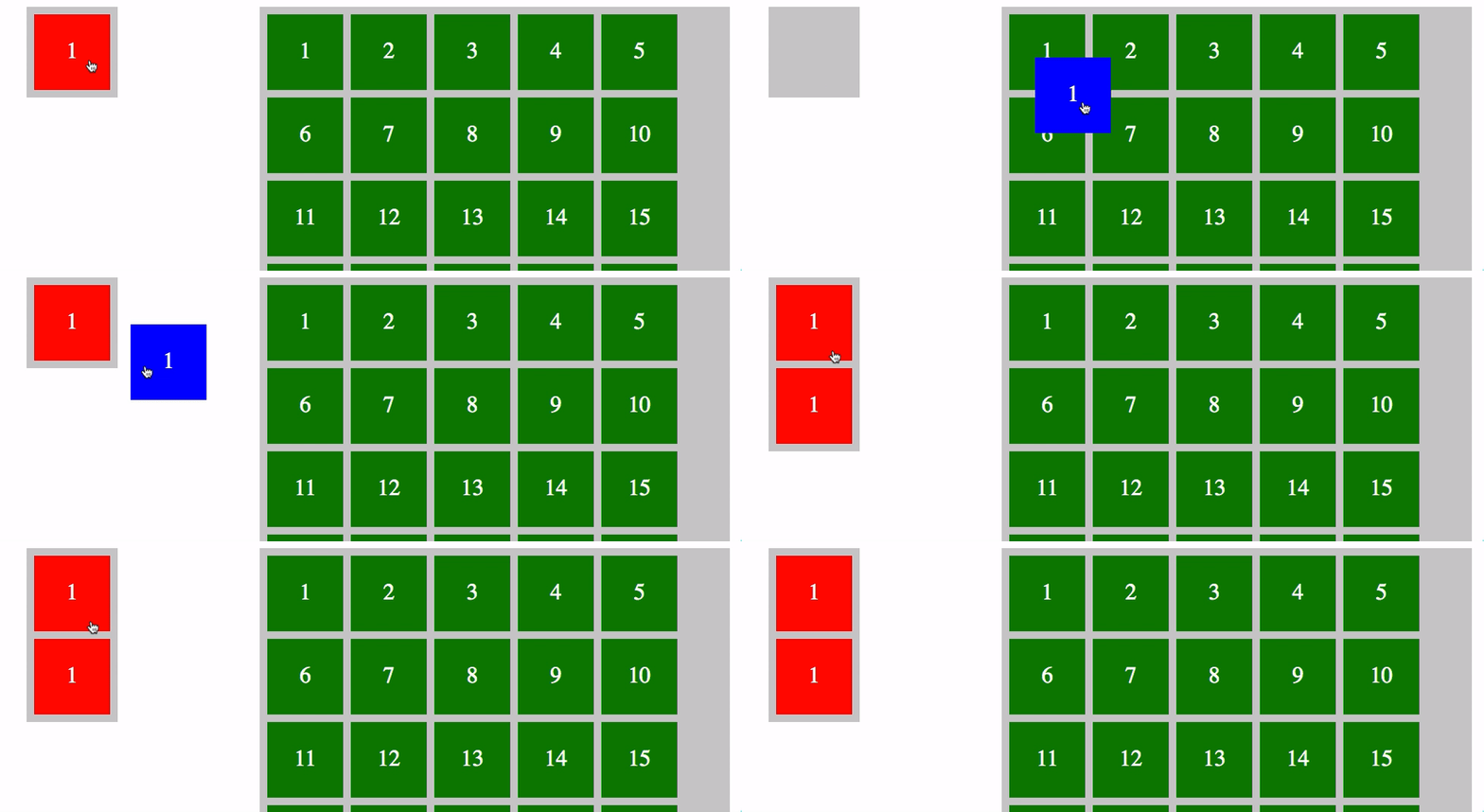
@niklasramo why is the receive event called so early ?
the same thing happens in your example:
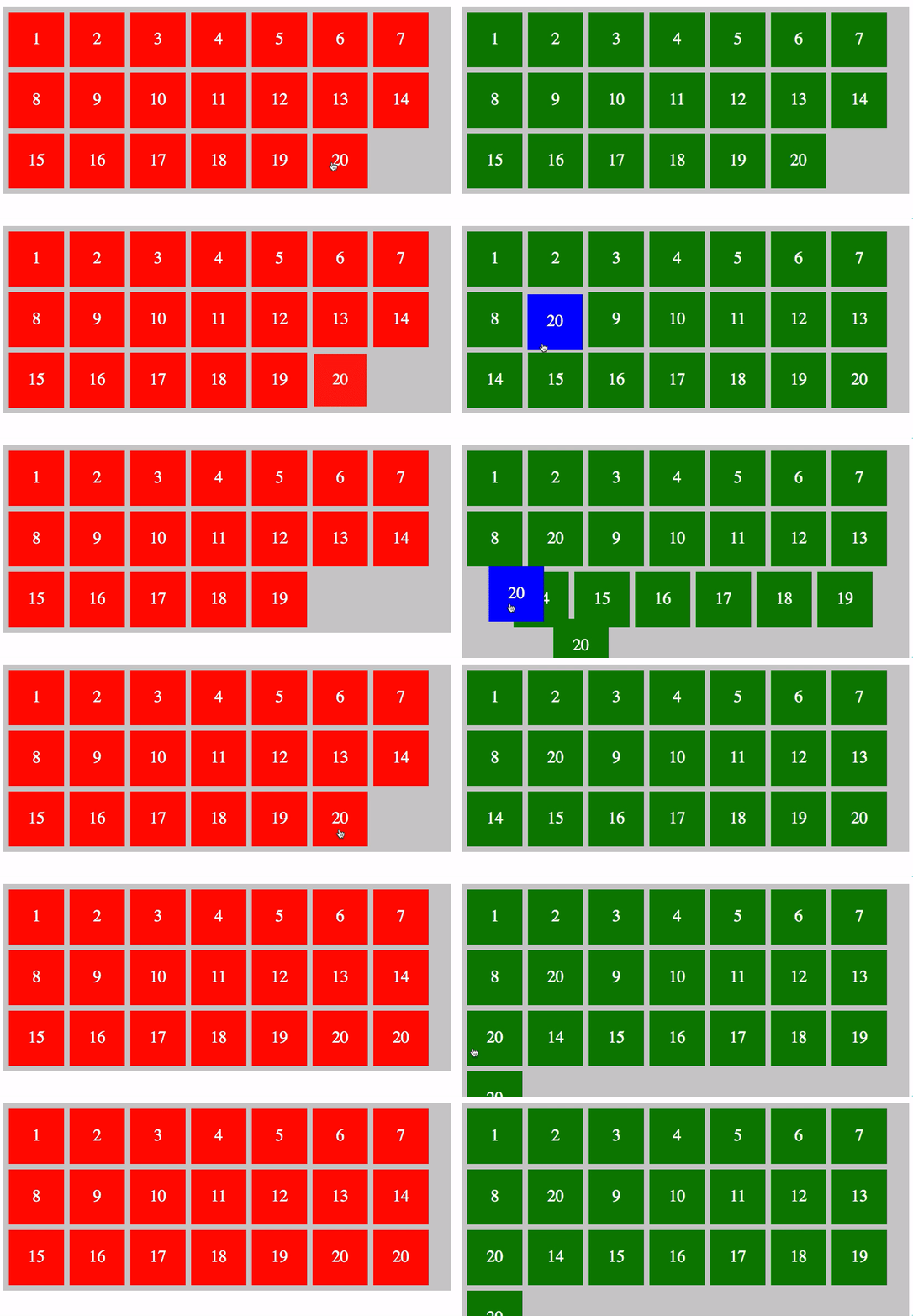
GianlucaFrongia
on 14 Jun 2019
@GianlucaFrongia You've done a very nice demo here so far, great job 👍 I'm not sure what you mean with receive event being called _early_, can you elaborate a bit?
However, you actually found a bug. grid.once() listener can not be unbound at the moment with grid.off() which is what causes the duplicate items in the original demo. If you change once -> on (and do the unbinding manually in the listener) it should work as supposed to. I'm actually thinking of removing the grid.once() method altogether as it is just a convenience method, and making it work with grid.off() would require more code and more maintaining.
However, I revised the old demo a bit to be a bit more elegant as it was originally just a quick hack: https://codepen.io/niklasramo/pen/zPVBLq
 niklasramo
on 14 Jun 2019
niklasramo
on 14 Jun 2019
thanks for the feedback!
I'm not sure what you mean with receive event being called early, can you elaborate a bit?
In the docs :
The item is dragged into another grid.
Means that the event is triggered when the dragged item over a grid ? I understood it in such a way that the event only happens when the grid 'receive' the item.
GianlucaFrongia
on 14 Jun 2019
@JetsonDavis bug free demo
GianlucaFrongia
on 14 Jun 2019
Cool! While I have the attention of both of you, can you tell me how to put a dashed line around the target area with text in the middle “Drop here” or such?
I put a div inside 'board-column-content’ but I get this:
On Jun 14, 2019, at 5:39 PM, Gianluca Frongia notifications@github.com wrote:
@JetsonDavis https://github.com/JetsonDavis bug free demo https://codepen.io/Chillskyy/pen/NZxrgG
—
You are receiving this because you were mentioned.
Reply to this email directly, view it on GitHub https://github.com/haltu/muuri/issues/287?email_source=notifications&email_token=AAGV3PULZU7PVPSCFRSYBGTP2QF2BA5CNFSM4HR6DYJKYY3PNVWWK3TUL52HS4DFVREXG43VMVBW63LNMVXHJKTDN5WW2ZLOORPWSZGODXYFDOQ#issuecomment-502288826, or mute the thread https://github.com/notifications/unsubscribe-auth/AAGV3PTA2VL3F5A6GRD4AYTP2QF2BANCNFSM4HR6DYJA.
JetsonDavis
on 15 Jun 2019
@GianlucaFrongia Yes, the receive event should be emitted immediately _after_ the item has been moved between grids (for the _receiving_ grid). And by _moving_ I mean that when the item has become part of the other grid's layout, so it is _not_ emitted by merely hovering the item over another grid.
niklasramo
on 15 Jun 2019
how to put a dashed line around the target area with text in the middle “Drop here” or such?
@JetsonDavis that's separate issue, so maybe better to create a new issue for that.
niklasramo
on 15 Jun 2019
One last question about this demo. Say I have added the '1' box in a few places and even moved around the order of the right boxes. What is the easiest way to determine the order of the boxes, going left to right, then down? All I can come up with is looking at the translateX & Y values and using them to compute the order, but there must be a more simple way?
Thank you!
JetsonDavis
on 16 Jun 2019
grid.getItems() returns the grid item instances in order. The order is _not_ the visual order though (necessarilly) but the internal order which is fed to the layout algorithm.
niklasramo
on 16 Jun 2019
But if I do a grid.synchronize() I will get the visual order, yes? Also, can you pls look at this code and tell me what the last line should actually be? I tried 'self', 'this', and 'muuri' but none work?? Thanks!!
itemContainers.forEach(function (container) {
    var muuri = new Muuri(container, {
      items: '.board-item',
      layoutDuration: 400,
      layoutEasing: 'ease',
      dragEnabled: true,
      dragSort: function () {
        return columnGrids;
      },
      dragSortInterval: 0,
      dragContainer: document.body,
      dragReleaseDuration: 400,
      dragReleaseEasing: 'ease'
    })
    .on('dragReleaseEnd', function (item) {
      if (toggle){
        // New video added to target area
        if (player_ptr === 0){
          // First item added to playlist so reveal video player
          if ($('.drag-message').attr('display') != "none") {
            $('.drag-message').hide()
            $(".reel-maker" ).animate({'marginTop':"375px" }, 1000, function(){
              $('#videoPlayer').fadeIn(2000)
            });
          }
        }

        muuri.sychronize()
grid.synchronize() will only reorder the _DOM nodes_ based on the internal item order. In most cases you should not need to call grid.synchronize(). You should _only_ use it if you have some code that requires the DOM nodes to be in sync with the internal order.
niklasramo
on 16 Jun 2019
So what is the best way to determine the visual order of the items? Thanks!
JetsonDavis
on 16 Jun 2019
@niklasramo this demo shows my question with receive:
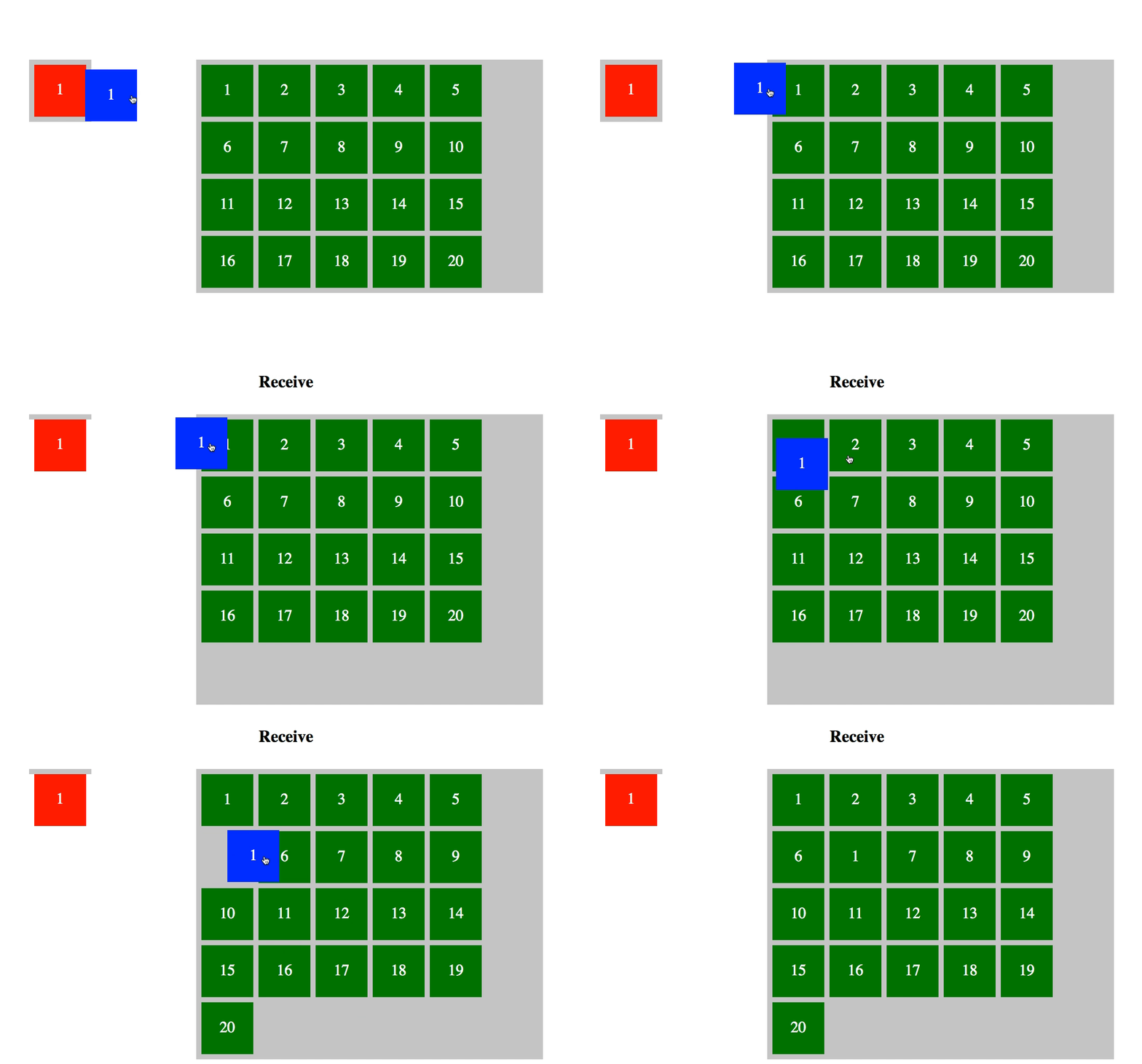
so when the 'receive' pop ups, the item is part of the other grid ?
mean that when the item has become part of the other grid's layout
GianlucaFrongia
on 17 Jun 2019
@JetsonDavis well, the question that needs answering first is "_what is the visual order_"? Muuri works by having the items ordered internally in some order and then it feeds the items to the layout algorithm which generates positions for the items. How the items are positioned is _fully_ dependent on the layout algorithm and how it uses the items as input. As you can also provide your own layout algorithm it's pretty much impossible to have an API in Muuri that would give you the _visual order_.
niklasramo
on 17 Jun 2019
@GianlucaFrongia Yes, when the receive pops up the item is indeed part of the other grid, it's positioned as the last item. When moving item between grids the default drag sort predicate will first try to find a grid it overlaps with enough and then it tries to find out if it overlaps enough with any item within that grid. If no suitable item is found it will be added as the last item in that grid.
You _can_ override all of that logic by providing your own dragSortPredicate, but it's quite a lot of logic and code there to make it work nicely. I've actually been thinking myself too how to make that logic easier to customize, because it indeed does not look so nice when the item is first added as the last item and then soon after it probably overlaps with some item and is moved again. This looks especially weird with the placeholder, which is coming up.
niklasramo
on 17 Jun 2019
@niklasramo I discovered that I can use grid.getItems() to get an array in visual order!
JetsonDavis
on 17 Jun 2019
@JetsonDavis It's not guaranteed to be the visual order. It depends on the layout algorithm.
grid.getItems()returns the grid item instances in order. The order is _not_ the visual order though (necessarilly) but the internal order which is fed to the layout algorithm.
niklasramo
on 18 Jun 2019
@niklasramo thanks for the explanation 👍
in our projects we had the same problem that the item cloned back before the user let go of the item. But seems that your hack works. We ende up using thegrid.send method and disabled drag&drop.
GianlucaFrongia
on 19 Jun 2019
I think the original issue here was solved so closing this one, thanks @GianlucaFrongia for the help here!
niklasramo
on 23 Jul 2019
Hey Niklas,
Do you have a code pen for this demo appearing on Muuri homepage? (See red arrow)
Thanks!
JetsonDavis
on 27 Apr 2020
Related issues
 stat92
·
6Comments
stat92
·
6Comments
 emilime93
·
5Comments
emilime93
·
5Comments
 Sashkan
·
3Comments
Sashkan
·
3Comments
 osamamaruf
·
4Comments
osamamaruf
·
4Comments
 realsoelynn
·
4Comments
realsoelynn
·
4Comments