Mumble: Trying to configure ASIO device crashes mumble
All 58 comments
Specs:
Windows 10
Focusrite 2i2 with beta drivers.
 ElPumpo
on 15 May 2016
ElPumpo
on 15 May 2016
I corrected the typo in both the title and the comment :wink:
Have you tried running Mumble as administrator?
 davidebeatrici
on 21 Jul 2016
davidebeatrici
on 21 Jul 2016
Yep, running as admin doesn't help
ElPumpo
on 21 Jul 2016
Have you tried with the latest snapshot?
Try also increasing the sound card's latency.
davidebeatrici
on 21 Jul 2016
Latest and greatest as of today - g2f88605
ElPumpo
on 22 Jul 2016
Did you try updating your drivers?
davidebeatrici
on 22 Jul 2016
Yes, running the latest. But ofc Windows drivers suck compared for Mac OS X ones. Might be drivers, but don't know.
How do you copy the mumble crash log?
ElPumpo
on 22 Jul 2016
You should try using a third party driver, like ASIO4ALL. :wink:
Do you encounter any problems with other programs that make use of ASIO?
About the Mumble crash log, we should ask to @mkrautz.
davidebeatrici
on 22 Jul 2016
ASIO4ALL doesn't seem to work for me, and haven't tried ASIO on other applications; can you give me a example?
ElPumpo
on 22 Jul 2016
Cubase is one of the most popular :wink:
davidebeatrici
on 22 Jul 2016
You kidding me? I didn't ask for a full program - now you're just begging for warez. Just kidding but meant a concept program using the ASIO protocol or whatever and not a full program.
ElPumpo
on 22 Jul 2016
Why am I just begging for warez? There's a trial on the official website. Also, you have asked me for an example of ASIO application, not a testing tool.
This should work: http://www.tropicalcoder.com/ASIOTestSigGen.htm :wink:
davidebeatrici
on 22 Jul 2016
Closed by mistake.
Anyway, I was already searching for a testing tool, but there aren't many; let me know if the one I linked you works fine :wink:
davidebeatrici
on 22 Jul 2016
I have a friend who has a Focusrite 18i8 and Windows 7 x64; I asked him to set ASIO for both audio input and output in Mumble and it works flawlessly.
Focusrite panel settings:
Latency: 4 ms
Bandwidth: 44.1 KHz
I guess that the problem is the driver, which causes issues with Windows 10.
Do you have any other sound cards installed? Have you tried disabling them?
davidebeatrici
on 22 Jul 2016
Well disabling other audio devices in device manager didn't help. Why ever do that?
"Unhandled exception at 0x0000000180024294 (Scarlett_UAC2Asio_x64.dll) in mumble.exe: 0xC0000005: Access violation reading location 0x00000000703A4868."
"If there is a handler for this exception, the program may be safely continued."
I debugged the application using Visual Studio and gave me the above, guess it's a driver issue? Your friend, what driver (version) do he currently use?
ElPumpo
on 22 Jul 2016
Found a .dmp file located at %appdata%mumble.dmp and have already inserted the file, doing another one, mumble-dump.zip
ElPumpo
on 22 Jul 2016
@ElPumpo Can you point me to the driver you're using? I can't find it on the Focusrite website. The two drivers I've found don't include that DLL. (Scarlett_UAC2Asio_x64.dll)
 mkrautz
on 23 Jul 2016
mkrautz
on 23 Jul 2016
http://beta.focusrite.com/releases/focusrite_usb2_drivers/ - top one ending "292"
ElPumpo
on 23 Jul 2016
I asked my friend what version of driver he's using and to check if he has the file Scarlett_UAC2Asio_x64.dll, I'm waiting for his response.
Could you try using the driver mentioned here?
davidebeatrici
on 23 Jul 2016
Will try tomorrow, it's 1am (01:00 in 24h clock) here in sweden
ElPumpo
on 23 Jul 2016
No problem, keep us updated :wink:
We're in the same time zone :smile:
davidebeatrici
on 23 Jul 2016
With the v2.5.1 drivers I get the following error: "Error: no Focusrite USB 2.0 audio devices were detected" when to configure the ASIO settings
ElPumpo
on 23 Jul 2016
So I went back to using beta drivers, and here's result:
v2.5.1: there was no support for ASIO in mumble
v3.1.10: added support for ASIO I guess
v3.2.1: nothing changed
v3.2.2: nothing changed
but hey, I guess it's a driver issue and not a issue with mumble. Gotta be something with Windows 10 and ASIO, as it works for your friend running W8.1.
Might aswell close this issue as it doesn't have anything to do with mumble, but the error handling could be better I guess as the computer go really slow and the mouse lag is back as starting mumble in the first place (but that got fixed by @mkrautz).
I'll email the driver developers and try to get them to look into the issue. Might also that I'm running a Windows 10 Insider build (new beta drivers, search yourself) build; have caused a lot of issues already and let's hope that it doesn't have anything to do with my possible bugged OS.
ElPumpo
on 23 Jul 2016
My friend is running Windows 7 x64 with driver version 2.5.128.1.
Probably something regarding audio/drivers has been changed with the Insider builds of Windows 10; contacting the Focusrite developers is the best thing to do at this point: we tried almost everything; you could try with another PC or a different installation of Windows 10, if you have another hard drive.
I'm leaving the issue open, so you can keep us updated :wink:
I hope that this problem will be solved in the best way possible, without the need to reinstall the OS.
Good luck :smile:
davidebeatrici
on 23 Jul 2016
The crash from your dump was inside Scarlett_UAC2Asio_x64.dll, however, when I debugged this yesterday, I didn't have access to the DLL, so the crash location in Scarlett_UAC2Asio_x64.dll wasn't helpful.
With the DLL, perhaps I can get some more hints from the DLL's export symbols... Who knows. (I haven't had time to look at it, yet).
Anyway, the crash was in the Scarlett DLL, so it would make sense to notify them of this crash as well.
mkrautz
on 23 Jul 2016
Yeah already contacted devs, and scarlett usb2 beta drivers.zip
ElPumpo
on 24 Jul 2016
@ElPumpo Yeah, sorry for being unclear. I did receive the last link to the beta drivers. I guess this links to the same one? :)
I just hadn't had time to spin up the debugger again...
mkrautz
on 24 Jul 2016
Haha no it's the requested dll files
ElPumpo
on 24 Jul 2016
Is anybody forgetting #1473?
Also, for the love of god, I think actual ASIO on realtek would offer better results than ASIO4ALL on a flagship soundcard.
 mirh
on 5 Aug 2016
mirh
on 5 Aug 2016
Mirh.. from pcgamingwiki? (Hi from hawaii_beach in that case)
Anyways, fuck ASIO I guess. Yes it might be useful for some users but just a pile of crap in general.
ElPumpo
on 5 Aug 2016
Btw for anyone wondering what happened to the emails I sent to the scarlett drivers: they still haven't responded. I'm not even expecting a email from them at this point.
Even sent them a email reguarding the same issue months ago....
ElPumpo
on 5 Aug 2016
Lol, yes.
And ASIO isn't all that bad once you make it work.
mirh
on 5 Aug 2016
Hi, I am having a similar issue. I want to use my UA Apollo Twin Duo for mumble I/O using ASIO drivers. When I select ASIO and go to Settings->ASIO->Query and select in and out channels, and click accept, Mumble crashes. The same thing happens when I first configure ASIO and then select it as a driver in the audio wizard. Here is a console log from one such instance: http://pastebin.com/Q7YYqkDG.
Additionally, if I use WASAPI I get no sound from my microphone (but I can hear Mumble through the out channel on the device). I've done this with my Apollo monitoring software closed and opened. When it's opened, I can see that the signal from the mic is at that which is normally audible.
The device is fully functional with ASIO drivers in DAWs, for example Reaper.
System: Intel DZ77SL-50K motherboard with Intel i7-3770 running Windows 8.1.
The device is connected via USB 3.0. Sample rate is set to 44.1kHz, the lowest possible. My microphone is a Lewitt LCT 240.
 g-perez-scornik
on 22 Sep 2016
g-perez-scornik
on 22 Sep 2016
Screw it, doesn't seem to be caused by mumble and the devs still haven't responded.
ElPumpo
on 22 Sep 2016
Hey, actually I went on IRC yesterday with my issue and a dev told me to post it in this thread.
g-perez-scornik
on 22 Sep 2016
Screw it, doesn't seem to be caused by mumble and the devs still haven't responded.
If mumble crashes, then it is its business.
If you are no longer interested, leave open the issue and simply unsubscribe.
mirh
on 22 Sep 2016
Last time I looked, the crash was inside the ASIO driver's DLL:
https://github.com/mumble-voip/mumble/issues/2274#issuecomment-234742517
I don't recall the stacktrace (and I seemingly didn't post it to this issue...).
mkrautz
on 22 Sep 2016
Wowow calm down lads
ElPumpo
on 22 Sep 2016
Last time I looked, the crash was inside the ASIO driver's DLL
Oh, gosh... I had miss that.
Then.. Yes, of course I guess this isn't the right place to discuss that.
mirh
on 23 Sep 2016
Yeah, I thought you meant that it had something to do with Mumble. I didn't read your reply correctly, my bad - closing issue for good now.
ElPumpo
on 23 Sep 2016
So.. a new version of the driver was out. The devs finally responded to my email 👍 💌
I was able to configure my ASIO device but when I change system to ASIO in the settings, mumble crashes yet again with the following:

ElPumpo
on 25 Oct 2016
Still located in Scarlett_UAC2Asio_x64.dll uh?
mirh
on 25 Oct 2016
Well, they did change the filename to FocusriteUSBAsio64.dll, and lemme check...
ElPumpo
on 25 Oct 2016
Exception Code: 0xC0000005
Exception Information: The thread tried to read from or write to a virtual address for which it does not have the appropriate access.
dmp_new.zip .. not directly refering to the ASIO driver (FocusriteUSBAsio64.dll) this time.
FocusriteUSBdrivers.zip for anyone who wants.
ElPumpo
on 25 Oct 2016
Unfortunately stack text still points to it.
mirh
on 25 Oct 2016
Just to poke this, I'm seeing the same crash with ASIO using several different asio drivers and two different operating systems on three different PCs.
Focusrite/behringer/voicemeeter/rearoute asio drivers all cause the crash randomly (i'm trying to get both inputs and outputs to show up in mumble, and was testing every option available)
Mumble version 1.3.0
OS: windows 8.1 and windows 10
 eldorel
on 19 May 2020
eldorel
on 19 May 2020
In the previous comments it seemed as if this was an issue in the DLL that caused the crash. Any chance you might now where the crash happened (any stacktrace available?)
 Krzmbrzl
on 19 May 2020
Krzmbrzl
on 19 May 2020
I actually gave up after realizing that even if it WAS working as expected, mumble only manages to query inputs no matter what ASIO driver/device is being used.
The app just crashes to desktop.
I have submitted crash reports a few times over the last couple of years, but If you can point me in the right direction for how to enable debugging or force a stacktrace, I'll attempt to replicate the issue while work is slow.
In my case(s), Querying the ASIO devices repeatedly eventually causes a crash and assigning inputs to both a mic and speaker device causes a crash immediately. (which is only a minor surprise, as that's a misconfiguration, but it should produce an error, not a CTD...)
I do get the option to submit a report after restarting, so I went ahead and intentionally did that via the 'misconfiguration' crash method just a moment ago. (email address starts with my username)
The fact that mumble's behavior is 100% consistent across multiple ASIO drivers, OS revisions, and hardware configurations pretty strongly implies that Mumble is doing something weird when it attempts to access these ASIO devices.
I would even go so far as to suggest that the ASIO drivers that "work" are functioning because those developers have included some trap or workaround for this particular error and are functioning due to being written to gracefully handle some out-of-spec behavior.
So it's pretty likely that the crash IS happening inside the ASIO device drivers, but only because they're not gracefully handling whatever is being done by mumble.
eldorel
on 28 May 2020
if you can point me in the right direction for how to enable debugging or force a stacktrace, I'll attempt to replicate the issue while work is slow.
Uhm the nor la procedure would be to build Mumble in debug mode and then start the app via a debugger. Once it crashes, you should then be able to get a proper stacktrace.
I have no experience with debugging on Windows though, so I can't really give specific instructions.
You seem to know your way around the ASIO stuff. Do you think you might be bale to take a look at our ASIO backend code to check if you can spot something that seems off?
Anyways from what you describe it indeed seems like there is a bug in Mumble. I'll reopen this issue.
Krzmbrzl
on 28 May 2020
I think that's part of the problem. We got two groups of people with very different skill sets trying to talk about a feature.
I'm not a programmer, I'm a network admin who was a sound tech in a past life.
The extent of my programming experience is glue-code in non-compiled languages, and moderately effective rubber-ducking for the guys who get paid by the line.
That means I speak a little bit of programmer and a lot of gaffer, so hopefully I can translate well enough that we can figure out where the actual problem is.
+++++++
Looking at the asio backend code you linked, the only thing I see that stands out is that the output channels are collected and "ochannels" is defined and set on lines 222-225, but then nothing is ever done with them.
Meanwhile, the input channels are assigned to "ichannels" at the same place, and it looks like the next code block (starting at L#229) collects the info on them, initializes them, and (i assume) adds them to the list of available channels in mumble.
So unless I'm misreading something (likely) or there's code in another file that I'm not seeing, the code is collecting all of the available channels, but only does anything with the inputs.
That might also explain the crashing, since most full-blown ASIO drivers are expecting software to access the inputs and the outputs at the same time, so trying to initialize ONLY the input channels can result in some weird effects. (I've done this by accident while setting up JACK before, it caused a kernel panic on debian...)
eldorel
on 28 May 2020
Maybe @thorvald could explain some of the reasoning behind, or how it ever worked?
mirh
on 28 May 2020
Looking at this comment on issue #1113, I'm now under the impression that leaving off the output channels was intentional.
That causing crashes would have been a simple thing to test, but the UI and sanity checks when enabling the ASIO features weren't setup to reflect the input-only configuration, so no one was really ever able to test it.
As it is, _the UI forces you to assign a channel to the 'speakers' column_, but since all of the available channels are INPUT channels, standard ASIO drivers are crashing when someone actually follows those directions.
The crashes on 'query' are probably unrelated.
- (perhaps something to do with initializing and collecting info on the input channels multiple times when the drive is expecting you to run through the inputs and then outputs in order?)
eldorel
on 28 May 2020
That might also explain the crashing, since most full-blown ASIO drivers are expecting software to access the inputs and the outputs at the same time, so trying to initialize ONLY the input channels can result in some weird effects.
If this is indeed the case, then I'd say that's a bug in the implementation of the driver (Unless we're also doing something that convinces the driver that we're actually also accessing the output channels).
As it is, the UI forces you to assign a channel to the 'speakers' column, but since all of the available channels are INPUT channels, standard ASIO drivers are crashing when someone actually follows those directions.
Could you post a screenshot of that part of the UI? I'm on Linux so I don't have access to the ASIO stuff
Maybe @ thorvald could explain some of the reasoning behind, or how it ever worked?
Pretty sure that won't happen (sadly) as he hasn't worked on Mumble in years (afaik).
Krzmbrzl
on 28 May 2020
That might also explain the crashing, since most full-blown ASIO drivers are expecting software to access the inputs and the outputs at the same time, so trying to initialize ONLY the input channels can result in some weird effects.
If this is indeed the case, then I'd say that's a bug in the implementation of the driver (Unless we're also doing something that convinces the driver that we're actually also accessing the output channels).
I'm not sure of this, but It might have something to do with the ASIO spec.
Every DAW and functional ASIO implementation I've ever seen initializes the entire stack of inputs and outputs, then lets you select the ones you want to have mapped to the software's routing inputs.
Even software that you would expect to be input-only still pulls the outputs and lists them.
Mumble is the only one i've ever seen try to only list the inputs, and it's also the only one I've seen with this crashing behavior.
Could you post a screenshot of that part of the UI? I'm on Linux so I don't have access to the ASIO stuff
Here you go:
https://i.imgur.com/VcNMfJs.png (mirror)
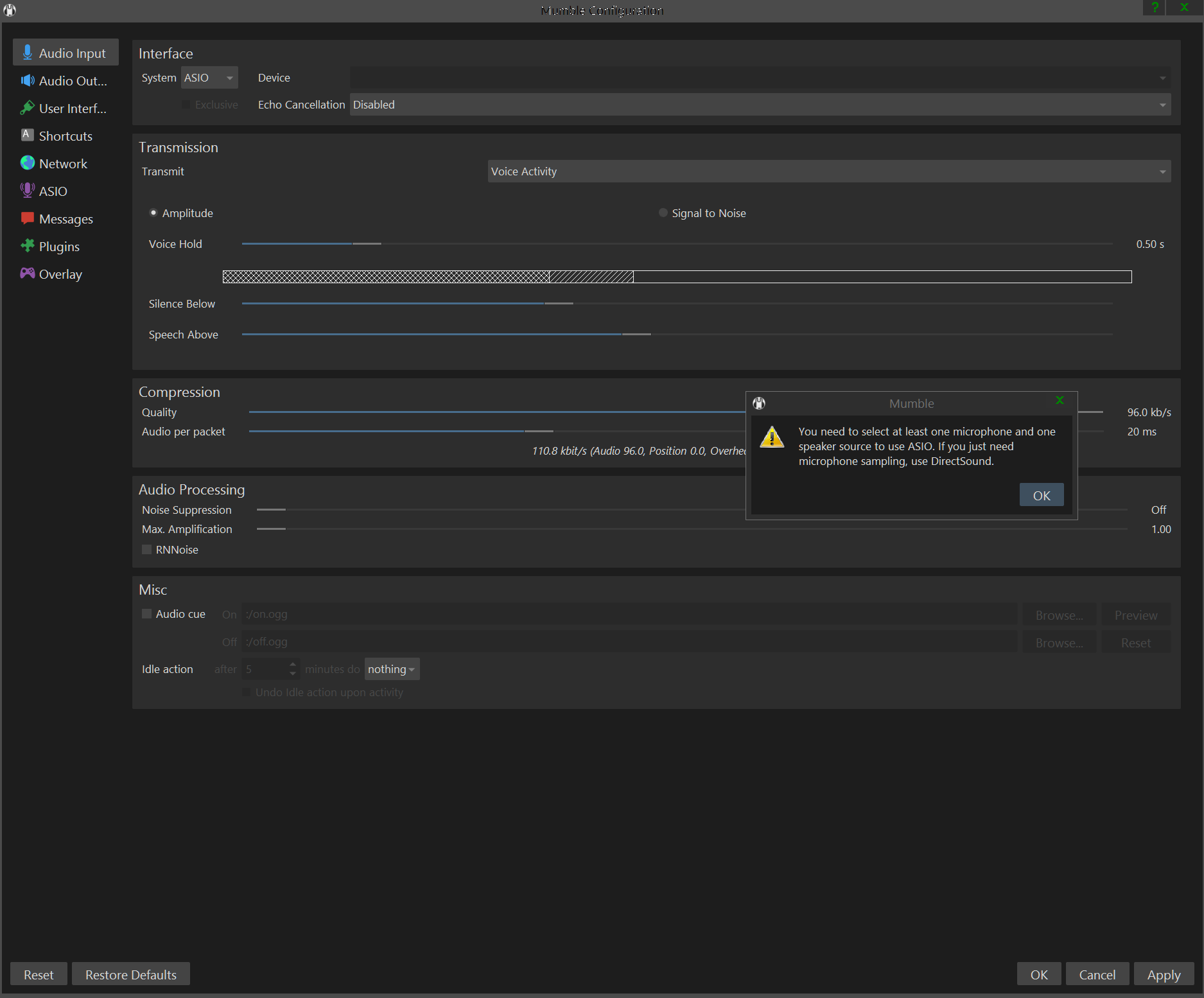
This is triggered by flipping the input 'system' to ASIO, and then not assigning any outputs (with or without inputs set).
I don't have access to the ASIO stuff
If you like, I can grab an old laptop and install win10-pro and teamviewer for you to test with. I have the spare hardware and an isolated VLAN available.
I even have a UMC1820 sitting on the bench that's not getting installed for a couple of days, so we can test with actual hardware.
So far, I haven't found any ASIO hardware devices that mumble detects the outputs on at all, and there's a pretty good number of tickets in here about crashes or missing outputs when queried.
eldorel
on 28 May 2020
I'm on Linux so I don't have access to the ASIO stuff
Yes you have :)
https://github.com/wineasio/wineasio
(though this may be far more resilient than an official driver)
I even have a UMC1820 sitting on the bench that's not getting installed for a couple of days, so we can test with actual hardware.
You don't really need anything fancy, realteks already support it (put even aside there is ASIO4ALL, but it always seemed hacky).
mirh
on 28 May 2020
You don't really need anything fancy, realteks already support it (put even aside there is ASIO4ALL, but it always seemed hacky).
I was under the impression that the realtek ASIO driver was a compatibility shim on top of the windows drivers.
When I tested them a while back they would be disabled if you disabled the sound device in the windows sound control panel. (granted it's been a VERY long time. 5+years{?}..)
eldorel
on 28 May 2020
So Mumble wants you to assign a Device to use for microphone and speaker? Did you even have ASIO set as the output interface? :thinking:
If you like, I can grab an old laptop and install win10-pro and teamviewer for you to test with. I have the spare hardware and an isolated VLAN available.
Thanks for the offer, but in fact I do have a Windows machine available but it's just not my main device and thus I can't "quickly" check how the UI looks and behaves.
As to the ASIO stuff: I don't know much about audio processing so I avoid touching the audio code of Mumble as much as possible (especially since it is in a really messy state).
Thus I'll most likely not really be able to fix this (any time soon) unless someone can tell me how I should change the code (in principle).
You said that we should probably access input and output "at the same time". From the code though it looked like we do also do something with output? Could you maybe elaborate on this? Maybe with that I can write a small patch that you can try out...
Krzmbrzl
on 28 May 2020
So Mumble wants you to assign a Device to use for microphone and speaker?
This is the ASIO tab's UI after hitting the Query button.

As you can see it's listed all of the inputs on the interface, but it's missing all of the outputs. (that's screenshot is showing a scarlett 18i8)
The previous screenshot was showing the error message shown after trying to assign inputs to "microphone" channels in the ASIO tab, and leaving the "speakers" channels empty.
Assigning any of the inputs to "speakers" channels reliably causes the crash when you hit apply.
Did you even have ASIO set as the output interface?
That option is greyed out on all of the systems I have access to.

You said that we should probably access input and output "at the same time". From the code though it looked like we do also do something with output? Could you maybe elaborate on this?
I was theorizing that this might be the cause of the 'query' crashing I'd seen, but that's probably a secondary issue not related to fixing ASIO inputs. (and it would be rather easy to test that if we can map the inputs to microphone without the UI saying "no, go map an input to a speaker as well".)
When the code is listing off the items stored in 'ichannels' and collecting info on them, you should be able to include the 'ochannels' and collect info the same way.
Even if that data is discarded, the interface/driver won't be holding a list of the output capabilities in memory waiting for the code to query for them.
In theory, you may be able to handle the outputs in the exact same way as the inputs are handled, as ASIO treats them almost identically.
eldorel
on 28 May 2020
Related issues
 bontibon
·
5Comments
bontibon
·
5Comments
 Teteros
·
4Comments
Teteros
·
4Comments
 TalkLounge
·
4Comments
TalkLounge
·
4Comments
 hoxia
·
4Comments
hoxia
·
4Comments
 promi
·
5Comments
promi
·
5Comments