Multi-account-containers: [Feature Requests] Custom Color(s) & Icons
I've added a review on official Firefox Add-On page, please add 2 new features:
1) A colour panel to choose our own custom colour for containers.
2) Add functionally to add more icons into add-on.
edit:
I recently found another excellent add-on: Containers Theme!
As the name implies, it will change your whole theme (top & sidebar) to whatever colour your container tab is. No matter matter the container colour. Purple? It'll match. Switch to different container? It'll follow through.
This even works with Temporary Containers; it'll turn grey-ish black.
 Solid-Ice8
All 11 comments
Maybe just allow to upload custom pics for containers?
- Containers sorting (drg n drop, some custom like Alphabetic, creation time)
- Containers grouping (folders)
- Command-line launching
 Dmitresso
on 14 Apr 2020
Dmitresso
on 14 Apr 2020
- Containers sorting (drg n drop, some custom like Alphabetic, creation time)
There's no real way to automatically sort containers. You'd have to manually sort it.
I did this myself too. I read some of the issues here and someone mentioned it (I can't seem to find it)
It's very important that you follow the instructions to manually sort it.
In FireFox address bar, type: About:Profiles & open up desired profile.
_I have multiple profiles, so I had to be extra careful not to mix them up_
Make sure you have a backup copy of your profile(s) in case you make some mistake.
A) Close FireFox(es)!! <-- Very important!!
B) In the desired %appdata% profile, find 'containers.json'.
C) Open with preferred text editor. You'll notice it's in one really long line. You can organize to look better for now.
D) Use Ctrl+F to find {"userContextId" with curly brackets in the front & double quote at the end
E) Press "Enter" to make it drop down one line. It'll look something like this:
{"version":4,"lastUserContextId":10,"identities":[

{"userContextId":1,"public":true,"icon":"vacation","color":"green","name":"Container1"},
{"userContextId":2,"public":true,"icon":"gift","color":"blue","name":"Container2"},
The coding for the first 4 will differ slightly, as these are main starting ones. It'll have accessKey & all that. Leave them alone, do not remove.
F) It's important that these all have _commas at the end of the line_; except for the last one!
If you forget, it'll ruin everything & you'll have problems after starting FireFox.
Make sure it looks something like this:
{"version":4,"lastUserContextId":4,"identities":[
{"userContextId":1,"public":true,"icon":"vacation","color":"green","name":"Container1"},
{"userContextId":2,"public":true,"icon":"gift","color":"blue","name":"Container2"},
{"userContextId":3,"public":true,"icon":"glasses","color":"yellow","name":"Container3"}
]}
_No comma on the last one!_
G) Save it after re-ordering it & run FireFox. Note you may need to manually click Multi Account Container add-on icon a few times for it to work normally again, this behavior is normal.
H) You can remove any usercontextid's that's higher than 2 digits "userContextId":41258 & any entries that's public:false. Even if you toggle true and filled in correctly, nothing will appear.
I) Please remember to use color names and not their hex numbers. I've never worked with JavaScript myself but, I know HTML & CSS uses hex.
edit (April 17th):
Added H) & I) instructions for clarifications.
- Containers grouping (folders)
Simple Tab Groups is your solution here. This add-on requires container tabs to function so, it'll fit right in. However, you'll need to manually create groups & sort tabs. I believe when creating a "Group", you're essentially creating container tab.
Solid-Ice8
on 14 Apr 2020
@Solid-Ice8, thanks for your description. Does it all means it's possible to create new containers via manipulating with 'containers.json'? Did you try that?
It's great and last one — starting window with containered new page via command line option — what I mostly need.
Dmitresso
on 15 Apr 2020
Oh, I forgot to mention, you can omit any of usercontextid's with public:false lines. When changed to true & filled in all fields properly, add-on wasn't able to open up despite clicking many times.
Does it all means it's possible to create new containers via manipulating with 'containers.json'?
In short, yes, it's possible, but I wouldn't recommend always using the .json file itself. Only for sorting/organizing purposes only.
Even without "Multi-Account Container" add-on, these 'containers' will still exist. In firefox, press Alt+F to open up File menu & you'll see 'New Container Tab' on the second context menu.
This is where you can essentially add/remove containers, Multi-Account Container only 'extends features' to amplify it.
I'm not sure how that'll work with command lines, I've never worked with those either.
Solid-Ice8
on 15 Apr 2020
@Solid-Ice8 Tried your containers.json solution and, unfortunately, looks like custom hex colours are not valid. Using colours such as #000000 breaks the extension. Somehow we have to use colour names such as black.
 sunknudsen
on 17 Apr 2020
sunknudsen
on 17 Apr 2020
@Solid-Ice8 Tried your
containers.jsonsolution and, unfortunately, looks like custom hex colours are not valid. Using colours such as#000000breaks the extension. Somehow we have to use colour names such asblack.
Yes, that is correct. I did include that in my example above. Perhaps you weren't paying attention?
{"version":4,"lastUserContextId":4,"identities":[
{"userContextId":1,"public":true,"icon":"vacation","color":"green","name":"Container1"},
{"userContextId":2,"public":true,"icon":"gift","color":"blue","name":"Container2"},
{"userContextId":3,"public":true,"icon":"glasses","color":"yellow","name":"Container3"}
]}
I've edit the initial post to reflect that as well. As a former HTML coder, I've forgotten about that. Staying home too long isn't a good thing... ;) My brain is frying from not actually working.
Solid-Ice8
on 17 Apr 2020
Well, I found more advanced features in Simple Tab Groups. You can find it after creating group and editing group settings. It also supports wildcards which some people have been suggesting as well.
Solid-Ice8
on 26 Apr 2020
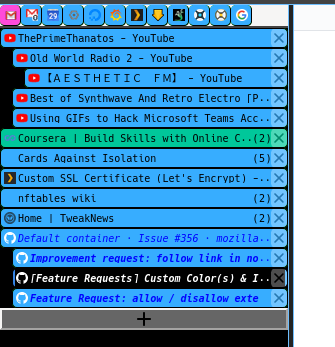
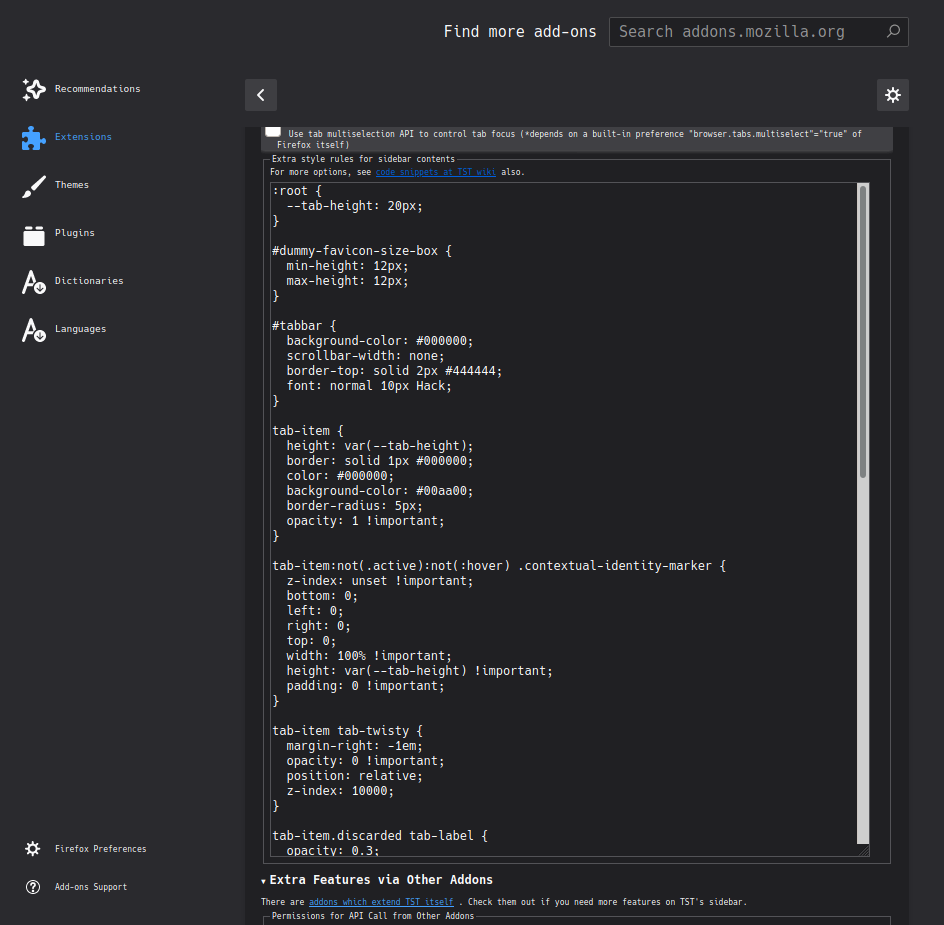
I personally like Tree Style Tabs (TST), and with TST, and a little (or like me, a lot) CSS tweaking in the preferences for TST, you can modify the look of TST. I am sure there is a way to set the tab colour for TST as well, but I just use the default colours in the containers menu.
E.g.:
 AlienResidents
on 29 Apr 2020
AlienResidents
on 29 Apr 2020
Yes, I use TST as well.
When you installed TST, you would've been given site that lists all other TST side add-ons. In that list, TST-Colour-Tabs is there. It's far from perfect but, better than nothing.
Solid-Ice8
on 29 Apr 2020
Apparently, the idea of more colours has already been suggested in #1673
Solid-Ice8
on 30 Apr 2020
The colour feature is a duplicate of #391 and the ordering feature in the second comment is a duplicate of #330.
 alexanderadam
on 5 Aug 2020
alexanderadam
on 5 Aug 2020
Related issues
 bcb44
·
4Comments
bcb44
·
4Comments
 krishnanunnir
·
3Comments
krishnanunnir
·
3Comments
 nekromoff
·
3Comments
nekromoff
·
3Comments
 budhajeewa
·
4Comments
budhajeewa
·
4Comments
 jbyler
·
4Comments
jbyler
·
4Comments
Most helpful comment
Maybe just allow to upload custom pics for containers?