Multi-account-containers: Icon inconsistencies
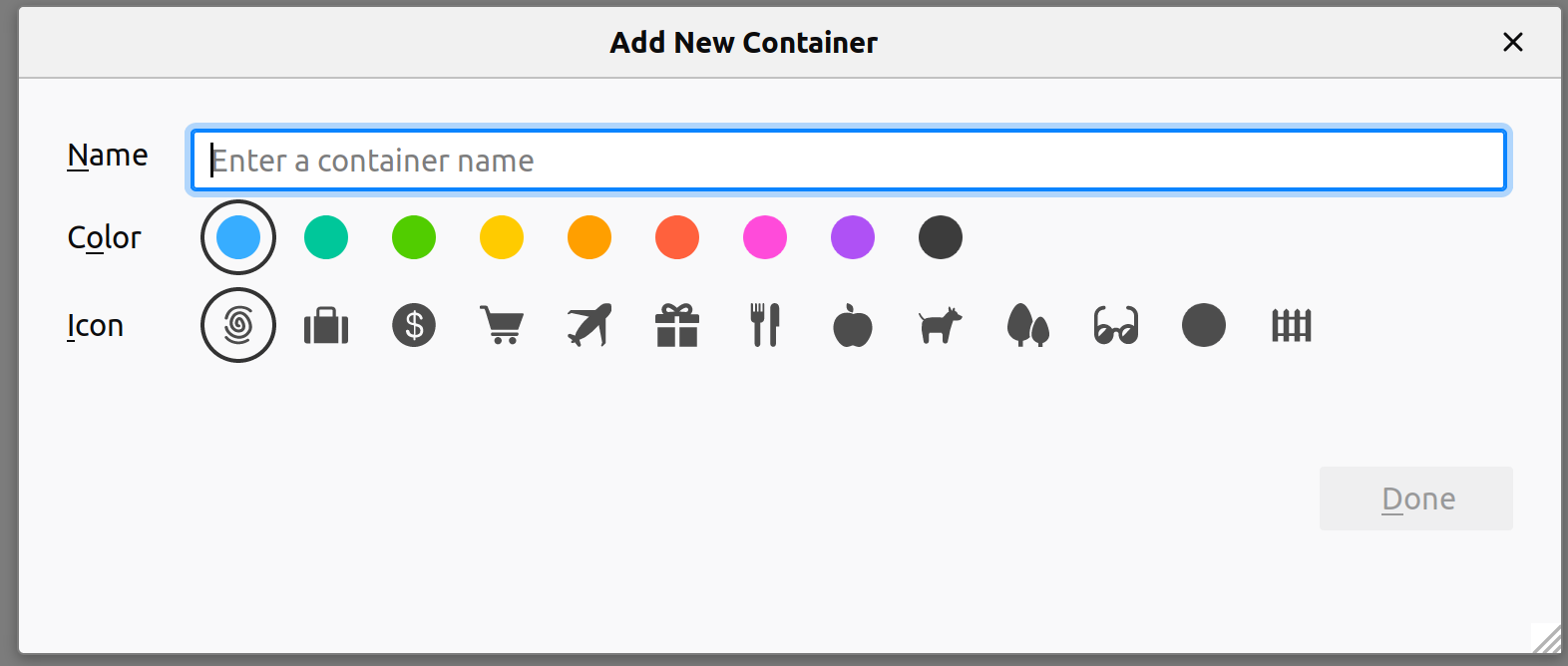
The icons in the popup and in Options (in Firefox 57) are inconsistent in both appearance and order:


Notable inconsistencies:
- The
circleicon is positioned at the end in the popup. - The positions of the
giftandvacationicons are switched. - The
carticon is more "solid" in the popup and has more detail in Options. - The
dollaricon is contained within a circle in the popup. - The
briefcaseicon is more "solid" in Options and has more detail in the popup. - Small detail, but still an inconsistency: In the popup, the
Coloroptions are shown before theIconoptions, while Options showsIconfirst.
 FayneAldan
All 16 comments
@FayneAldan Can I work on this issue?
And where can I find the Add new container window? I'm using Firefox version 62.0
 Paarmita
on 21 Sep 2018
Paarmita
on 21 Sep 2018
Make sure you have the extension installed. The first menu is when you click the extension icon and the second menu can be found in Firefox's settings in General.
FayneAldan
on 21 Sep 2018
@FayneAldan @jonathanKingston Can u plz help me find the file for the menu window in Firefox's settings. I got the file for the popup window.
Paarmita
on 21 Sep 2018
@FayneAldan @jonathanKingston @groovecoder Can I work on this issue? And can anyone of you guide me through this?
 yatri1609
on 23 Sep 2018
yatri1609
on 23 Sep 2018
@yatri1609 I was working on this. :)
Paarmita
on 23 Sep 2018
@Paarmita https://searchfox.org/ is a good code searching tool for Firefox.
Finding the code in Firefox
Sometimes searching for the string like the name in the modal is actually the simplest way to find the code:
"Add new Container" search result returns two results, one is the button that opens the modal and another is the modal.
The code being a ftl translation file:
containers-window-new =
    .title = Add New Container
"containers-window-new" search result returns one more result which is the code that uses the translation:
function setTitle() {
  let params = window.arguments[0] || {};

  let winElem = document.documentElement;
  if (params.userContextId) {
    document.l10n.setAttributes(winElem, "containers-window-update", {
      name: params.identity.name,
    });
  } else {
    document.l10n.setAttributes(winElem, "containers-window-new");
  }
}
Looking through this code in the rest of the file you can see it's responsible for opening up the modal and generating these icons.
The issues
These are all issues within the Firefox codebase and can be changed and tested within a 'artefact build' and shouldn't require a compile of Firefox.
Follow the instructions to setup your machine:
Mac Windows Linux
- After you get the bootstrap.py select artefact build and the script will setup your environment with mercurial and download the code too (you will be prompted at the end, if not follow the rest of the guide).
- Some of the icons being wrong is actually the icons that were in the initial set in Firefox were never updated (the briefcase, cart, dollar)
- The ordering of the modal in the extension came second to the modal within Firefox.
- Likely there will need to be some optimisations to the icons to be placed into the Mozilla codebase.
The work however will need to be moved and logged in http://bugzilla.mozilla.org/ rather than Github. You can mark me as a review when you are done. Please feel to reach out to me with any questions you might have :).
 jonathanKingston
on 28 Sep 2018
jonathanKingston
on 28 Sep 2018
@jonathanKingston Can u please provide what is the communication platform of this project, I tried #containers in irc but there was no response.
Paarmita
on 28 Sep 2018
@Paarmita irc is correct for now certainly (sorry I have been a little busy lately) please mention my irc handle (jkt) when messaging. Feel free to email Luke and I directly though instead.
jonathanKingston
on 2 Oct 2018
Can I work on this one or someone is already doin it? @jonathanKingston @groovecoder
 iillx
on 6 Oct 2018
iillx
on 6 Oct 2018
@iillx I think @Paarmita is already working on this.
 groovecoder
on 7 Oct 2018
groovecoder
on 7 Oct 2018
@iillx You can take this up 👍 As I am busy with my university exams So won't be able to work on the issues. :)
Paarmita
on 7 Oct 2018
@groovecoder Can I take up this issue as my first issue for outreachy?
 nidhi-nigam
on 12 Oct 2018
nidhi-nigam
on 12 Oct 2018
@iillx - are you already working on this? Or can @nidhi-nigam work on it?
groovecoder
on 16 Oct 2018
Hi. I would like to work on this issue.
 sakshi97
on 15 Jan 2019
sakshi97
on 15 Jan 2019
@jonathanKingston I have fixed this. I have submitted a bug to bugzilla here https://bugzilla.mozilla.org/show_bug.cgi?id=1570005
I'm working on next steps to get this submitted for review.
 kendallcorner
on 30 Jul 2019
kendallcorner
on 30 Jul 2019
Thanks @kendallcorner I just approved the change.
jonathanKingston
on 31 Jul 2019
Related issues
 krishnanunnir
·
3Comments
krishnanunnir
·
3Comments
 budhajeewa
·
4Comments
budhajeewa
·
4Comments
 ximex
·
3Comments
ximex
·
3Comments
 bcb44
·
4Comments
bcb44
·
4Comments
 anbenson
·
3Comments
anbenson
·
3Comments