Multi-account-containers: Restrict a container to a single domain
- → g00s mentioned on irc:
- 10:35 PM
hi .. wondering if there is a way i can say this container can only host a particular domain or from a selection - and if i try to open another website not on that list it gets opened in the default container - 10:39 PM g00s: the alternative is writing a separate extension to do that
jkt ok thanks, yeah i would think the usecase would be common: a container that /only/ hosts my bank, one that /only/ hosts google (gotta keep them separated!) - 10:41 PM after using containers for a while, i think they get polluted because i open links or other sites directly and forget which container i am in, so things aren't as segregated as l like. only way around this is to have 'most open site in container X' ... but for all the other ephemeral things i open up ...
- 10:42 PM 'must open site in container x' sorry
- 10:42 PM in that case, i can be sure sites specifically assigned to containers don't 'cross wires'
- 10:42 PM but we can't assign every website to a container, and most websites have outgoing links
- 10:43 PM but thanks for the info
- 10:46 PM from UI perspective seems easy, from edit containers -> pencil icon -> sites assigned to this container, maybe a checkbox "only allow sites assigned to this container"
 jonathanKingston
All 40 comments
My use case for this would be to isloate all Google domains to a container; so that whilst I can do a search in Google, I don't want every site I click through being tied back to Google.
 Kroc
on 12 Oct 2017
Kroc
on 12 Oct 2017
I just opened https://github.com/mozilla/multi-account-containers/issues/914 discussing propagating the banking context for example.
 gliptak
on 20 Oct 2017
gliptak
on 20 Oct 2017
For reference
https://hacks.mozilla.org/2017/10/containers-for-add-on-developers/
https://addons.mozilla.org/en-US/firefox/collections/jkt/container-tab-addons/
And in particular
https://addons.mozilla.org/en-US/firefox/addon/containers-on-the-go/
gliptak
on 25 Oct 2017
Agree with this! I want to sites that track / the sites I've logged in to contained!
 gabrielwhite
on 28 Dec 2017
gabrielwhite
on 28 Dec 2017
First-party isolation might be the solution for this. But not sure for when you want to have e.g. cookies for a set of domains.
 ArchangeGabriel
on 28 Dec 2017
ArchangeGabriel
on 28 Dec 2017
To make the scenarios clear:
I am searching using SomeSearchEngine, and I click on a link. I don't want SomeSearchEngine to be able to track me beyond my search query.
I am using SomeEmailService, and I click on a link. I don't want SomeEmailService to track me beyond me reading a particular message.
My web browser is already open, and I want to go to somewebsite.com. I go to the tab I was most recently using (which happens to be an isolated container I use for SomeSearchEngine). I don't need this page any more, so I type the URL into the address bar in this tab. I don't want SomeSearchEngine to be able to track me any more in the container that was previously set for this tab.
In all these cases I want to automatically escape my current container to continue my task.
gabrielwhite
on 29 Dec 2017
The new Facebook Container extension does this very well, where upon navigating away from Facebook the tab switches out of the Facebook specific container to the default container. I would love to see a similar function implemented for a more general use.
 ghost
on 28 Mar 2018
ghost
on 28 Mar 2018
Also chiming in to say that this is highly desirable. The new Facebook Container should be the model here; currently it's up to the user to remember to manage container access if they want to keep specific sites segregated.
Ideally there would be a toggle in the Edit Containers screen enabling this more restrictive behavior for a given container -- "Only open these sites" or similar.
 TrekkieTechie
on 28 Mar 2018
TrekkieTechie
on 28 Mar 2018
Agree - the Facebook Container model is exactly what I wanted to (automatically) prevent data leakage.
gabrielwhite
on 28 Mar 2018
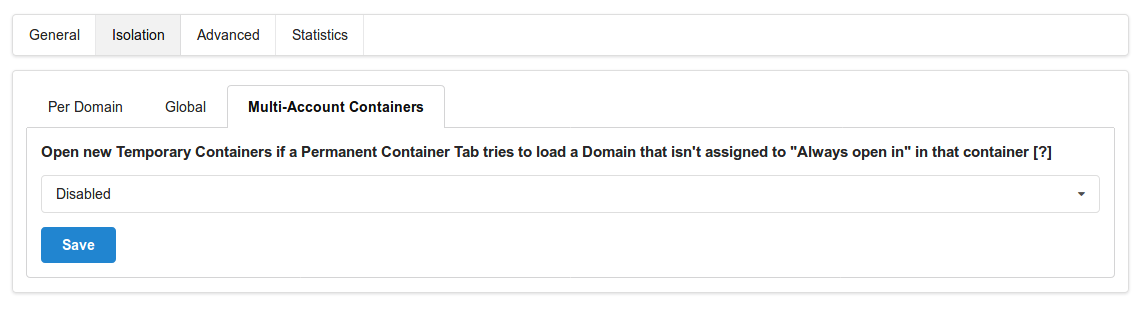
Since this Issue is also marked as "Good extra Add-on", I'll mention that I've implemented a feature doing that kind of Isolation for Multi-Account Containers "Always open in" assigned Domains in the Temporary Containers Add-on. You'll find it in the preferences/options under "Isolation > Multi-Account Containers":
I'd be up to implement this in Multi-Account Containers too if the core maintainers give green light to do so.
 stoically
on 28 Mar 2018
stoically
on 28 Mar 2018
I'll add my vote for this feature. Essentially I want a generalized version of the Facebook Container extension.
 scruffydan
on 9 Apr 2018
scruffydan
on 9 Apr 2018
@stoically I think we might consider accepting this patch now. We would likely need to do some clean up of code and I dunno how we would surface the UI at this point though.
jonathanKingston
on 30 Apr 2018
@jonathanKingston I'd say it should be a container-specific setting, something like
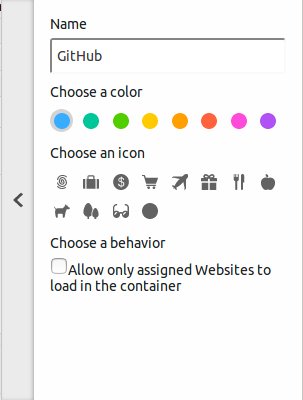
(just in polished :)
However, I'm not sure if that might not be too confusing for new users if they don't know what "assigning" means at this point. So yeah, how and where to implement the UI is indeed an interesting question. Also, if they activate the option directly when adding the container, they'll never be able to open any website in the container.
stoically
on 4 May 2018
@stoically How about Open links in Default container?
 nhck
on 5 May 2018
nhck
on 5 May 2018
How about Open links in Default container?
"Open links in [listbox] container" (with listbox defaulting to "None", "Default", or whatever is the proper name).
 mcepl
on 11 May 2018
mcepl
on 11 May 2018
I think there are challenges with the above suggestions, because a "site" may consist of multiple domains.
www.somesite.com
admin.somesite.com
sistersite.com
Think of YouTube (youtube.com), where authentication is handled by Google's login (google.com).
So there may be a "simple" mode ("open links in new container"), which accounts for a domain and all subdomains.
But for a robust system, I would think you'd need a curated ruleset of some kind.
This could be user curated (right-click on link, and select "Open this link in same container" -> "Once / Always?"), but I'm not sure this would work robustly if links are javascript enabled.
The other way to do this is allow the user to load (and update) externally managed rulesets. This could be like the IP blocklists used for torrent apps.
I'm not sure I'm missing something here, but hope this all makes sense.
gabrielwhite
on 11 May 2018
Maybe do this only for "Open links in new tab/window" (Middle click)? "Open new tabs in default container"?
 gwarser
on 11 May 2018
gwarser
on 11 May 2018
I think there are challenges with the above suggestions, because a "site" may consist of multiple domains.
Of course, those way goes the way towards Unix simple command line pipes ;) (I use Linux, I work at a Linux company, but I can see how „normals“ completely hate anything like that) I think separation into domains is sufficiently coarse for normal users of Firefox extension.
mcepl
on 11 May 2018
Of course, those way goes the way towards Unix simple command line pipes ;) (I use Linux, I work a Linux company, but I can see how „normals“ completely hate anything like that) I think separation into domains is sufficiently coarse for normal users of Firefox extension.
I'm not sure this is generally true: lots of sites use Facebook / Google / Twitter for authentication, for example, and a user may reasonably want to authenticate with somesite.com using Twitter, but also keep the browsing activity on that site isolated.
gabrielwhite
on 11 May 2018
Why not a global setting Open links in the same container that can be set to False?
The difference is subtle, but it would allow links to also be open in different containers depending on the link target (eg. a Google link on Facebook would open in the Google container), instead of defaulting to Default every time.
 nfvs
on 22 Jun 2018
nfvs
on 22 Jun 2018
I appreciate this thoughtful, intelligent discussion of specifying "single-purpose" and the "default" (no) containers. I'd add the following input, particularly addressing @stoically (and his brilliant _Temporary Containers_ MAC complement) and @gabrielwhite :
<2¢>
There are important use cases where using the default (no) container is essential: @stoically has incorporated two of them into his extension already: Mozilla Add-ons and GetPocket. But there may be more insofar as they more-or-less "integrate" with Firefox itself like those two: for instance, Firefox Sync itself; LastPass or other password managers; the Adobe Flash Player Global Privacy Settings Panel; or perhaps any given malware, antivirus, or privacy add-on site. (Those may not be perfect examples in that any or all of them may not _require_ being in the default/no container to function properly, but it may be the user's preference to put them there, if only out of a sense of taxonomy.)
Much agreed also with those—including @gabrielwhite —who have pointed out how _Facebook Containers_ is the archetypal and compelling use-case example of how a "single-purpose" container feature is needed—notwithstanding all the aforementioned challenges in making it so.
I for one would be very grateful to see both of these features implemented.
 GitBZ
on 8 Jul 2018
GitBZ
on 8 Jul 2018
@jonathanKingston Is there any timeline to implement this feature or accept a patch from @stoically ?
 AdKiller
on 11 Jul 2018
AdKiller
on 11 Jul 2018
Are there any news on this issue? While the Temporary Containers addon kinda solves this, it would be nice to have it as an per-container setting and configurable in the Multi Account Containers plugin itself.
 vbrandl
on 17 Feb 2019
vbrandl
on 17 Feb 2019
Would it be a valid option to reset container state for links with target="_blank" or those manually opened in a new window/tab?
So let’s say I’m on Twitter in my Twitter container and I click on an external link in my timeline. FF opens a new tab (forgets about the Twitter container) and opens the site without a specific environment preset. From there on its default behavior: If the new URL belongs to a container environment, FF changes it. So external links from Twitter to Twitter, Facebook, etc. still end up in their respective containers but anything else opens without environment.
 intellent
on 7 Mar 2019
intellent
on 7 Mar 2019
Looking forward to a feature similar to this request.
It holds me back from really getting to use M-A-C.
 ScraperDave
on 5 Apr 2019
ScraperDave
on 5 Apr 2019
The lack of this feature is the main reason that I don't currently use MAC (other than Facebook container). It defeats the purpose of the feature if I can accidentally open other websites in a container that I'm using for banking.
 WesleyBranton
on 12 Apr 2019
WesleyBranton
on 12 Apr 2019
I installed the addon. I thought this feature was in it already. It should be standard that if you add a domain to a container, then it restricts that domain only. If you click on a link or in your favorites bar. It should go to your standard mode. If you click on a link or favorite bar that contains a link that you have setup with another container, then it needs to open that particular container.
I uninstalled the addon for now, if this gets implemented, I will install it immediately. For now I can’t work with it.
 worldsdream
on 15 Apr 2019
worldsdream
on 15 Apr 2019
@worldsdream What do you use for alternative or you just don't use containers at all?
 lhorace
on 15 Apr 2019
lhorace
on 15 Apr 2019
@lhorace I dont use any alternative. Firefox for my private stuff. Chrome for gmail, youtube and other Google stuff. As they track everything already. Brave browser for social media. I call it the containers of browsers.
I also can delete the history of that browser and everything related gets deleted. I did not see a delete container history feature.
For example: I want to delete the cookies and so on of my “banking” container. I did not see that?!
worldsdream
on 15 Apr 2019
gwarser
on 15 Apr 2019
The implementation seems to be simple https://github.com/cypressious/ff-container-outgoing-links/blob/master/background.js#L21
gliptak
on 15 Apr 2019
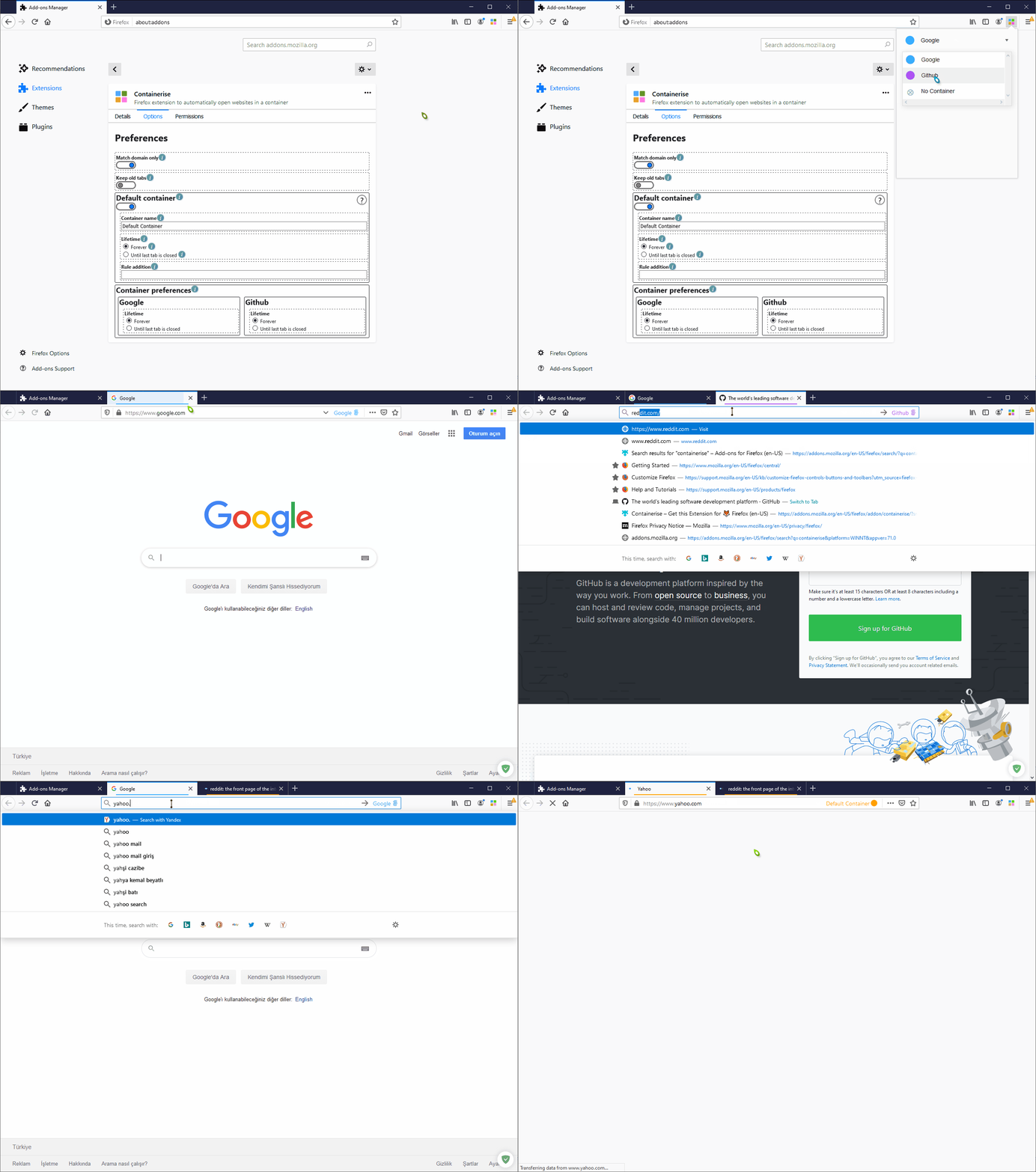
Containerise can easily restrict a container to a single domain. Just don't forget to set "Match domain only" and "Default container" option in extension option.
 sungerbob
on 5 Jan 2020
sungerbob
on 5 Jan 2020
@sungerbob it works if the other domain has a container defined for it.
If you try to open youtube, for example, while on github page/container, it (yt) will be open in github container -- which is what this issue is about.
The desired behavior is to open other sites in default container rather than the current one.
 mcha-dev
on 5 Jan 2020
mcha-dev
on 5 Jan 2020
@sungerbob it works if the other domain has a container defined for it.
If you try to open youtube, for example, while on github page/container, it (yt) will be open in github container -- which is what this issue is about.The desired behavior is to open other sites in default container rather than the current one.
Ops, I mean it's working as you mentioned but it creates "Default" container and redirects on it.
sungerbob
on 5 Jan 2020
@sungerbob just realized you're using a different plugin (not by mozilla).
This one doesn't have that option yet hence this issue is still open.
I think I've tried the one you're using and have had some memory issues with it.
mcha-dev
on 5 Jan 2020
Any updates on this? It's been nearly 3 years now
 ilindaniel
on 9 May 2020
ilindaniel
on 9 May 2020
This should get much more attention, the purpose of the containers is to prevent for instance Google from tracking on other sites, but we open a great portion of _the other sites_ from a Google search.
The best would be to be able to set for each specific container if it is a „_strict_” container, only allowing sites to open in it which were specifically assigned to it.
Another option is to set for each one if it is „_sticky_”, determining whether links opened from the specific container should open in the same one or in Default.
 floriensk
on 12 May 2020
floriensk
on 12 May 2020
Only one last nit pick to fix over here: https://github.com/mozilla/multi-account-containers/pull/1654
Looks like the solution to this will be merged very soon - thanks @mckenfra and @kendallcorner for your work on this!
 joweiser
on 14 May 2020
joweiser
on 14 May 2020
With the 7.0.0 release, this is now possible.
 groovecoder
on 13 Jul 2020
groovecoder
on 13 Jul 2020
Hey @groovecoder
Please check this https://imgur.com/a/0zETzEh
It looks like it can't distinguish main domain so still can't able to use wisely.
sungerbob
on 1 Sep 2020
Related issues
 skank
·
3Comments
skank
·
3Comments
 budhajeewa
·
4Comments
budhajeewa
·
4Comments
 brettcurrie346
·
3Comments
brettcurrie346
·
3Comments
 jbyler
·
4Comments
jbyler
·
4Comments
 ericlathrop
·
3Comments
ericlathrop
·
3Comments
Most helpful comment
Since this Issue is also marked as "Good extra Add-on", I'll mention that I've implemented a feature doing that kind of Isolation for Multi-Account Containers "Always open in" assigned Domains in the Temporary Containers Add-on. You'll find it in the preferences/options under "Isolation > Multi-Account Containers":
I'd be up to implement this in Multi-Account Containers too if the core maintainers give green light to do so.