Multi-account-containers: Nightly 57 doesn't work anymore since SDK removal
In addition to anything in: #708 the removal of SDK work has fully broken the extension:
https://bugzilla.mozilla.org/show_bug.cgi?id=1350646
 jonathanKingston
All 17 comments
I’m not sure this is a good move from Mozilla. This means that extensions are broken right now, while most of them are not yet ready. As of now, I have no extension working in my browser…
 ArchangeGabriel
on 13 Aug 2017
ArchangeGabriel
on 13 Aug 2017
(Though I understand the need to test this removal way ahead of the merge into beta)
ArchangeGabriel
on 13 Aug 2017
This prevents the SDK loading even when cut down to the current master and more.
jonathanKingston
on 13 Aug 2017
@ArchangeGabriel currently this is an experimental browser using an experimental extension. I'm trying to fix this but it might have to remain broken at the moment. It will come back certainly, we have nightly features that work still though.
However here isn't the place to discuss the removal issues, it's not this teams responsibility or view however it's always going to be painful whatever happens. I'm sorry this is frustrating at the moment.
jonathanKingston
on 13 Aug 2017
I hope you can find a fix for this :-)
The containers are quite useless without this feature :-D
 caemor
on 13 Aug 2017
caemor
on 13 Aug 2017
I don't know if this is helpful, but for me in 57.0a1 nightly while opening a website previously assigned to a container does not open it in the container, I can still use the 'open a container' to open a container then navigate to my site, and my logins are all valid.
 nimzodisaster
on 13 Aug 2017
nimzodisaster
on 13 Aug 2017
@nimzodisaster Yes indeed, this feature works, thankfully. Else that would have been a real pain (having to relogin in hundreds of website for me…).
ArchangeGabriel
on 13 Aug 2017
@nimzodisaster @ArchangeGabriel : You're lucky, on my Fedora (FF 12th August) I don't see anymore the Containers icon in the toolbar :-/
But I known it's an experimental browser/extension, so I'll wait until it's fixed, let me known if I can make test to confirm a bugfix.
Regards,
 lakano
on 14 Aug 2017
lakano
on 14 Aug 2017
For people on Nightly wanting to use the built-in containers feature (without the UI and features provided by this extension), a few ways to open a new tab in a specific container:
- Click-and-hold the New Tab button ("+" icon) in the tabs toolbar.
- Or use "File > New Container Tab" in the application menu (not the dropdown menu from the navigation bar; I’m talking about the application menu in MacOS, or the classical menu you can get on Linux and perhaps Windows by hitting the left Alt key).
- Or, go to the "Customize" view, and add the "Open Container Tab" icon to your toolbar. It looks like a filing drawer.
Screenshots:
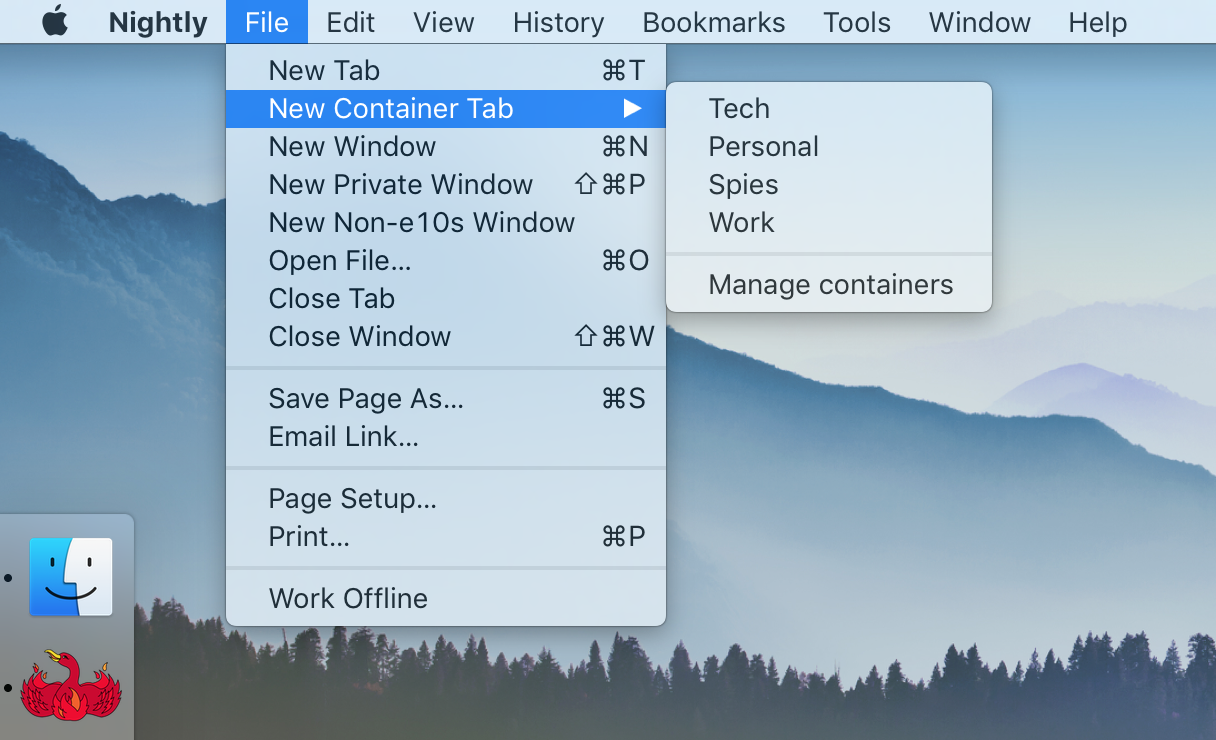
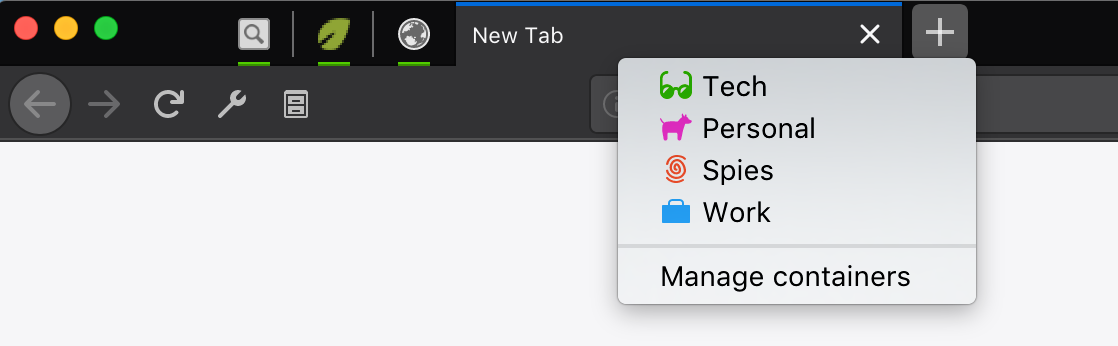
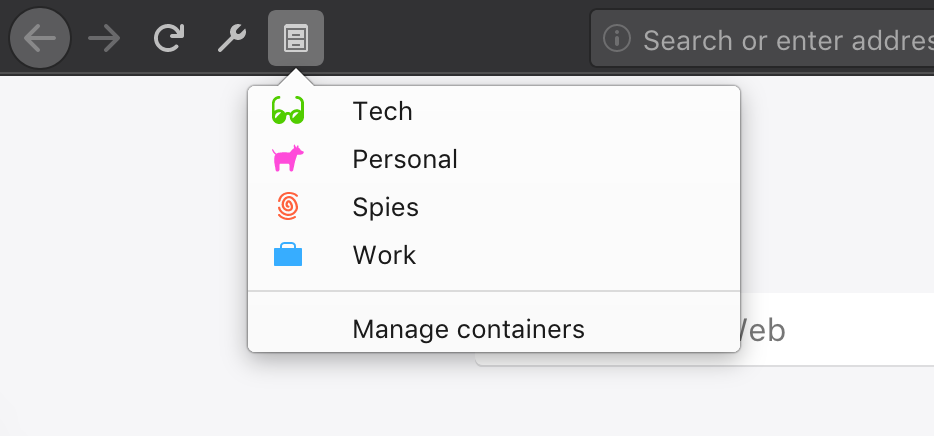
Note that without this extension, Nightly won’t automatically load websites in the right container, you have to manage that manually.
 fvsch
on 14 Aug 2017
fvsch
on 14 Aug 2017
I had to go.to.customizations and add it.
On Aug 14, 2017 3:09 AM, "Guillaume Lakano" notifications@github.com
wrote:
@nimzodisaster https://github.com/nimzodisaster @ArchangeGabriel
https://github.com/archangegabriel : You're lucky, on my Fedora I don't
see anymore the Containers icon in the toolbar :-/
But I known it's an experimental browser/extension, so I'll wait until
it's fixed, let me known if I can make test to confirm a bugfix.
Regards,—
You are receiving this because you were mentioned.
Reply to this email directly, view it on GitHub
https://github.com/mozilla/testpilot-containers/issues/725#issuecomment-322152437,
or mute the thread
https://github.com/notifications/unsubscribe-auth/ASyJ1fwh9ew99AqUyeMd5RNqRzXcKRJUks5sYBzPgaJpZM4O1aq8
.
nimzodisaster
on 14 Aug 2017
@lakano I don’t have it either, I use long press on the new tab button.
ArchangeGabriel
on 14 Aug 2017
thanks @nimzodisaster, I haven't used this before, the icon is now in my toolbar, it's better for a laptop with a touchpad, to not use the long-press click :)
lakano
on 14 Aug 2017
Testing through the bootstrap code I am using the following:
- Open a beta version of firefox with
-P sdafto create a new profile - Install test pilot containers from the test pilot site
- Should hopefully be working fine
- Shut down Firefox 🤷
- cat
~/.mozilla/firefox/<profile>/jetpack/@testpilot-containers/simple-storage/store.json
- Should output version 1 of the storage
- Change the following prefs:
- extensions.legacy.enabled = true
- xpinstall.signatures.required = false
- Load Nightly with the profile
- Notice extension is removed
- Make xpi with
jpm xpi --dest-dir 3.0.0 - Install the branch xpi
- Notice that containers are back
- cat
~/.mozilla/firefox/<profile>/jetpack/@testpilot-containers/simple-storage/store.json
- Should output version 2 of the storage
- Remove containers
- Prefs should be back to beta setup
jonathanKingston
on 15 Aug 2017
Storage is restored to something like this:
{"savedConfiguration":{"version":2,"prefs":{"privacy.userContext.enabled":false,"privacy.userContext.longPressBehavior":0,"privacy.userContext.ui.enabled":false,"privacy.usercontext.about_newtab_segregation.enabled":false},"metricsUUID":"{3ecdaaaf-b2ed-4b37-8906-e10a83c0b050}","preInstalledIdentities":[1,2,3,4]},"identitiesData":{"1":{"hiddenTabs":[],"openTabs":0},"2":{"hiddenTabs":[],"openTabs":0},"3":{"hiddenTabs":[{"title":"asdasdas - Google Search","url":"https://www.google.co.uk/search?q=asdasdas&ie=utf-8&oe=utf-8&client=firefox-b-ab&gfe_rd=cr&ei=NPiSWbTNCtCN8Qe7z7i4CA","favicon":"https://www.google.co.uk/images/branding/product/ico/googleg_lodp.ico","id":"-3-6","active":false,"pinned":false}],"openTabs":0},"4":{"hiddenTabs":[],"openTabs":0}}}
This however currently I am not handling the hidden container tabs but I made sure we keep the data.
@groovecoder ready to test if you have some spare cycles. I would like to push this out ASAP though.
jonathanKingston
on 15 Aug 2017
Open a beta version of firefox with -P sdaf to create a new profileI used unbranded release version; why beta?
Install test pilot containers from the test pilot siteI installed 3.0.0 .xpi manually from my repo directory - does that make a difference?
Should hopefully be working fineYup
Shut down Firefox
cat ~/.mozilla/firefox/<profile>/jetpack/@testpilot-containers/simple-storage/store.json
    Should output version 1 of the storage
Yup
Change the following prefs:
    extensions.legacy.enabled = true
Note:
extensions.legacy.exceptionsincludes@testpilot-containers- should that make it work without having to setlegacy.enabled = true?
    xpinstall.signatures.required = false
Load Nightly with the profile
Notice extension is removed
It was disabled - not removed?
Make xpi with jpm xpi --dest-dir 3.0.0
Install the branch xpi
Notice that containers are back
Yup
cat ~/.mozilla/firefox/<profile>/jetpack/@testpilot-containers/simple-storage/store.json
    Should output version 2 of the storage
Yup
Remove containers
Prefs should be back to beta setup
Which prefs?
 groovecoder
on 15 Aug 2017
groovecoder
on 15 Aug 2017
@groovecoder
I installed 3.0.0 .xpi
Assuming you installed 3.0.0 then made a new xpi for the update?
Note: extensions.legacy.exceptions includes @testpilot-containers - should that make it work without having to set legacy.enabled = true
Not sure to be honest, it never worked for me this way.
It was disabled - not removed?
Yeah sorry jargon failure. I just meant it's not loaded.
Which prefs?
All userContext ones. This final step only works if the fresh file wrote the config on shutdown (killing the process doesn't write simple storage it seems).
jonathanKingston
on 15 Aug 2017
Yup, I installed 3.0.0 then made a new xpi on this branch for the update.
groovecoder
on 15 Aug 2017
Related issues
 coot
·
3Comments
coot
·
3Comments
 maxxcrawford
·
3Comments
maxxcrawford
·
3Comments
 brettcurrie346
·
3Comments
brettcurrie346
·
3Comments
 jbyler
·
4Comments
jbyler
·
4Comments
 bcb44
·
4Comments
bcb44
·
4Comments
Most helpful comment
For people on Nightly wanting to use the built-in containers feature (without the UI and features provided by this extension), a few ways to open a new tab in a specific container:
Screenshots:
Note that without this extension, Nightly won’t automatically load websites in the right container, you have to manage that manually.