Multi-account-containers: Containers not synchronised
A facility like Containers in not as useful when I can't use it with the Sync facility.
I can use a bookmark group to keep groups of pages _together_. Because they sync. If I am doing that I don't think I'd "need" containers.
 aplatypus
All 164 comments
Thanks for the feedback!
Unfortunately our experiment doesn't span to mobile which leaves us with an issue around UX for when the tab is opened on a mobile. So in our experiment we chose not to sync to prevent users from opening a synced tab and expecting it to be containerised and instead leak all their cookies to non containers on mobile.
However we have platform bugs to iron out the sync situation and mobile ux. Unfortunately because of this being a test pilot experiment we can't actually fix either of these here. I will leave this open for now to ensure we have captured all your feedback.
 jonathanKingston
on 5 Mar 2017
jonathanKingston
on 5 Mar 2017
I have desktop machines.
aplatypus
on 7 Mar 2017
I'd just like to synchronize the mere configuration of containers, including their cookies, between all the machines I use Firefox on with sync enabled. I'm not interested at all in synchronized tabs. This seems rather basic and would not conflict with the mentioned mobile use case (I'm using desktop only, but on roughly 10 machines, so sync is essential).
Is this the same issue, or would I better open a separate one?
 cdrnet
on 26 Mar 2017
cdrnet
on 26 Mar 2017
@groovecoder we need to decide if we should enable some sync features here.
- Assignments
- Containers
- Cookies & storage
- Tabs
- Mobile
I don't think we can do 3. and 4. and certainly not 5. as part of this experiment.
We could however do 1. and 2. however would this add more confusion that not all sync features are available?
jonathanKingston
on 5 Apr 2017
@jonathanKingston @groovecoder The main purpose of Test Pilot is to get feedback on features, to figure out whether they're worth adding and if so, what's the optimal UX, right?
It seems totally clear to me that if/when containers come to firefox proper, sync should work, and it should work for everything listed above.
Add on the fact that I think adding just _1_ and _2_ would be confusing, and my vote goes against adding sync support at all during this period; it just doesn't seem like a good investment of resources.
edit: Now that the test pilot phase is over, it's surprising to me that there's still no sync. And after using containers for a while, 1 and 2 would be very helpful and 3 would be nice, even if it's confusing why 4 and/or 5 don't work.
 smichel17
on 5 Apr 2017
smichel17
on 5 Apr 2017
Personally, having (1) and (2) is a must. (3) would be really cool. (4) and (5) are irrelevant to me. I've two desktop, and rarely browse on my mobile (when I do, it's mostly to open links I got via IM).
I realize that the purpose of the experiment is to find out what most people like, not me. TBH, the order in which @jonathanKingston listed things above seems the natural order in which to implement them. Any alternative order wouldn't make sense (e.g.:cookies with no container!?).
 WhyNotHugo
on 10 May 2017
WhyNotHugo
on 10 May 2017
Hi folks,
for my personal use case I would like to be able to have even different sync accounts per container.
For example, maybe I want to have two sync accounts, one personal where containers like 'personal', 'shopping' or 'banking' are sync, and another firefox account (with my work address for example) for the 'work' container.
 arcturus
on 12 May 2017
arcturus
on 12 May 2017
I don't think separate sync accounts makes any sense. History is shared, as are a few other things. Syncing all containers with the same account is the logical choice.
WhyNotHugo
on 12 May 2017
@hobarrera, I think the sense depends on each user's case. I'm not saying that should be a feature for absolutely everyone.
But in my case I really appreciate not having to use 2 different profiles, or having nightly and stable open to have a true separation. Containers is a magnificient effort towards making this separation a reallity, but there are several levels.
I totally understand that hooking more than one sync account it could be a completely different project, but, IMOH, it's does make sense to me, at least I definitely will have two accounts, one for work, and one for personal usage.
Definitely let's containers sync first, and maybe other ideas will come later, but language and attitude in a OS project matter.
arcturus
on 12 May 2017
I didn't mean it doesn't make sense for a user to want this. I meant that your request doesn't really fit into either how weave/sync works, or how containers work.
Currently, a profile contains multiple containers. A [firefox] account syncs the same profile onto multiple machines. I find it rather confusing to think how multiple accounts would sync mulitple containers, but onto a single profile.
Since history is shared: will visiting a page with containerA on accountA also add it to accountB's history?
What happens if a history entry is on accountA and accountB, but I delete it on a machine that only has the latter account?
You've suddenly made the sync model extremely more complex (because, essentially, firefox needs to support multiple sync accounts for the same historyStore/cookieStore/bookmarks/etc. Just like these, there are too many rabbit holes like these ones, and, IMHO, and it's a very difference scenario from what's being proposed and done here.
WhyNotHugo
on 13 May 2017
1) and 2) would be awesome, I've been using the containers for a few days, and I keep pestering against it because 2), and then because of 1) :-)
 mat813
on 23 May 2017
mat813
on 23 May 2017
Hi, here's my feedback to help you prioritize:
- Assignments -> Must have
- Containers -> Must have
- Cookies & storage -> Nice to have
- Tabs -> Nice to have
- Mobile -> Not now. I agree that you need more research about how to implement this feature in mobile. It also depends on what is the use case for each user, in my case, I use Firefox Focus when I am concerned about privacy / tracking.
 lordserch
on 4 Jun 2017
lordserch
on 4 Jun 2017
Maybe you could add a "Vote for me" label on this issue?
 neurolit
on 17 Sep 2017
neurolit
on 17 Sep 2017
Synchronisation would be really nice. If thats not possible a simple import & export option for assignments and containers would also already be a great help in the beginning.
 caemor
on 22 Sep 2017
caemor
on 22 Sep 2017
My take on must haves:
Containers (incl. sync)
Cookies & storage
 ghost
on 27 Sep 2017
ghost
on 27 Sep 2017
… simple import & export option for assignments and containers …
FYI (in the absence of simple/GUI options): https://github.com/mozilla/multi-account-containers/wiki/Debugging-containers#wiki-body with reference to containers.json and storage.js files.
 grahamperrin
on 3 Oct 2017
grahamperrin
on 3 Oct 2017
To help a little bit in that topic, while waiting for this to be solved, you may use the Containerise add-on with FF 57.
 klint
on 4 Oct 2017
klint
on 4 Oct 2017
I was wondering why my Sync wasn’t working because my MAC configuration differs between my laptops, then I found this issue. I think what I’m looking for is almost the same thing as @cdrnet – the configuration (which containers do I have, which sites open where) should be synced, the open tabs should be synced if enabled in Sync options.
 moeffju
on 5 Oct 2017
moeffju
on 5 Oct 2017
From https://github.com/kesselborn/conex/issues/15#issuecomment-324244197 (2017-08-23) under _Implement backup / restore for conex · Issue #15 · kesselborn/conex_:
… (i.e. for moving the session to a different profile or firefox instance).
grahamperrin
on 11 Oct 2017
FWIW
- 1 & 2 "must"
- 3 nice,
- 4, 5 I don't care
 the-noob
on 2 Nov 2017
the-noob
on 2 Nov 2017
I'm attempting to switch over to Firefox since Quantum's release. Love the concept of multi-containers but not having them sync is actually counter-intuitive for me since it requires me to set them up on 3 separate computers. I had some social media sites setup for one container and was actually surprised they didn't transfer to another computer.
1 and 2 are definitely must haves for me.
 swang
on 16 Nov 2017
swang
on 16 Nov 2017
My votes:
1 & 2 -> Must have
4 -> Nice to have
3 & 5 -> Don't care
I mostly work on desktop computers on 3 different machines. 1 & 2 are really required there and mobile isn't the major platform for me to work on continuous basis. On mobile Firefox Focus is more than enough.
 DheerendraRathor
on 17 Nov 2017
DheerendraRathor
on 17 Nov 2017
My two cents:
1& 2: must have.
others: don't care.
That said, containers are _awesome_!
 barnex
on 18 Nov 2017
barnex
on 18 Nov 2017
I want to drop my vote as well:
- 1 & 2 -> Must have
- 3 & 5-> Nice to have
- 4 -> I might miss the point but FF already syncs Tabs, right?
 Mirodin
on 20 Nov 2017
Mirodin
on 20 Nov 2017
Is there anything that can be done to help speed this up, other than coding?
If only coding, could someone with a bit of experience in the codebase offer some pointers to start, or maybe offer themselves up as a mentor-like point of contact? I really want to see container definitions synced :)
moeffju
on 23 Nov 2017
1&2 would be awesome!!
the rest, less important.
for me.....
 tes5884
on 27 Nov 2017
tes5884
on 27 Nov 2017
1&2 would be really nice
rest is less important and would prefer that 1&2 get active ;)
i already copied the .js file to other machines and this is working fine to export the settings but have to be done manually
ghost
on 29 Nov 2017
Mine:
1 & 2 -> Must have
3 -> Nice to have
5 -> Don't care that much.
My scenario is for several desktops/laptops ( Work and Private )
 luisnuxx
on 7 Dec 2017
luisnuxx
on 7 Dec 2017
1&2 = must have...... 3....would be nice.... :D
 Teyro
on 11 Dec 2017
Teyro
on 11 Dec 2017
1&2: must have
3&4: nice to have
5: don't care
 s-lm
on 11 Dec 2017
s-lm
on 11 Dec 2017
1 & 2 & 5: must have
3 & 4: nice to have
 LIyoai
on 13 Dec 2017
LIyoai
on 13 Dec 2017
1 & 2: must have
3 & 4 & 5: nice to have
 schrnz
on 13 Dec 2017
schrnz
on 13 Dec 2017
My votes:
1 & 2 & 3 -> Must have
 syepes
on 20 Dec 2017
syepes
on 20 Dec 2017
My votes:
- Assignments -> Must have
- Containers -> Must have
- Cookies & storage -> Don't you dare do this, it violates security!
- Tabs -> I don't care (abstain from voting)
- Mobile -> Nice to have
In the mean time, I'll be using the JSON workaround to manually "sync".
 Narvey
on 21 Dec 2017
Narvey
on 21 Dec 2017
My votes:
1&2: must have
3&4: as a option, it is a potential security hole
5: nice to have
 TomaszJanusz
on 26 Dec 2017
TomaszJanusz
on 26 Dec 2017
Containers need syncing BADLY... Is there a timeline on this?! :
 levifig
on 10 Jan 2018
levifig
on 10 Jan 2018
It would be like sessionbox extension.
-grouping sites
-open all site at one time
+offline backup like bookmarks
 linuxtopia
on 26 Mar 2018
linuxtopia
on 26 Mar 2018
Please enable Sync on Containers !
This is a pain in the a$$ to recreate the same containers on all my desktop machines
 Cedric-Saegus
on 29 Mar 2018
Cedric-Saegus
on 29 Mar 2018
I badly need (1) and (2)!
(5) would be nice.
 carpati
on 31 Mar 2018
carpati
on 31 Mar 2018
1 and 2 would be perfect!
 greenywd
on 1 Apr 2018
greenywd
on 1 Apr 2018
1. Assignments
2. Containers
3. Cookies & storage
4. Tabs
5. Mobile
Does "Vote For Me" mean voting by commenting?
I am definitely for (1) and (2), and notify the user that only the container names are being synchronized, nothing more.
 Eduardo06sp
on 1 Apr 2018
Eduardo06sp
on 1 Apr 2018
1 & 2 "must"
3 nice,
4, 5 I don't care
 dmiranda2
on 1 Apr 2018
dmiranda2
on 1 Apr 2018
1 and 2 as a definite for me
3 would be nice perhaps as an option for people to choose.
 demiise
on 3 Apr 2018
demiise
on 3 Apr 2018
(1) and (2) : must have for me.
 GuillaumeFavelier
on 3 Apr 2018
GuillaumeFavelier
on 3 Apr 2018
1 and 2, please (don't care about the rest)!
Seems so natural in combination with Firefox sync that I was kind of disappointed to find out that it didn't sync right away.
 sh1bby
on 3 Apr 2018
sh1bby
on 3 Apr 2018
I have Firefox Desktop on multiple computers (4 that I use on a weekly or daily basis) and I'd like to sync my containers between them, otherwise I have to manually configure them myself and risk them getting out of sync (hence, why I'd like to sync them ;)).
 madb1lly
on 4 Apr 2018
madb1lly
on 4 Apr 2018
For 4 and 5 I don't really care but having a synced container experience with cookies included would just be awesome.
 bdbch
on 6 Apr 2018
bdbch
on 6 Apr 2018
1 & 2 are definitely a must have
 stonebanks
on 10 Apr 2018
stonebanks
on 10 Apr 2018
@moeffju directed me here to comment, any of the 1-5 are difficult, pretty much in increasing order of difficulty.
the open tabs should be synced if enabled in Sync options.
Sync tabs would be hard given this is currently disabled in Firefox given that sync itself doesn't know about what container history is in. This is a very big task.
the configuration (which containers do I have, which sites open where) should be synced,
However this bug could add in sync functionality for container names and assignments much more easily, it still would require careful effort to ensure data is synced correctly to tackle 1 and 2.
Extension sync
Syncing data can be done through https://developer.mozilla.org/en-US/Add-ons/WebExtensions/API/storage/sync at start up and regular intervals the extension could check the synced version of the data to it's own and decide how to merge datasets together. The biggest limitation is this API only supports up to 100kb of data, which isn't much for assignments. Also this doesn't guarantee performance so the sync code would have to handle that somewhat.
Currently assignments are unique to this extension so it will always have to be done through the extension itself. Container names however would be better synced through Firefox and would free up more space for those assignments.
Container names
The first step of call would be syncing container names the relevant platform bug for syncing container names is https://bugzilla.mozilla.org/show_bug.cgi?id=1288858 it discusses why we haven't done this already and the issues with syncing. If we in future want cookies to match, the CookieStoreId will need to match, which is what makes it much more complex.
From memory we would either need to keep userContextId in sync or the extension/browser later would have to migrate storage data which would make this a much harder and slower task. The problem with keeping userContextId in sync means that existing tabs would have to be reopened to a new container.
To handling syncing of anything at this point I would advise creating a new file in: src/js/background/ this would have an init step similar to the other code and check the synced storage and manage when and how data should be merged together.
Anyone who seriously wants to tackle this should read all the discussion in the Bugzilla thread first and I can try and explain through the problem a bit more.
jonathanKingston
on 12 Apr 2018
Thank you @jonathanKingston, much appreciated. Will read through the bugzilla entry and then try scouring the code!
moeffju
on 12 Apr 2018
https://github.com/ramkumar-kr/containers-sync
This plugin implements (2), but is (was perhaps, due to #1095) unable to do (1).
 p3lim
on 19 Apr 2018
p3lim
on 19 Apr 2018
There is an attempt (https://github.com/mozilla/multi-account-containers/pull/1197) to allow exporting/importing assignments with pull request.
Could someone provide some review on that pull request?
 pszypowicz
on 9 May 2018
pszypowicz
on 9 May 2018
Wouldn't synchronising cookies be a security risk? I don't feel to comfortable storing my cookies with which I am logged in into my facebook, online banking account, etc. on the mozilla servers... Or am I wrong?
 mkurz
on 13 May 2018
mkurz
on 13 May 2018
@mkurz The way I understand the protocol, the Mozilla servers never actually store your plaintext data. They store the encrypted sync data, plus a variant of the encryption key that can only be used to decrypt if you also give your Firefox Sync password (which they don't store).
 jonhoo
on 13 May 2018
jonhoo
on 13 May 2018
Is this dead? (1) and (2) still seem to be must-haves for this extension to reach its full potential.
 mikechabot
on 30 Jun 2018
mikechabot
on 30 Jun 2018
so this is an amazing and awesome step forward for general user privacy <3 mozilla thankyou.
must-have: 1+2 (sync the list of container types, and the url assignments)
the rest, meh. If I fling (send tab) from mobile to desktop, 1+2 enable the desktop to put it in the appropriate container.
 dch
on 18 Jul 2018
dch
on 18 Jul 2018
Totally agree. I'm not using containers anymore since I'm switching my computers quite often and don't have time to setup everything again and again.
bdbch
on 19 Jul 2018
Definitely need 1 & 2 (Sync containers and associated urls).
The rest of these options should be considered after accomplishing 1 & 2.
 andrew-jacob
on 20 Jul 2018
andrew-jacob
on 20 Jul 2018
1 & 2 asap, 5 eventually. Not sure what 3 actually means.
 mcepl
on 20 Jul 2018
mcepl
on 20 Jul 2018
Hi all. As it´s been said here, 1&2 are a must.
Is there any roadmap for that?
 raulcano
on 5 Aug 2018
raulcano
on 5 Aug 2018
2017 is a year ago now... is this still a Test Pilot product?
 francisluong
on 21 Aug 2018
francisluong
on 21 Aug 2018
No, this is now an add-on on AMO. But it's not receiving active development - bug-fixes and maintenance patches only.
 groovecoder
on 21 Aug 2018
groovecoder
on 21 Aug 2018
Totally agree. I'm not using containers anymore since I'm switching my computers quite often and don't have time to setup everything again and again.
This is the problem. I go back and forth between iMac Pro and MacBook Pro with Firefox as my default browser. Sync for Multi-Account Containers should be a no-brainer.
2017 is a year ago now... is this still a Test Pilot product?
No, Multi-Account Containers have since graduated into becoming a Featured Extension as a Firefox Add-on: https://addons.mozilla.org/en-CA/firefox/addon/multi-account-containers/
 SolespireMarcus
on 3 Oct 2018
SolespireMarcus
on 3 Oct 2018
Thanks for all the great work. I just found out about the containers and it took me a while do have it all configured the way i like it and now i realized it doesn't sync over :( Everyone seems to agree that it is needed for Assignments and Containers.. Is this planned at all?
 enRchi
on 6 Oct 2018
enRchi
on 6 Oct 2018
1&2 are must have features; 3&4 seem like a technical nightmare to the point that I would prefer they be completely de-prioritized to ensure other features don't get set aside; 5 is nice to have.
 edziegle
on 9 Oct 2018
edziegle
on 9 Oct 2018
600+ commits, 500+ likes, 19 contributors and no active development to support sync. This is nuts.
 geotheory
on 13 Oct 2018
geotheory
on 13 Oct 2018
Is this still being discussed? I'd love to have 1 & 2, just like all the others. Otherwise a great add-on.
 dermondbaer
on 30 Oct 2018
dermondbaer
on 30 Oct 2018
Totally agree. I'm not using containers anymore since I'm switching my computers quite often and don't have time to setup everything again and again.
Actually, this is beginning to look quite the same as the synchronization of search engines, which is endlessly "discussed" since more than 10 years... https://bugzilla.mozilla.org/show_bug.cgi?id=444284
:cry:
 buzuck
on 30 Oct 2018
buzuck
on 30 Oct 2018
No promises, as we haven't investigated what a full implementation might look like. We are planning to spend some full-time on Containers add-ons in the December-March time-frame. We will be going thru issues & bugs, prioritized by community upvotes. And this is the 2nd-highest upvoted feature.
groovecoder
on 31 Oct 2018
@arcturus You can just use different profiles if you need to have multiple sync accounts.
(Sorry for the off-topic noise)
 mrwensveen
on 6 Nov 2018
mrwensveen
on 6 Nov 2018
Please reach out to the sync team if/when you decide to implement this, we've actually given it some thought.
(This only applies if you aren't planning on using the webext sync api, of course, if you are you're on your own for the most part, for better or worse).
 thomcc
on 8 Nov 2018
thomcc
on 8 Nov 2018
Just adding some (probably useless) energy in here to say that any way of syncing even manually a config for containers and site assignments to those would be a real upgrade. I love containers but use many different PCs and setups.
 Julianoe
on 16 Dec 2018
Julianoe
on 16 Dec 2018
Just adding some (probably useless) energy in here to say that any way of syncing even manually a config for containers and site assignments to those would be a real upgrade. I love containers but use many different PCs and setups.
Totally agree! A simple import/export function for config files would be already very useful for me!
 inconspicuous-username
on 16 Dec 2018
inconspicuous-username
on 16 Dec 2018
Sync would be amazing!
Containers are great, but configuring them on all of my different computers is a major pain.
 abulgatz
on 24 Dec 2018
abulgatz
on 24 Dec 2018
Containerise might be helpful for some cases.
 andromedarabbit
on 24 Dec 2018
andromedarabbit
on 24 Dec 2018
Hey @andromedarabbit , does that extension sync?
 lhorace
on 24 Dec 2018
lhorace
on 24 Dec 2018
@lhorace No, it doesn't. However this extension help you manage containers with plaintext, which makes managing url and container mappings easier. Maybe it might be much easier to add the sync feature to Containerise instead of multi account containers itself
andromedarabbit
on 24 Dec 2018
No promises, as we haven't investigated what a full implementation might look like. We are planning to spend some full-time on Containers add-ons in the December-March time-frame. We will be going thru issues & bugs, prioritized by community upvotes. And this is the 2nd-highest upvoted feature.
It looks like this is now the most upvoted feature request for Containers. I hope that means we'll see some movement in the next two months or so! I have been holding out on using containers outside of the Facebook and Google container extensions due to the fact that I cannot sync my container configuration through Firefox Sync.
 freeAgent85
on 29 Jan 2019
freeAgent85
on 29 Jan 2019
For the second time now since i use containers a bug at update (could be my fault) caused the loss of containers configuration.
This is a real problem even if you don't need a integrated sync across different devices. I feel that any mean of syncing and export / import is mandatory for this extension to become recommendable to a larger audience
Julianoe
on 31 Jan 2019
@Julianoe - we think the implicit "un-install" step during an update can cause Containers to be deleted. But, if you have any other add-on that requires Containers, the "un-install" step should detect that, and shouldn't delete Containers.
Do you have any other add-ons installed that require Containers?
groovecoder
on 31 Jan 2019
Just adding some (probably useless) energy in here to say that any way of syncing even manually a config for containers and site assignments to those would be a real upgrade. I love containers but use many different PCs and setups.
a push for this workaround. This would be a step into the right direction
 hillbilly3456avk
on 1 Feb 2019
hillbilly3456avk
on 1 Feb 2019
Hi everyone, I am also very interested in the sync of containers and I´m following this thread for quite some months already. Are there any news on this?
raulcano
on 3 Feb 2019
I love the container concept, but I've stopped using them on any new systems for the reasons above. Features 1 and 2 are a must.
 gcrow
on 3 Feb 2019
gcrow
on 3 Feb 2019
I love the containers too, but now I'm about to format my computer and I'll lose all my configuration :(
That's sad. Is there at least a way for us to backup such configuration and be able to import it into the browser again?
 renannprado
on 10 Feb 2019
renannprado
on 10 Feb 2019
Just copy the Firefox profile folder and paste in on your formatted
computer, you'll loose nothing this way. I let you google around to find
out the location of that folder...
Le 10 février 2019 12:15:48 AM Renann Prado notifications@github.com a
écrit :
I love the containers too, but now I'm about to format my computer and I'll
lose all my configuration :(
That's sad. Is there at least a way for us to backup such configuration and
be able to import it into the browser again?--
You are receiving this because you commented.
Reply to this email directly or view it on GitHub:
https://github.com/mozilla/multi-account-containers/issues/339#issuecomment-462088290
klint
on 10 Feb 2019
Waiting for an eventual official support, I created a script to export and import containers: https://github.com/pierlauro/ffcontainers
 pierlauro
on 10 Feb 2019
pierlauro
on 10 Feb 2019
As I started using MAC extensively:
- Assignments ==> Yes, please
- Containers ==> Yes, please
- Cookies & storage ==> Nice to have, if possible
- Tabs ==> Nice to have, would need to be somehow integrated with Tab Sync, which probably makes it incredibly complex
- Mobile ==> No
 cxt666
on 10 Mar 2019
cxt666
on 10 Mar 2019
@cxt666 when it comes to point 3, the 'cookie autodelete' extension has an option that can be enabled to work with the containers. When whitelisting a website or domain you can do this globally or for the current container.
inconspicuous-username
on 13 Mar 2019
Just ran into a variation of this issue after using Firefox Refresh on one of my machines. While my tabs and other data were maintained, my Containers were not. And they did not Sync back from my other machine.
A quick fix - aka a "manual sync" that some have asked for – is to copy containers.json from the source profile to the target profile, then restart Firefox.
 miahz
on 1 Apr 2019
miahz
on 1 Apr 2019
A quick fix - aka a "manual sync" that some have asked for – is to copy
containers.jsonfrom the source profile to the target profile, then restart Firefox.
By just copying the containers.json you would still loose all the Container -> websites associations ("Always open site X in container Y").
An effective way of exporting and importing containers safely is using ffcontainers.
pierlauro
on 1 Apr 2019
An effective way of exporting and importing containers safely is using ffcontainers.
Except, will it work now with storage being in IndexedDB, not in storage.js files?
mcepl
on 1 Apr 2019
Except, will it work now with storage being in IndexedDB, not in storage.js files?
The updated version does work with the new storage in IndexedDB.
pierlauro
on 1 Apr 2019
It's unfortunate that this is not officially supported yet (at least 1 and 2 - assignments and containers). In the meantime I'm putting my hopes in @pierlauro with https://github.com/pierlauro/ffcontainers!
 joaopsys
on 10 Apr 2019
joaopsys
on 10 Apr 2019
Is @pierlauro willing to open PR, proof of concept, at least there could be talked about how this would look like? IIRC, without going through the backlog, I recalled this was a firefox limitation and not necessarily an MAC issue? Perhaps @pierlauro can talk about the road blocks. Waiting on the Mozilla team can take awhile. As indicative on how long this issue has been open.
lhorace
on 10 Apr 2019
Is @pierlauro willing to open PR, proof of concept, at least there could be talked about how this would look like? IIRC, without going through the backlog, I recalled this was a firefox limitation and not necessarily an MAC issue? Perhaps @pierlauro can talk about the road blocks. Waiting on the Mozilla team can take awhile. As indicative on how long this issue has been open.
As soon as I will understand how to properly synchronize contents with the new storage solution (problems referenced here), I would rather prepare a generic addons data export/import tool (independent from the addon, working with all the ones using IndexedDB).
That would solve the problem at an upper level as it would work for multi-account-containers and for thousands of other addons. I will keep you updated.
pierlauro
on 11 Apr 2019
FWIW, some if the issues doing this have been enumerated in https://bugzilla.mozilla.org/show_bug.cgi?id=1288858 - it's far from trivial to do correctly (although quite easy to do poorly)
 mhammond
on 11 Apr 2019
mhammond
on 11 Apr 2019
OK I don't see any real solution but just a discussion. Or maybe there is a solution but has been lost in all the comments. Can anyone tell me if there is a solution to get back all the containers to transfer to the new PC?
 T3chminator
on 20 Apr 2019
T3chminator
on 20 Apr 2019
I've ceased active use of containers until the user experience (including
sync) is improved. Got too much on to maintain the various hacks.
On Sat, Apr 20, 2019 at 8:34 PM T3chminator notifications@github.com
wrote:
OK I don't see any real solution but just a discussion. Or maybe there is
a solution but has been lost in all the comments. Can anyone tell me if
there is a solution to get back all the containers to transfer to the new
PC?—
You are receiving this because you commented.
Reply to this email directly, view it on GitHub
https://github.com/mozilla/multi-account-containers/issues/339#issuecomment-485156343,
or mute the thread
https://github.com/notifications/unsubscribe-auth/AFRYZAHL7ZIMGS3CAC4SINLPRNV4FANCNFSM4DCNQISQ
.
gcrow
on 20 Apr 2019
I've ceased active use of containers until the user experience (including sync) is improved. Got too much on to maintain the various hacks.
…
On Sat, Apr 20, 2019 at 8:34 PM T3chminator @.*> wrote: OK I don't see any real solution but just a discussion. Or maybe there is a solution but has been lost in all the comments. Can anyone tell me if there is a solution to get back all the containers to transfer to the new PC? — You are receiving this because you commented. Reply to this email directly, view it on GitHub <#339 (comment)>, or mute the thread https://github.com/notifications/unsubscribe-auth/AFRYZAHL7ZIMGS3CAC4SINLPRNV4FANCNFSM4DCNQISQ .
Is there an alternative?
T3chminator
on 20 Apr 2019
Unfortunately, there is no solution and if you are following the upstream ticket, the issue is still in discussion how it should look like. Options are, unless someone tackle this or we wait for development time availability which to my understanding is not till the end of the year from the moz-team. :(
lhorace
on 20 Apr 2019
The AMO certificate issues over the weekend would have been substantially less disruptive if at least the container names had been synchronized. Right now I have to delete all of the default containers and create a dozen new ones on every system I use for work.
 acdha
on 6 May 2019
acdha
on 6 May 2019
@acdha why so? The armagadd-on2 did not delete extensions data - unless you removed and reinstalled them manually
 RememberTheAir
on 6 May 2019
RememberTheAir
on 6 May 2019
@RememberTheAir Whoever told you that it didn't delete data is categorically wrong. I arrived at work this morning to find the message that several addons had been disabled & that 66.0.4 was available, let it restart, and the container list was reset to the defaults. The system was locked over the weekend so there was no user interaction involved at any point until I clicked the restart button for 66.0.4.
acdha
on 6 May 2019
I did the same thing and my containers survived.
 dentarg
on 6 May 2019
dentarg
on 6 May 2019
This is pretty much what happened to me.
Chris Adams notifications@github.com schrieb am Mo., 6. Mai 2019, 11:19:
@RememberTheAir https://github.com/RememberTheAir Whoever told you that
it didn't delete data is categorically wrong. I arrived at work this
morning to find the message that several addons had been disabled & that
66.0.4 was available, let it restart, and the container list was reset to
the defaults. The system was locked over the weekend so there was no user
interaction involved at any point until I clicked the restart button for
66.0.4.—
You are receiving this because you commented.
Reply to this email directly, view it on GitHub
https://github.com/mozilla/multi-account-containers/issues/339#issuecomment-489638047,
or mute the thread
https://github.com/notifications/unsubscribe-auth/AAMWUZ2SQMCYQTJPE5ODMDLPUA47ZANCNFSM4DCNQISQ
.
raulcano
on 6 May 2019
I also lost all of my container settings, because the extensions were disabled... :(
enRchi
on 7 May 2019
I haven't touched my FF for days as I was on holidays. Shall I download the new version with another browser, install it and the only run FF? Will I be safe like this? But wait... I'm using the beta version and there is no fix for that one yet.
klint
on 7 May 2019
Hello,
Does anyone by any chance is aware of which version of FFx was affected by AMO issue this past weekend?
Cheers
lhorace
on 8 May 2019
Coming back to the original reason of this post: is there any plan to
implement the sync for containers?
On Wed, 8 May 2019 at 08:36, Horace notifications@github.com wrote:
Hello,
Does anyone by any chance is aware of which version of FFx was affected by
AMO issue this past weekend?Cheers
—
You are receiving this because you commented.
Reply to this email directly, view it on GitHub
https://github.com/mozilla/multi-account-containers/issues/339#issuecomment-490468686,
or mute the thread
https://github.com/notifications/unsubscribe-auth/AAMWUZ6OZFO3GI3SQE5SGRTPULCNDANCNFSM4DCNQISQ
.
raulcano
on 8 May 2019
I am not sure about down vote but I haven't updated Firefox, I'd like to avoid problems? So if someone could clue me in?
lhorace
on 9 May 2019
The problem has been resolved from Firefox 66.0.4 on.
inconspicuous-username
on 9 May 2019
Then I haven't lost any container data here, so, I guess I'm the lucky one. AFAIK for Sync, I've seen @stoically and @jonathanKingston is active. So work should start ? But upstream bug report should be the place to follow
lhorace
on 9 May 2019
Hey folks! I love that there's such a keen interest in containers. I too use containers and believe that they can offer so much more, with sync being integral to that vision. However, what isn't integral is the continuous chatter in this thread. Please respect your fellow container sync enthusiasts and just silently watch this thread. When there is news, it will be posted.
 pwd-github
on 9 May 2019
pwd-github
on 9 May 2019
I disagree, we need work to move, this endless chatter is not for not. Whatever the objective, to get this to move, since there hasn't been anything from the mox-team (granted they have been been busy with other projects), doesn't necessarily mean we stop being vocal. Anyway, whatever the position, there should be enough votes and someone working on this. However, where I will concede with is, no matter, unless someone takes this on, it is just endless chatter
lhorace
on 9 May 2019
For those of you who may not have seen it, there's a Container add-ons section in a recent knowledge base (KB) article:
https://support.mozilla.org/kb/add-ons-disabled-or-fail-to-install-firefox#w_container-add-ons
grahamperrin
on 12 May 2019
I did the same thing and my containers survived.
...except on my laptop 😢
dentarg
on 13 May 2019
...except on my laptop cry
Guys, could you cut it, please? As much as the ArmagAdd-on was a disaster, it is not relevant to this ticket.
mcepl
on 13 May 2019
I think what @mcepl means, keep it on-topic.
lhorace
on 13 May 2019
When I upgraded to FF67 it created a brand new profile. With a sync feature -- or even a way to export and import settings -- I now have to reconfigure EVERYTHING... Please, please, please add the sync functionality!
 dfwdraco76
on 21 May 2019
dfwdraco76
on 21 May 2019
Hi all,
In the meantime, as it has been suggested by someone else in this thread (in 2017!), I can only recommend you all to use Containerise, which allows you to export all your config in a text file and import it as easily:
https://addons.mozilla.org/en-US/firefox/addon/containerise/#&gid=1&pid=4
Have fun!
Cheers,
Raúl.
raulcano
on 26 May 2019
How to use it?
On Sun, 26 May 2019 at 03:21, raulcano notifications@github.com wrote:
Hi all,
In the meantime, as it has been suggested by someone else in this thread
(in 2017!), I can only recommend you all to use Containerise, which allows
you to export all your config in a text file and import it as easily:
https://addons.mozilla.org/en-US/firefox/addon/containerise/#&gid=1&pid=4Have fun!
Cheers,
Raúl.—
You are receiving this because you were mentioned.
Reply to this email directly, view it on GitHub
https://github.com/mozilla/multi-account-containers/issues/339?email_source=notifications&email_token=AL36RMICHU2IMO7AWJFKNOLPXHXYZA5CNFSM4DCNQIS2YY3PNVWWK3TUL52HS4DFVREXG43VMVBW63LNMVXHJKTDN5WW2ZLOORPWSZGODWH4VAI#issuecomment-495962753,
or mute the thread
https://github.com/notifications/unsubscribe-auth/AL36RMPVBOBLZKQLW6IF5CLPXHXYZANCNFSM4DCNQISQ
.
T3chminator
on 26 May 2019
Hi @T3chminator
It is rather simple, but you have to know where and in which format to add
the input.
Install the addon, and in the new icon that appear in your brower, click on
the "pencil" button (CSV editor).
Paste the following as an example, and save it. You will have a few
containers with the names assigned below:
!.amazon.com , Shopping
!.calendar.google.com , Google
!.contacts.google.com , Google
!.facebook.com , Social
!.deepl.com , Language
!.dict.leo.org , Language
Now, everytime you want to add a new one, just write a new line there in
the format as above.
Actually, the formats can get quite complex, even with RegEx, but this is
explained in the addon site.
Enjoy!
On Sun, 26 May 2019 at 00:03, T3chminator notifications@github.com wrote:
How to use it?
On Sun, 26 May 2019 at 03:21, raulcano notifications@github.com wrote:
Hi all,
In the meantime, as it has been suggested by someone else in this thread
(in 2017!), I can only recommend you all to use Containerise, which
allows
you to export all your config in a text file and import it as easily:https://addons.mozilla.org/en-US/firefox/addon/containerise/#&gid=1&pid=4
Have fun!
Cheers,
Raúl.—
You are receiving this because you were mentioned.
Reply to this email directly, view it on GitHub
<
https://github.com/mozilla/multi-account-containers/issues/339?email_source=notifications&email_token=AL36RMICHU2IMO7AWJFKNOLPXHXYZA5CNFSM4DCNQIS2YY3PNVWWK3TUL52HS4DFVREXG43VMVBW63LNMVXHJKTDN5WW2ZLOORPWSZGODWH4VAI#issuecomment-495962753
,
or mute the thread
<
https://github.com/notifications/unsubscribe-auth/AL36RMPVBOBLZKQLW6IF5CLPXHXYZANCNFSM4DCNQISQ.
—
You are receiving this because you commented.
Reply to this email directly, view it on GitHub
https://github.com/mozilla/multi-account-containers/issues/339?email_source=notifications&email_token=AAMWUZ6WQOOWLDZIZTVBRXTPXIDXVA5CNFSM4DCNQIS2YY3PNVWWK3TUL52HS4DFVREXG43VMVBW63LNMVXHJKTDN5WW2ZLOORPWSZGODWH5VAI#issuecomment-495966849,
or mute the thread
https://github.com/notifications/unsubscribe-auth/AAMWUZ4RNGCB7UYWUMFCSR3PXIDXVANCNFSM4DCNQISQ
.
raulcano
on 26 May 2019
You know I hate you, don't you? With upgrade to FF67 I have to reconfigure all my containers AGAIN.
mcepl
on 31 May 2019
It's a shame that the Container allocations aren't accessible ... Containerize and Mozilla's MAC don't share the data. I wonder what happens if they conflict?
 GLComputing
on 3 Jun 2019
GLComputing
on 3 Jun 2019
Considering @jonathanKingston 's comment (and recently @pierlauro 's updates) regarding what's harder and what's (not so) easier, I would like to share my opinion too, just for the sake of adding (I don't see any other way of helping)!!
- Assignments ==> Would be amazing, but it's possible to survive without it.
2. Containers ==> Please, please, please, please, please... It's killing me to add around 5 containers every computer I go for the 3 different profiles I have. - Cookies & storage ==> I would like, but never mind!!
- Tabs ==> That would be amazing, but I'm not going to die if I don't have it
- Mobile ==> Well, I guess it should be priority No. 2, but again, I will survive
By priority: 2 [, 5, [1, [4, 3 ]]]
 brunodOut
on 11 Jun 2019
brunodOut
on 11 Jun 2019
At this point, there's little point in continuing the discussion. There has long been a pull request to add, or at least pave the way for the functionality in #1197 and that's been ignored. At this point, we need to find out what Mozilla wants to do with containers. As hampering their development doesn't make logical sense unless there's a plan for them.
pwd-github
on 11 Jun 2019
I presumed Firefox sync wasn't working because my containers didn't show up on the new device.
 eoghanmurray
on 2 Jul 2019
eoghanmurray
on 2 Jul 2019
Noting here for posterity ...
https://github.com/mozilla/multi-account-containers/issues/1415#issuecomment-509728750 made me realize that integrating code from containers-sync may be a straightforward way to do this.
groovecoder
on 9 Jul 2019
I too am very eager to have this functionality build into this extension. (was about to open an issue just like this)
PS: Just FYI the repo for that would be: https://github.com/ramkumar-kr/containers-sync :wink:
 TriMoon
on 30 Jul 2019
TriMoon
on 30 Jul 2019
Same here. I just started organizing things into containers and was stunned that they didn't actually sync across machines.
 rcarmo
on 13 Aug 2019
rcarmo
on 13 Aug 2019
Same here. I just started organizing things into containers and was stunned that they didn't actually sync across machines.
This is why I don't use Containers anymore; however, I still use Firefox as my default browser – it's superb in every other way.
SolespireMarcus
on 15 Aug 2019
@groovecoder you asked in https://github.com/mozilla/multi-account-containers/issues/1415#issuecomment-509732985 to upvote here.
Looking at the upvotes and comments present in this thread it should be very obvious that this is a much sought after feature. Not sure how many upvotes are needed?
ghost
on 2 Sep 2019
We really need at least syncing of website placement in containers via Firefox account. This seems like one of the top features addon should have aside from core functionality. Atm it's like having to manually transfer your bookmarks one at the time. I hope team makes this priority :)
 hacker92e
on 31 Oct 2019
hacker92e
on 31 Oct 2019
Personally, having (1) and (2) is a must. (3) would be really cool. (4) and (5) are irrelevant to me. I've two desktop, and rarely browse on my mobile (when I do, it's mostly to open links I got via IM).
I realize that the purpose of the experiment is to find out what _most_ people like, not me. TBH, the order in which @jonathanKingston listed things above seems the natural order in which to implement them. Any alternative order wouldn't make sense (e.g.:cookies with no container!?).
This is exact usecase I have. I don't see anyone is assigned with this issue, Please make this a priority.
 IAmSurajBobade
on 1 Nov 2019
IAmSurajBobade
on 1 Nov 2019
Please add sync between devices for this extension.
It's a great ext but lack of syncing is THE functionnality that missed. It's annoying to reconfigure between each computers (home, job, etc)...
 fmatsos
on 10 Nov 2019
fmatsos
on 10 Nov 2019
I'd just like to synchronize the mere configuration of containers, including their cookies, between all the machines I use Firefox on with sync enabled. I'm not interested at all in synchronized tabs. This seems rather basic and would not conflict with the mentioned mobile use case (I'm using desktop only, but on roughly 10 machines, so sync is essential).
Is this the same issue, or would I better open a separate one?
this. Please just enable containers (preferably with their cookies) to sync. Tabs can be moved to other devices easily enough (send to device), but not so for containers and their attributes
 macks2008
on 8 Dec 2019
macks2008
on 8 Dec 2019
Has any further thought been put into creating a sync for 1 and 2? Absolute basic sync would be great to allow configuration on one machine and using that configuration on the rest. I can spend time at home getting my containers the way I want, but when I go to work and expect my containers that way, they currently aren't and I then have to spend time configuring them on another machine where literally everything else is synced (bookmarks, Add-Ons, etc).
If the containers can be used on mobile, even better. Even if I can't configure my containers on mobile but only to use my configuration, that's totally good with me. I'd rather only configure them on the desktop version, but I may be a minority in this.
 TheMrAnderson
on 10 Dec 2019
TheMrAnderson
on 10 Dec 2019
Would it be possible to just write the current container configuration, including associated URLs, to browser.storage.sync and then allow users to pull in that config on other machines? the only potential issue I see is the limit of 100KB, but that's quite a few containers and urls. I try to keep my setups similar on various machines that I use but creating exact duplicates is very difficult. I'd be just as happy if the list of container urls/rules were written out to containers.json :)
 blackjackshellac
on 12 Dec 2019
blackjackshellac
on 12 Dec 2019
Would it be possible to just write the current container configuration
This! I'm more than happy to do the synchronization manually between machines. Just give me something that I can synchronize.
 jagenheim
on 12 Dec 2019
jagenheim
on 12 Dec 2019
We (@kendallcorner , @maxxcrawford , and I) are digging into this issue now. The current plan is just to synchronize this extension's data. I.e.,
- Containers
- Site assignments
We do NOT plan to include Cookies, History, or other Container-isolated data in the first sync feature release. We may publish some pre-release versions of the add-on to get help with testing. We will comment here with updates.
groovecoder
on 12 Dec 2019
Recommend users that value further development of containers provide feedback: https://qsurvey.mozilla.com/s3/favorites-survey
andrew-jacob
on 6 Jan 2020
Container settings should be synced across different installs
 the100rabh
on 12 Jan 2020
the100rabh
on 12 Jan 2020
that survey is rubbish at capturing requests like this. The only relevant field seems to be on the first page.
gcrow
on 14 Jan 2020
This is being worked on here: https://github.com/mozilla/multi-account-containers/pull/1611
pwd-github
on 20 Jan 2020
1611 was just merged and there's a new tag https://github.com/mozilla/multi-account-containers/releases/tag/6.2.0
 anavarre
on 11 Feb 2020
anavarre
on 11 Feb 2020
Add-on update was released today. Check it out!
 kendallcorner
on 12 Feb 2020
kendallcorner
on 12 Feb 2020
I logged in but I don't think the containers are syncronized. How can I check if it work or there are errors?
 drazde
on 14 Feb 2020
drazde
on 14 Feb 2020
You might have to give it up to 10 minutes, or you can do a manual sync through the Firefox Sync menu.
kendallcorner
on 14 Feb 2020
what is the sync "policy" when syncing devices with nearly identical container setup?
 torlarse
on 17 Feb 2020
torlarse
on 17 Feb 2020
When sync is first enabled, it should merge containers with the same name. Otherwise it will duplicate the containers. It then assigns a UUID to each container, so changes after the first sync will be reflected on the other devices.
kendallcorner
on 17 Feb 2020
Is the site assignments sync feature working already? Or just the containers themselves? I assigned 2 websites permanently to the work container, forced Firefox to Sync. And on the second computer (after force syncing), the assignment wasn't there.
joaopsys
on 18 Feb 2020
Is the site assignments sync feature working already? Or just the containers themselves? I assigned 2 websites permanently to the work container, forced Firefox to Sync. And on the second computer (after force syncing), the assignment wasn't there.
the same for me
drazde
on 18 Feb 2020
Yes, site assignments should also sync. Double check it's enabled on the options page (though if your containers synced, there's no reason to think it would be disabled).
If you are having trouble, you could install an addon called About Sync: https://addons.mozilla.org/en-US/firefox/addon/about-sync/ This will let you know if Firefox Sync itself ever has a failed sync attempt. Obviously if Sync fails, then the addon info and site assignments aren't going to get over to the other computer. I had this issue a few times during development. A browser restart usually helped.
kendallcorner
on 18 Feb 2020
I found out what happened...I didn't really add any new container, nor edit the current ones. I tried to assign sites to the 4 default containers and that by itself doesn't trigger the sync.
After manually adding a new container, my site assignments towards the old containers were sync'ed.
So that might be a clue on what's happening :)
joaopsys
on 18 Feb 2020
And of course, thank you very much for this feature. I've been holding off on using containers for a while now, and I have finally started yesterday, thanks to this amazing feature.
Great work here and thank you for listening to the community! :)
joaopsys
on 19 Feb 2020
@kendallcorner Turns out I had slight mismatches in the naming of containers across different machines, so sync duplicated some of them. Is there a way I can merge them manually (even by diving in with sqlite)?
EDIT: I suppose maybe it's just easier to delete and re-create...
jonhoo
on 21 Mar 2020
Does the sync work at all? I enabled sync of containers on multiple devices and I haven't noticed any synced containers... I just clicked on "Start syncing" inside the extension menu and logged in. Do I need to do anything else?
 sryze
on 17 Apr 2020
sryze
on 17 Apr 2020
@sryze My guess is that you are also running into the issue that the sync size of your config is too large. Try going to about:sync-log and look at your most recent logs.
jonhoo
on 17 Apr 2020
Is there a solution to the problem with sync size?
I am running into this problem now, I assume it is because I'm also using the temporary container add-on, and MUC will try and sync every tmp* container it sees?
jagenheim
on 2 May 2020
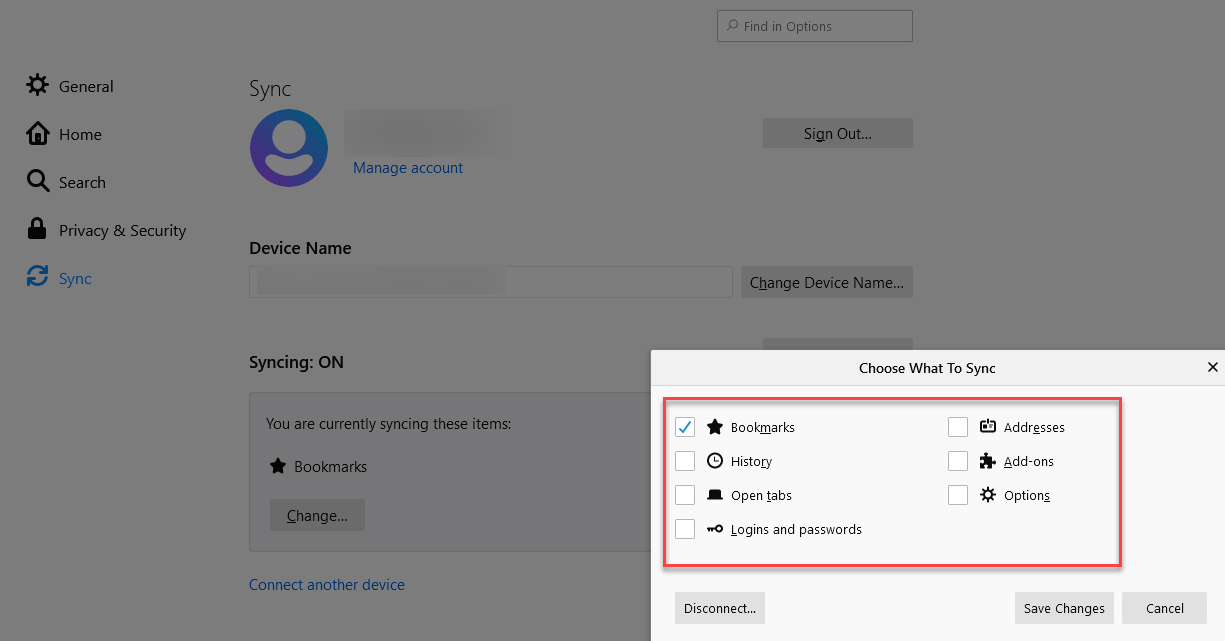
Which of these settings must be enabled to enable sync of the multi-account-containers data? I wish that "multi-account-containers" was an option here so I had the option to sync ONLY that:
 gavinr
on 15 May 2020
gavinr
on 15 May 2020
@gavinr You need to select "Add-ons"
 llostris
on 15 May 2020
llostris
on 15 May 2020
@llostris thank you for the quick answer! I have enabled that, and on my second (fresh) computer it installed the extensions but does not have my multi-account-containers settings ("always open github.com in ___ container" for example) ... is it possible I must enable "Options" too? If so that's a problem because I intentionally do not want to enable Options sync for other reasons.
gavinr
on 15 May 2020
@gavinr I don't think that's required. Make sure you also go to about:addons, click onMulti-Account Containers extension, then Preferences, and then Enable sync. This needs to be done on each of your machines. I believe the add-on asks you about that when you install it for the first time, too.
llostris
on 15 May 2020
@llostris update: ok, that seems to have fixed it. thanks!
gavinr
on 15 May 2020
Related issues
 anbenson
·
3Comments
anbenson
·
3Comments
 budhajeewa
·
4Comments
budhajeewa
·
4Comments
 maxxcrawford
·
3Comments
jonhoo
·
4Comments
maxxcrawford
·
3Comments
jonhoo
·
4Comments
 brettcurrie346
·
3Comments
brettcurrie346
·
3Comments
Most helpful comment
We (@kendallcorner , @maxxcrawford , and I) are digging into this issue now. The current plan is just to synchronize this extension's data. I.e.,
We do NOT plan to include Cookies, History, or other Container-isolated data in the first sync feature release. We may publish some pre-release versions of the add-on to get help with testing. We will comment here with updates.