Multer: Why req.files is always undefined
Why req.files is always undefined?
"express": "^4.13.3",
"multer": "^1.0.3",
 tomoat
All 68 comments
Can officials provide some full examples
tomoat
on 13 Aug 2015
How are you using multer? Please post some code
 LinusU
on 13 Aug 2015
LinusU
on 13 Aug 2015
Full example:
var express = require('express')
var multer = require('multer')
var upload = multer({ dest: 'uploads/' })
var app = express()
app.post('/profile', upload.single('avatar'), function (req, res, next) {
// req.file is the `avatar` file
// req.body will hold the text fields, if there were any
})
Taken straight from the readme
LinusU
on 13 Aug 2015
<form method="post" enctype="multipart/form-data" action="/upload">
<input type="hidden" name="msgtype" value="2"/>
<input type="file" name="images" />
<input type="submit" value="Upload" />
</form>
app.js
var express = require('express');
var multer = require('multer');
var app = express();
var server = require('http').createServer(app);
var port = process.env.PORT || 3434;
var upload = multer({ dest: 'uploads/' });
app.use(function (req, res, next) {
//console.log(req.files); // JSON Object
next();
});
server.listen(port, function () {
console.log('Server listening at port %d', port);
});
app.get('/', function(req, res) {
res.sendFile(__dirname + '/public/upload.html');
})
app.post('/upload', upload.single('avatar'), function(req, res) {
console.log(req.files);
});
error
INFO] 16:08:50 Restarting
Server listening at port 3434
undefined
Error: Unexpected field
tomoat
on 13 Aug 2015
    <input type="file" name="images" />
    <!--                     ^ Here
app.post('/upload', upload.single('avatar'),  function(req, res) {
//                                 ^ Here
These two should match.
From the documentation:
.single(fieldname)
Accept a single file with the name fieldname. The single file will be stored
in req.file.
.array(fieldname[, maxCount])
Accept an array of files, all with the name fieldname. Optionally error out if
more than maxCount files are uploaded. The array of files will be stored in
req.files.
.fields(fields)
Accept a mix of files, specified by fields. An object with arrays of files
will be stored in req.files.
fields should be an array of objects with name and optionally a maxCount.
Example:
[
  { name: 'avatar', maxCount: 1 },
  { name: 'gallery', maxCount: 8 }
]
Thank you @LinusU
tomoat
on 13 Aug 2015
Here is my code. I couldn't get the file to be uploaded (although the uploads folder is created). Can you help me @LinusU Thank you very much!
var express = require('express');
var path = require('path');
var favicon = require('serve-favicon');
var logger = require('morgan');
var cookieParser = require('cookie-parser');
var bodyParser = require('body-parser');
var routes = require('./routes/index');
var users = require('./routes/users');


var multer = require('multer');


var app = express();

// view engine setup
app.set('views', path.join(__dirname, 'views'));
app.set('view engine', 'hjs');

// uncomment after placing your favicon in /public
//app.use(favicon(path.join(__dirname, 'public', 'favicon.ico')));
app.use(logger('dev'));

app.use(bodyParser.json());
app.use(bodyParser.urlencoded({ extended: false }));
app.use(cookieParser());
app.use(require('less-middleware')(path.join(__dirname, 'public')));
app.use(express.static(path.join(__dirname, 'public')));

app.use('/', routes);
app.use('/users', users);

var upload = multer({ dest: 'uploads/' })

app.post('/upload', upload.single('img'), function(req, res, next){
  console.log("file"+req.file+req.files);
  res.send('Successfully uploaded!');
});

// catch 404 and forward to error handler
app.use(function(req, res, next) {
  var err = new Error('Not Found');
  err.status = 404;
  next(err);
});

// error handlers

// development error handler
// will print stacktrace
if (app.get('env') === 'development') {
  app.use(function(err, req, res, next) {
    res.status(err.status || 500);
    res.render('error', {
      message: err.message,
      error: err
    });
  });
}

// production error handler
// no stacktraces leaked to user
app.use(function(err, req, res, next) {
  res.status(err.status || 500);
  res.render('error', {
    message: err.message,
    error: {}
  });
});


module.exports = app;
HTML
<html lang="en">

    <body>
      <form action="/upload" enctype="multipart/form-data" method="post">
        File <input type="file" name="img" accept="image/*">
         <input type="submit" value="Upload">
      </form>
    </body>
</html>
 ichenjia
on 15 Oct 2015
ichenjia
on 15 Oct 2015
Looks right to me, do you get any log output?
LinusU
on 15 Oct 2015
The log indicated both req.files and req.file are undefined. So not much luck. Is there a default size limit or something? The photo was about 7mb
ichenjia
on 15 Oct 2015
@LinusU I think it is because of the large size of the photo. I am not sure what's the default size limit. But I tried a 300K photo and it worked well. Thank you for answering my question earlier.
ichenjia
on 16 Oct 2015
That's strange, I actually don't think that we have a default limit at all. This is something that should be addressed in #182 thought.
Anyways, you should get an error if the file size limit is hit. What's the output in the browser? Is it Successfully uploaded!?
LinusU
on 16 Oct 2015
Yes it is successfully uploaded. With undefined in req.file. Could it be something timed out as a result of a large JPG file?
ichenjia
on 16 Oct 2015
Still the same issue with req.files. Getting each time undefined.
 ankit2002
on 31 Dec 2015
ankit2002
on 31 Dec 2015
Same here. Don't understand what the issue seems to be.
 ktkaushik
on 19 Feb 2016
ktkaushik
on 19 Feb 2016
Well, Some How i did it,
Hopefully work for you,
var a = new user({
_id: req.body.job_seeker_id,
pwd: req.body.job_seeker_pwd,
});
    if (req.file)
        a.img.data = fs.readFileSync(req.file.path);
    else
        a.img.data = fs.readFileSync("./public/images/default-user-profile-image.png");

    a.save(function (err, doc) {
        if (err) {
            res.json(err);
        } else {
            res.redirect('/view');
        }
    });
Hi , I just start use node.js , and trying to upload image to node.js , use multer as middle ware , I try this for 14 hours , can not figure it out , I follow this one ,I use postman upload an image , it reply file is upload , and if i console.log(req.files); , it reply File is uploaded , that's it , I though it should be reply an array of information. , than I can use req.file.image.pathto read the file to store it , I try this for 15 hours , please help :(
my question on stack over flow
my app.js:
var    express = require('express')
      ,bodyParser = require('body-parser')
      ,app = express()
      ,multer  =  require('multer')
      ,binary = require('binary')
      ,fs = require('fs')
      ,util= require('util')
      ,http = require('http')
      ,multer = require('multer')
      ,upload = multer({ dest: '/Node/file-upload/uploads/' });

  app.use(bodyParser.urlencoded({ extended: true })); // support encoded bodies.
  app.use(bodyParser.json({limit: '5mb'}));


songs = require('./routes/router');

app.listen(3000, function () {
          console.log('Example app listening on port 3000!');
                              });
app.post('/upload',songs.upload);
route.js
var mongoose = require('mongoose');
var uri = "mongodb://xxxx:[email protected]:61365/aweitest";
mongoose.connect(uri);
// we're connected!
var db = mongoose.connection.db;
var BSON = require('bson').BSONPure;
var binary = require('binary');
var body = require('body-parser');
var fs = require('fs');
var path = require ('path');

var multer = require('multer');

var storage =   multer.diskStorage({
 destination: function (req, file, callback) {
                     callback(null, '/Node/file-upload/uploads/');
                     },
filename: function (req, file, callback) {
                 callback(null, file.fieldname + '-' + Date.now());
                    }
   });
var upload = multer({ storage : storage}).single('image');


db.on('error', console.error.bind(console, 'connection errrrrrrrror:'));
//db = mongoose.connection.db;
db.once('open', function() {
  console.log("mongodb is connected!!");
});


exports.upload = function(req, res) {
      upload(req,res,function(err) {
            console.log(req.body);
    fs.readFile(req.files.image.path, function (err, data){  <error here>
          var dirname = "/Node/file-upload/uploads/";
          var newPath = dirname + req.body.filename;
      fs.writeFile(newPath, data, function (err) {
    if(err) {
      return res.end("Error uploading file.");
    }
    res.end("File is uploaded");
          });
      });
    });
};
error message
TypeError: Cannot read property 'image' of undefined
at c:\Users\awei\WebstormProjects\untitled\routes\girlshanlder.js:107:24
 awei1208
on 25 Feb 2016
awei1208
on 25 Feb 2016
@awei1208 use req.file instead of req.files
LinusU
on 26 Feb 2016
@LinusU Thanks for reply , I find out ,if use POSTMAN to upload image , use form-data don't use binary , and have to be sure assign a value same as single('image') 'image' here , and postman are send an array , not a single one , thanks for your reply ;)
awei1208
on 26 Feb 2016
@LinusU
i am trying to upload image, however i have used req.file and also the "name" field which is "image" here from html is same. but it is giving error: Cannot read property 'path' of undefined in post method at uploader
app.js
var express  = require('express');
var session = require('express-session');
//var connect = require('connect');
var bodyParser = require('body-parser');
var jwt    = require('jsonwebtoken');
var app      = express();
var port     = process.env.PORT || 8080;
//var path = require('path');
var fs = require('fs');
var multer = require('multer');
var path = require('path');


app.use(multer({dest: __dirname + '/public'}).single('image')); // <--

app.use(express.static(__dirname + '/public'));
//app.use(connect.logger('dev'));
app.use(bodyParser.json());
app.use(bodyParser.urlencoded({extended: true}));

app.set('views', __dirname + '/views');
app.engine('html', require('ejs').renderFile);

module.exports = app; /**/

require('./routes/routes.js')(app);
app.listen(port);
console.log('The App runs on port ' + port);
post method in routes/routes.js
app.post('/createEvent', function(req, res){
        var imageFile = req.file.image;
        console.log(imageFile);
        **cloudinary.uploader.upload(imageFile.path, function(result) { **                   //<-- Error is here
            console.log(result);
            console.log('***************************');
            console.log(result.secure_url);
            //you can write this image url to your database
            res.send('Your image was uploaded to :'+result.secure_url +');
        }
    );
});
 ravinsingh16
on 2 Apr 2016
ravinsingh16
on 2 Apr 2016
Switch out var imageFile = req.file.image for var imageFile = req.file.
When using the .single function, req.file will hold the uploaded file directly.
LinusU
on 2 Apr 2016
Hi the same to me. I use the same fieldname everywhere and still undefined :(
api.js
var bodyParser = require('body-parser');    // get body-parser
var User       = require('../models/user');
var Bike    = require('../models/bikeModel');
var jwt        = require('jsonwebtoken');
var config     = require('../../config');
var multer = require('multer');
var upload = multer({dest: './uploads/'});
....

// Bikes
    apiRouter.route('/bikes')
        .post(upload.single('mainImage'),function(req, res,next) {

            var bike = new Bike();

            bike.model = req.body.model;
            bike.description = req.body.description;
            bike.photo = req.body.mainImage;

            console.log( '\n\n\nMODEL ---->'+req.body.model+ '\n\n');
            console.log( '\n\n\nDESC ---->'+req.body.description+ '\n\n');
            console.log( '\n\n\nFILES ---->'+req.files+ '\n\n');
            console.log( '\n\n\nFILES ---->'+req.file+ '\n\n');
            console.log( '\n\n\nFILES ---->'+req.body.file+ '\n\n');
            console.log( '\n\n\nBIKE ---->'+bike+ '\n\n');
      });
FORM:
<form class="form-horizontal" ng-submit="bike.saveBike()" enctype="multipart/form-data" method="post">

    <div class="form-group">
        <label class="col-sm-2 control-label">Name</label>
        <div class="col-sm-10">
            <input type="text" class="form-control" ng-model="bike.bikeData.model">
        </div>
    </div>

    <div class="form-group">
        <label class="col-sm-2 control-label">Descripció</label>
        <div class="col-sm-10">
            <input type="text" class="form-control" ng-model="bike.bikeData.description">
        </div>
    </div>

    <div class="form-group">
        <label class="col-sm-2 control-label">Imatge Principal</label>
        <div class="col-sm-10">
            <input name="mainImage" type="file" class="form-control" ng-model="bike.bikeData.photo">
        </div>

    </div>
    <div class="form-group">
    <div class="col-sm-offset-2 col-sm-6">
        <button type="submit" class="btn btn-success btn-lg btn-block" ng-if="bike.type == 'create'">Create Bike</button>
        <button type="submit" class="btn btn-success btn-lg btn-block" ng-if="bike.type == 'edit'">Update Bike</button>
    </div>
    </div>

</form>
I have no idea about what's going on :(
Thanx
 DespertaWeb
on 13 Apr 2016
DespertaWeb
on 13 Apr 2016
@DespertaWeb Are you using angular to submit the form? Can you try without first to nail down the cause?
LinusU
on 13 Apr 2016
But I'm getting the others fields , mainImage 's the only one I can't grab :(
DespertaWeb
on 13 Apr 2016
Hmm, could it be that there is something case sensitive that goes wrong? could you try naming it mainimage just to test, both in html and on server?
LinusU
on 13 Apr 2016
Still not working .
I guessm the action is not needed right?
DespertaWeb
on 13 Apr 2016
@LinusU I know why ! :D
It's because:
"success": false,
"message": "No token provided."
When I'm trying to upload the form with angularjs it has to be able to find the token in my $localstorage. If there's no input field it works fine, but it desn't when I upload a file.
Why is that?
that's the middleware that has to perform this check :
    // route middleware to verify a token

    apiRouter.use(function(req, res, next) {
        // do logging
        console.log('\n==================================\nVerifing token!\n');

      // check header or url parameters or post parameters for token
      var token = req.body.token || req.query.token || req.headers['x-access-token'];
        console.log('TOKEN ? :'+ token+'\n==================================\n');

      // decode token
      if (token) {

        // verifies secret and checks exp
        jwt.verify(token, superSecret, function(err, decoded) {
                console.log('req.decoded ? :'+ JSON.stringify(decoded)+'\n\n');

          if (err) {
            res.status(403).send({
                success: false,
                message: 'Failed to authenticate token.'
            });
          } else {
            // if everything is good, save to request for use in other routes

            req.decoded = decoded;

            next(); // make sure we go to the next routes and don't stop here
          }
        });

      } else {
        // if there is no token
        // return an HTTP response of 403 (access forbidden) and an error message
        res.status(403).send({
            success: false,
            message: 'No token provided.'
        });

      }
    });
If I comment that code it works pretty fine, but there's a lack of security :(
I'm new in MEAN Stack so maybe it's easy to figure it out.
DespertaWeb
on 14 Apr 2016
Ahh, hmm, I think that this has been brought up before. You need to place multers middleware before the token check if you want the token to come in the body.
However, I would recommend to send the token in the Authorization header as that is where it belongs, and then you wont have this problem. e.g.
Authorization: Bearer eyJhbGciOiJIUzI1NiIsInR5cCI6IkpXVCJ9.eyJzdWIiOiIxMjM0NTY3ODkwIn0.Rq8IxqeX7eA6GgYxlcHdPFVRNFFZc5rEI3MQTZZbK3I
Never done before ( My first project in MEAN and too heavy I guess, but it's too late :P )
I'll dig into it ! Cheers :)
Any good tutorial to get Started?
DespertaWeb
on 14 Apr 2016
@LinusU, did you get the reason why the file is not uploaded and req.file comes out to be undefined but the output in the browser comes as 'Successfully uploaded'? req.files comes out to be {}
 minu-aswanth
on 15 Apr 2016
minu-aswanth
on 15 Apr 2016
I found that using multer alongside bodyParser can cause req.file to be undefined. Make sure to check that also if you're having issues.
 nikkwong
on 7 Jun 2016
nikkwong
on 7 Jun 2016
I had similar issues. What worked in the end was defining the upload route BEFORE the middleware. I was also in a situation where Multer had a conflict with Keystone CMS. Spent days on getting everything playing together.
 ChristianRich
on 8 Jun 2016
ChristianRich
on 8 Jun 2016
i want to recieve a file in request..it may be a text docuement or html...any suggestions?
 LaNa215
on 13 Dec 2016
LaNa215
on 13 Dec 2016
I have been having the same issue ChristianRich, could you elaborate. I am trying to add capture form data: req.body and multiple images: req.files and store the req.body in a mongo database and then store the image names from req.files in the same database entry. All of this in order to retrieve the images associated with the form post. @ChristianRich
 tlgevers
on 13 Dec 2016
tlgevers
on 13 Dec 2016
For people using Postman, see https://github.com/postmanlabs/postman-app-support/issues/2602, with a workaround from S.O included
 cyrilchapon
on 17 Mar 2017
cyrilchapon
on 17 Mar 2017
is this closed without being resolved? I am having same issues...
req.files nor req.file works
 bluermind
on 24 Apr 2017
bluermind
on 24 Apr 2017
I have the same problem when I copy the README code. I am in multer 1.3 and express 4.
//---------------index.js-------------------------
```javascript
var express = require('express');
var router = express.Router();
var multer = require('multer');
var upload = multer({ dest: 'uploads/' });
router.get('/', function(req, res, next) {
res.render('index', { title: 'Express' });
});
router.post('/', upload.single('avatar'), function(req, res, next) {
console.log("upload");
console.log(req.body);
console.log(req.file);
res.render('index', { title: 'Express' });
});
module.exports = router;
//-------------------index.ejs--------------------
<%= title %>
Welcome to <%= title %>
 suiguoxin
on 7 May 2017
suiguoxin
on 7 May 2017
@DespertaWeb : Did you get a way to work with your problem?
 embeddedVagary
on 14 May 2017
embeddedVagary
on 14 May 2017
This issue needa be locked. Undefined req.file is the main symptom of every trouble including misconfiguration, typos, buggy third party file uploaders and stuff. There are like 20 different issues here, and
1) this is not gonna end
2) there is no bug to be fixed
3) this issue won't help any reader un trouble
cyrilchapon
on 14 May 2017
I am using Multer and evrything is fine, except, I am not able to see req.file.path when I console log in my app.js. However I am able to see that in my response header as 'Text/html'. Please check the code snippet below:
// No error occured.
var path = req.file.path;
return res.send("Upload Completed for "+ path);
console.log(path); --> Nothing is logged on console
BELOW is the response I am getting in my broswer network tab
Upload Completed for uploads\download.png
Is it because this method from multer gives simple text? How can see i value of req.file.path in nodejs? Any help would be really appreciated as I have been doing research on this from past a week.
Thanks
 apoorvachikara
on 6 Jul 2017
apoorvachikara
on 6 Jul 2017
I created an app that writes the file path of the saved image to a mongo database. This works, I use angular for the front-end but used jquery in order to post.
https://github.com/tlgevers/pmt.git
$('#uploadimg2').submit(function(e) {
e.preventDefault();
$("#status2").empty().text("File is uploading...");
$(this).ajaxSubmit({
error: function(xhr) {
status('Error: ' + xhr.status);
},
success: function(response) {
console.log(response);
$("#status2").empty().text(response);
$scope.editDisplay(sessionid);
}
});
tlgevers
on 6 Jul 2017
I am not able to locate where you have path of uploaded file. The multer provides res.file.path object which stores the path of file. I am able to see that in my response which is sent back to calling function.
But when I am trying to check the value in "var path = res.file.path", it shows nothing. is there anything I am doing wrong or something I am missing in my code to get the value for this path object?
apoorvachikara
on 7 Jul 2017
I am able to get the values for req.file.path. The reason I was not getting it, I have console.log() after return function so it was never executed and in other function they were called before the value was assigned to path variable.
Thanks
apoorvachikara
on 7 Jul 2017
Try with the following code with the corresponding file
var multer = require('multer');
app.use(multer({dest: __dirname + '../public/upload/temp'}).single('file'));
var tempPath = req.file.path,
ext = path.extname(req.file.filename).toLowerCase(),
targetPath = path.resolve('./public/upload/' + imgUrl + ext);
 aungmyatmoe
on 13 Jul 2017
aungmyatmoe
on 13 Jul 2017
i am using multer to upload files it is working perfectly on local machine but when service is hosted on cloud server and file is uploaded from local machine the multer is creating a file with the file name with size 0 kb can anbody tell me what i am doing wrong?
my front end is C# windows application.
 curiousalok
on 27 Sep 2017
curiousalok
on 27 Sep 2017
How do you retrieve and save an image within an object with multer.
For example sending an object with various fields mostly text and an image. The object is called postData and the image is called postImage. So to reference it would simple be postData.postImage.
Note I am not sending directly from form submit but from Vue component method. Trying to get it to work for 2 days, running out of ideas. Thanks
 nigeljames
on 13 Nov 2017
nigeljames
on 13 Nov 2017
@nikkwong is there a solution?
 niksmac
on 21 Nov 2017
niksmac
on 21 Nov 2017
You have ways to do this:
multer is middware of router.post:
    router.post('/upload', upload.multer({...}).array(...), function(req, res, next) {
        console.log(req.body);
        console.log(req.files);
        //do somethings
        .....
    });
multer in router.post:
var upload = multer({....}).array('txtThumb', settings.maxFilesUpload);
router.post('/upload', function(req, res, next) {

    console.log(req.body); // return empty
    console.log(req.files); // return empty

    upload(req, res, function(err) {

        console.log(req.body); // return full value
        console.log(req.files); // return full value

        if (err) {
             return res.end("Something went wrong!" + err);
         }
        // do somethings
        .........
         res.redirect('/admin/products/add-product');
     });
});
hope help you.
 2pay
on 4 Dec 2017
2pay
on 4 Dec 2017
req.file or req.files is always undefined
`const express = require('express')
const hbs = require('express-handlebars');
const multer = require('multer');
const bodyParser = require('body-parser');
const path = require('path');
const upload = multer({ dest: 'uploads/' });
const app = express();
app.use(bodyParser.json());
app.use(bodyParser.urlencoded({ extended: true }));
app.engine('hbs', hbs({ extname: 'hbs', defaultlayout: 'index' }));
app.set('views', path.join(__dirname, 'views'));
app.set('view engine', 'hbs');
app.get('/', (req,res) => {
res.render('file');
});
app.post('/after',upload.single('upl'), (req,res)=> {
console.log(req.body.text); //working perfectely
console.log(req.file); //undefined
res.send('Successfully uploaded!');
});
app.listen(8080,(req,res) => {
console.log("server started at 8080");
});`
my html file is as follwos
this is an hbs(express handlebars ) file u can take it as html file
my html code some what look like this
<form action="/after",enctype="multipart/form-data", method="post">
name : <input type="text" name="text"/>
<input type="file" name="upl"/>
<input type="submit" value="submit"/>
</form>
 piyush-jumpbyte
on 4 Jan 2018
piyush-jumpbyte
on 4 Jan 2018
Im getting req.file undefined. i have followed every steps possible here but still it doesn't works for me. I am trying to update data in the database.
Server.js looks like this :
app.get('/edititem/:productid/:category/:itemname', post.updateitem);
app.post('/edititem/:productid/:category/:itemname', post.update, upload.single('mainpicture'));
edititem.js
input type='file' name = 'mainpicture' id = 'coverinput' onchange="readcover(this);" accept = ".jpg, .jpeg, .png" required/
- Posting.js *
exports.update = function (req, res) {
var src;
var dest;
var targetPath;
var targetName;
if (!req.file) {
    return res.status(415).send('Please upload a file');
} // why cant it get a file

var tempPath = req.file.path;
var nameoffile = req.file.originalname;


console.log("req.file = ", req.file);
console.log("tempPath = ", tempPath);
console.log("req.file.originalname = ", req.file.originalname);


//get the mime type of the file
var type = mime.lookup(req.file.mimetype);

//get file extension
var extension = req.file.path.split(/[. ]+/).pop();

// check support file types
if (IMAGE_TYPES.indexOf(type) == -1) {
    return res.status(415).send('Supported image format: jpeg, jpg, jpe, png.');
}

//set new path to images folder
targetPath = './public/uploads/' + req.file.originalname;

// using read stream API to read file
src = fs.createReadStream(tempPath);

//using a write stream API to write files
dest = fs.createWriteStream(targetPath);
src.pipe(dest);

//show error
src.on('error', function (err) {
    if (err) {
        return res.status(400).send({
            message: error
        });
    }
});

var record_num = req.params.productid;
var nameofitem = req.params.itemname;
var category = req.params.category;
console.log("record_num = ", record_num);

src.on('end', function () {
    var updatedata = {
        //missing one user
        coverpicture : req.file.originalname,
        secondpicture : req.body.secondpicture,
        thirdpicture : req.body.thirdpicture,
        lastpicture :  req.body.lastpicture,
        categories : req.body.categories,
        itemname : req.body.itemname,
        price : req.body.price,
        condition : req.body.condition,
        deliverymethod : req.body.deliverymethods,
        pricenego : req.body.pricenegos,
        contact : req.body.contact,
        description : req.body.description,
        itemtype : req.body.itemtype,
        itembrand : req.body.itembrand,
        specialfeatures : req.body.specialfeatures,
        storage : req.body.storage,
        colour : req.body.colour,
        meetup : req.body.meetup

    };

    Post.update(updatedata, { where : {productid : record_num}}).then((updatedpost) => {
        if (!updatedpost || updatedpost == 0 ) {
            return res.send(400, {
                message: "error"
            });
        }
        res.redirect('/product/' + record_num + '/' + category + '/' + nameofitem);
    })


    //remove from temp folder
    fs.unlink(tempPath, function (err) {
        if (err) {
            return res.status(400).send('Something bad happened here');
        }

    });

});
};
 thefakejunhao
on 15 Jun 2018
thefakejunhao
on 15 Jun 2018
@thefakejunhao
Please include this " enctype = multipart/form-data " ur below code.
"input type='file' name = 'mainpicture' id = 'coverinput' onchange="readcover(this);" accept = ".jpg, .jpeg, .png" required/ . "Also please make sure you are using middleware in the server config.
for example use
var bodyParser = require('body-parser');
app.use(bodyParser.json({ limit: "50mb" }));
app.use(bodyParser.urlencoded({ limit: "50mb", extended: true, parameterLimit: 50000 }));
Happy Coding !!
 rahulexstart
on 20 Jul 2018
rahulexstart
on 20 Jul 2018
I added this middleware before my routes.
app.use('/api/', function(req, res, next) {
  var contype = req.headers['content-type'];
  console.log(contype);
  if (contype === 'multipart/form-data') {
    return next();
  } else {
    app.use(bodyParser.json({ type: '*/*', limit: '10mb'}));
    app.use(bodyParser.urlencoded({extended: true}));
    next();
  }
});
and use Multer as they suggest. bodyparser and multer don't work together
 ghost
on 27 Sep 2018
ghost
on 27 Sep 2018
@LinusU
my route
route.post('/addItem', upload.single('flPhoto'),async(req,res)=>{
  const {name,size,color,material,weight,description,stok,tag,price,discount,categoryName} = req.body
  const photo = req.file.filename
  console.log(photo)

  const data = await product.create({
    name,
    size,
    color,
    material,
    weight,
    description,
    flPhoto : photo,
    stok,
    tag,
    price,
    discount,
    categoryName
  })
  res.json(data)
})
 kukode
on 2 Oct 2018
kukode
on 2 Oct 2018
my js for frontend
const save = document.getElementById('send')
save.addEventListener('click',async()=>{
try {
const addItem= 'http://localhost:3000/api/addItem'
// const myForm = document.getElementById('myForm')
const bname = document.getElementById('inputNama').value
const bsize = document.getElementById('inputSize').value
const bcolor = document.getElementById('inputWarna').value
const bmaterial = document.getElementById('inputMaterial').value
const bweight = document.getElementById('inputWeight').value
const bdesc = document.getElementById('deskripsi').value
const bfile = document.getElementById('inputFile').files
const bstok = document.getElementById('inputStok').value
const btag = document.getElementById('inputTag').value
const bprice = document.getElementById('inputPrice').value
const bdiscount = document.getElementById('inputDiscount').value
const bkategori = document.getElementById('inputKategori').value
const formData = new FormData()
formData.set('name',bname)
formData.set('size',bsize)
formData.set('color',bcolor)
formData.set('material',bmaterial)
formData.set('weight',bweight)
formData.set('description',bdesc)
formData.set('flPhoto',bfile)
formData.set('stok',bstok)
formData.set('tag',btag)
formData.set('price',bprice)
formData.set('discount',bdiscount)
formData.set('categoryName',bkategori)
console.log(formData)
                const data = await axios({
                        method: 'post',
                        url: addItem,
                        data: formData,
                        config: {
                            headers: {
                                    'Content-Type': 'multipart/form-data'
                                }
                            }
                        }
                    )
                if(data){
                    alert('sukses')
                    // window.location.href = 'product.html'
                    console.log(data)
                }
                else {
                    alert('gagal')
                }


            } catch (error) {
                console.log(error)
            }

        })
but error TypeError: Cannot read property 'filename' of undefined
kukode
on 2 Oct 2018
const bfile = document.getElementById('inputFile').files
I don't think you can pass in an array of files, try changing that line to:
const bfile = document.getElementById('inputFile').files[0]
LinusU
on 2 Oct 2018
ok thank work @LinusU
kukode
on 2 Oct 2018
@LinusU
i want create logic if im edit text with multer and no upload file change only text,but im update log error Cannot read property 'filename' of undefined
my route update
why i place logic
oute.put('/updateItem/:id',upload.single('flPhoto'),async(req,res)=>{
  const id = req.params.id
  const {name,size,color,material,weight,description,stok,tag,price,discount,categoryName} = req.body
  const photo = req.file.filename
  console.log(photo)

  const data = await product.update(
    {name,
      size,
      color,
      material,
      weight,
      description,
      flPhoto : photo,
      stok,
      tag,
      price,
      discount,
      categoryName},
    {where : {id : id}}
  )

  res.json(data)
})
You'll have to check if a file was uploaded before trying to read the filename then:
  if (req.file) {
    const photo = req.file.filename
    // handle that a file was uploaded
  }
In case anyone is here because they are using firebase functions there is a bug in firebase that does not allow the use of multer.
 nickjuntilla
on 3 Nov 2018
nickjuntilla
on 3 Nov 2018
// Models
var mongoose = require('mongoose');
var ProfileSchema = new mongoose.Schema({
fullName: {
    type: String,
    required: true
}
  //  profileImage: {type: String, required: true}
});
module.exports = mongoose.model('Profile', ProfileSchema)
// Controllers
var Profile = require('../models/profile');
var multer = require('multer');
var upload = multer({dest: 'uploads/'});
exports.createProfile = (upload.single('profileImage'), function (req, res, next) {
var profileData = {
    fullName: req.body.fullName,
    // profileImage: req.file
}
console.log(req.file);
console.log('req.file: ', JSON.stringify(req.file));
console.log(profileData);
    Profile.create(profileData, function (err, profile) {
    if (err) {
        // console.log(err);
        res.end();
        return;
        // res.send(err);
    }
    Profile.create(function (err, profiles) {
        if (err) {
            res.end();
            // res.send(err);
            return;
        }

        res.json(profileData);
    });
});
});
I'm trying to use middleware to add text and image at the same time in the MongoDB database. However, my fields aren't populated and when I try to print it out in the console it says req.file(): undefined. I've researched on the other issues and it states using 'upload.single()' will solve the problem. In my case, it didn't! The first section is my model view(Schema), the second section is my controllers' view.
 Nileshmaharjan
on 14 Jan 2019
Nileshmaharjan
on 14 Jan 2019
I've tried all the options and no success - uploading file from Angular CLI to Node.js with multer. Please any help...
component ---------------------------------------------------------------------------------------->
ngOnInit() {
this.form = new FormGroup({
title: new FormControl(null, {
validators: [Validators.required, Validators.minLength(3)]
}),
firstName: new FormControl(null, { validators: [Validators.required] }),
lastName: new FormControl(null, {validators: [Validators.required]}),
email: new FormControl(null, {validators: [Validators.required, Validators.email]}),
password: new FormControl(null, {validators: [Validators.required, Validators.minLength(8)]}),
role: new FormControl(null, {validators: [Validators.required]}),
image: new FormControl(null, {
validators: [Validators.required],
asyncValidators: [mimeType]
})
});
}
onImagePicked(event: Event) {
const file = (event.target as HTMLInputElement).files[0];
this.form.patchValue({ image: file });
this.form.get("image").updateValueAndValidity();
const reader = new FileReader();
reader.onload = () => {
this.imagePreview = reader.result as string;
};
reader.readAsDataURL(file);
this.uploadData = new FormData();
this.uploadData.append('image', file, file.name);
console.log(file);
}
onSignup(){
const email = this.form.value.email;
const password = this.form.value.password;
const username = this.form.value.firstName+'_'+this.form.value.lastName;
const image = this.form.value.image;
const role = this.form.value.role;
this.dataContext.putWithProgress('/upload', image).then(res=> console.log(res));
// this.store.dispatch(new AuthActions.TrySignup({username: username,
// password: password,
// email: email,
// image: image,
// role: role}));
}
}
HTML - - - ------------------------------------
<<<
image preview works fine
server.js______________________________________________________________________________________
app.use(bodyParser.urlencoded({ extended: false })); // x-www-form-urlencoded
app.use(bodyParser.json()); // application/json
app.use('/images', express.static(path.join(__dirname, 'images')));
app.use((req, res, next) => {
res.setHeader('Access-Control-Allow-Origin', '*');
res.setHeader(
'Access-Control-Allow-Methods',
'OPTIONS, GET, POST, PUT, PATCH, DELETE'
);
res.setHeader('Access-Control-Allow-Headers', 'Origin, X-Requested-With, Content-Type, Accept, Authorization');
if (req.method === 'OPTIONS') {
return res.sendStatus(200);
}
next();
});
const fileFilter = (req, file, cb) => {
console.log('fileFilter', file);
if (
file.mimetype === 'image/png' ||
file.mimetype === 'image/jpg' ||
file.mimetype === 'image/jpeg'
) {
cb(null, true);
} else {
cb(null, false);
}
};
const fileStorage = multer.diskStorage({
destination: (req, file, cb) => {
console.log('fileStorage', file);
cb(null, 'images');
},
filename: (req, file, cb) => {
cb(null, new Date().toISOString() + '-' + file.originalname);
}
});
app.post('/upload', multer({ storage: fileStorage, fileFilter: fileFilter }).single('image'), (req, res, next)=>{
try{
console.log(req.body);
res.status(201).json({
message: 'img added successfully.'
// imageUrl: req.file.location
});
}catch(err){
next(err);
}
});
console from POSTMAN__________________________________________________________
mongo started
fileFilter { fieldname: 'image',
originalname: 'me.png',
encoding: '7bit',
mimetype: 'image/png' }
fileStorage { fieldname: 'image',
originalname: 'me.png',
encoding: '7bit',
mimetype: 'image/png' }
{ fieldname: 'image',
originalname: 'me.png',
encoding: '7bit',
mimetype: 'image/png',
destination: 'images',
filename: '2019-02-10T18:45:58.751Z-me.png',
path: 'images/2019-02-10T18:45:58.751Z-me.png',
size: 138284 }
console after uploading from browser:
undefined
TypeError: Cannot read property 'path' of undefined
The file is empty, also if I send it with the form, or directly... I don't know what else I have to do.
front end headers:
let headers = new HttpHeaders().set("Accept", "application/json");
return headers;

 morsella
on 10 Feb 2019
morsella
on 10 Feb 2019
I was getting this error because I copied the form code from the web and someone put 'encrypt' instead of 'enctype' in the form html template.
 adimittal
on 15 Apr 2019
adimittal
on 15 Apr 2019
Hi everyone, i have some code below
const validateCreatePostmiddleware = (req, res, next) => {
    if(req.files.image.name === null) {
        return res.redirect('/posts/new')
    }
    next()
}


app.use( '/posts/store' ,validateCreatePostmiddleware)
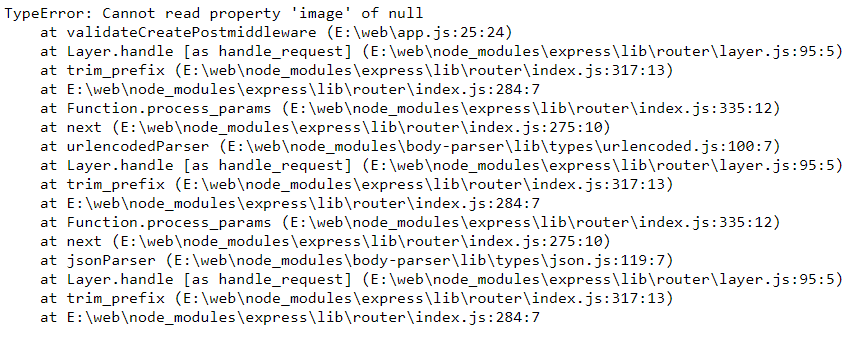
I want when req.files.name === null then redirect to '/posts/new' but it not working, So who can find error and tell me how to fix. Thanks ❤️
 KudoKhang
on 8 Jul 2019
KudoKhang
on 8 Jul 2019
@LinusU
Can you help me too:)
router.post('/add-product', function (req, res) {
var imageFile = typeof req.files.image !== "undefined" ? req.files.image.name : "";

req.checkBody('title', 'Title must have a value.').notEmpty();
req.checkBody('desc', 'Description must have a value.').notEmpty();
req.checkBody('price', 'Price must have a value.').isDecimal();
req.checkBody('image', 'You must upload an image').isImage(imageFile);

var title = req.body.title;
var slug = title.replace(/\s+/g, '-').toLowerCase();
var desc = req.body.desc;
var price = req.body.price;
var category = req.body.category;

var errors = req.validationErrors();

if (errors) {
    Category.find(function (err, categories) {
        res.render('admin/add_product', {
            errors: errors,
            title: title,
            desc: desc,
            categories: categories,
            price: price
        });
    });
} else {
    Product.findOne({slug: slug}, function (err, product) {
        if (product) {
            req.flash('danger', 'Product title exists, choose another.');
            Category.find(function (err, categories) {
                res.render('admin/add_product', {
                    title: title,
                    desc: desc,
                    categories: categories,
                    price: price
                });
            });
        } else {

            var price2 = parseFloat(price).toFixed(2);

            var product = new Product({
                title: title,
                slug: slug,
                desc: desc,
                price: price2,
                category: category,
                image: imageFile
            });

            product.save(function (err) {
                if (err)
                    return console.log(err);

                mkdirp('public/product_images/' + product._id, function (err) {
                    return console.log(err);
                });

                mkdirp('public/product_images/' + product._id + '/gallery', function (err) {
                    return console.log(err);
                });

                mkdirp('public/product_images/' + product._id + '/gallery/thumbs', function (err) {
                    return console.log(err);
                });

                if (imageFile != "") {
                    var productImage = req.files.image;
                    var path = 'public/product_images/' + product._id + '/' + imageFile;

                    productImage.mv(path, function (err) {
                        return console.log(err);
                    });
                }

                req.flash('success', 'Product added!');
                res.redirect('/admin/products');
            });
        }
    });
}
});
 JOHNOSA1995
on 15 Jul 2019
JOHNOSA1995
on 15 Jul 2019
@JOHNOSA1995 what is the problem you are seeing?
LinusU
on 18 Jul 2019
@LinusU i have 2 error.on edit page and on post product can i talk to you in Twitter or email I really need help on my university project:(
JOHNOSA1995
on 18 Jul 2019
i have 2 error.on edit page and on post product
Can you describe the actual error? Are you getting an error message or is something specific not working?
LinusU
on 18 Jul 2019
@LinusU
[

](url)
JOHNOSA1995
on 18 Jul 2019
Related issues
ChristianRich
·
4Comments
 tonghae
·
4Comments
tonghae
·
4Comments
 samipjain
·
4Comments
samipjain
·
4Comments
 bpetty-formfast
·
3Comments
bpetty-formfast
·
3Comments
 trexanhvn
·
3Comments
trexanhvn
·
3Comments
Most helpful comment
These two should match.
From the documentation:
.single(fieldname)Accept a single file with the name
fieldname. The single file will be storedin
req.file..array(fieldname[, maxCount])Accept an array of files, all with the name
fieldname. Optionally error out ifmore than
maxCountfiles are uploaded. The array of files will be stored inreq.files..fields(fields)Accept a mix of files, specified by
fields. An object with arrays of fileswill be stored in
req.files.fieldsshould be an array of objects withnameand optionally amaxCount.Example: