Mujoco-py: Environmental Variable Naming - Failing to import mujoco-py
The process for installing this package is supposed to be straightforward, but I am not really sure what's going on with this environmental naming error that keeps popping up no matter what I try. I have scoured every thread that mentions any of this to address this issue, so any help would be greatly appreciated.
Basically, mujoco-py failed to import inside my python notebook raising the following error:

I have successfully installed mujoco-py on Windows 10 64-bit using pip install as instructed, and I am currently on Python 3 64-bit.
Here are my mjpro131 binaries and activation key text file inside my .mujoco folder:

Here's how I set my environmental variables, which I directly got from browsing the directory/file for the path names:

 huanntran100
>All comments
I followed this https://github.com/openai/mujoco-py/issues/83 after reinstalling mujoco-py and doing all the steps here https://github.com/openai/mujoco-py under "Install MuJoCo".
System:
- Windows 10 64-bit
- Python 3.5 64-bit
in mujoco_py/mjlib.py, changed bin/mujoco131.lib --> bin/mujoco131.dll
- Addresses the error: "[Win 193] %1 is not a valid win32 application"
in mujoco_py/platname_targdir.py, changed sys.platform.startswith("windows") --> sys.platform.startswith("win")
- Addresses the error: "name 'platname' is not defined"
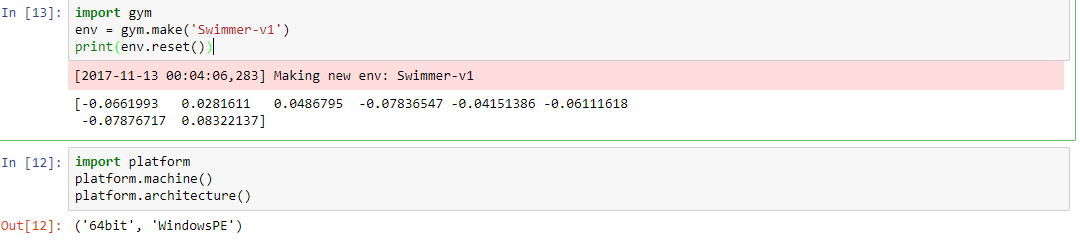
Here's proof that it works now thanks to this https://github.com/openai/mujoco-py/issues/83:
huanntran100
on 13 Nov 2017
Related issues
 henrycharlesworth
·
5Comments
henrycharlesworth
·
5Comments
 matwilso
·
3Comments
matwilso
·
3Comments
 yasiemir
·
5Comments
yasiemir
·
5Comments
 rajathkmp
·
4Comments
rajathkmp
·
4Comments
 dialogchat
·
3Comments
dialogchat
·
3Comments
Most helpful comment
I followed this https://github.com/openai/mujoco-py/issues/83 after reinstalling mujoco-py and doing all the steps here https://github.com/openai/mujoco-py under "Install MuJoCo".
System:
in mujoco_py/mjlib.py, changed bin/mujoco131.lib --> bin/mujoco131.dll
in mujoco_py/platname_targdir.py, changed sys.platform.startswith("windows") --> sys.platform.startswith("win")
Here's proof that it works now thanks to this https://github.com/openai/mujoco-py/issues/83:
