Dear developers,
is there a way I can check all collisions between geometries. Also can I somehow access force applied between two geometries which are colliding?
Thanks.
 kovacspeter
All 8 comments
There's isn't a high-level interface for contacts defined by mujoco-py, just a low-level interface into the Mujoco data structures. They're documented, sort of, at http://mujoco.org/book/programming.html (see 'Contacts' section) and http://mujoco.org/book/computation.html (see 'Contact' section)
Force isn't directly available, because of the way the constraint solver works.
Here's a script that runs a mujoco env and prints out the available info:
import gym

def str_mj_arr(arr):
    return ' '.join(['%0.3f' % arr[i] for i in range(arr._length_)])

def print_contact_info(env):
    d = env.unwrapped.data
    for coni in range(d.ncon):
        print('  Contact %d:' % (coni,))
        con = d.obj.contact[coni]
        print('    dist     = %0.3f' % (con.dist,))
        print('    pos      = %s' % (str_mj_arr(con.pos),))
        print('    frame    = %s' % (str_mj_arr(con.frame),))
        print('    friction = %s' % (str_mj_arr(con.friction),))
        print('    dim      = %d' % (con.dim,))
        print('    geom1    = %d' % (con.geom1,))
        print('    geom2    = %d' % (con.geom2,))

def run_env(env, step_cb):
    env.reset()
    stepi = 0
    while True:
        print('Step %d:' % (stepi,))
        step_cb(env)
        obs, rew, done, info = env.step(env.action_space.sample())
        stepi += 1
        if done: break

def main():
    run_env(gym.make('HalfCheetah-v1'), print_contact_info)

if __name__ == '__main__': main()
I hope that helps! If you write a clean, high-level API we'd be delighted to merge it in.
 tlbtlbtlb
on 26 Feb 2017
tlbtlbtlb
on 26 Feb 2017
@tlbtlbtlb
I am trying to detect (self)collisions in a simple 7-DOF robot, and I am having problems figuring out the MuJoCo api, so I'll try to pose 3 questions:
1) So does this mean that a contact, e.g., "2" will appear in the d.obj.contact list only if the d.obj.contact[2].geom1 and d.obj.contact[2].geom2 are close?
2) How is it possible to determine which geom pertains to which link or is it just in the order as they are nested?
3) How does this relate to conaffinity and contype?
I know that this is mentioned in the links @tlbtlbtlb provided, but I am having much difficulties understanding it.
 nemanja-rakicevic
on 6 Feb 2018
nemanja-rakicevic
on 6 Feb 2018
@nemanja-rakicevic Better to ask the Mujoco folks at http://www.mujoco.org/forum/index.php
tlbtlbtlb
on 6 Feb 2018
@kovacspeter Hello, I am now having exactly the same question, which is to detect the collision and calculate the contact force. Do you have any solutions now? I would appreciate it if u could give me some hints.
@tlbtlbtlb Thanks for your advice. I read the mujoco documentation u referred, it seems that the contact information is all saved in mjData.contact. Do you know how can I access this variable at runtime with mujoco-py? And how can I calculate the contact force from that? Thanks in advance.
 WuXinyang2012
on 9 Nov 2018
WuXinyang2012
on 9 Nov 2018
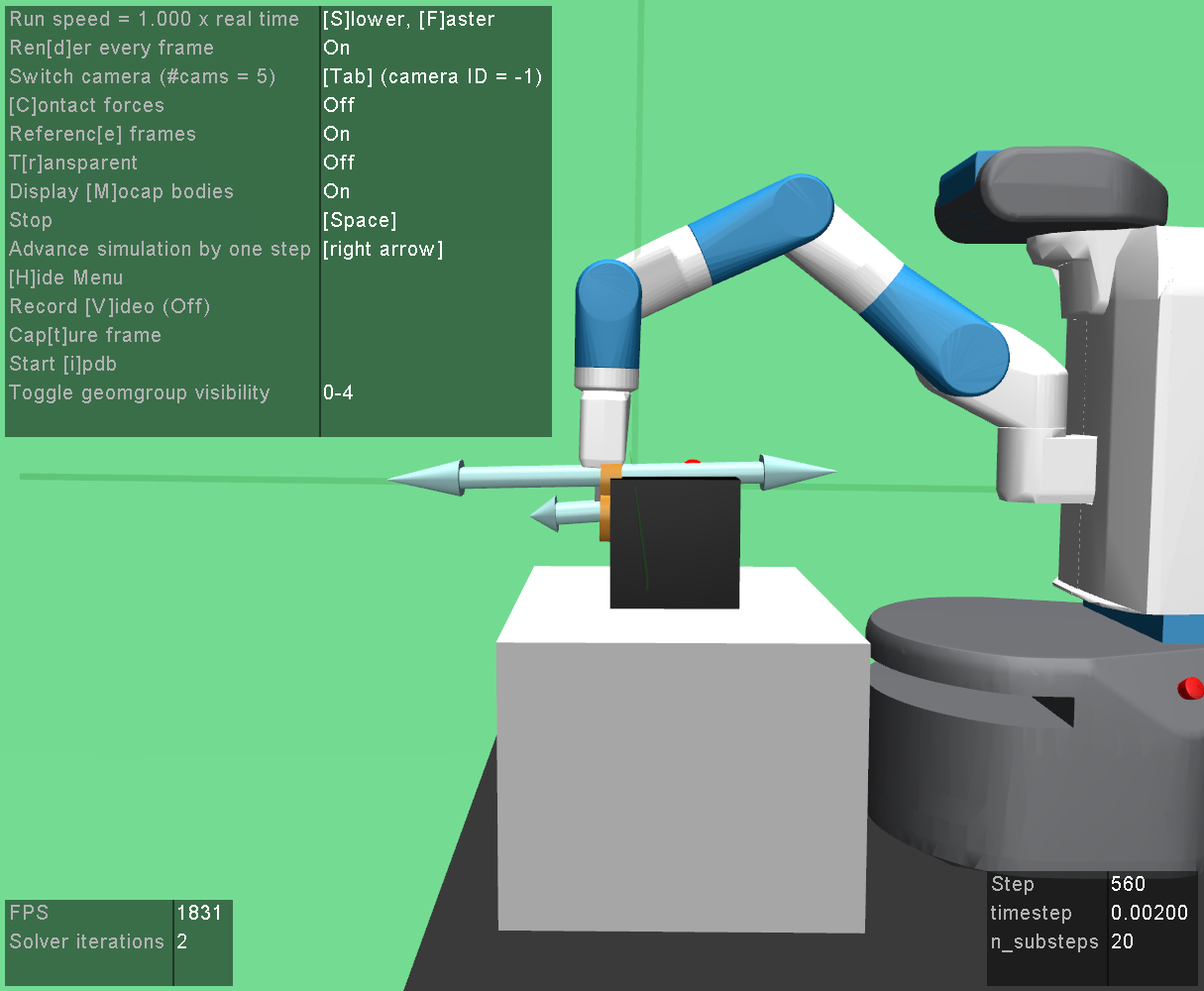
@tlbtlbtlb In fact, in the OpenAI's baselines repository: https://github.com/openai/baselines, for the HER experiments, their play.py script can already plot the contact force when colliding, like shown in the figure below. I am really curious how can I extract the information.
WuXinyang2012
on 9 Nov 2018
Oh yeah this is a real old bug and we have this feature now. Let me throw an example script together.
 machinaut
on 9 Nov 2018
machinaut
on 9 Nov 2018
alright here you go. file a new issue if you need something different than what is already available! https://gist.github.com/machinaut/209c44e8c55245c0d0f0094693053158
machinaut
on 9 Nov 2018
To plot arrows in Mujoco_py, Instead of these you can get the position and magnitudes of the contact forces and give them instead of the given values in the example.
```import time
import numpy as np
from mujoco_py.generated import const
from scipy.spatial.transform import Rotation as R
from mujoco_py import load_model_from_xml, MjSim, MjViewer
def euler2mat(euler, degrees=True):
r = R.from_euler('xyz', euler, degrees=degrees)
return r.as_matrix()
MODEL_XML = """
"""
model = load_model_from_xml(MODEL_XML)
sim = MjSim(model)
viewer = MjViewer(sim)
step = 0
while True:
t = time.time()
x0, y0 = np.cos(t), np.sin(t)
viewer.add_marker(pos=np.array([x0, y0, 0.3]), #position of the arrow
                  size=np.array([0.005,0.005,0.4]), #size of the arrow
                  mat=euler2mat([45,0,0]), # orientation as a matrix
                  rgba=np.array([1.,1.,1.,1.]),#color of the arrow
                  type=const.GEOM_ARROW,
                  label=str('GEOM_ARROW'))

viewer.render()

step += 1```
 mjm522
on 20 Apr 2020
mjm522
on 20 Apr 2020
Related issues
 hartikainen
·
4Comments
hartikainen
·
4Comments
 cbjtu
·
5Comments
cbjtu
·
5Comments
 bebbo203
·
3Comments
bebbo203
·
3Comments
 inksci
·
3Comments
inksci
·
3Comments
 libo-wu
·
3Comments
libo-wu
·
3Comments
Most helpful comment
There's isn't a high-level interface for contacts defined by mujoco-py, just a low-level interface into the Mujoco data structures. They're documented, sort of, at http://mujoco.org/book/programming.html (see 'Contacts' section) and http://mujoco.org/book/computation.html (see 'Contact' section)
Force isn't directly available, because of the way the constraint solver works.
Here's a script that runs a mujoco env and prints out the available info:
I hope that helps! If you write a clean, high-level API we'd be delighted to merge it in.