Mui-datatables: Changing columns prop no longer updates state after 2.0.0
Expected Behavior
Changing the columns prop should update the internal column state and render the new columns. This was working in 2.0.0.
Current Behavior
The columns stay the same after updating the prop.
Steps to Reproduce (for bugs)
- Create an initial table
- Add a new column to the columns prop
- Table does not render the new column
Your Environment
| Tech | Version |
|--------------|---------|
| Material-UI | 3.9.3 |
| MUI-datatables | 2.2.0 |
| React | 16.8.6 |
 muvari
All 14 comments
Same problem, i have the same environment!!
 IDrissAitHafid
on 24 May 2019
IDrissAitHafid
on 24 May 2019
Sandbox Link: https://codesandbox.io/embed/cranky-goldberg-koszc
Probable cause: (Might be wrong)
The condition at https://github.com/gregnb/mui-datatables/blob/master/src/MUIDataTable.js#L316 will always be true because this.props.columns already contains newColumns as it is being called from componentDidUpdate
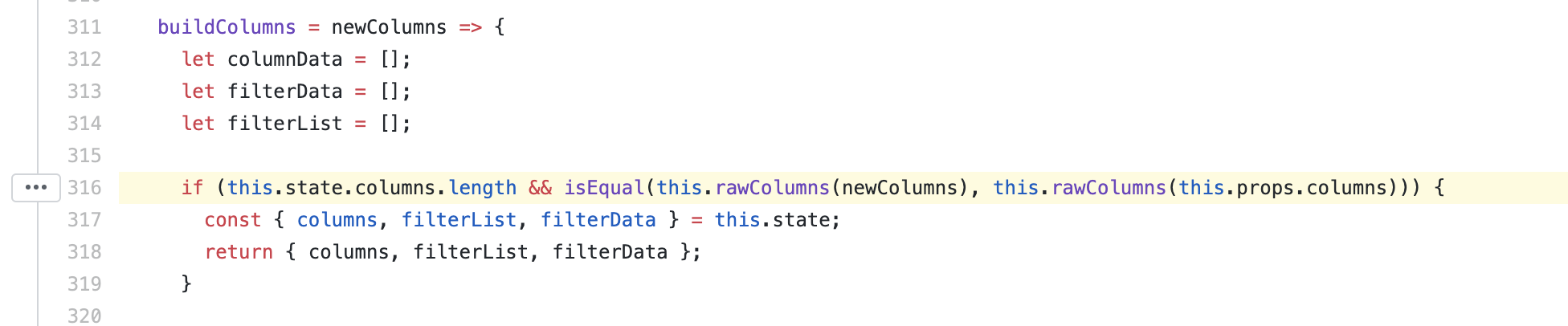
This could have been the case since certain logic was moved out of componentWillReceiveProps into componentDidUpdate.

 karthick-vinod
on 28 May 2019
karthick-vinod
on 28 May 2019
I am also seeing this issue and am interested in a fix.
 SatorSquare
on 28 May 2019
karthick-vinod
on 28 May 2019
SatorSquare
on 28 May 2019
karthick-vinod
on 28 May 2019
Updating the options prop also stopped working, after 2.0.0.
 tiagofernandez
on 30 May 2019
tiagofernandez
on 30 May 2019
Updating the
optionsprop also stopped working, after 2.0.0.
Handled options and columns now.
karthick-vinod
on 31 May 2019
Just ran into this myself. I tried dynamically updating the rowsPerPage option and it didn't work:
https://codesandbox.io/s/0lmlx
If I use the 2.0.0 version of mui-datatables (as the original sandbox does), it works fine.
 patorjk
on 3 Jun 2019
patorjk
on 3 Jun 2019
Hello again, I guess this PR #687 fix the column options changed outside the table.
 VagnerNico
on 12 Jun 2019
VagnerNico
on 12 Jun 2019
Very interested in this one.
I can't migrate to V2.x.x because of this issue for the moment..
 jkeruzec
on 20 Jun 2019
jkeruzec
on 20 Jun 2019
Hi! Also gonna be watching this issue. Gonna try an older version for now
 yilinggk
on 20 Jun 2019
yilinggk
on 20 Jun 2019
Working on a potential fix for this, at least temporarily. Not sure if it will cause regressions. If anyone is willing to test it out locally, let me know, and I can help get it up and running!
 gabrielliwerant
on 21 Jun 2019
gabrielliwerant
on 21 Jun 2019
A potential fix for this is available in 2.5.1. Would love to get feedback on it, especially if people want to play around with other functionality and see if they can find regressions.
gabrielliwerant
on 21 Jun 2019
Not sure if it fixed the problem for me. I'm trying to append a customBodyRender function to my columns after the user clicks a customized edit button in the toolbar. I'm passing a handleEdit method as a prop to my customToolbar component that adds the customBodyRender function to the column data and sets the column state in the index. When I console.log the state, it shows the change, but the table doesn't.
yilinggk
on 21 Jun 2019
@yilinggk Can you open a codesandbox that demonstrates the issue? Thanks!
gabrielliwerant
on 21 Jun 2019
Related issues
 kylane
·
3Comments
kylane
·
3Comments
 pranavtheway
·
3Comments
pranavtheway
·
3Comments
 T-pirithiviraj
·
3Comments
T-pirithiviraj
·
3Comments
 cahna
·
3Comments
cahna
·
3Comments
 mhmmdakbr
·
4Comments
mhmmdakbr
·
4Comments
Most helpful comment
PR: https://github.com/gregnb/mui-datatables/pull/650