Mui-datatables: More Custom Column Header
Thanks again for a great library. I'm interested in providing this feature and would submit a PR for it, but I think there might be API additions/changes in order to support this, so I thought I'd start with an issue.
Expected Behavior
What I would really like to be able to do is to create a header that acts as a filter as well as a sortable header. I have a basic implementation, done right now, but the filtering is not possible with the current customHeadRender feature. I need more access to more of the props from the MUIDataTable component.
I'm not really sure what the best way to achieve this is. One thought I had was to be able to allow the API to completely replace components. i.e. I could re-write my custom TableHead component and then inject it something like:
components = {
  'TableHead': <MyCustomTableHead />
}
<MuiDataTable components={components} data={data} columns={columns}/>
Again, what I really want to do is to be able to create a header for a column that is capable of filtering. However you think is best to achieve this, I'm open to implementing.
 loganasherjones
All 8 comments
Ok, I've done some work to make the column header that I wanted. Now I just need to figure out the best way to make this available.
Code
Code Comparison
- https://github.com/loganasherjones/mui-datatables/compare/darkTheme...loganasherjones:filterAndSortHeader
Screenshots
This is all just proof-of-concept and works pretty well. I'd like to figure out how you'd like to see this added as a feature. Here are some screenshots of what the filtering looks like:
Dark Theme
No Filters No Sorting

Sort ascending

Sort descending

Filter Active
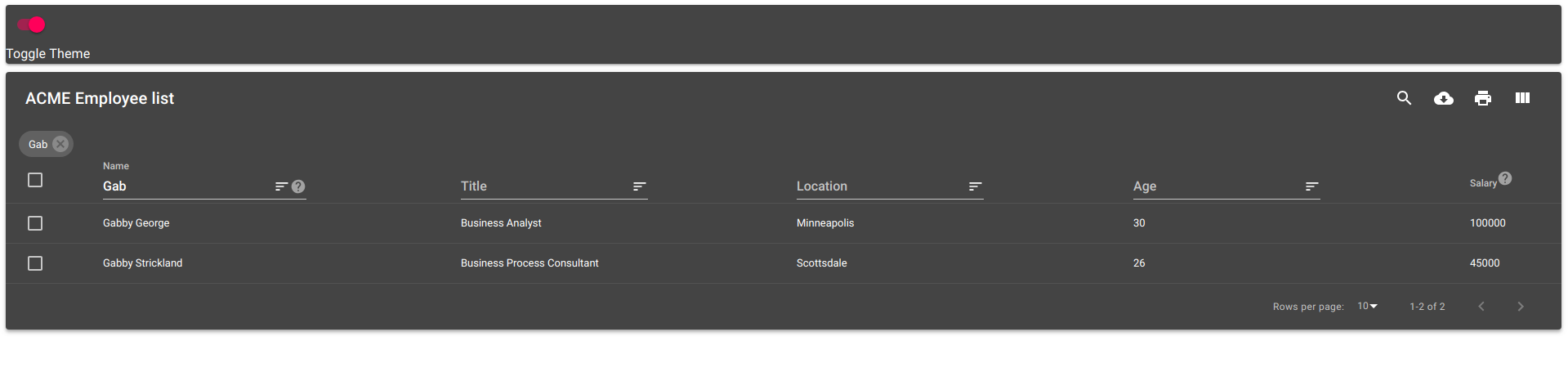
Light Theme
No Filters No Sorting

Sort ascending

Sort descending

Filter Active

loganasherjones
on 12 Jan 2019
I would like to see how you would turn this feature on and off? Need more API information. I think it's a great feature it just has to fit in nicely. Also something to consider if filter is turned on for the column header does it mean the filters in the toolbar get hidden? etc
 gregnb
on 15 Jan 2019
gregnb
on 15 Jan 2019
I'd love to see it working. Some ideas:
- To switch it on, use
options.filterStyle = "header"(better naming?). - The filter symbol in the toolbar could be used to hide (and disable) the filters. And to show (and enable) them again.
- Doesn't make the permanently shown filter the chips redundant? I could imagine adding a cross near the filter word so it can be removed as easily as when using the chip.
 Maaartinus
on 20 Jan 2019
Maaartinus
on 20 Jan 2019
For sure, I will keep a watch here for anymore updates
gregnb
on 25 Jan 2019
@loganasherjones Let me know if you make anymore updates
gregnb
on 21 Feb 2019
Hello,
I will also need this feature.
Any chance to have a Pull Request soon?
Thanks,
 chupee120
on 26 Feb 2019
chupee120
on 26 Feb 2019
Custom components have been added as of version 3.0.0.
 patorjk
on 18 Jun 2020
patorjk
on 18 Jun 2020
What is the repository name to get above column header changes ?
 rahul-network
on 24 Oct 2020
rahul-network
on 24 Oct 2020
Related issues
 sarawinter
·
15Comments
sarawinter
·
15Comments
 jmarucha
·
18Comments
jmarucha
·
18Comments
 jkeruzec
·
17Comments
jkeruzec
·
17Comments
 joaoaguiam
·
32Comments
joaoaguiam
·
32Comments
 rooby
·
32Comments
rooby
·
32Comments
Most helpful comment
Ok, I've done some work to make the column header that I wanted. Now I just need to figure out the best way to make this available.
Code
Code Comparison
Screenshots
This is all just proof-of-concept and works pretty well. I'd like to figure out how you'd like to see this added as a feature. Here are some screenshots of what the filtering looks like:
Dark Theme
No Filters No Sorting
Sort ascending
Sort descending
Filter Active
Light Theme
No Filters No Sorting
Sort ascending
Sort descending
Filter Active